
1. Introduction
This manual provides essential information for the proper installation, operation, and maintenance of your Generic AGC-MIC FPV Power Audio Kit. This component is designed to enhance your FPV drone experience by providing clear audio capture and power filtering capabilities. Please read this manual thoroughly before use to ensure optimal performance and safety.
2. Product Overview
The AGC-MIC is a compact module designed for FPV drones, integrating an Automatic Gain Control (AGC) microphone for audio capture and often combined with power filtering capabilities to ensure clean power delivery to sensitive components. It is a crucial part of a comprehensive FPV power and audio solution.
Key Features:
- Audio Capture: Integrated AGC microphone for clear sound recording.
- Compact Design: Small dimensions for easy integration into FPV drone builds.
- Durability: Designed to withstand typical FPV flight conditions.
- Compatibility: Works with standard arm and frame configurations.
- Protection: Helps protect key components by providing filtered power.
Components:
The AGC-MIC module typically consists of a small printed circuit board (PCB) with a microphone, integrated circuits for automatic gain control, and connection pads for power and audio output. It may be part of a larger kit that includes various filters and connectors.

Image: A collection of FPV drone components, including the AGC-MIC module (bottom right), various capacitors, and other filter PCBs. This illustrates the typical components found in a comprehensive FPV power and audio kit.
3. Specifications
| Model Name | AGC-MIC |
| Brand | Generic |
| Dimensions (L x W x H) | 0.39" x 0.39" x 0.39" (approx. 7.7mm x 1.0mm) |
| Item Weight | 0.1g (module only) |
| Connectivity Technology | Wired (for power and audio signal) |
| Manufacturer | kaimu |
4. Setup and Installation
Proper installation is crucial for the functionality of the AGC-MIC module. Always ensure your drone's power is disconnected before beginning any installation.
General Installation Steps:
- Identify Connection Points: Locate the appropriate power (typically VCC and GND) and audio input/output pads on your FPV video transmitter (VTX) or flight controller, as per your drone's specific wiring diagram.
- Prepare Wiring: Solder small gauge wires to the corresponding pads on the AGC-MIC module. Ensure clean solder joints to prevent shorts.
- Connect to Drone System: Connect the power wires from the AGC-MIC to a filtered power source on your drone (e.g., a dedicated 5V or 9V output from your flight controller or PDB). Connect the audio output wire from the AGC-MIC to the audio input pad on your VTX.
- Secure the Module: Mount the AGC-MIC module securely within your drone frame using double-sided tape or a small zip tie, ensuring it is away from propellers and high-vibration areas.
- Test Connections: Before powering up, double-check all solder joints and connections for continuity and correct polarity.
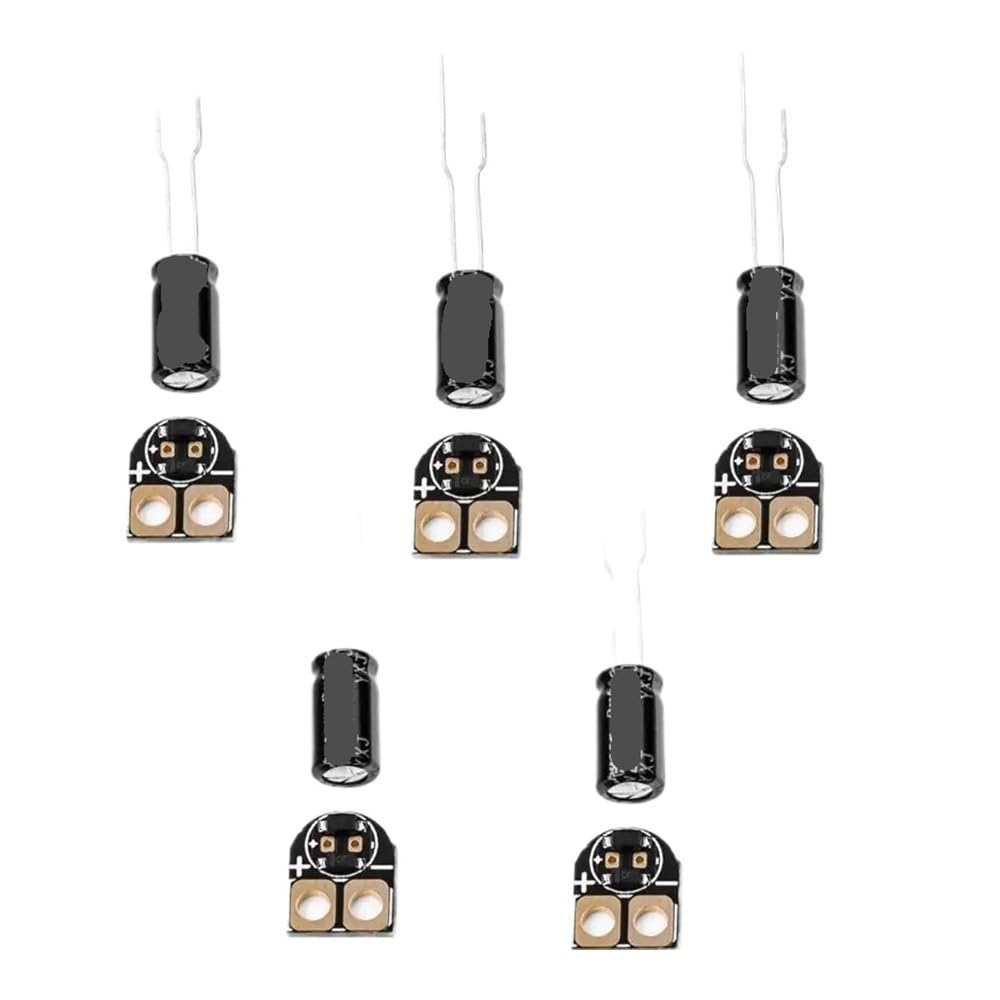
Image: A close-up of several small FPV PCBs, including a module similar to the AGC-MIC, highlighting the compact size and connection points for integration into a drone system.
Note: Always refer to your specific drone frame and VTX/flight controller manuals for detailed wiring diagrams and power requirements. Incorrect wiring can damage components.
5. Operating Instructions
Once the AGC-MIC module is correctly installed and connected, its operation is largely automatic.
- Power On: When your FPV drone is powered on, the AGC-MIC module will automatically activate.
- Audio Capture: The integrated microphone will begin capturing ambient sounds from the drone's environment.
- Automatic Gain Control (AGC): The AGC feature automatically adjusts the microphone's sensitivity to maintain a consistent audio level, preventing sound from being too loud or too quiet, even during varying flight conditions.
- Audio Transmission: The processed audio signal is sent to your FPV video transmitter (VTX) and then transmitted along with your video feed to your FPV goggles or receiver.
No user intervention is typically required during flight for the AGC-MIC to function.
6. Maintenance
The AGC-MIC module is designed for durability and requires minimal maintenance.
- Regular Inspection: Periodically inspect the module and its connections for any signs of physical damage, loose wires, or corrosion.
- Cleaning: If dust or debris accumulates on the module, gently clean it with a soft, dry brush or compressed air. Avoid using liquids.
- Environmental Protection: While durable, avoid exposing the module to excessive moisture, extreme temperatures, or direct impacts.
- Secure Mounting: Ensure the module remains securely mounted to prevent vibrations from affecting performance or causing damage.
7. Troubleshooting
If you encounter issues with your AGC-MIC module, consider the following troubleshooting steps:
No Audio or Distorted Audio:
- Check Connections: Verify that all power and audio signal wires are securely connected and that solder joints are solid. Ensure correct polarity for power connections.
- Power Supply: Confirm that the AGC-MIC is receiving the correct voltage from a stable, filtered power source. Unstable power can cause noise or lack of function.
- VTX Audio Input: Ensure your FPV video transmitter (VTX) has its audio input enabled and is configured correctly to receive the audio signal.
- Microphone Obstruction: Check if the microphone opening is blocked by debris, tape, or other components.
- Interference: Keep the AGC-MIC module away from high-current wires, motors, or other sources of electromagnetic interference (EMI) that could introduce noise.
Module Not Powering On:
- Power Connections: Double-check power (VCC and GND) connections for correct polarity and continuity.
- Voltage Check: Use a multimeter to confirm that voltage is present at the module's power input pads.
- Short Circuits: Inspect the module and surrounding area for any accidental short circuits that could prevent it from powering up.
If problems persist after following these steps, contact the manufacturer's support for further assistance.
8. Warranty and Support
This product is covered by a standard manufacturer's warranty against defects in materials and workmanship. The specific terms and duration of the warranty may vary. Please retain your proof of purchase for warranty claims.
For technical support, troubleshooting assistance beyond this manual, or warranty inquiries, please contact the manufacturer, Generic, or your authorized reseller. Contact information can typically be found on the product packaging or the seller's website.


