
Introduction
This manual provides detailed instructions for the installation, operation, and maintenance of your XTRONS UA95MTVL Car Radio. The UA95MTVL is a state-of-the-art multimedia system designed for Volkswagen Golf, Passat, Polo, Tiguan, Seat, and Skoda vehicles. Featuring Android 15, Apple CarPlay, Android Auto, GPS, Wi-Fi, and 4G connectivity, it offers an advanced and intuitive in-car experience. Please read this manual thoroughly before installation and use to ensure proper function and safety.
Product Features
- Universal Compatibility: Designed for VW Golf, Passat, Polo, Tiguan, Seat, and Skoda vehicles.
- Android 15 Operating System: Provides a fluid, responsive, and feature-rich multimedia experience.
- High Performance: Octa-Core processor (2xA76 + 6xA55) with AI NPU, 4GB RAM + 64GB ROM (expandable).
- Integrated Apple CarPlay & Android Auto: Seamless smartphone integration for navigation, calls, and music.
- Advanced Connectivity: Built-in GPS for real-time navigation, Wi-Fi 6, Bluetooth 5.4, and 4G connectivity.
- QLED Touchscreen Display: High-resolution 1280x720 pixel QLED display for intuitive control.
- High-Res Audio Output: Optical, Coaxial, and 3-volt RCA & Subwoofer outputs.

Figure 1: Overview of XTRONS UA95MTVL Car Radio features.
Setup and Installation
Package Contents
Before beginning installation, please verify that all components are present in the package.
- XTRONS UA95MTVL Car Radio Unit
- Wiring Harnesses and Cables
- GPS Antenna
- USB Cables
- External Microphone
- User Manual (this document)
- Installation Accessories (if applicable)

Figure 2: Included components in the XTRONS UA95MTVL package.
Vehicle Compatibility
The XTRONS UA95MTVL is designed for a precise fit in the following vehicle models:
- Volkswagen Golf
- Volkswagen Passat
- Volkswagen Polo
- Volkswagen Tiguan
- Seat models
- Skoda models
Ensure your vehicle's dashboard matches the dimensions and connector types of the UA95MTVL unit. Professional installation is recommended.
Dimensions
The main unit dimensions are provided below for reference during installation.

Figure 3: XTRONS UA95MTVL unit dimensions.
- Product Dimensions: 5 cm (depth) x 18 cm (width) x 5 cm (height)
- Front Panel Dimensions: Approximately 220mm (width) x 130mm (height)
- Rear Chassis Dimensions: Approximately 178mm (width) x 98mm (height)
Operating Instructions
Power On/Off and Basic Navigation
To power on the unit, ensure it is correctly installed and your vehicle's ignition is on. The unit will typically power on automatically. Use the touchscreen for all navigation. The main interface provides access to various functions and applications.
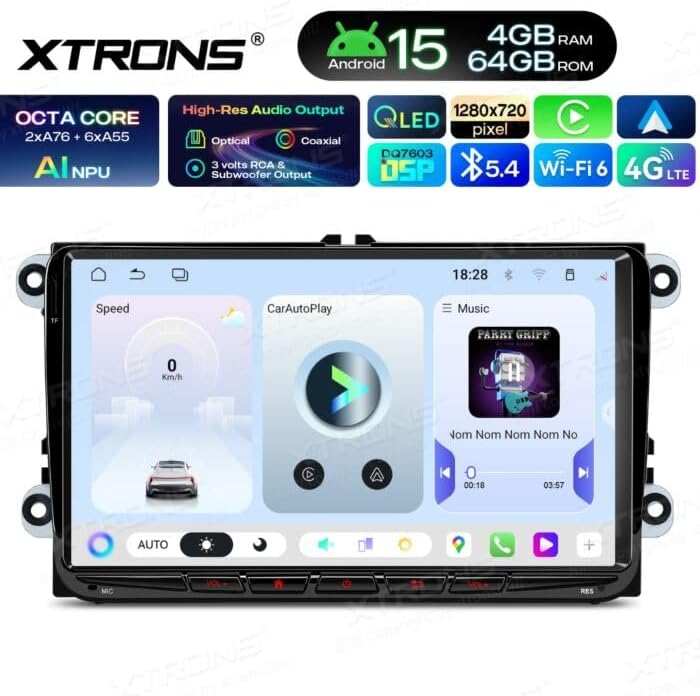
Figure 4: Main User Interface.
Apple CarPlay and Android Auto
Connect your smartphone via USB to activate Apple CarPlay or Android Auto. This allows you to safely access your phone's navigation, music, messages, and other compatible applications directly from the car radio's display.

Figure 5: Apple CarPlay Interface.

Figure 6: Android Auto or general application screen.
Navigation and Connectivity
The integrated GPS module provides real-time navigation. Connect to Wi-Fi or use the 4G connectivity (requires a SIM card, not included) to access online maps, streaming services, and other internet-based applications.

Figure 7: Available applications and connectivity options.
Audio and Multimedia
The unit supports various audio and video formats. Utilize the integrated speaker output, subwoofer output, or preamplified outputs for a customized audio experience. The system supports 2.0 channel stereo audio.

Figure 8: Multimedia playback interface.
Maintenance
To ensure the longevity and optimal performance of your XTRONS UA95MTVL car radio, follow these maintenance guidelines:
- Cleaning: Use a soft, dry cloth to clean the screen and unit exterior. For stubborn marks, slightly dampen the cloth with water. Avoid abrasive cleaners or solvents.
- Software Updates: Periodically check for available software updates through the unit's settings or the official XTRONS website to ensure you have the latest features and bug fixes.
- Environmental Conditions: Avoid exposing the unit to extreme temperatures, direct sunlight for prolonged periods, or excessive moisture.
- Cable Connections: Ensure all cables are securely connected. Loose connections can lead to intermittent issues.
Troubleshooting
If you encounter issues with your XTRONS UA95MTVL, refer to the following common troubleshooting steps:
- No Power:
- Check all power connections to ensure they are secure.
- Verify the vehicle's fuse for the radio is not blown.
- Ensure the vehicle's ignition is on.
- No Sound:
- Check volume levels on the unit and any connected devices.
- Ensure speaker wires are correctly connected.
- Verify audio output settings in the unit's menu.
- Touchscreen Unresponsive:
- Restart the unit by turning off the vehicle's ignition and then restarting it.
- Ensure the screen is clean and free of debris.
- GPS Signal Issues:
- Ensure the GPS antenna is properly installed and has a clear view of the sky.
- Check GPS settings in the unit's menu.
- CarPlay/Android Auto Not Connecting:
- Use a high-quality USB cable.
- Ensure your smartphone is compatible and has the latest software updates.
- Check settings on both the car radio and your smartphone.
If the problem persists after attempting these steps, please contact XTRONS customer support or your installer.
Specifications
| Feature | Specification |
|---|---|
| Model Number | UA95MTVL |
| Operating System | Android 15 |
| Processor | Octa Core (2xA76 + 6xA55) AI NPU |
| RAM | 4 GB |
| ROM | 64 GB |
| Display Type | QLED Touchscreen |
| Display Resolution | 1280 x 720 pixels |
| Connectivity | Wi-Fi 6, Bluetooth 5.4, 4G, USB |
| Special Features | Android Auto, Apple CarPlay, GPS |
| Compatible Devices | Smartphone |
| Connector Types | 3.5mm Jack, USB Type A |
| Audio Output Mode | Stereo (2.0 channels) |
| Audio Outputs | Integrated Speaker, Subwoofer Output, Preamplified Output, Optical, Coaxial |
| Video Encoding | H.264 |
| Control Method | Touch |
| Output Power | 180 Watts (Total), 4 Watts (Per Channel) |
| Color | Black |
| Product Dimensions (L x W x H) | 5 cm x 18 cm x 5 cm |
Warranty and Support
Warranty Information
The XTRONS UA95MTVL car radio is covered by a warranty that includes the availability of spare parts in the EU for a duration of 2 years. Please retain your proof of purchase for warranty claims.
Customer Support
For technical assistance, warranty claims, or further inquiries, please contact your retailer or the official XTRONS customer support channels. Refer to the XTRONS website for the most up-to-date contact information.


