
Product Overview
The Merax Full Size Wood Gaming Loft Bed (Model SY5295) is a multi-functional high sleeper designed to optimize space. It features a full-size bed elevated above a U-shaped workstation, integrated storage, RGB LED lighting, and USB charging ports. This manual provides essential information for safe assembly, proper operation, and routine maintenance of your loft bed.

Image: The Merax Full Size Wood Gaming Loft Bed in white, showcasing the elevated bed, U-shaped desk, and integrated storage solutions.
Important Safety Information
Please read and understand all instructions before beginning assembly and use. Failure to follow these instructions may result in serious injury.
- Maximum Weight Capacity: The loft bed is designed to support a maximum weight of 550 pounds. Do not exceed this limit.
- Guardrails: Always use the provided guardrails on both sides of the upper bunk. Ensure they are securely fastened.
- Mattress Requirements: Use a full-size mattress that is no more than 6 inches thick to ensure proper guardrail height.
- Ladder Safety: Always use the integrated ladder for climbing to and from the upper bunk. Do not use alternative climbing methods.
- Ventilation: Ensure adequate ventilation around the bed, especially if using electronic devices on the desk.
- Electrical Safety: Only use the provided USB ports and power outlets as intended. Do not overload circuits. Keep liquids away from electrical components.
- Assembly: Assembly should be performed by at least two adults. Ensure all hardware is tightened securely before use and periodically check for loose connections.
- Children: This loft bed is not recommended for children under 6 years of age.
Setup and Assembly
Assembly of the Merax Gaming Loft Bed requires careful attention to detail. It is recommended that two adults perform the assembly. Please ensure all parts are present before starting.
1. Unpacking and Part Identification
Carefully unpack all components and lay them out on a clean, soft surface to prevent scratches. Refer to the included parts list to identify each piece of hardware and wooden component.
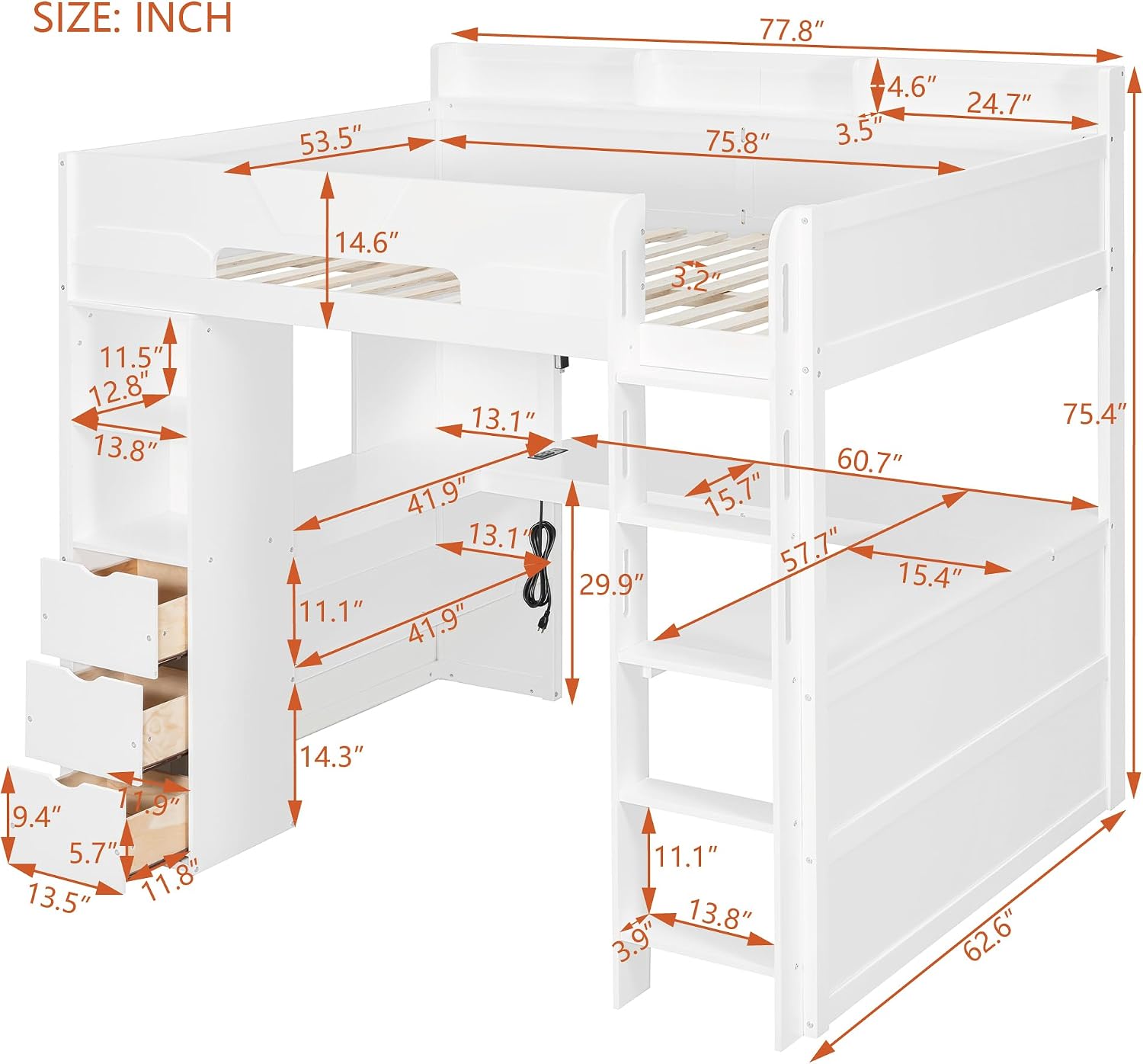
Image: Detailed dimension diagram of the loft bed, illustrating overall size and component measurements for planning assembly space.
2. Frame Assembly
- Begin by assembling the main bed frame components. Connect the side rails to the headboard and footboard using the provided hardware. Do not fully tighten bolts until the entire frame is assembled.
- Attach the support beams for the mattress platform. Ensure they are evenly spaced and securely fastened.
3. Desk and Storage Unit Assembly
- Assemble the U-shaped desk components according to the diagrams. Attach the desk surface to its supporting frame.
- Construct the integrated storage tower, including the three drawers and open shelving units. Insert the drawer slides and assemble the drawers.
- Integrate the desk and storage unit with the main bed frame. Ensure all connections are stable and aligned.

Image: View of the loft bed from an angle, highlighting the three storage drawers and open shelves integrated into the design.
4. Ladder and Guardrail Installation
- Attach the integrated ladder securely to the bed frame. Verify that each step is firm and capable of supporting weight.
- Install the full-length safety guardrails on the upper bunk. These are crucial for user safety.
5. Electrical Component Installation
- Install the USB charging ports and power outlets into the designated cutout on the desk surface. Connect the power cable.
- Affix the RGB LED light strip beneath the bed frame, ensuring it is positioned to illuminate the desk area. Connect the LED controller and power supply.

Image: Close-up view of the integrated power strip on the desk, featuring two AC outlets and a USB charging port.

Image: Close-up of the power connection for the RGB LED light strip, showing the cable and adapter.
6. Final Tightening and Inspection
Once all components are assembled, go back and fully tighten all bolts and screws. Ensure the bed is stable and does not wobble. Place your full-size mattress on the bed platform.
Operation Instructions
Using the RGB LED Lights
The integrated RGB LED light strip provides customizable ambient lighting for your workstation. The lights are app-controlled.
- Power On: Ensure the LED light strip is properly connected to its power adapter and plugged into a wall outlet or the integrated power strip.
- App Download: Download the specified control application for the RGB LED lights on your smartphone (refer to the LED controller's packaging or included instructions for app name).
- Pairing: Follow the in-app instructions to pair your smartphone with the LED light controller via Bluetooth or Wi-Fi.
- Customization: Use the app to select colors, adjust brightness, choose lighting modes (e.g., static, flashing, fading), and set timers.

Image: The loft bed with the desk area illuminated by the integrated LED lights, showing a gaming setup.
Using the USB Charging Ports and Power Outlets
The desk features embedded USB charging ports and standard power outlets for convenient access to power.
- Power Connection: Ensure the integrated power strip is plugged into a functional wall outlet.
- USB Charging: Connect your USB-powered devices (e.g., smartphones, gaming headsets, controllers) to the USB ports for charging.
- AC Power: Plug in standard electronic devices (e.g., monitors, laptops, lamps) into the AC power outlets.
- Overload Protection: Do not exceed the maximum power rating of the integrated power strip. Avoid plugging in high-power appliances.
Maintenance
Regular maintenance will help prolong the life and ensure the safety of your Merax Gaming Loft Bed.
- Cleaning: Wipe down wooden surfaces with a soft, damp cloth. Avoid harsh chemicals or abrasive cleaners that may damage the finish.
- Hardware Check: Periodically (e.g., every 3-6 months) check all bolts, screws, and connections to ensure they are tight. Re-tighten any loose hardware.
- Guardrails: Ensure guardrails remain securely attached and free from damage.
- Electrical Components: Keep the USB ports and power outlets clean and free of dust. Inspect power cords for any signs of wear or damage.
- Weight Distribution: Avoid concentrating heavy loads in one area of the bed or desk. Distribute weight evenly.
Troubleshooting
| Problem | Possible Cause | Solution |
|---|---|---|
| Bed feels wobbly or unstable. | Loose hardware connections. | Check and tighten all bolts and screws throughout the frame. Ensure the bed is on a level surface. |
| RGB LED lights are not turning on. | Power connection issue; App not paired; Faulty LED strip. | Verify the LED strip's power adapter is securely plugged into a working outlet. Ensure the app is correctly paired via Bluetooth/Wi-Fi. Check for visible damage to the LED strip or controller. |
| USB ports or AC outlets are not working. | Power strip not plugged in; Circuit overload; Faulty power strip. | Ensure the integrated power strip is plugged into a functional wall outlet. Unplug some devices to check for overload. Test with different devices. |
| Drawers are sticking or difficult to open/close. | Misaligned drawer slides; Obstruction; Loose hardware. | Check that drawer slides are properly aligned and free of debris. Ensure all drawer hardware is tight. |
Product Specifications
| Brand | Merax |
| Model Number | SY5295 |
| Size | Full |
| Material | MDF, Pine Wood, Plywood |
| Product Dimensions (L x W x H) | 77.8"L x 62.6"W x 75.4"H |
| Item Weight | 101.4 pounds |
| Maximum Weight Recommendation | 550 pounds |
| Number of Drawers | 3 |
| Special Features | U-Shaped Desk, RGB LED Lighting, USB Charging Station, Storage Drawers, Shelves, Guardrails, Integrated Ladder |
| Color | White |
| UPC | 199962246127 |
Warranty and Customer Support
For warranty information, missing parts, or any questions regarding your Merax Full Size Wood Gaming Loft Bed, please contact Merax customer support directly. Refer to your purchase documentation or the official Merax website for the most current contact details.
Online Support: Visit the official Merax Store on Amazon for product information and support resources.


