
Introduction
This document provides instructions for the Generic HJ20180113 Replacement Remote Control, designed for use with Konka Smart LED TV KDG50JT628A models. This remote is a direct replacement and typically requires no programming or setup. It offers stable performance and a compact design for ease of use.
Note: As a replacement remote, it may not support all advanced functions or features present on your original Konka TV remote control.
Setup
-
Battery Installation:
Open the battery compartment cover on the back of the remote control. Insert two AAA batteries (not included), ensuring the positive (+) and negative (-) terminals align correctly with the indicators inside the compartment. Close the cover securely.
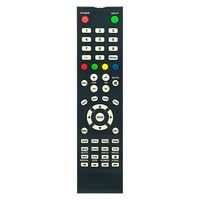
Image: The Generic HJ20180113 replacement remote control, typically black, designed for Konka Smart LED TVs. This image illustrates the general appearance of the remote.
-
No Programming Required:
This replacement remote control is pre-programmed for compatible Konka Smart LED TVs. No manual programming or code entry is typically required. Once batteries are installed, it should be ready for immediate use.
-
Compatibility Check:
Before use, please ensure your TV model is Konka Smart LED TV KDG50JT628A to guarantee full compatibility with the primary functions of this remote.
Operating Instructions
To operate your Konka Smart LED TV with this remote control, simply point the remote directly at the TV's infrared sensor and press the desired button. The maximum effective range is approximately 10 meters (33 feet).
- Power Button: Turns the TV on or off.
- Number Buttons (0-9): For direct channel selection.
- Volume Up/Down: Adjusts the TV's volume level.
- Channel Up/Down: Changes the TV channel sequentially.
- Mute Button: Silences or restores the TV's audio.
- Input/Source Button: Cycles through available input sources (HDMI, AV, etc.).
- Navigation Buttons (Up, Down, Left, Right, OK/Enter): Used for menu navigation and selection.
- Menu Button: Accesses the TV's main menu.
- Exit/Back Button: Exits menus or returns to the previous screen.
Refer to your Konka TV's user manual for specific functions and menu navigation details.
Maintenance
-
Cleaning:
Wipe the remote control with a soft, dry cloth. Do not use liquid cleaners, abrasive pads, or chemical solvents, as these can damage the remote's surface or internal components.
-
Battery Replacement:
Replace batteries when the remote's response becomes sluggish or stops working. Always replace both batteries at the same time with new ones of the same type (AAA). Do not mix old and new batteries or different types of batteries.
-
Storage:
If the remote control will not be used for an extended period, remove the batteries to prevent leakage and potential damage.
-
Environmental Conditions:
Avoid exposing the remote to extreme temperatures, direct sunlight, high humidity, or dusty environments.
Troubleshooting
-
Remote is not working:
- Check if the batteries are inserted correctly with the correct polarity (+/-).
- Replace the batteries with fresh ones.
- Ensure there are no obstructions between the remote control and the TV's infrared sensor.
- Make sure you are within the effective operating range (up to 10 meters) and pointing the remote directly at the TV.
-
Some functions are not working:
- Confirm that your TV model is Konka Smart LED TV KDG50JT628A.
- Remember that this is a replacement remote. Certain advanced or smart TV specific functions (e.g., voice control, specific app buttons) that were on your original remote may not be supported by this generic replacement.
- Try basic functions like power, volume, and channel change to confirm general operation.
Specifications
| Feature | Description |
|---|---|
| Model Number | HJ20180113 |
| Brand | Generic |
| Compatible Devices | Konka Smart LED TV KDG50JT628A |
| Material | ABS/Plastic |
| Color | Black (Color may vary, some units may be white) |
| Max Number of Supported Devices | 1 |
| Maximum Range | 10 meters (approx. 33 feet) |
| Power Source | 2 x AAA Batteries (not included) |
Warranty and Support
Information regarding specific warranty terms or direct manufacturer support for this Generic replacement remote control is not available in the provided product details. For any issues, please refer to the retailer's return policy or contact the seller directly.