
Introduction
Thank you for choosing the Ergalithic Ergonomic Office Chair Model TX002-3. This manual provides detailed instructions for assembly, operation, maintenance, and troubleshooting to ensure you get the most out of your new chair. Please read this manual thoroughly before assembly and use, and retain it for future reference.
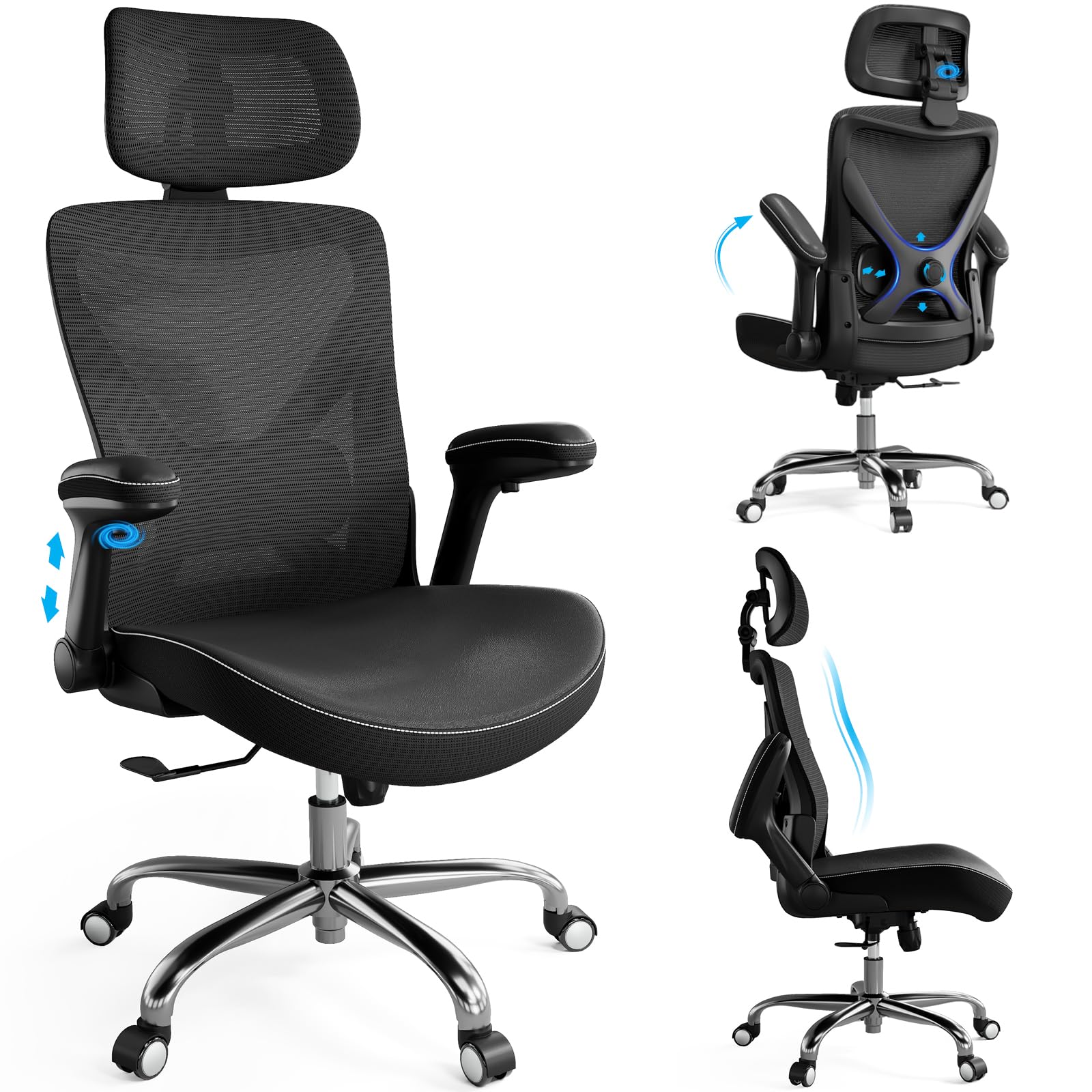
Image: The Ergalithic Ergonomic Office Chair in a modern office setting.
Safety Information
- Maximum Weight Capacity: This chair is designed to support a maximum weight of 330 pounds (150 kg). Do not exceed this limit.
- Assembly: Ensure all components are securely fastened before use. Periodically check and retighten all screws.
- Usage: Do not stand on the chair. Use the chair only for its intended purpose.
- Children: Keep children away from moving parts during assembly and adjustment.
- Maintenance: Do not use abrasive cleaners or harsh chemicals on any part of the chair.
Setup and Assembly
Follow these steps carefully to assemble your Ergalithic Ergonomic Office Chair. It is recommended to have two people for certain steps.
Components Overview
Before starting, ensure all parts are present. Refer to the included parts list in your packaging.

Image: Diagram showing the product dimensions and the maximum weight recommendation of 330 lbs.
Assembly Steps
- Attach the Armrests: Securely fasten the armrests to the seat base using the provided screws. Ensure they are aligned correctly.
- Connect Seat and Backrest: Attach the backrest to the seat assembly.
- Install Casters: Insert the casters into the base.
- Attach Gas Lift: Place the gas lift cylinder into the center hole of the chair base.
- Connect Upper and Lower Sections: Carefully place the assembled seat and backrest onto the gas lift cylinder, pressing down firmly until fully engaged.
Video: This video demonstrates the correct method for installing the armrests onto the chair seat.
Video: This video provides a comprehensive guide to the full office chair installation process.
Operating Instructions
Your Ergalithic Ergonomic Office Chair offers multiple adjustments to customize your seating experience for optimal comfort and support.
Chair Height Adjustment
- To raise the chair, lift the lever on the right side of the seat while taking your weight off the seat.
- To lower the chair, lift the lever on the right side of the seat while remaining seated.
Recline and Tilt Tension Adjustment
- Recline Lock: Pull the lever on the left side of the seat outwards to unlock the recline function. Push it inwards to lock the backrest in an upright position.
- Tilt Tension: Rotate the round knob located underneath the seat, at the front, to adjust the tension of the recline mechanism. Turn clockwise to increase tension (harder to recline), and counter-clockwise to decrease tension (easier to recline).

Image: Visual guide demonstrating the recline lock lever and the tilt tension adjustment knob.
Lumbar Support Adjustment
- The X-shaped lumbar support can be adjusted vertically (up & down) and horizontally (forward & back) to provide personalized lower back support. Use the knobs on the backrest to make these adjustments.
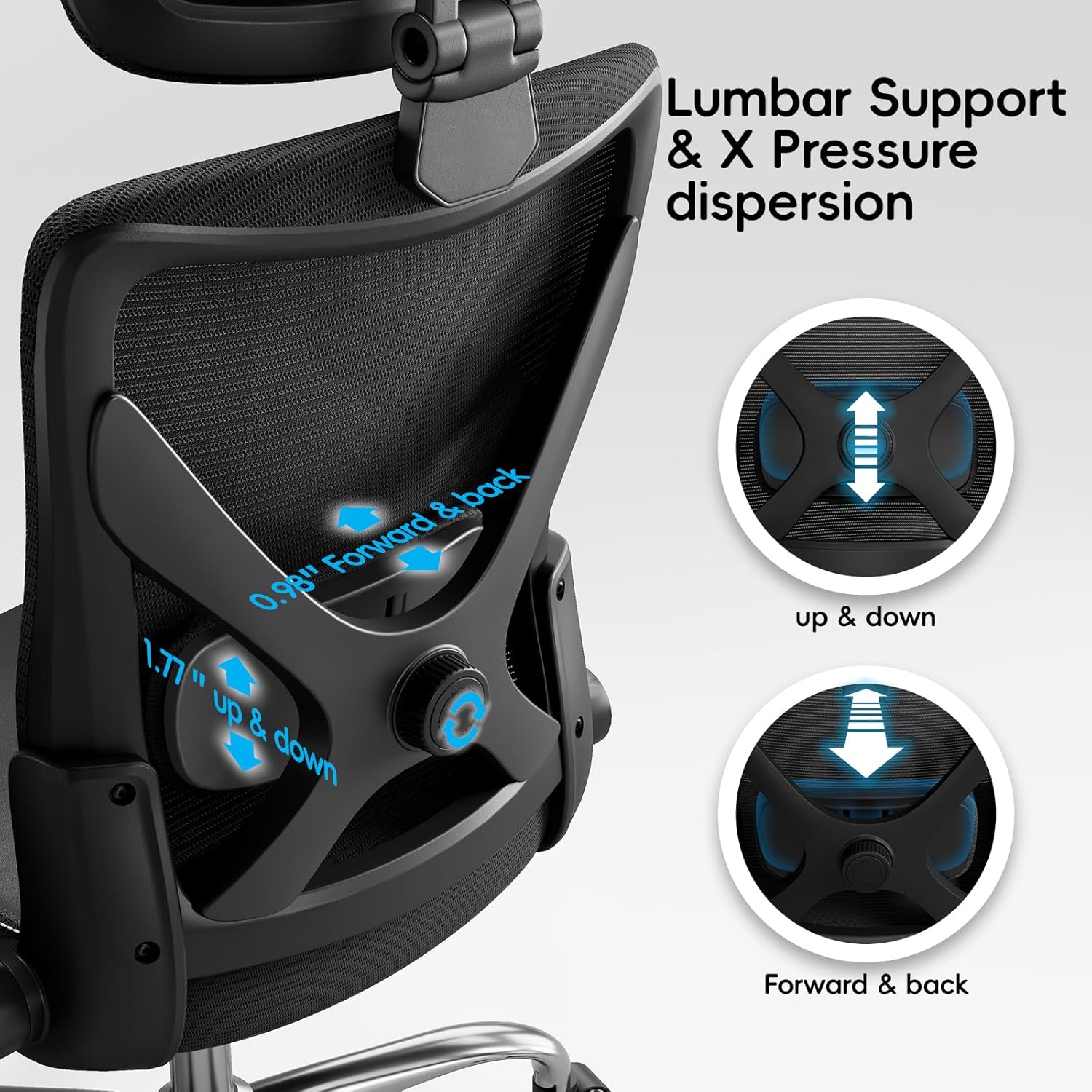
Image: Detailed view of the X-shaped lumbar support, illustrating its up/down and forward/back adjustment capabilities.
Armrest Adjustment
- The armrests feature up & down adjustment and rotation adjustment for optimal arm positioning.

Image: Illustrations showing the up/down and rotation adjustments for the soft padded armrests.
Headrest Adjustment
- The two-axis variable orbit neck support (headrest) can be adjusted 0.98 inches forth & back, 4.9 inches up & down, and rotated 60 degrees to support your head and neck comfortably.

Image: Diagram illustrating the forth/back, up/down, and rotation adjustments of the headrest.
Video: This video demonstrates various function adjustments of the office chair, including height, recline, and armrest settings.
Video: This video illustrates the operation of the chair's various adjustable features.
Maintenance
Proper maintenance will extend the life and performance of your office chair.
- Cleaning: For mesh and PU leather surfaces, wipe with a soft, damp cloth. For stubborn stains, use a mild soap solution and wipe dry immediately. Avoid harsh chemicals or abrasive cleaners.
- Inspection: Periodically check all screws and bolts to ensure they are tight. Retighten if necessary.
- Casters: Keep casters free of hair and debris to ensure smooth movement.
Troubleshooting
If you encounter any issues with your chair, refer to the following common problems and solutions:
| Problem | Possible Cause | Solution |
|---|---|---|
| Chair does not adjust height | Gas lift not engaged or faulty | Ensure the height adjustment lever is fully pulled. If issue persists, contact customer support. |
| Chair squeaks | Loose screws or friction between parts | Check and tighten all assembly screws. Apply a small amount of silicone lubricant to friction points if necessary. |
| Casters do not roll smoothly | Debris caught in casters | Remove any hair or debris from the caster wheels. |
Specifications
Key specifications for the Ergalithic Ergonomic Office Chair Model TX002-3:
- Brand: Ergalithic
- Model Name: TX002-3
- Color: Dark Black
- Material: Metal frame, Mesh back, PU Leather seat
- Product Dimensions (D x W x H): 20" x 20" x 50" (50.8 cm x 50.8 cm x 127 cm)
- Item Weight: 31 pounds (14.06 kg)
- Maximum Weight Recommendation: 330 pounds (150 kg)
- Additional Features: Adjustable Headrest, Adjustable Lumbar Support, Adjustable Armrests, Recline with Tilt Tension Control
- Included Components: Caster wheels

Image: Close-up view of the seat cushion, highlighting its PU skin-softness surface, high rebound sponge, and ergonomic design.
Warranty Information
Ergalithic products are manufactured to high-quality standards. For specific warranty details regarding your Ergonomic Office Chair Model TX002-3, please refer to the warranty card included in your product packaging or contact Ergalithic customer support directly. Keep your proof of purchase for warranty claims.
Customer Support
If you have any questions, require assistance with assembly, or need troubleshooting help that is not covered in this manual, please contact Ergalithic customer support. You can typically find contact information on the product packaging or the official Ergalithic website.
For more information, visit the Ergalithic Store.


