
1. Introduction
This manual provides instructions for the Cobra PX280 Compact Portable FRS Two-Way Radios. These radios are designed for clear and reliable communication in various professional environments. The PX280 features a durable, compact design with IP54 certification for dust and water resistance, 12-hour battery life, and convenient dock charging.
The Cobra PX280 is suitable for environments such as construction sites, warehouses, restaurants, hospitality services, and retail operations, facilitating enhanced team coordination.

Image: Cobra PX280 radios and charging dock, illustrating their application in various professional settings like construction, warehouses, restaurants, hospitality, and retail.
2. What's in the Box
The Cobra PX280 package includes the following components:
- 2 x PX280 Radios
- 2 x Rechargeable Lithium-Ion Batteries
- 2 x Belt Clips
- 1 x 2-Way Dock Charger
- 1 x USB Cable
- 1 x Wall Adapter
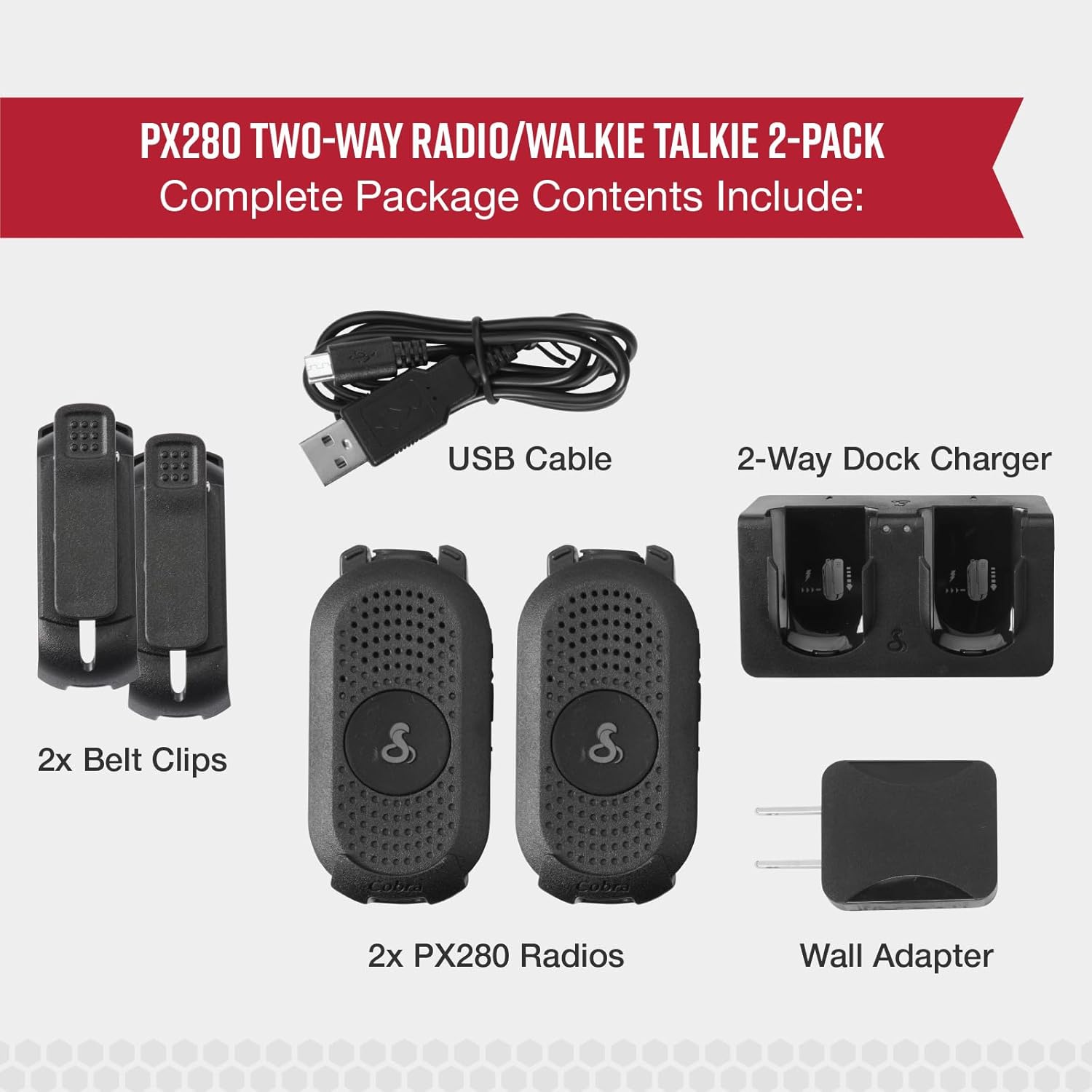
Image: A visual representation of all items included in the Cobra PX280 two-way radio package, showing the radios, belt clips, USB cable, dock charger, and wall adapter.
3. Setup
3.1. Battery Installation and Charging
- Ensure the radio is powered off before installing the battery.
- Open the battery compartment cover on the back of the radio.
- Insert the lithium-ion battery, aligning the contacts correctly.
- Close the battery compartment cover securely.
- Place the radio(s) into the 2-way dock charger.
- Connect the USB cable to the dock charger and the wall adapter.
- Plug the wall adapter into a standard electrical outlet.
- The charging indicator on the radio or dock will illuminate, indicating charging is in progress. A full charge provides approximately 12 hours of operation.
3.2. Attaching the Belt Clip
- Align the belt clip with the designated slots on the back of the radio.
- Slide the belt clip downwards until it clicks securely into place.
- To remove, push the release tab (if present) and slide the clip upwards.
4. Operation
4.1. Powering On/Off
- To power on: Press and hold the Power button until the radio turns on.
- To power off: Press and hold the Power button until the radio turns off.
4.2. Channel Selection
- The PX280 features 22 preset FRS channels.
- Use the Channel Up/Down buttons to select the desired channel. Ensure all radios in your group are on the same channel for communication.
4.3. Communication (Push-to-Talk)
- To transmit: Press and hold the Push-to-Talk (PTT) button located on the side of the radio. Speak clearly into the microphone.
- To receive: Release the PTT button.
4.4. VOX (Voice Operated Transmission)
The VOX feature allows for hands-free communication. When activated, the radio will automatically transmit when it detects your voice, without needing to press the PTT button.
- Refer to the radio's on-screen menu or specific button combinations (if available) to activate and adjust VOX sensitivity.

Image: The Cobra PX280 radio, illustrating its multi-channel communication capabilities, intuitive hands-free (VOX) operation, and robust, simple design.
4.5. Privacy Codes
The PX280 supports privacy codes (CTCSS/DCS) to minimize interference from other users on the same channel. To communicate privately, all radios in your group must be set to the same channel and privacy code.
- Consult the radio's menu or button functions to set privacy codes.
4.6. Headset Compatibility
For enhanced communication and hands-free operation, the PX280 is compatible with compact, over-the-ear headsets. The threaded connector helps prevent accidental disconnections.
- Connect a compatible headset to the audio jack on the radio.

Image: The Cobra PX280 radio attached to a swivel holster, highlighting features like dynamic connectivity, extended battery life, and clear audio with extended range capabilities.
5. Maintenance
5.1. Cleaning
- Wipe the radio's exterior with a soft, damp cloth.
- Do not use abrasive cleaners or solvents.
- Ensure the charging contacts are clean and free of debris for optimal charging.
5.2. Battery Care
- Charge batteries fully before first use.
- Avoid overcharging or completely draining the battery for extended periods to prolong battery life.
- Store radios and batteries in a cool, dry place when not in use.
5.3. Durability
The Cobra PX280 radios are IP54 certified, meaning they are dust protected and resistant to water splashes from any direction. This design allows them to withstand demanding work environments. However, they are not designed for submersion in water.
6. Troubleshooting
| Problem | Possible Cause | Solution |
|---|---|---|
| No power | Battery not installed correctly or discharged. | Ensure battery is properly seated. Charge the battery fully. |
| Cannot communicate with other radios | Radios are on different channels or privacy codes. Out of range. | Verify all radios are on the same channel and privacy code. Move closer to the other radio. |
| Poor audio quality | Low battery. Obstructions between radios. Volume too low. | Charge battery. Move to an area with fewer obstructions. Adjust volume. |
| Radio not charging | Charger not connected. Dirty charging contacts. Faulty battery/charger. | Ensure charger is properly connected to power and radio. Clean charging contacts. Try a different battery or charger if available. |

Image: An illustration detailing walkie-talkie range, explaining that maximum range is achieved under ideal conditions, while usable range is influenced by environmental factors such as weather, terrain, and physical obstructions.
7. Specifications
| Feature | Detail |
|---|---|
| Brand | COBRA |
| Model | PX280 |
| Color | Black |
| Number of Channels | 22 FRS Channels |
| Special Features | Dust Protected, Lightweight, Rechargeable, Silent Operation, Voice Operated Transmission (VOX) |
| Voltage | 3 Volts |
| Item Weight | 3.36 ounces (per radio) |
| Battery Type | Lithium-Ion |
| Battery Life (Average) | 8-12 Hours (depending on usage) |
| Durability Rating | IP54 (Dust Protected, Water Resistant) |
| UPC | 728434373674 |
| Manufacturer Part Number | 0190018-1-cr |
8. Warranty Information
The Cobra PX280 radios come with a 90-day limited warranty. This warranty covers defects in materials and workmanship under normal use. For warranty claims or further details, please refer to the official Cobra support channels or the documentation included with your purchase.
9. Support
For additional support, technical assistance, or to purchase accessories, please visit the official Cobra website or contact their customer service department. Keep your product model number (PX280) and UPC (728434373674) available when seeking support.


