
1. Introduction
Thank you for choosing the HONOR Choice S8 Wireless Earbuds. These in-ear Bluetooth 5.4 headphones are designed to provide a high-quality audio experience with stereo sound, clear hands-free calling, and active noise cancellation. This manual will guide you through the setup, operation, maintenance, and troubleshooting of your new earbuds.
Package Contents
- HONOR Choice S8 Wireless Earbuds
- Charging Case
- USB Type-C Charging Cable
- Ear Tips (various sizes)
- User Manual

Image: The HONOR Choice S8 wireless earbuds and their compact charging case, shown from a top-down perspective.
2. Safety Information
- Do not expose the earbuds or charging case to extreme temperatures.
- Avoid dropping or applying excessive force to the device.
- Keep away from water and liquids, although the earbuds are water-resistant, the charging case is not.
- Do not attempt to disassemble or repair the device yourself.
- Use only the provided charging cable or a certified USB Type-C cable.
- Prolonged exposure to loud sounds may cause hearing damage. Adjust volume to a safe level.
3. Setup
3.1 Charging the Earbuds and Case
- Place the earbuds into the charging case. Ensure they are correctly seated.
- Connect the USB Type-C charging cable to the charging port on the case and plug the other end into a power adapter (not included) or a computer's USB port.
- The indicator light on the case will show charging status. A full charge for the case and earbuds typically takes approximately 1.5 hours.
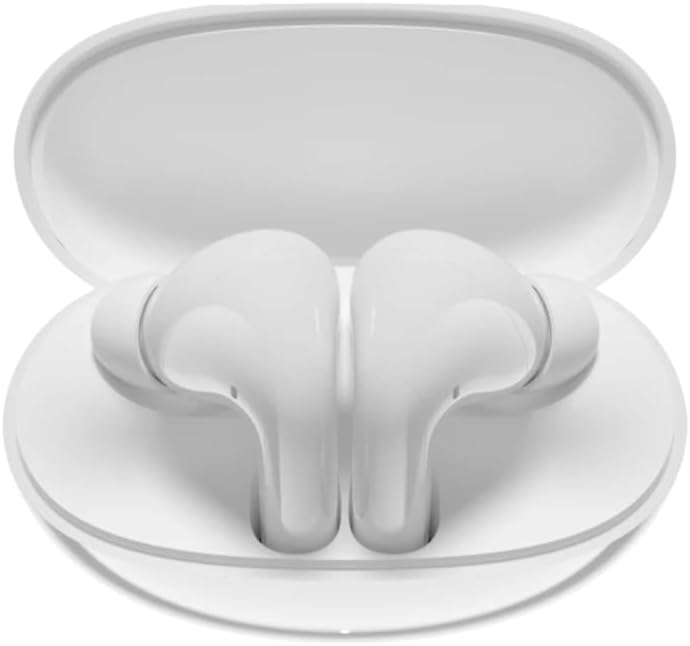
Image: The HONOR Choice S8 earbuds securely placed inside their open charging case, ready for charging.
3.2 Bluetooth Pairing
- Open the charging case. The earbuds will automatically enter pairing mode (if it's the first time or after a reset). The indicator light on the case will flash.
- On your device (smartphone, tablet, PC, game console), enable Bluetooth.
- Search for available Bluetooth devices and select "HONOR Choice S8" from the list.
- Once connected, the indicator light on the case will turn off or show a steady light, and you will hear a confirmation tone.
Note: For subsequent use, the earbuds will automatically connect to the last paired device when taken out of the case.
3.3 Fitting the Earbuds
Choose the ear tips that provide the most comfortable and secure fit for optimal sound quality and noise cancellation. Gently insert the earbuds into your ear canals and twist slightly to ensure a snug seal.
4. Operating Instructions
4.1 Power On/Off
- Power On: Open the charging case, or take the earbuds out of the case. They will power on automatically.
- Power Off: Place the earbuds back into the charging case and close the lid. They will power off automatically.
4.2 Touch Controls
The HONOR Choice S8 earbuds feature intuitive touch controls on each earbud. The specific functions may vary slightly depending on your device and application.
- Play/Pause: Single tap on either earbud.
- Next Track: Double tap on the right earbud.
- Previous Track: Double tap on the left earbud.
- Answer/End Call: Single tap on either earbud.
- Reject Call: Press and hold either earbud for 2 seconds.
- Toggle ANC/Awareness Mode: Press and hold either earbud for 2 seconds (when not on a call).
- Activate Voice Assistant: Triple tap on either earbud.
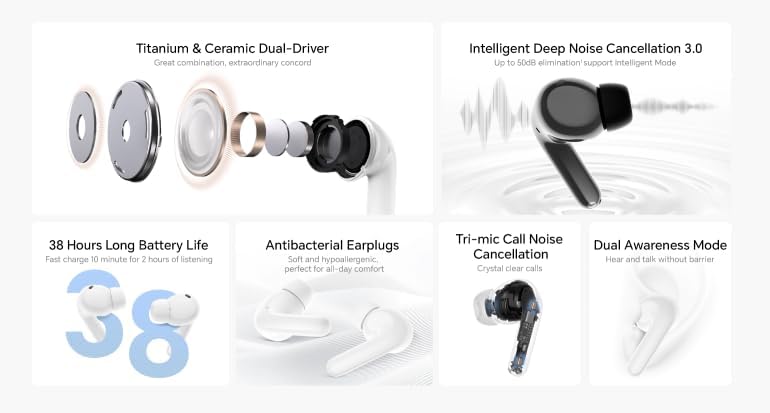
Image: An infographic detailing key features of the HONOR Choice S8, including 38-hour battery life, antibacterial earplugs, tri-mic call noise cancellation, and dual awareness mode.
4.3 Active Noise Cancellation (ANC) and Awareness Mode
The earbuds feature Active Noise Cancellation to reduce ambient noise and an Awareness Mode to let you hear your surroundings. Toggle between these modes by pressing and holding either earbud for 2 seconds.
4.4 Multi-device Connectivity
The HONOR Choice S8 supports multi-device connectivity, allowing seamless switching between paired devices like your smartphone, PC, or game console without needing to re-pair each time.
5. Maintenance
5.1 Cleaning
- Regularly clean the earbuds and charging case with a soft, dry, lint-free cloth.
- Remove ear tips and clean them with mild soap and water, then dry thoroughly before reattaching.
- Ensure charging contacts on both earbuds and case are clean and free of debris.
5.2 Storage
When not in use, store the earbuds in their charging case to protect them and keep them charged. Store in a cool, dry place away from direct sunlight.
5.3 Water Resistance
The earbuds are water-resistant, making them suitable for daily use and workouts. However, they are not waterproof and should not be submerged in water. The charging case is not water-resistant.

Image: The HONOR Choice S8 earbuds with water droplets, illustrating their water-resistant design.
6. Troubleshooting
Common Issues and Solutions
- Earbuds not pairing:
- Ensure earbuds are charged.
- Place earbuds back in the case, close the lid, wait a few seconds, then open again to re-enter pairing mode.
- Turn off and on Bluetooth on your device.
- Forget/delete "HONOR Choice S8" from your device's Bluetooth list and try pairing again.
- No sound from one earbud:
- Ensure both earbuds are charged.
- Clean the charging contacts on both the earbud and the case.
- Try resetting the earbuds (refer to the full user manual for specific reset instructions if available).
- Charging issues:
- Check if the charging cable is securely connected.
- Try a different USB Type-C cable and power adapter.
- Ensure charging contacts are clean.
- Poor sound quality/ANC performance:
- Ensure earbuds are properly seated in your ears with the correct size ear tips.
- Clean the ear tips and earbud grilles.
- Ensure your device is within the Bluetooth range (up to 10 meters).
7. Specifications
| Feature | Specification |
|---|---|
| Model Name | Choice S8 |
| Model Number | 5504ACTN |
| Connectivity Technology | Bluetooth 5.4 |
| Bluetooth Range | 10 meters |
| Ear Placement | In-Ear (Intraurales) |
| Form Factor | True Wireless |
| Noise Control | Active Noise Cancellation |
| Impedance | 32 Ohms |
| Frequency Response | 20 Hz - 40 kHz |
| Sensitivity | 100 dB |
| Audio Driver Type | Dynamic Driver |
| Audio Driver Size | 10 mm |
| Control Type | Touch Control |
| Earbud Weight | 4.8 Grams (per earbud) |
| Charging Case Dimensions | 62 x 50.4 x 26.7 mm |
| Battery Charge Time | Approx. 1.5 Hours |
| Water Resistance Level | Water Resistant (Earbuds only) |
| Compatible Devices | Laptop, Smartphone, Mobile Phones, Game Consoles |
8. Warranty and Support
8.1 Warranty Information
The HONOR Choice S8 Wireless Earbuds are backed by a 1-year manufacturer's warranty from the date of purchase. This warranty covers manufacturing defects and workmanship under normal use. It does not cover damage caused by misuse, accidents, unauthorized modifications, or normal wear and tear.
Please retain your proof of purchase for warranty claims.
8.2 Customer Support
For technical assistance, warranty claims, or further inquiries, please contact HONOR customer support through their official website or the retailer where you purchased the product. Please have your model number (5504ACTN) and proof of purchase ready when contacting support.


