
1. Introduction
Thank you for choosing the BTHFST Low Twin Over Twin Bunk Bed. This manual provides essential information for the safe assembly, operation, and maintenance of your new bunk bed. Please read all instructions carefully before beginning assembly and retain this manual for future reference.
Important Safety Information
- Always follow assembly instructions precisely.
- Ensure all connections are securely tightened before use. Periodically check and re-tighten as necessary.
- The top bunk is intended for children aged 6 years and older.
- Use only mattresses that meet the specified dimensions to prevent entrapment.
- Do not allow children to play on or under the bunk bed without supervision.
- Always use the provided anti-tip kits to secure the bed to the wall.
- Do not attach or suspend items from any part of the bunk bed that are not designed for use with the bed.
Included Components
The package includes the Bunk Bed frame, LED Light Strip, Remote Control, 8 Fabric Drawers, Assembly Kit, and Instructions.
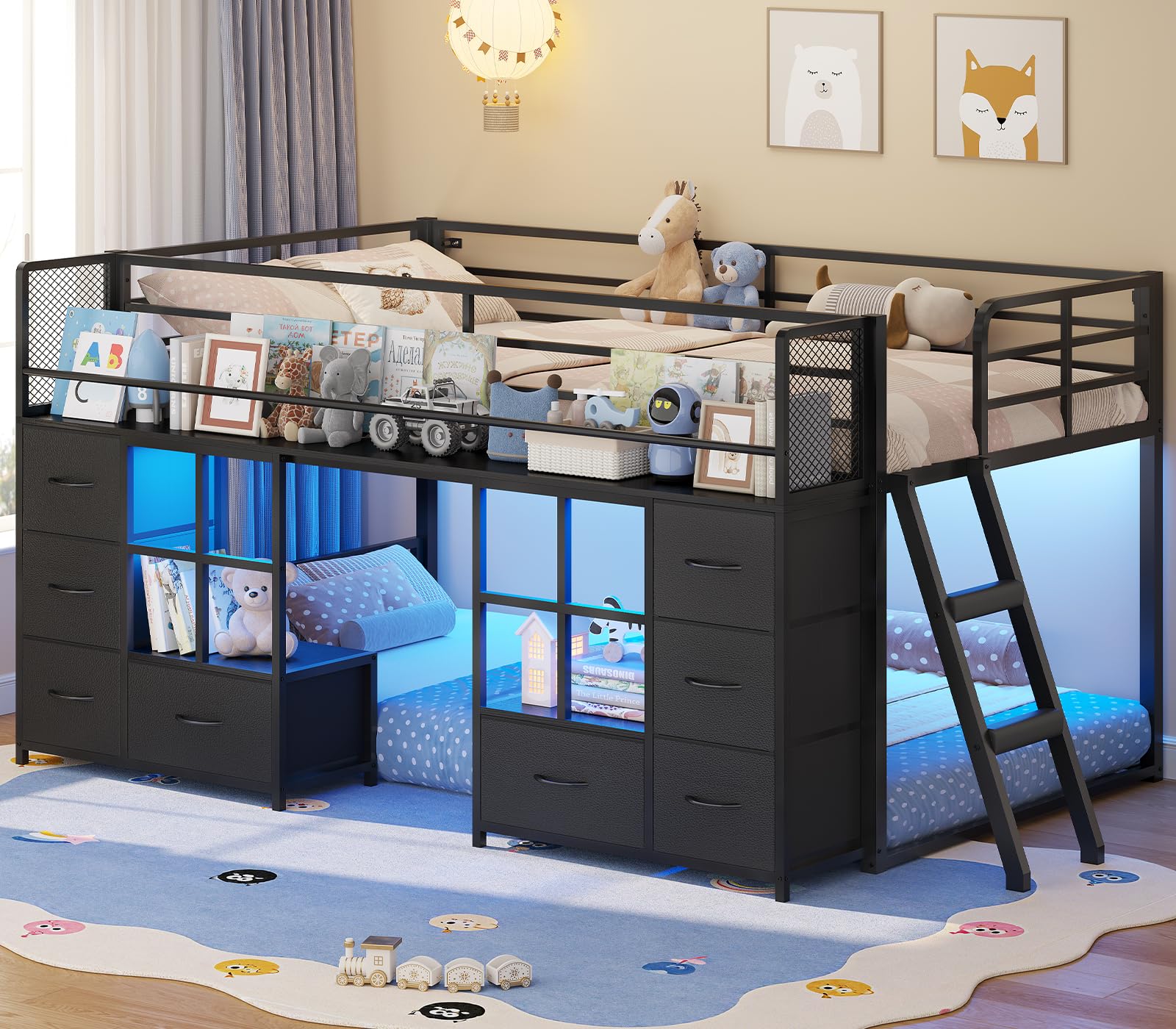
Figure 1: Overview of the BTHFST Low Twin Over Twin Bunk Bed.
Video 1: Product overview of the BTHFST Low Bunk Bed Twin Size with 8 Fabric Drawers & Bookshelf, highlighting key features and design.
2. Setup and Assembly
Assembly of the BTHFST bunk bed requires two adults. Please ensure all parts are present before beginning. Refer to the detailed assembly diagrams in the separate assembly guide for step-by-step instructions.
Key Assembly Steps:
- Unpack all components and verify against the parts list.
- Assemble the main bed frames (upper and lower) according to the provided diagrams.
- Attach the slanted ladder, ensuring it is securely fastened. The ladder rungs are equipped with foam padding for comfort and safety.
- Install the 8 fabric drawers into their designated compartments.
- Secure the bunk bed to the wall using the two included anti-tip kits. This is crucial for stability and safety.
- Install the RGB LED light strip as per the separate LED installation guide.

Figure 2: Product dimensions for the BTHFST Low Twin Over Twin Bunk Bed, including overall length, width, height, and individual component measurements.

Figure 3: The slanted ladder design with foam-padded rungs, designed for easier and safer climbing for children.

Figure 4: The bunk bed in a child's room, illustrating its compact design and integrated storage solutions.
3. Operating Instructions
RGB LED Lights
The bunk bed features adjustable RGB LED lights. These lights can be controlled via a remote control or a dedicated smartphone application. Refer to the separate LED light instruction sheet for detailed pairing and operation instructions.
- Remote Control: Use the provided remote to power on/off, change colors, adjust brightness, and select various lighting modes (e.g., dynamic, music sync).
- Smartphone App: Download the recommended app (details in LED guide) to access over 60,000 colors, dynamic modes, music mode, mic mode, and timing functions.

Figure 5: The bunk bed illuminated by RGB LED lights, demonstrating the various control options including a remote and smartphone application for color and mode selection.
Storage Drawers and Bookshelf
The bunk bed is equipped with 8 fabric drawers and integrated bookshelves for organizing personal items. The lower bunk area can be utilized in multiple ways:
- Floor Bed: A mattress can be placed directly on the floor within the lower bunk area to create a Montessori-style floor bed for toddlers.
- Play Area: Add a rug and bed curtains to transform the lower bunk into a cozy play area, reading nook, or indoor fort.

Figure 6: Close-up view of the integrated storage, including eight fabric drawers and two open shelves, designed to reduce clutter.

Figure 7: The versatile lower bunk area, shown here as a play space, can also accommodate a mattress for a floor bed setup.
4. Maintenance
Regular maintenance ensures the longevity and safety of your bunk bed.
- Cleaning: Wipe the metal frame with a soft, damp cloth. Avoid abrasive cleaners. Fabric drawers can be spot cleaned with a mild detergent and air-dried.
- Hardware Check: Periodically inspect all bolts, screws, and connections to ensure they are tight. Re-tighten any loose hardware to maintain structural integrity.
- LED Lights: Ensure the LED light strip and connections are free from dust and damage. If any issues arise, refer to the LED light instruction sheet for troubleshooting.
5. Troubleshooting
If you encounter any issues with your bunk bed, please refer to the following common problems and solutions:
| Problem | Possible Cause | Solution |
|---|---|---|
| Bed feels wobbly or unstable. | Loose hardware; anti-tip kits not installed or improperly secured. | Check and tighten all bolts and screws. Ensure anti-tip kits are correctly installed and anchored to a wall stud. |
| LED lights not working. | Power connection issue; remote control battery dead; LED strip damage. | Verify power connection to the LED strip. Replace remote control battery. Inspect LED strip for visible damage. Refer to the LED light instruction sheet for specific troubleshooting. |
| Drawers do not slide smoothly. | Obstruction in the drawer compartment; drawer not assembled correctly. | Remove any obstructions. Ensure fabric drawers are fully expanded and correctly inserted. |
If the problem persists, please contact BTHFST customer support for assistance.
6. Specifications
| Feature | Detail |
|---|---|
| Brand | BTHFST |
| Model | Twin over Twin Bunk Bed |
| ASIN | B0H4Q1PDYM |
| Color | Black |
| Style | Modern |
| Frame Material | Alloy Steel |
| Item Dimensions (L x W x H) | 78"L x 51.2"W x 43.5"H |
| Special Features | LED Lights, Remote & APP Control, Slanted Ladder, Storage (8 Fabric Drawers, Bookshelf) |
| Age Range Description | Child |
| Included Components | Bunk Bed, LED Light Strip, Remote Control, 8 Fabric Drawers, Assembly Kit, Instructions |
7. Warranty and Support
For warranty information or technical support, please contact BTHFST customer service through the retailer where the product was purchased. Please have your model number (B0H4Q1PDYM) and purchase date available when contacting support.
You can also visit the BTHFST store for more information: BTHFST Store