
Introduction
Thank you for choosing the FUNMILY Walking Pad Treadmill. This manual provides essential information for the safe and effective use, maintenance, and troubleshooting of your new walking pad. Please read it thoroughly before operation and retain it for future reference.
Important Safety Instructions
- Always place the walking pad on a flat, stable surface.
- Keep children and pets away from the walking pad during operation.
- Ensure adequate clearance around the walking pad (at least 2 feet on all sides).
- Do not operate the walking pad if it has a damaged cord or plug, or if it is not working properly.
- Wear appropriate athletic footwear when using the walking pad.
- Do not exceed the maximum weight capacity of 300 lbs.
- Unplug the walking pad from the power outlet when not in use, before cleaning, or before performing maintenance.
- Consult a physician before starting any exercise program.
Product Overview
Components Included
- FUNMILY Walking Pad Treadmill
- Remote Control
- Tool Kit
- Lubricant
- User Manual
Key Features
- Motor: 2.5HP / 3.0HP Quiet Motor (operates at approximately 45 decibels)
- Speed Range: 0.5 - 4.0 MPH
- Weight Capacity: 300 lbs
- Incline: Adjustable 8% manual incline
- Display: Integrated LED display showing Time, Speed, Distance, and Calories
- Control: Remote control operation
- Portability: Ultra-thin 4.1-inch profile, 50 lbs item weight, with built-in wheels for easy storage
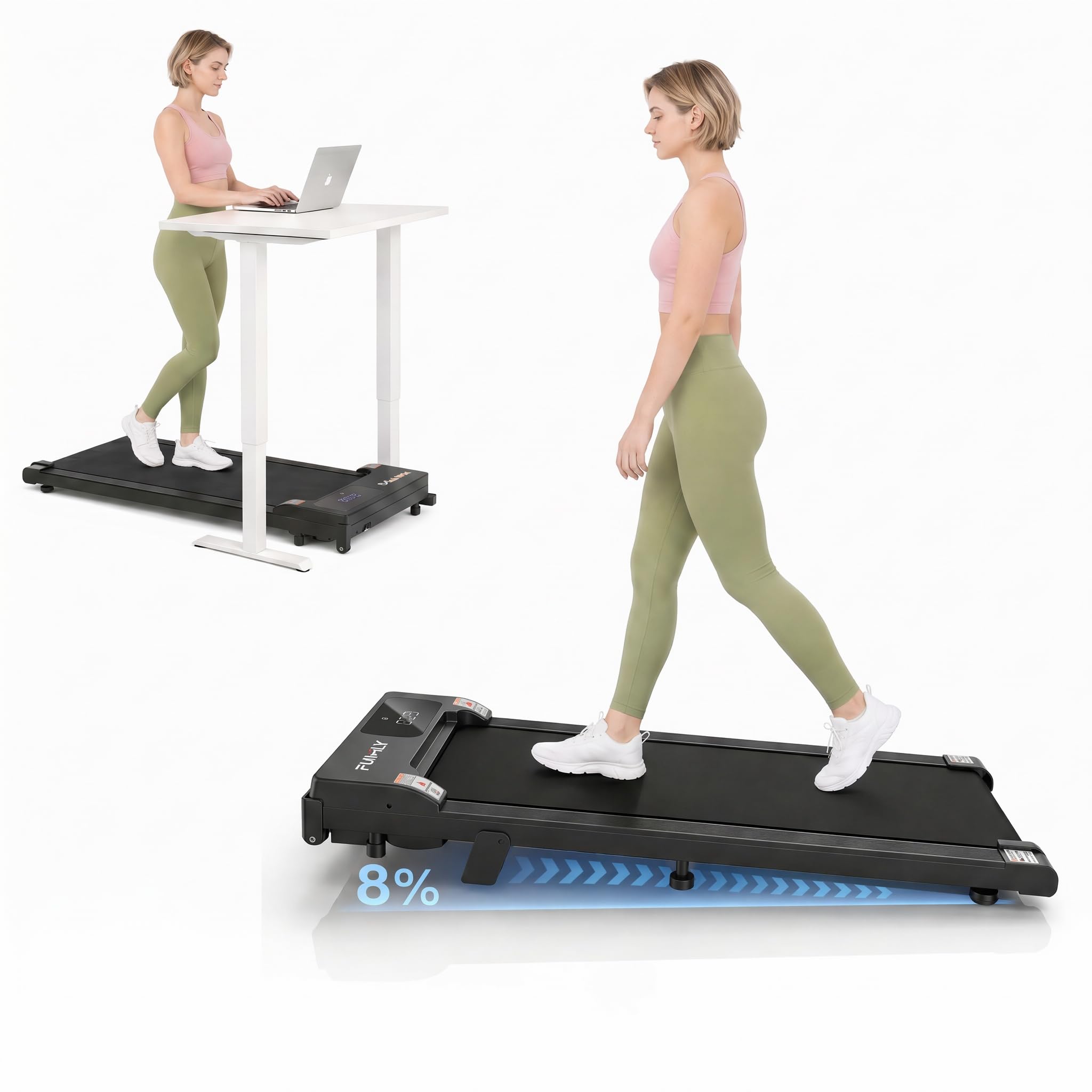
Image: The FUNMILY Walking Pad Treadmill, showcasing its compact design.
Setup
The FUNMILY Walking Pad Treadmill requires no assembly. Follow these steps for initial setup:
- Unpack: Carefully remove the walking pad from its packaging.
- Placement: Choose a flat, stable surface for the walking pad. Ensure there is sufficient space around the unit for safe operation.
- Power Connection: Plug the power cord into a grounded electrical outlet.
- Remote Control: Ensure the remote control has batteries installed and is ready for use.

Image: The walking pad shown in various storage locations, highlighting its small and lightweight design for easy placement under furniture.
Operating Instructions
Powering On/Off
- To power on, press the power button on the remote control. The LED display will illuminate.
- To power off, press and hold the power button on the remote control until the display turns off.
Using the Remote Control
The remote control allows you to start, stop, and adjust the speed of the walking pad.
- Start/Pause: Press the central button to start or pause the walking pad.
- Speed Adjustment: Use the '+' button to increase speed and the '-' button to decrease speed.
Video: Demonstrates the quiet operation and compact nature of the walking pad, suitable for home or office use.
LED Display
The integrated LED display provides real-time workout data:
- TIME: Duration of your workout.
- SPEED: Current walking speed in MPH.
- DIST: Distance covered during your workout.
- CAL: Estimated calories burned.

Image: Close-up of the LED display on the walking pad, showing workout metrics.
Adjusting Incline
The walking pad features an 8% manual incline. To adjust the incline:
- Ensure the walking pad is powered off and unplugged.
- Locate the incline adjustment mechanism at the rear of the unit.
- Manually adjust the incline to the desired position. Ensure it is securely locked before use.

Image: Illustration of the walking pad with an 8% incline, demonstrating how it can increase calorie burn compared to a flat surface.
Workout Modes
The walking pad supports various modes of use:
- Working Mode: Use while standing at a desk for light activity.
- Walking Mode: Standard walking exercise.
- Jogging Mode: For a more intense workout at higher speeds.
- Climbing Mode: Utilize the 8% incline for an uphill simulation.

Image: Visual representation of the walking pad being used in different scenarios: under a standing desk, for walking, jogging, and with incline for climbing.
Video: Shows the walking pad in use under a desk, demonstrating its suitability for working and exercising simultaneously.
Maintenance
Regular maintenance ensures the longevity and optimal performance of your walking pad.
Lubrication
The walking belt requires periodic lubrication to reduce friction and wear. Use the provided lubricant and follow these steps:
- Turn off and unplug the walking pad.
- Lift the edge of the walking belt and apply a small amount of lubricant to the center of the deck, underneath the belt.
- Plug in the walking pad and run it at a low speed (e.g., 1 MPH) for a few minutes to distribute the lubricant evenly.
- Frequency: Lubricate every 3 months or after 50 hours of use, whichever comes first.
Cleaning
- Wipe down the walking pad with a damp cloth after each use to remove sweat and dust.
- Do not use abrasive cleaners or solvents.
- Keep the area around the walking pad clean and free of obstructions.
Belt Adjustment
If the walking belt feels loose or is slipping, it may need adjustment. Refer to the detailed instructions in the full user manual for specific belt tensioning procedures, which typically involve adjusting screws at the rear of the unit.
Troubleshooting
Here are solutions to common issues you might encounter:
| Problem | Possible Cause | Solution |
|---|---|---|
| Walking pad does not power on. | Power cord not plugged in; power switch off; circuit breaker tripped. | Check power cord connection; ensure power switch is on; reset circuit breaker if necessary. |
| Remote control not working. | Dead batteries; remote not paired. | Replace remote control batteries; refer to the full manual for remote pairing instructions. |
| Walking belt slips or hesitates. | Belt too loose; insufficient lubrication. | Adjust belt tension (refer to full manual); lubricate the walking belt. |
| Unusual noise during operation. | Loose components; belt misalignment; motor issue. | Inspect for loose parts and tighten; check belt alignment; if noise persists, contact customer support. |
Specifications
| Feature | Detail |
|---|---|
| Brand | FUNMILY |
| Model Name | Walking Pad Treadmill |
| Product Dimensions (D x W x H) | 50"D x 24"W x 5.5"H |
| Item Weight | 50 Pounds |
| Material | Alloy Steel |
| Maximum Speed | 3.8 Miles per Hour |
| Minimum Speed | 0.6 Miles per Hour |
| Maximum Horsepower | 2.5 Horsepower |
| Maximum Weight Recommendation | 300 Pounds |
| Display Type | LED |
| Power Source | Corded Electric |
| Assembly Required | No |
Warranty
The FUNMILY Walking Pad Treadmill comes with a 1-year warranty from the date of purchase. This warranty covers manufacturing defects and material flaws under normal use. Please retain your proof of purchase for warranty claims. The warranty does not cover damage caused by misuse, neglect, accident, or unauthorized modification.
Customer Support
For any questions, technical assistance, or warranty claims, please contact FUNMILY customer support. Refer to the contact information provided on the product packaging or the official FUNMILY website.