
Introduction
This manual provides detailed instructions for the assembly, operation, and maintenance of your SEDETA Farmhouse Executive Desk, Model 5932_2. Please read all instructions carefully before beginning assembly and retain this manual for future reference.
Safety Information
- Ensure all parts are present before assembly.
- Do not overtighten screws during assembly to avoid damaging the material.
- Place the desk on a level surface to prevent wobbling.
- Keep small parts away from children during assembly.
- Do not exceed the maximum load capacity of 200 lbs (90.7 kg).
Package Contents
The package includes all necessary components for assembling the desk, including panels, hardware, and the integrated power strip. Please verify all parts against the included parts list provided in your packaging before starting assembly.
Setup: Assembly Instructions
1. Unpacking and Preparation
Carefully unpack all components and hardware. Lay them out on a clean, soft surface to prevent scratches. Identify all parts by comparing them with the parts list provided in your packaging. Ensure you have a Phillips head screwdriver and a hammer (not included) for assembly.
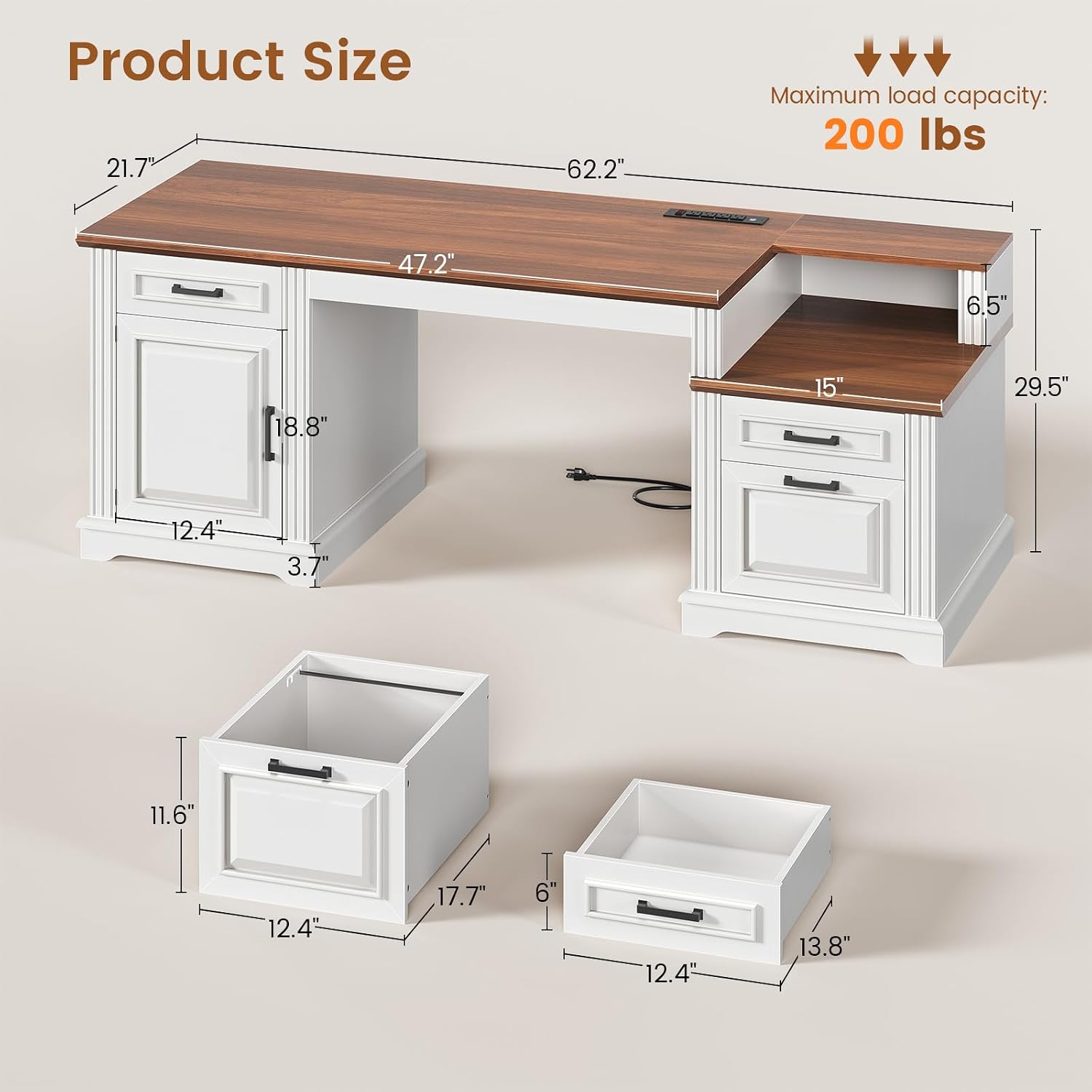
Image: Product dimensions and maximum load capacity of 200 lbs.
2. Assembling the Base Units
Begin by assembling the two base units (pedestals) that support the desktop. Each unit typically involves attaching side panels to a bottom panel and then securing the top frame for the drawers and cabinet. Pay attention to the orientation of panels with pre-drilled holes for drawer slides or hinges.

Image: Detail of the desk's classic American crafted structure with thick solid base and vertical fluted molding.
3. Installing Drawers and Cabinet Doors
Install the drawer slides onto the internal panels of the base units. Assemble the drawer boxes and attach them to the slides. For the cabinet, attach hinges to the door and the cabinet frame, then mount the door. Ensure smooth operation of all moving parts.
4. Attaching the Desktop
Carefully place the main desktop panel onto the assembled base units. Align the pre-drilled holes and secure the desktop using the provided screws. Ensure the desk is stable and level before proceeding.

Image: Detail of the 24mm thick tabletop with fine beveled edge craftsmanship.
5. Integrating the Power Outlet
The desk features a built-in power outlet. Insert the power strip into its designated slot on the desktop. Route the power cord safely to a wall outlet. Ensure the power switch is accessible.
6. Final Checks
Once assembled, gently shake the desk to check for stability. Tighten any loose connections. Verify that all drawers and cabinet doors open and close smoothly. Clean any dust or debris from the assembly process.

Image: The spacious 62-inch wide desktop provides ample room for multiple monitors and work essentials.
Operating Instructions
1. Using the Built-in Power Outlet
The SEDETA Executive Desk includes a power strip with 4 AC outlets and 2 USB ports. To use, plug the desk's main power cord into a wall outlet. Use the independent on/off switch located on the power strip to control power to your devices. This allows for convenient charging of laptops, phones, tablets, and other electronics directly on your desktop.
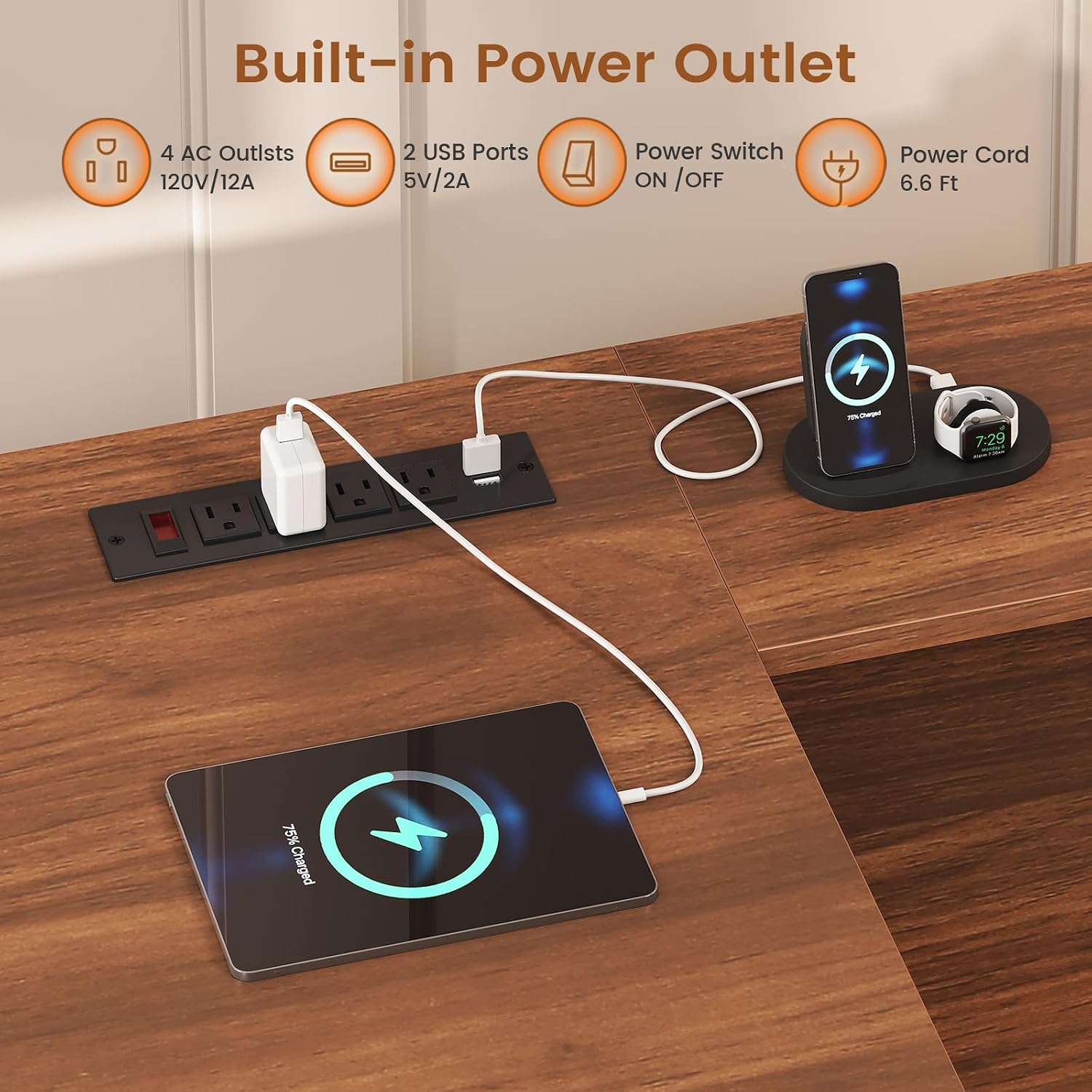
Image: Built-in power outlet with 4 AC outlets and 2 USB ports for convenient device charging.
2. Utilizing Storage Compartments
The desk features a zoned storage system:
- File Drawer: Located in one of the base units, this drawer is designed to accommodate letter, A4, or legal-sized documents.
- Utility Drawers: Two smaller drawers are available for storing pens, office supplies, and other small items.
- Storage Cabinet: A spacious cabinet provides room for larger items such as a printer, books, or binders.
Ensure drawers and cabinet doors are closed properly when not in use to maintain a tidy workspace.
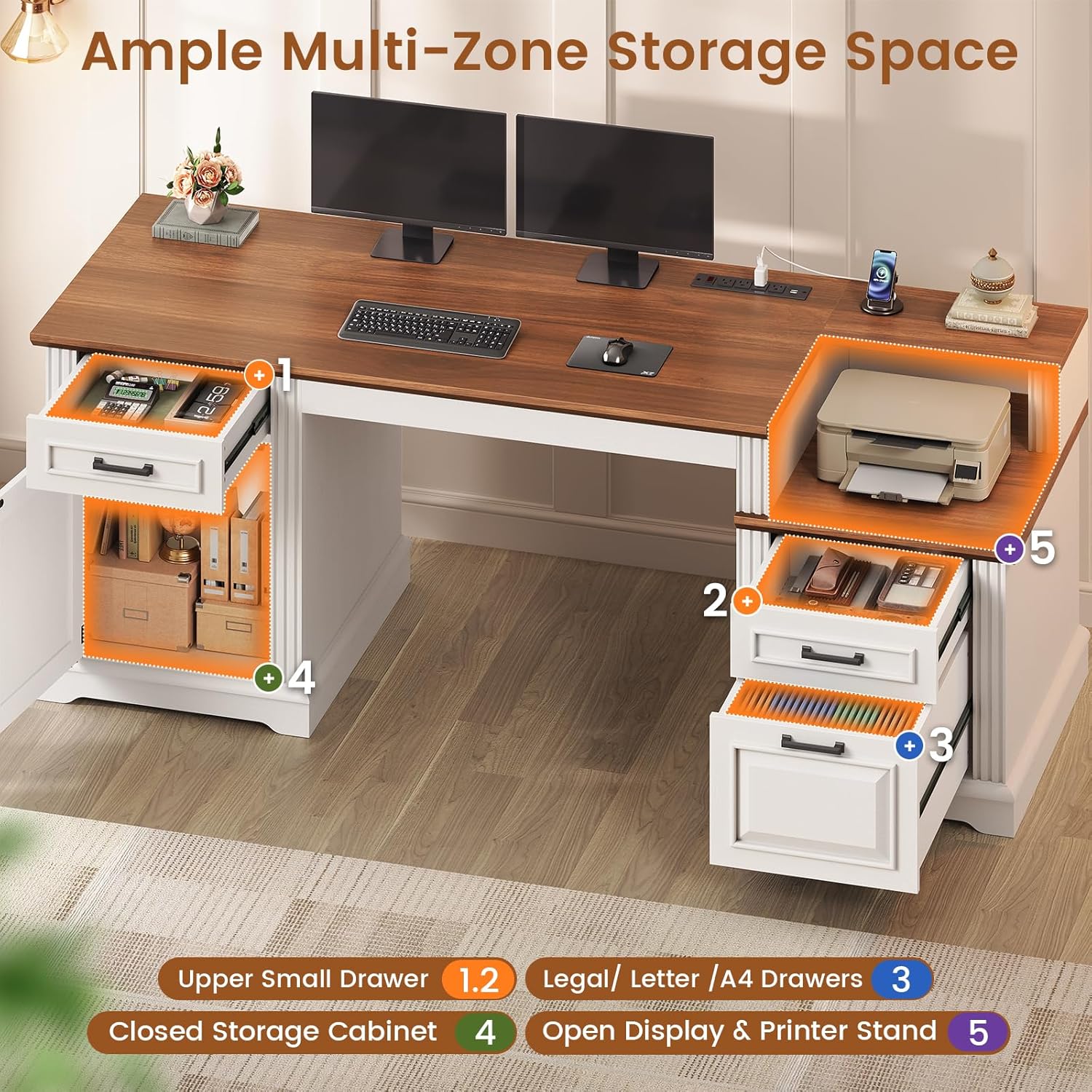
Image: Overview of the desk's multi-zone storage, including drawers and cabinet.

Image: Detail of the file drawer, accommodating various document sizes, and an upper utility drawer.
3. Product Overview Video
Watch this video for a visual overview of the SEDETA Farmhouse Executive Desk's features and functionality.
Video: A demonstration of the SEDETA Farmhouse Computer Desk, showcasing its spacious work surface, built-in power outlet, and storage solutions.
Maintenance
1. Cleaning
Regularly wipe the desk surfaces with a soft, damp cloth. For spills, clean immediately with a mild soap solution and dry thoroughly. Avoid abrasive cleaners or harsh chemicals, as these can damage the laminated finish.
2. General Care
- Avoid placing hot items directly on the desktop; use coasters or protective pads.
- Do not drag heavy objects across the surface to prevent scratches.
- Periodically check and tighten all screws to maintain stability.
- Keep the desk away from direct sunlight and excessive moisture to prevent material degradation.
Troubleshooting
1. Desk Wobbles
If the desk feels unstable, ensure it is placed on a level surface. Check all assembly screws and tighten them if necessary. Uneven flooring can be compensated for by placing shims under the desk legs.
2. Drawers Stick or Don't Close Properly
Verify that the drawer slides are correctly installed and aligned. Ensure no objects are obstructing the drawer's path. If the issue persists, check if any screws on the slides or drawer boxes are loose.
3. Power Outlet Not Working
Ensure the desk's main power cord is securely plugged into a functional wall outlet. Check the on/off switch on the power strip to ensure it is in the "on" position. If the issue continues, try plugging another device into the wall outlet to confirm the outlet is working. If the power strip itself is faulty, contact customer support.
Specifications
Product Specifications
| Feature | Detail |
|---|---|
| Brand | SEDETA |
| Model Number | 5932_2 |
| Desk Design | Executive Desk, Computer Desk |
| Dimensions (D x W x H) | 21.7"D x 62.2"W x 29.5"H |
| Color | White + Walnut |
| Style | Farmhouse |
| Material | Engineered Wood (MDF) |
| Finish Type | Laminated |
| Special Features | Built-In Power Outlet (4 AC, 2 USB), File Drawer, Storage Cabinet |
| Number of Drawers | 3 (1 file, 2 utility) |
| Number of Cabinets | 1 |
| Item Weight | 106 Pounds (48.1 kg) |
| Tabletop Thickness | 24 mm |
| Maximum Load Capacity | 200 lbs (90.7 kg) |
Warranty and Customer Support
SEDETA stands by the quality of its products. This desk is built for daily use with heavy-duty MDF and reinforced frames. If you encounter any issues such as damaged, scratched, or missing parts upon arrival, please contact our customer support team. We are committed to providing a free replacement or partial refund as needed.
For support, please refer to the contact information provided with your purchase or visit the official SEDETA store page on Amazon: SEDETA Store.