
Introduction
The AIRAIN TECH Wireless Weather Station provides comprehensive real-time weather data for both indoor and outdoor environments. This device features a high-precision Swiss temperature and humidity sensor, a radio-controlled clock, and capabilities to measure rainfall, wind speed, wind direction, moon phase, and barometric pressure. This manual will guide you through the setup, operation, maintenance, and troubleshooting of your weather station.
Package Contents
Before beginning installation, please verify that all components are present and in good condition:
- Display Console ×1
- Outdoor Sensor ×1
- User Manual ×1
- Power Adapter ×1
- Feet ×1
- Mounting Bracket Backplate ×1
- Mounting Pole ×1
- Nuts (M3/M5) / Bolts (M3/M5)
- Screws

Product Overview
Display Console
The indoor display console features a 6.5-inch color LCD screen that presents various weather data. It shows wind speed and direction, weather forecast, indoor and outdoor temperature and humidity, barometric pressure, rainfall, moon phase, and time/date.

Outdoor Sensor
The outdoor sensor unit is a multi-functional device designed to collect environmental data. It integrates a rainwater collector, solar panel, wind vane, wind cup, thermo-hygrometer, and an antenna for wireless transmission.

Setup
Powering the Devices
The outdoor sensor is primarily solar-powered but requires 3 AAA batteries (included) for backup power. The display console is powered by the included power adapter.
Outdoor Sensor Installation
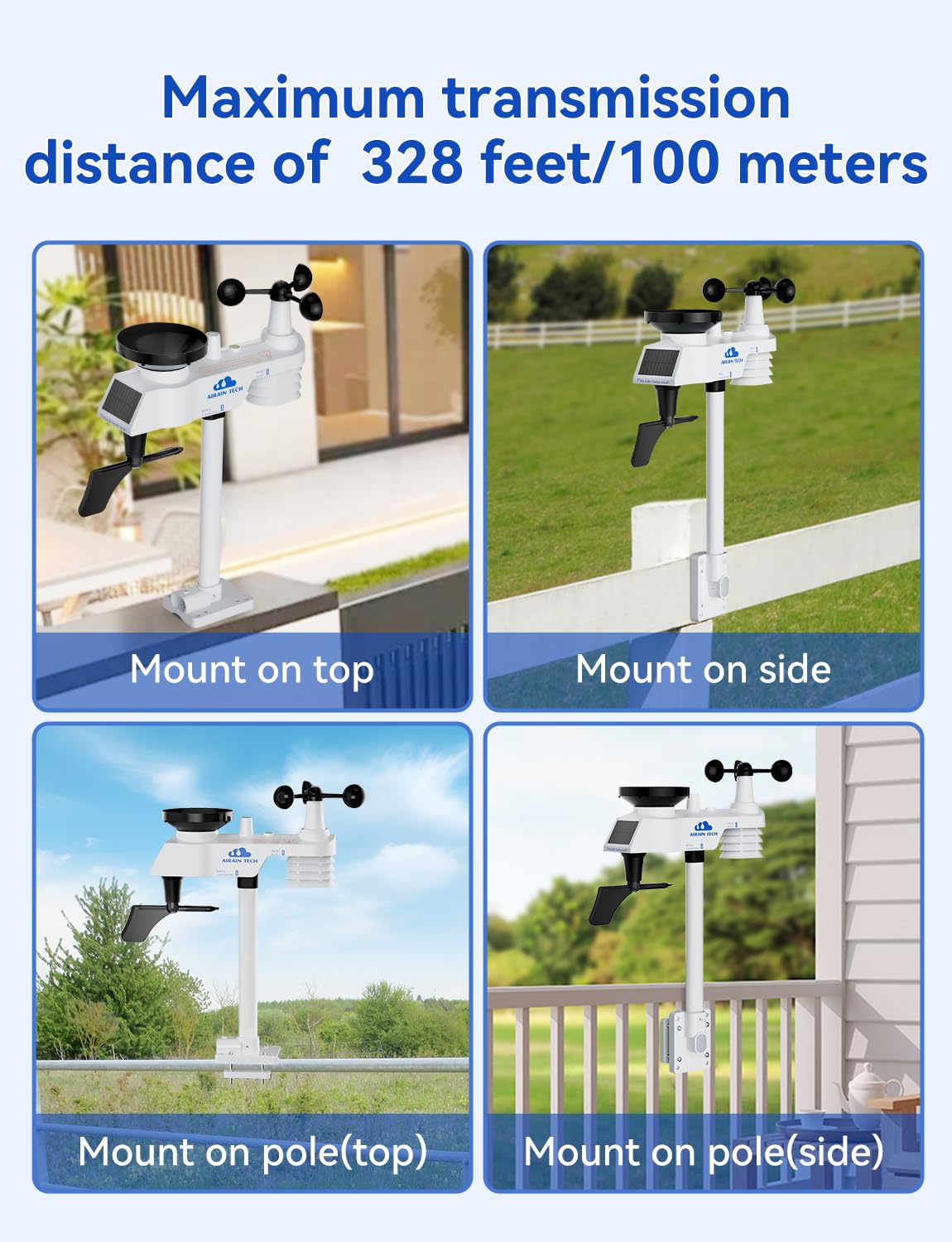
The outdoor sensor can be installed in various ways using the adjustable bracket and mounting pole. Ensure it is placed in an open area for accurate readings, away from obstructions. The wireless transmission range is up to 328 feet (100 meters) in open areas.
- Mount on top: Secure the sensor to a flat surface.
- Mount on side: Attach the sensor to a vertical surface.
- Mount on pole (top/side): Use the mounting pole to elevate the sensor.


Console Placement
The display console can be placed on a desktop using its stand or mounted on a wall. Choose a location that is easily visible and within range of the outdoor sensor.

Synchronization
After powering both the outdoor sensor and the display console, the devices will automatically attempt to connect and synchronize data. This process typically takes a few minutes.
Operating Instructions
Reading the Display
The 6.5-inch LCD screen provides a clear overview of current weather conditions. Refer to the 'Product Overview' section for a detailed labeled diagram of the display console.
Weather Forecast
The weather station provides a localized weather forecast based on changes in barometric pressure. Icons on the display indicate conditions such as sunny, partly cloudy, cloudy, or rainy.

Radio Controlled Clock (RCC)
The console features a WWVB radio-controlled clock function, which automatically synchronizes the time and date. The console will perform an RCC signal search at 2:00, 8:00, 14:00, and 20:00 daily to ensure accurate timekeeping.

Backlight Adjustment
The display console features a 3-level backlight brightness adjustment. Press the [SNOOZE/LIGHT] key to cycle through the three brightness levels or turn the backlight off.

Wind Chill and Dew Point
The weather station analyzes wind chill index and outdoor dew point data. This information can be used to assess how cold the weather feels and to plan safe outdoor activities.

Maintenance
- Cleaning: Periodically clean the display console with a soft, dry cloth. For the outdoor sensor, gently wipe away any dirt or debris from the solar panel, rain collector, and wind sensors to ensure accurate readings.
- Battery Replacement: Replace the 3 AAA batteries in the outdoor sensor annually or when the low battery indicator appears on the display console. Ensure proper polarity when inserting new batteries.
- Sensor Placement: Regularly check the outdoor sensor's mounting to ensure it remains secure and unobstructed.
Troubleshooting
| Problem | Possible Cause | Solution |
|---|---|---|
| No outdoor data displayed | Outdoor sensor not powered or out of range. | Check outdoor sensor batteries. Ensure sensor is within 328 ft (100m) of the console and free from major obstructions. Re-synchronize if necessary. |
| Inaccurate temperature/humidity readings | Sensor exposed to direct sunlight or heat sources. | Relocate the outdoor sensor to a shaded area, away from direct sunlight or heat-emitting surfaces. Ensure the radiation shield is clean. |
| Inaccurate wind speed/direction | Obstructions near the sensor or sensor not level. | Ensure the outdoor sensor is mounted in an open area, free from trees or buildings that could block wind. Verify the sensor is level. |
| Rainfall not registering | Rain collector blocked or dirty. | Clean the rain collector funnel and ensure the tipping bucket mechanism moves freely. |
| Time not synchronizing (RCC) | Weak WWVB signal or interference. | Place the console near a window, away from electronic devices that may cause interference. Allow time for automatic synchronization. |
Specifications
- Brand: AIRAIN TECH
- Model: 6.5-inch Single screen
- Recommended Uses: Garden, Home
- Specific Uses: Temperature, humidity, air pressure, wind speed, wind direction, rainfall, moon phase, calendar
- Power Source: Solar Powered (Outdoor Sensor), Power Adapter (Display Console)
- Special Features: Radio Controlled Clock, Wireless Transmission
- Outdoor Sensor Batteries: 3 AAA batteries (included)
- Temperature Accuracy: ±2°F / 1°C
- Outdoor Temperature Range: -40°F to 140°F
- Humidity Range: 10% to 99%
- Wireless Transmission Range: Up to 328 ft (100 meters) in open areas
- Display Size: 6.5-inch color LCD
- Smart Home Compatibility: Not Smart Home Compatible
- Item Weight: 1.7 Kilograms
Warranty and Support
AIRAIN TECH provides 2 years of high-quality after-sales service for this product. Our goal is to design high-quality, easy-to-use personal weather stations. If you encounter any technical issues or require assistance, please contact our dedicated after-sales team.
- After-Sales Service Phone Number: 904-652-2795 (Monday to Friday, 9:00 a.m. to 6:00 p.m. Eastern Time)
- Email: Refer to the front of the product packaging for the email address. Replies are typically within 24 hours on weekdays.
