
1. Introduction
Thank you for choosing the Bellemave Metal Twin XL Loft Bed. This manual provides essential information for the safe assembly, operation, and maintenance of your new loft bed. Please read all instructions carefully before beginning assembly and retain this manual for future reference. This loft bed is designed to maximize space with an integrated desk, charging station, and LED lighting, making it suitable for various environments.
2. Safety Information
WARNING: Failure to follow these warnings and instructions could result in serious injury or death.
- Maximum Weight Capacity: Do not exceed the maximum weight capacity for the upper bunk. Refer to the specifications section for details.
- Guardrails: Always use the provided guardrails on the upper bunk to prevent falls. Ensure they are securely fastened.
- Mattress Size: Use only mattresses that comply with the recommended dimensions for Twin XL beds to ensure proper fit and safety.
- Ladder Safety: Always use the ladder for entering and exiting the upper bunk. Do not jump on or off the bed. Ensure the ladder steps are securely fixed.
- Electrical Safety: The integrated charging station and LED lights require electrical power. Ensure all connections are secure and avoid overloading outlets. Do not use damaged cords or plugs.
- Ventilation: Ensure adequate ventilation around the charging station to prevent overheating.
- Children's Product Certificate (CPC): This product has passed several Children's Product Certificate (CPC) tests, ensuring it meets safety standards for children's products.
- Regular Checks: Periodically check all bolts, screws, and connections to ensure they remain tight. Retighten as necessary.
- No Horseplay: Prohibit horseplay on or under the bed.
3. Parts List
Before assembly, unpack all components and verify against the included parts list in your packaging. Ensure all hardware and tools are present. If any parts are missing or damaged, do not proceed with assembly and contact customer support.
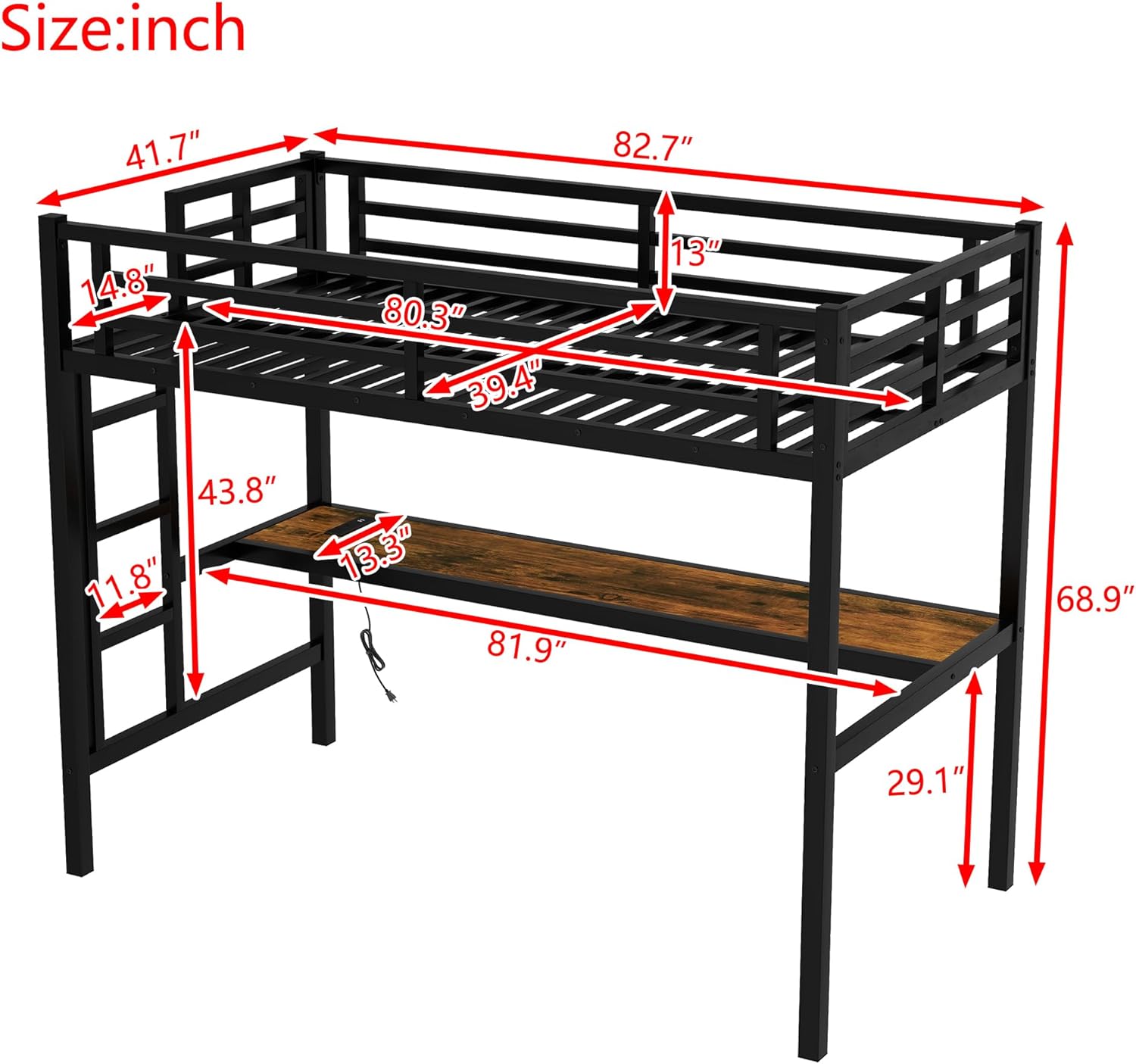
Image 1: Dimensional diagram of the Bellemave Metal Twin XL Loft Bed, illustrating overall length, width, height, and specific measurements for the bed frame, desk, and ladder. This helps in identifying parts and understanding the bed's structure during assembly.
4. Assembly Instructions
Assembly of the Bellemave Metal Twin XL Loft Bed is designed to be straightforward. An illustrated installation manual is included with your product to guide you through each step. Please follow these general guidelines:
- Preparation: Clear a spacious area for assembly. Lay out all parts and hardware.
- Step-by-Step: Follow the numbered steps in the provided manual. Do not skip steps.
- Secure Fastening: Ensure all screws, bolts, and connections are tightened securely. Periodically re-check tightness after initial assembly.
- Two-Person Assembly: For safety and ease, it is recommended to have two adults for assembly.
Video 1: An overview video demonstrating the features and structure of the Twin XL Loft Bed with Desk. This video can provide a visual aid for understanding the product's components and overall design during assembly.

Image 2: A complete view of the Bellemave Metal Twin XL Loft Bed, showcasing the elevated bed, integrated desk, and charging station. This image provides a reference for the finished product after assembly.
5. Operating Instructions
5.1. Loft Bed Usage
- Ensure the mattress is properly seated within the bed frame and does not exceed the height of the guardrails.
- Always use the ladder for safe access to and from the upper bunk.
5.2. Integrated Desk
The spacious desk underneath the loft bed provides a dedicated area for studying, working, or creative activities. Ensure the desk surface is kept clear of excessive weight.

Image 3: An image illustrating the integrated desk in use, showing a person studying. This highlights the functional workspace provided by the loft bed.
5.3. Charging Station
The built-in charging station includes USB ports and standard outlets for convenient device charging.
- Plug the charging station's power cord into a standard wall outlet.
- Connect your devices (laptops, phones, tablets) to the USB ports or outlets.
- Avoid spilling liquids near the charging station.

Image 4: A detailed view of the integrated charging station, showing its USB ports and power outlets, with icons indicating compatibility with laptops, cell phones, and headphones.
5.4. LED Lights
The LED light strip under the bed provides ambient lighting with customizable options.
- Use the provided remote control to turn the LED lights on/off.
- Adjust brightness and choose from 16 color options using the remote.

Image 5: The loft bed with its LED lights illuminated in a blue hue, demonstrating the lighting feature. Icons for 16 colors, LED lights, and remote control are also visible.
6. Maintenance
- Cleaning: Wipe the metal frame and desk surface with a damp cloth and mild detergent. Avoid abrasive cleaners.
- Hardware Check: Periodically inspect all bolts, screws, and connections. Tighten any loose hardware to ensure structural integrity.
- Electrical Components: Keep the charging station and LED lights free from dust and debris. Do not attempt to repair electrical components yourself.
7. Troubleshooting
- Bed feels wobbly: Check all assembly bolts and screws. Ensure they are fully tightened.
- LED lights not working: Ensure the LED strip is properly connected to its power source. Check the remote control battery.
- Charging station not providing power: Verify the charging station's power cord is securely plugged into a functional wall outlet. Test with a different device.
8. Specifications
| Feature | Detail |
|---|---|
| Model Number | TH-00363R-TXL-B2 |
| Size | Twin XL |
| Material | Metal |
| Product Dimensions (L x W x H) | 82.7" x 41.7" x 68.7" |
| Item Weight | 42 pounds |
| Special Features | Charging Station, Desk, LED Lights |
| Included Components | Guardrails, Slats |

Image 6: A visual representation of the heavy-duty metal frame and closely packed metal slats, highlighting the robust construction of the loft bed.
9. Warranty and Support
For any questions, concerns, or assistance with your Bellemave Metal Twin XL Loft Bed, please contact our customer support team:
Email: US-VC@bellemavehome.com
Please have your model number (TH-00363R-TXL-B2) and purchase information ready when contacting support.


