
ONBRILL TV-126-BR
ONBRILL 62 Inch TV Stand with Storage
Model: TV-126-BR
Introduction
Thank you for choosing the ONBRILL 62 Inch TV Stand with Storage. This manual provides essential information for the safe assembly, operation, and maintenance of your new furniture. Please read these instructions carefully before beginning assembly and retain them for future reference.
Safety Information
- Always assemble on a soft, clean surface to prevent scratches.
- Ensure all parts are present and undamaged before assembly.
- Do not overtighten screws, as this may damage the material.
- Keep small parts away from children during assembly.
- This unit is designed to support up to 300 lbs. Do not exceed this weight limit.
- Always use two adults for assembly and moving the unit.
Components Overview
Familiarize yourself with the main components of your TV stand:
- Main Cabinet Body: The primary structure of the TV stand.
- Drawers (x4): For concealed storage.
- Arched Glass Doors (x2): For the central compartment.
- Adjustable Shelves (x2): For customizable storage within the glass door section.
- Turned Wooden Legs (x4): Provide stability and aesthetic appeal.
- Hardware Kit: Includes all necessary screws, dowels, and tools for assembly.

Figure 1: Labeled features of the TV stand.

Figure 2: Product dimensions.
Setup and Assembly
Assembly typically takes less than 45 minutes with two adults. All required tools and illustrated instructions are included in the package.
Assembly Steps:
- Unpack and Identify: Carefully unpack all components and hardware. Refer to the included parts list to ensure everything is present.
- Assemble the Main Frame: Follow the step-by-step diagrams in the provided instruction booklet to connect the main panels of the TV stand.
- Attach Legs: Secure the four turned wooden legs to the base of the TV stand.
- Install Drawers: Assemble the four drawers according to the instructions and slide them into their designated slots.
- Install Glass Doors and Shelves: Attach the arched glass doors to the central compartment. Insert the adjustable shelves at your desired height.
- Final Checks: Ensure all connections are secure and the unit is stable.
Placement Considerations:
Choose a flat, stable surface for your TV stand. Ensure adequate space around the unit for ventilation and access to cables.
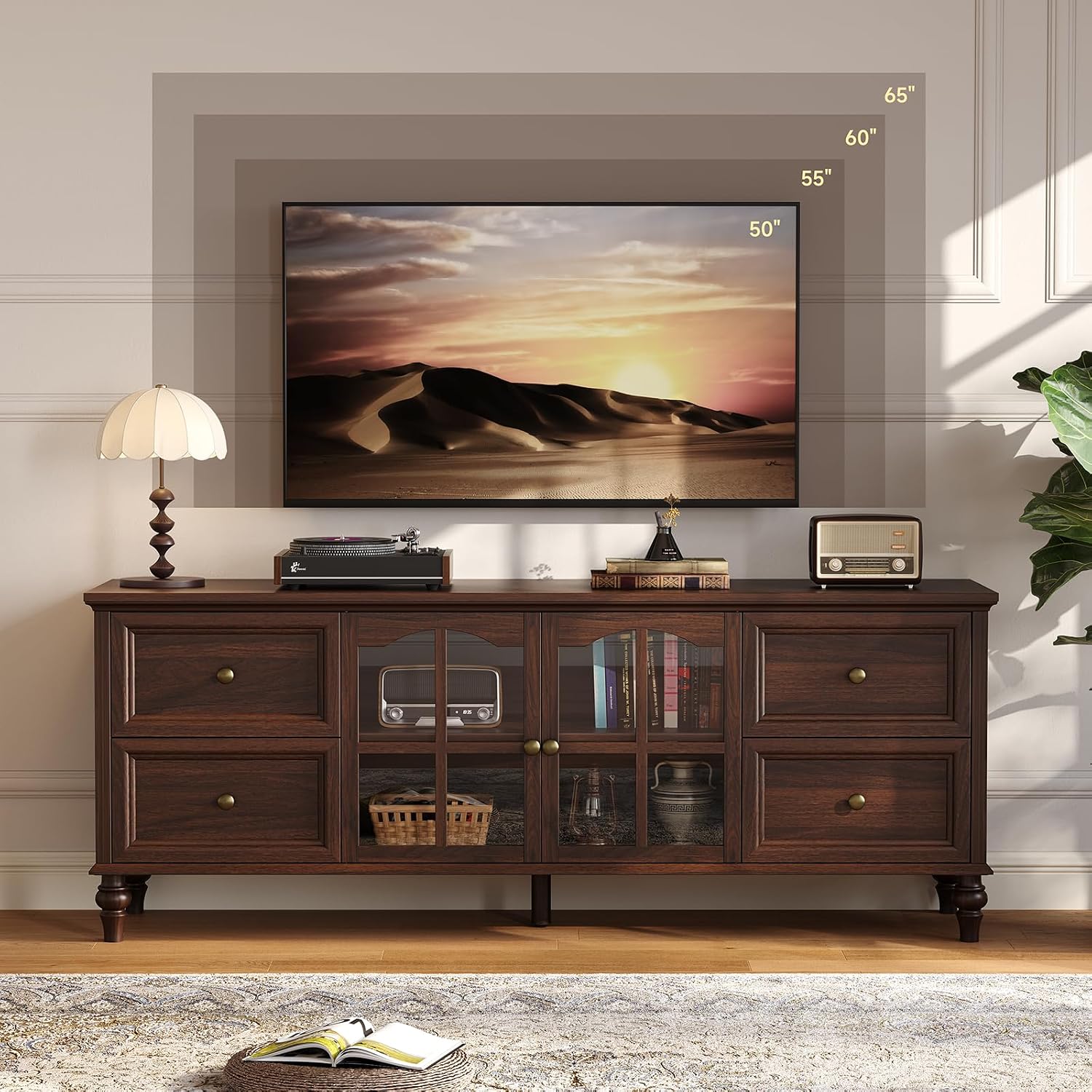
Figure 3: Example of TV stand placement with various TV sizes.
Operation and Features
Storage Utilization:
- Drawers: The four smooth-glide drawers are ideal for storing remotes, small accessories, and other daily essentials, keeping them out of sight.
- Arched Glass Doors with Adjustable Shelves: The central section features two arched glass doors, allowing for display or storage of media players, game consoles, books, or decorative items. The shelves inside are height-adjustable to accommodate items of various sizes.

Figure 4: Spacious storage and adjustable shelves.

Figure 5: Detail of arched glass doors.
Smart Cord Management:
The TV stand includes pre-drilled cable holes on the back panel to help organize and conceal wires from your electronic devices. Route your cords through these holes for a clean and professional-looking media setup.

Figure 6: Detail of cable management hole.
Product Video:
Watch this video for a visual overview of the ONBRILL Entertainment Center's features, including its spacious storage and cable management solutions.
Video 1: ONBRILL Entertainment Center with 4 Drawers & 2 Arched Glass Doors.
Maintenance and Care
To ensure the longevity and appearance of your ONBRILL TV stand, follow these care instructions:
- Cleaning: Wipe the surface with a damp cloth for general cleaning. For a dry finish, follow with a dry cloth. Avoid harsh chemicals or abrasive cleaners.
- Spills: Promptly wipe up any spills to prevent staining, especially on the engineered wood surfaces.
- Protection: Use coasters or placemats under hot or wet items to protect the desktop surface.
- Sunlight: Avoid prolonged exposure to direct sunlight, which can cause fading or discoloration over time.
- Stability: Periodically check and tighten all screws and fasteners to maintain structural integrity.
Troubleshooting
If you encounter any issues with your TV stand, refer to the following common solutions:
- Wobbling Unit: Ensure the TV stand is placed on a level surface. Check that all legs are securely attached and all assembly screws are tightened.
- Drawers Not Sliding Smoothly: Verify that the drawer slides are correctly installed and free from obstructions. Ensure the drawers are not overloaded.
- Doors Not Closing Properly: Check the hinges for proper alignment and tightness. Adjust if necessary according to the assembly instructions.
- Missing Parts: If any parts are missing upon unpacking, please contact ONBRILL customer support immediately.
Product Specifications
| Feature | Detail |
|---|---|
| Brand | ONBRILL |
| Model Number | TV-126-BR |
| Color | Walnut |
| Size | 62 Inch |
| Item Dimensions (L x W x H) | 62 x 15.74 x 23.7 inches |
| Item Weight | 80.6 Pounds |
| Material Type | Engineered Wood, Glass |
| Style | Farmhouse |
| Number of Drawers | 4 |
| Number of Shelves | 2 (adjustable) |
| Additional Features | Storage, Cord Management |
| Is Waterproof | True |
| Required Assembly | Yes |
| Included Components | Installation Kit, User Manual |
Warranty Information
ONBRILL products are manufactured with quality and care. This product comes with a standard manufacturer's warranty against defects in materials and workmanship. Please refer to the warranty card included in your package or contact ONBRILL customer support for specific warranty terms and conditions.
Customer Support
For any questions, assistance with assembly, or to report missing/damaged parts, please contact ONBRILL customer support. Our team is dedicated to providing you with the best possible service.
- Online Support: Visit the ONBRILL Store on Amazon for FAQs and contact options.
- Email: Refer to your product packaging or included documentation for direct email support.
Related documentsTV-126-BR

Ask a question about this manual
Ask about setup, troubleshooting, compatibility, parts, safety, or missing instructions. Manuals+ will review the question and use this page’s manual context to help answer it.