
OLIXIS NI-OL6BC-47RT
OLIXIS 47-Inch Computer Desk with 6 Fabric Drawers Instruction Manual
Model: NI-OL6BC-47RT
1. Product Overview
The OLIXIS 47-inch computer desk is designed for home office, study, or gaming environments. It features a robust metal frame, a durable rustic brown desktop, and integrated storage solutions including six fabric drawers and two adjustable shelves. This manual provides essential information for safe assembly, proper use, and maintenance of your desk.
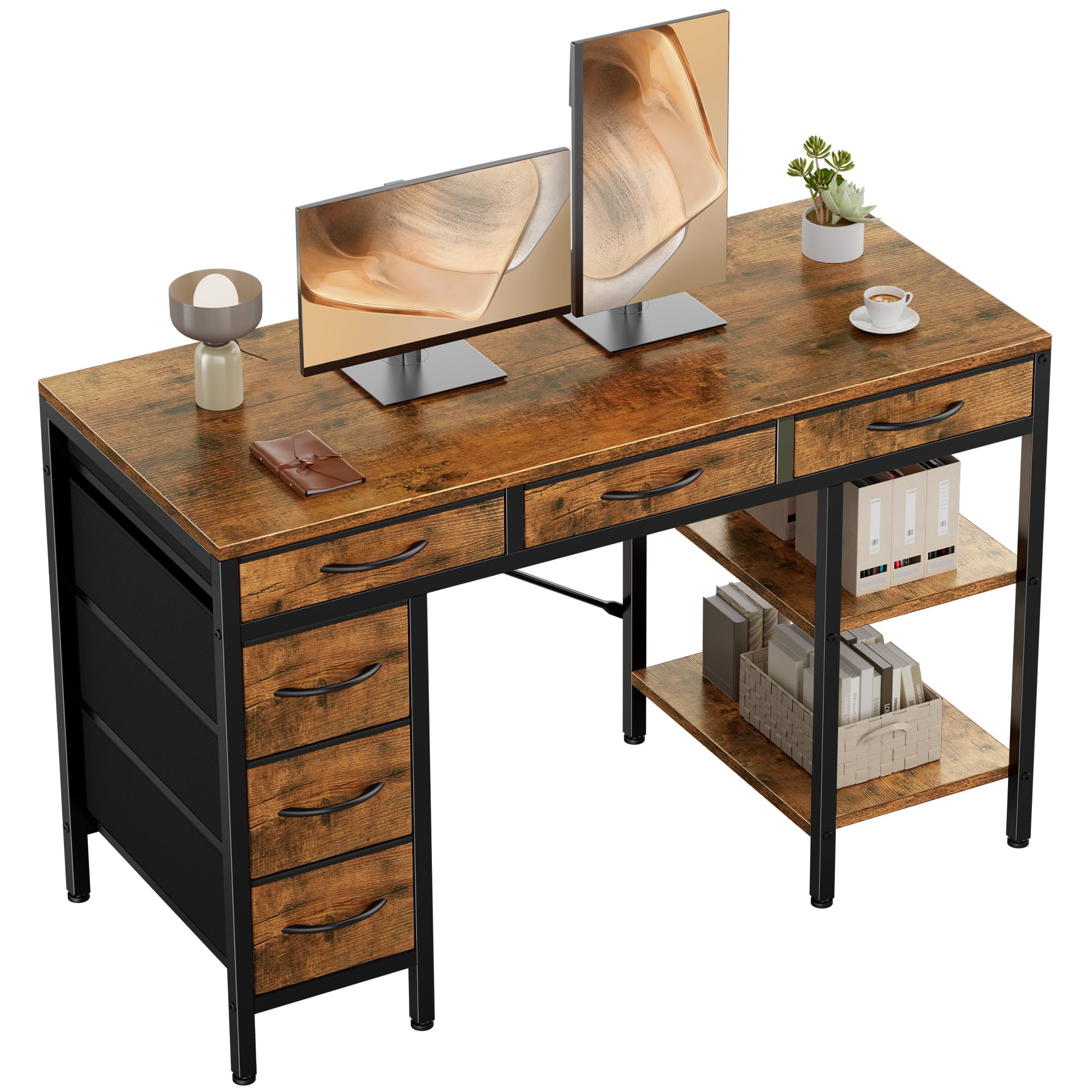
Image 1.1: The OLIXIS 47-inch computer desk, showcasing its rustic brown finish, spacious desktop, and integrated storage drawers.
2. Safety Information
- Always follow assembly instructions carefully.
- Ensure all screws and fasteners are tightened securely before use.
- Do not overload the desk or shelves beyond the recommended weight capacity of 250 pounds.
- Keep small parts away from children during assembly.
- Place the desk on a level surface to prevent tipping.
- Avoid placing hot items directly on the desktop without protection.
- Regularly check for loose connections and tighten as necessary.
3. Package Contents
Before beginning assembly, verify that all components are present and undamaged. Refer to the parts list provided in your physical assembly guide. Typically, the package includes:
- Desktop panel
- Metal frame components (legs, crossbars, brackets)
- Fabric drawers (6 units)
- Adjustable shelves (2 units)
- Assembly hardware (screws, bolts, Allen wrench)
- Adjustable feet

Image 3.1: A diagram illustrating the desk's dimensions and key components, including the fabric drawers and shelves.
4. Setup and Assembly
Assembly of the OLIXIS computer desk is designed to be straightforward. All necessary tools and clearly numbered parts are included. Follow the step-by-step instructions provided in your physical assembly manual.
4.1 Assembly Video Guide
For visual assistance during assembly, please refer to the official installation video below.
Video 4.1: Official OLIXIS installation video demonstrating the assembly process for the desk, including frame construction and drawer integration.
4.2 Key Assembly Steps
- Unpack all components and verify against the parts list.
- Assemble the metal frame structure using the provided hardware. Ensure all connections are firm.
- Attach the desktop panel to the assembled frame.
- Insert the fabric drawers into their designated slots.
- Install the adjustable shelves according to your preferred height or remove them if not needed.
- Adjust the leveling feet at the bottom of the desk to ensure stability on uneven floors.

Image 4.2: Detail of the desk's robust construction, highlighting the reinforced metal frame and adjustable leveling feet for stability.
5. Operating Instructions
5.1 Using the Fabric Drawers
The desk includes six spacious fabric drawers designed for organizing various items such as books, files, office supplies, or gaming accessories.
- To open a drawer, gently pull the handle.
- To close, push the drawer back into its slot until it is fully seated.
- Avoid overloading drawers to ensure smooth operation and prevent damage.

Image 5.1: The desk with its six fabric drawers open, demonstrating ample and organized storage space for office essentials and personal items.
5.2 Adjusting the Shelves
The middle shelf on the storage unit is adjustable and removable, allowing for customized storage configurations.
- To adjust the shelf height, carefully lift the shelf and reposition it into the desired set of notches on the frame.
- To remove the shelf, lift it completely out of the frame.
- This feature accommodates taller items like CPU towers or larger books.

Image 5.2: Illustrations demonstrating three ways to customize the desk's shelves: creating open space for a CPU tower, using a single top shelf for display, or maintaining balanced dual shelves for varied storage.
6. Maintenance
- Cleaning: Wipe the desktop and metal frame with a damp cloth. Avoid harsh chemicals or abrasive cleaners that may damage the finish.
- Fabric Drawers: For minor spills on fabric drawers, spot clean with a mild detergent and damp cloth. Allow to air dry completely.
- Inspection: Periodically check all screws and connections to ensure they remain tight. Retighten as needed to maintain stability.
- Protection: Use coasters or placemats for drinks and hot items to protect the desktop surface.
7. Troubleshooting
- Desk Wobbles: Ensure the desk is on a level surface. Adjust the leveling feet at the bottom of the legs until the desk is stable. Check that all assembly screws are tightened.
- Drawers Stick: Verify that the fabric drawers are correctly inserted into their slots and are not overloaded. Ensure no foreign objects are obstructing the drawer path.
- Missing Parts: If any parts are missing upon unpacking, please contact customer support immediately with your purchase details.
- Damage During Assembly: If a component is damaged during assembly, stop and contact customer support for assistance. Do not attempt to force parts together.
8. Specifications
| Feature | Detail |
|---|---|
| Brand | OLIXIS |
| Model Number | NI-OL6BC-47RT |
| Product Dimensions (D x W x H) | 18"D x 47"W x 30"H |
| Color | Rustic Brown |
| Material Type | Metal, Wood |
| Number of Drawers | 6 (Fabric) |
| Number of Shelves | 2 (Adjustable) |
| Item Weight | 39.6 pounds |
| Maximum Weight Recommendation | 250 pounds |
| Special Features | Compact, Scratch Resistant, Adjustable Feet, Adjustable Shelf, Cable Hole |
| Recommended Uses | Drafting, Gaming, Studying, Working, Writing |
9. Warranty Information
OLIXIS products are manufactured with quality and durability in mind. This product comes with a limited warranty against manufacturing defects. Please retain your proof of purchase for warranty claims. For specific warranty terms and conditions, refer to the documentation included with your product or contact OLIXIS customer support.
10. Customer Support
If you have any questions, require assistance with assembly, or need to report missing/damaged parts, please contact OLIXIS customer support.
- Online Support: Visit the official OLIXIS store on Amazon: OLIXIS Store
- Email/Phone: Refer to the contact information provided in your product packaging or on the OLIXIS brand store page.
Related documentsNI-OL6BC-47RT


Ask a question about this manual
Ask about setup, troubleshooting, compatibility, parts, safety, or missing instructions. Manuals+ will review the question and use this page’s manual context to help answer it.