
1. Introduction
Thank you for purchasing the Generic Portable Ice Maker, Model IM011-B1WH. This compact and efficient appliance is designed to provide fresh ice quickly and conveniently for your home, office, or outdoor activities. With its user-friendly features, including rapid ice production, automatic cleaning, and a portable design, you can enjoy chilled beverages anytime, anywhere.
Please read this instruction manual thoroughly before operating the appliance and retain it for future reference. Proper use and maintenance will ensure optimal performance and longevity of your ice maker.
2. Safety Instructions
To reduce the risk of fire, electric shock, or injury, always follow these basic safety precautions:
- Ensure the power supply voltage matches the rating label on the appliance.
- Do not immerse the power cord, plug, or the appliance itself in water or other liquids.
- Unplug the appliance from the power outlet when not in use, before cleaning, or during maintenance.
- Keep the appliance away from heat sources, direct sunlight, and flammable materials.
- Do not operate the appliance with a damaged cord or plug, or after the appliance malfunctions or has been damaged in any manner.
- This appliance is for household use only. Do not use it for commercial or industrial purposes.
- Always place the ice maker on a stable, level surface.
- Do not block ventilation openings. Ensure adequate air circulation around the unit.
- Use only potable water in the water tank.
- Keep children away from the appliance during operation.
3. Product Overview
The Generic Portable Ice Maker is designed for convenience and efficiency. It features a compact design with a sturdy handle for easy portability, making it suitable for various environments.

Image: Front view of the ice maker showing its compact dimensions (approximately 24.2 x 29.4 x 28.8 cm) and key components like the ice scoop and ice basket.

Image: The ice maker features a robust handle for easy carrying, highlighting its lightweight design of approximately 5.66 kg.
Key Features:
- Rapid Ice Production: Produces 9 bullet-shaped ice cubes in as little as 6 minutes.
- Quiet Operation: Operates at a noise level below 45dB, ensuring minimal disturbance.
- Automatic Self-Cleaning: One-button cleaning function for easy maintenance.
- Smart Indicators: LED indicators for 'Ice Full' and 'Add Water' alerts.
- Transparent Window: Allows real-time monitoring of the ice-making process.
- Portable Design: Lightweight (5.66kg) with a sturdy handle for easy transport.
4. Setup
Before first use, it is recommended to clean the ice maker. Follow these steps for initial setup:
- Unpack: Carefully remove the ice maker from its packaging. Remove all packing materials, including any tape or protective films.
- Placement: Place the ice maker on a flat, stable, and heat-resistant surface. Ensure there is at least 10 cm of space around the unit for proper ventilation.
- Initial Cleaning: Perform an initial cleaning cycle as described in the 'Maintenance and Cleaning' section.
- Fill Water Tank: Open the water tank lid and fill the tank with potable water up to the MAX fill line. Do not overfill.
- Connect Power: Plug the power cord into a grounded electrical outlet.

Image: Visual guide showing the two simple steps for operation: Step 1: Add water to the tank. Step 2: Press the power button to start ice production.
5. Operating Instructions
Operating your ice maker is straightforward:
- Power On: Press the 'ON/OFF' button to turn on the ice maker. The ice-making process will begin automatically.
- Ice Production: The ice maker will start producing ice. The first batch of ice may take slightly longer, but subsequent batches will be ready in approximately 6-12 minutes, depending on ambient temperature and water temperature.
- Ice Full Indicator: When the ice basket is full, the 'Ice Full' indicator light will illuminate, and the ice maker will automatically pause operation. Remove ice from the basket to resume production.
- Add Water Indicator: If the water level in the tank is too low, the 'Add Water' indicator light will illuminate, and the ice maker will pause. Add potable water to the tank up to the MAX line, and the ice maker will resume operation automatically after a short delay.
- Power Off: Press the 'ON/OFF' button again to turn off the ice maker.

Image: Illustration showing the ice maker's high-speed production, yielding 9 ice cubes per cycle, which then drop into the ice basket.
6. Maintenance and Cleaning
Regular cleaning and maintenance are essential to ensure hygienic ice production and prolong the life of your ice maker.
Automatic Self-Cleaning Function:
- Ensure the ice maker is in standby mode (plugged in but not actively making ice).
- Press and hold the 'ON/OFF' button for 5 seconds. The cleaning cycle will begin.
- The cleaning process typically lasts for 30 minutes, thoroughly cleaning the internal components.
- To stop the cleaning cycle prematurely, press the 'ON/OFF' button again.
- After the cleaning cycle, drain any remaining water from the unit by unplugging it and tilting it over a sink, or by using the drain plug if available.

Image: The ice maker's internal components during the automatic self-cleaning process, illustrating the thorough washing action. This feature ensures clean and fresh ice.
General Cleaning Tips:
- Wipe the exterior of the ice maker with a soft, damp cloth.
- Clean the ice basket and ice scoop with mild detergent and rinse thoroughly.
- For stubborn mineral deposits, use a solution of water and vinegar for cleaning the interior, then run a few cycles with clean water to rinse.
- Always ensure the unit is completely dry before storing or reusing.
7. Troubleshooting
If you encounter issues with your ice maker, refer to the following troubleshooting guide:
| Problem | Possible Cause | Solution |
|---|---|---|
| Ice maker not turning on | No power supply | Check if the power cord is securely plugged in and the outlet is functional. |
| "Add Water" indicator is on | Water tank is empty or low | Fill the water tank with potable water up to the MAX line. |
| "Ice Full" indicator is on | Ice basket is full | Remove ice from the basket. The ice maker will resume operation. |
| Ice production is slow or ice cubes are small | High ambient temperature or water temperature | Ensure the ice maker is in a cool environment. Use colder water for faster production. |
| Unusual noise during operation | Unit not level or internal components vibrating | Ensure the ice maker is on a stable, level surface. If noise persists, contact customer support. |
If the problem persists after attempting these solutions, please contact customer support for assistance.
8. Specifications
| Specification | Detail |
|---|---|
| Brand | Generic |
| Model Name | IM011-B1WH |
| Product Dimensions (D x W x H) | 22.2 cm x 29 cm x 29.4 cm (approx. 8.7 x 11.4 x 11.6 inches) |
| Item Weight | 5.66 kg (approx. 12.48 lbs) |
| Water Tank Capacity | 1200 ml |
| Daily Ice Production | Up to 12.2 kg |
| Ice Production Cycle | Approx. 6-12 minutes per batch (9 cubes) |
| Noise Level | Below 45dB |
| Included Components | Ice case, Ice scoop, Instruction manual |
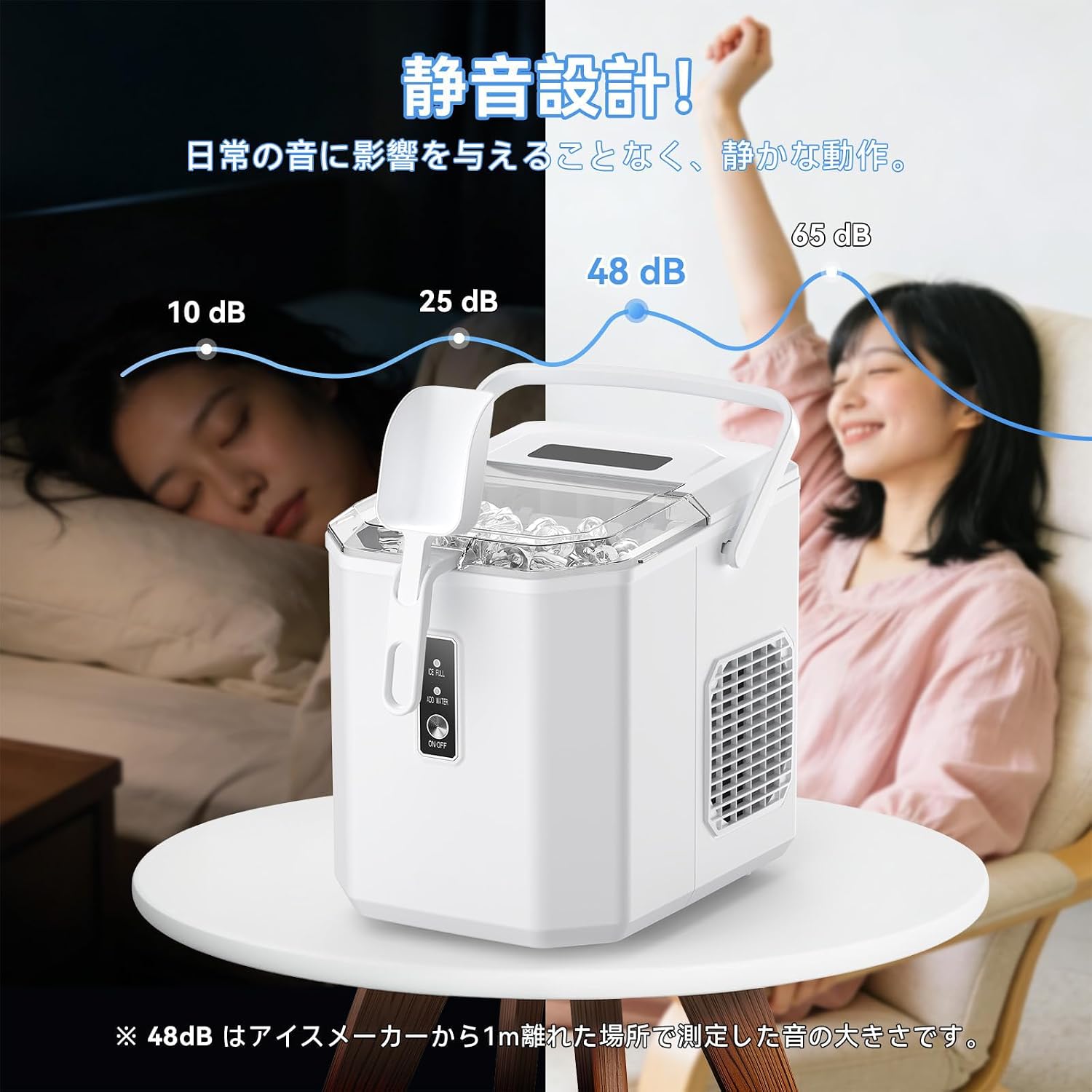
Image: A visual representation of the ice maker's quiet operation, indicating a noise level of 48dB at 1 meter distance, which is significantly lower than typical conversation or office noise.
9. Warranty and Support
This product comes with a standard manufacturer's warranty. For specific warranty details, please refer to the warranty card included with your purchase or contact the retailer. If you have any questions, require technical support, or need assistance with troubleshooting beyond what is covered in this manual, please contact our customer service department. Contact information can typically be found on the product packaging or the retailer's website.