
1. Introduction
Thank you for choosing the CHORTAU B-T36FR 4K+1080P Dual Dash Cam. This manual provides detailed instructions for the installation, operation, and maintenance of your new dash camera system. Please read this manual thoroughly before use to ensure proper functionality and to maximize your driving safety and recording experience.
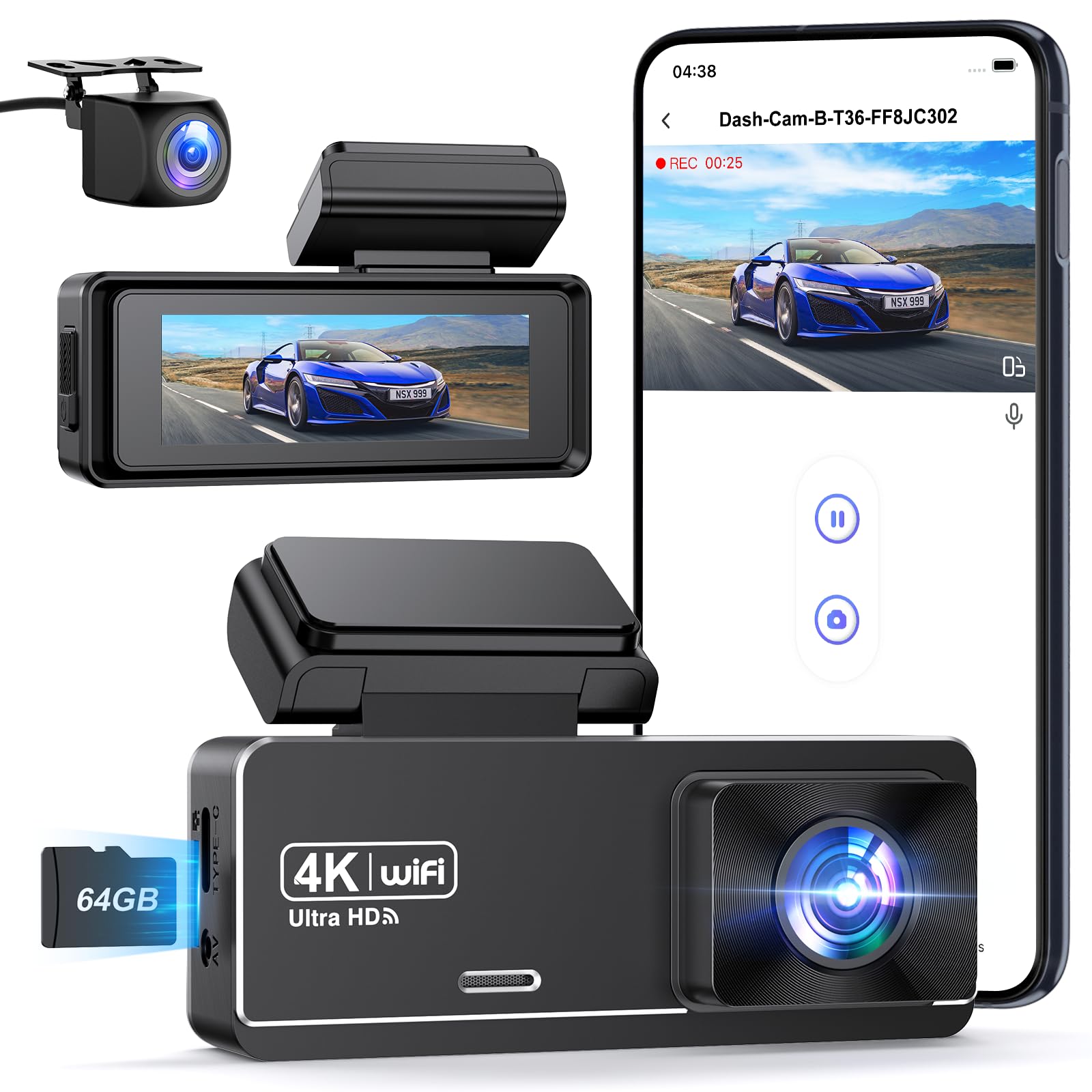
Image 1.1: CHORTAU B-T36FR Dual Dash Cam overview, showing the main unit and rear camera.
2. What's in the Box
Please check the contents of your package to ensure all items are present:
- CHORTAU Dash Cam (Main Unit)
- Rear Camera
- Car Charger (Type-C)
- Car Mount (Suction Cup or 3M Adhesive)
- 64GB Memory Card (pre-inserted)
- User Manual
- Quick Guide
- Pry Tool
- 3M Adhesive Pad
- Electrostatic Film

Image 2.1: Visual representation of the items included in the CHORTAU B-T36FR Dash Cam package.
3. Setup and Installation
3.1 Memory Card Installation
Your dash cam comes with a pre-inserted 64GB memory card. The device supports up to a 256GB memory card. Ensure the card is properly seated before first use. For optimal performance, it is recommended to format the memory card periodically.
3.2 Front Dash Cam Installation
- Clean the area on your windshield where you intend to mount the dash cam.
- Apply the electrostatic film to the cleaned area. This helps in easy removal and prevents residue.
- Attach the chosen mount (suction cup or 3M adhesive) to the dash cam.
- Mount the dash cam to the electrostatic film on your windshield, ensuring it does not obstruct your view.
- Connect the Type-C car charger to the dash cam and plug it into your car's cigarette lighter socket. Route the cable neatly using the provided pry tool to tuck it along the windshield trim.
3.3 Rear Camera Installation
The rear camera connects to the main dash cam unit via a cable. It is not wireless. Route the rear camera cable from the main unit to the rear of your vehicle. Use the pry tool to hide the cable along the vehicle's headliner and pillar trim for a clean installation. Mount the rear camera on the rear windshield using its adhesive.

Image 3.1: Illustration of the easy installation process for the front and rear dash cameras, including cable routing.
3.4 Detachable Mount
The dash cam features a detachable mount base, allowing for easy removal of the camera body. This is convenient for transferring the camera between vehicles or for reviewing footage indoors.

Image 3.2: The detachable mount allows for easy removal and reattachment of the dash cam unit.
4. Operation
4.1 Power On/Off
The dash cam will automatically power on and begin recording when your vehicle's ignition is turned on. It will power off automatically when the ignition is turned off.
4.2 Dual Camera Recording
The CHORTAU B-T36FR records simultaneously from both the front and rear cameras. The front camera captures UHD 4K (3840x2160P) video with a 170° wide-angle lens, while the rear camera records in 1080P with a 140° wide-angle lens, providing comprehensive coverage of your surroundings.

Image 4.1: Display showing simultaneous recording from the front (4K) and rear (1080P) cameras.
4.3 Loop Recording
The dash cam utilizes seamless loop recording. When the memory card is full, the oldest unlocked video files are automatically overwritten by new recordings. This ensures continuous recording without manual intervention.

Image 4.2: Visual explanation of how loop recording overwrites older files to ensure continuous recording.
4.4 G-Sensor (Gravity Sensor)
The built-in G-sensor automatically detects sudden impacts or collisions. In the event of an incident, the current video footage is automatically locked and saved to a separate folder, preventing it from being overwritten by loop recording. The sensitivity of the G-sensor can be adjusted in the settings.

Image 4.3: The G-sensor automatically locks important video segments during impacts.
4.5 24H Parking Mode & Time-Lapse Function
When your car is parked, the dash cam can provide continuous surveillance for 24 hours. This feature requires a hardwire kit (not included) to ensure constant power supply. The time-lapse function compresses long parking videos into shorter ones, recording at 1/2/3 frames per second to save memory card space while maintaining continuous monitoring.

Image 4.4: Overview of the 24H Parking Mode and Time-Lapse function for continuous vehicle surveillance.
4.6 Exceptional Night Vision
Equipped with WDR technology and an F1.8 aperture 6-layer optical lens, the dash cam enhances visibility and recording quality in low-light conditions or at night. It captures clear and sharp UHD 4K videos, making details like license plates and road signs identifiable during nighttime driving.

Image 4.5: Example of 4K night vision recording, showing clear details in low light.
4.7 Wi-Fi Connection & App Control
Connect your dash cam to your smartphone (Android or iOS) via Wi-Fi using the "Viidure" or "Road Cam" application. The app allows you to:
- View live stream footage.
- Download recorded videos to your phone.
- Modify dash cam settings.
- Edit and share your footage on social media platforms.
Note: The effective Wi-Fi connection range is approximately 9 to 16 feet. The connection will automatically disconnect if out of range.

Image 4.6: The dash cam connects to a smartphone app for live viewing, video download, and settings management.
4.8 Voice Alerts
The dash cam provides various voice alerts to keep you informed about its current status, such as "Recording started," "Please format the memory card," or "Memory card full."

Image 4.7: Voice alerts provide real-time status updates to the driver.
5. Maintenance
5.1 Memory Card Management
To ensure optimal recording performance and prevent data corruption, it is recommended to format the memory card every 2-4 weeks. This can typically be done through the dash cam's settings menu or via the mobile application.
5.2 Cleaning the Lenses and Screen
Regularly clean the front and rear camera lenses, as well as the dash cam's screen, with a soft, lint-free cloth. Avoid using abrasive cleaners or solvents that could damage the surfaces.
6. Troubleshooting
6.1 Dash Cam Not Powering On
- Ensure the car charger is securely plugged into both the dash cam and the vehicle's cigarette lighter socket.
- Check if the vehicle's cigarette lighter socket is receiving power.
- Try a different car charger or USB cable if available.
6.2 Wi-Fi Connection Issues
- Ensure your smartphone is within 9-16 feet of the dash cam for a stable connection.
- Restart both the dash cam and your smartphone.
- Verify that the correct app ("Viidure" or "Road Cam") is installed and updated.
6.3 Parking Mode Not Working
- The 24H Parking Mode requires a hardwire kit (not included) for continuous power when the vehicle is off. Ensure the hardwire kit is correctly installed.
- Check parking mode settings in the dash cam menu or app.
6.4 Poor Video Quality
- Clean the camera lenses to remove any dirt or smudges.
- Ensure the protective film has been removed from the lenses.
- Check video resolution settings; ensure it is set to 4K for the front camera.
If you encounter issues not covered here, please refer to the support section for assistance.
7. Specifications
| Feature | Detail |
|---|---|
| Brand | CHORTAU |
| Model Name | B-T36FR |
| Video Recording Resolution | Front: 4K (2160p), Rear: 1080P |
| Field of View | Front: 170 Degrees, Rear: 140 Degrees |
| Connectivity Technology | Wi-Fi |
| Special Features | Voice Alert, App Control, Compact Design, G-Sensor, Automatic Incident Detection, Loop Recording, Built-in Speaker, Parking Monitor, Night Vision, Integrated Wi-Fi |
| Included Memory Card Size | 64 GB (Max support 256GB) |
| Mounting Type | Windshield Mount |
| Display Type | 2.99 Inch IPS Touch Screen |
| Compatible Devices | Smartphone, Tablet |
| Battery Type | Lithium-ion |
| Item Weight | 50 Grams |
| Product Dimensions | 3P x 8L x 5H centimeters |
8. Warranty and Support
8.1 Warranty Information
The CHORTAU B-T36FR Dual Dash Cam comes with a 2-year manufacturer's warranty. This warranty covers defects in materials and workmanship under normal use. Please retain your proof of purchase for warranty claims.
8.2 Customer Support
CHORTAU is committed to customer satisfaction. We offer 24/7 technical assistance. If you have any questions, concerns, or require support regarding your dash cam, please do not hesitate to contact our customer service team. Contact details can typically be found on our official website or through the retailer where you purchased the product.

Image 8.1: CHORTAU provides professional customer support for all inquiries.


