
1. Product Overview
The Xiaomi 17T Pro is a high-performance smartphone designed for advanced users. It features a vibrant 144Hz Eye-Care display, a powerful MediaTek Dimensity 9500 processor, a versatile Leica 5x telephoto camera, and a long-lasting 7000 mAh silicon-carbon battery with 100W wired and 50W wireless HyperCharge capabilities.
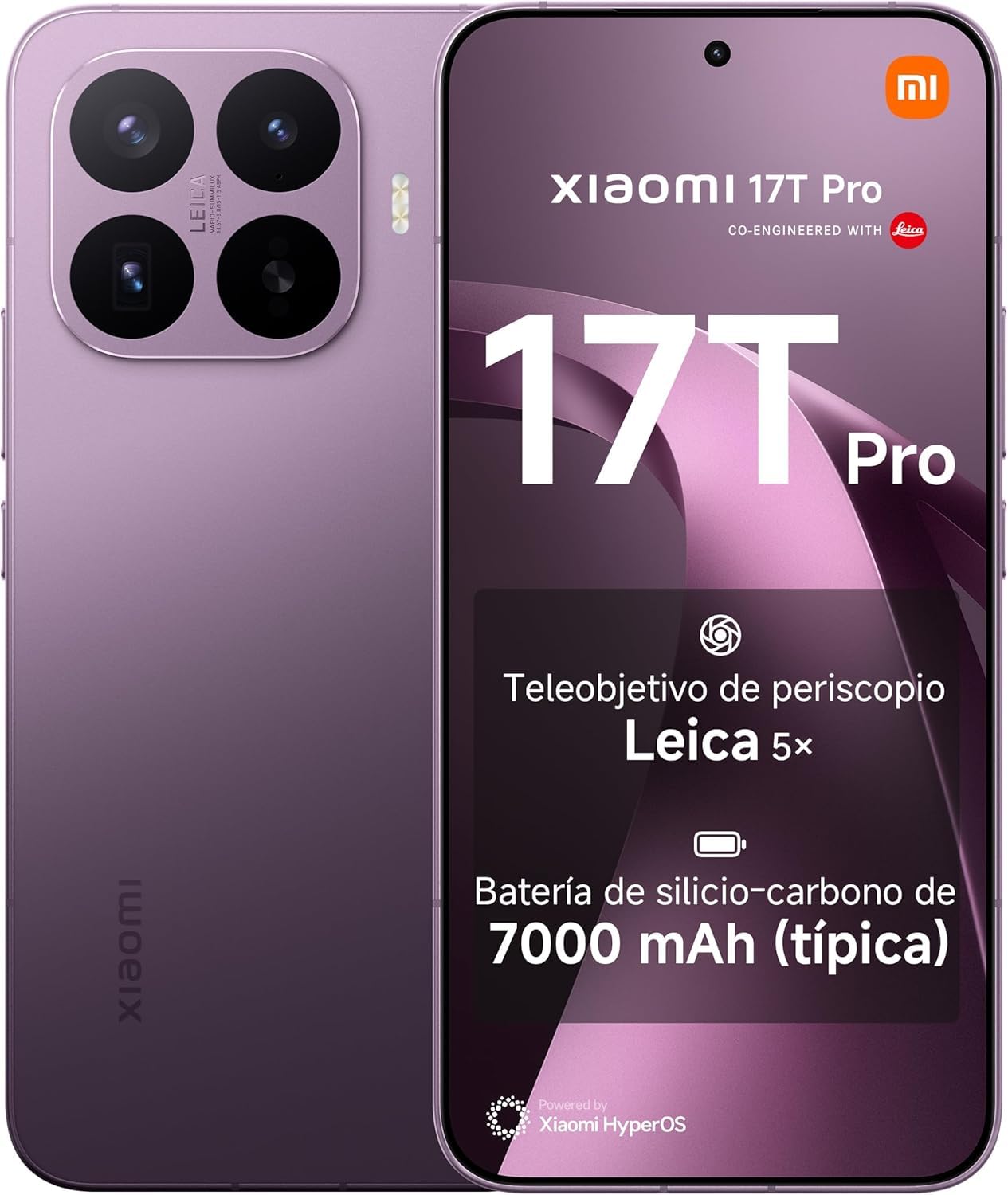
Image: Xiaomi 17T Pro Smartphone in Violet.
2. Setup Guide
2.1. Box Contents
Before you begin, ensure all items are present in the box:

Image: Box Contents: Xiaomi 17T Pro smartphone, silicone cover, USB-C cable, and SIM ejector pin.
- Xiaomi 17T Pro Smartphone
- Silicone Protective Cover
- USB-C Charging Cable
- SIM Ejector Pin
- Quick Start Guide (this manual)
2.2. Inserting the SIM Card
- Locate the SIM card tray on the side of your device.
- Insert the SIM ejector pin into the small hole on the tray and press firmly until the tray pops out.
- Place your Nano-SIM card(s) into the tray with the gold contacts facing down.
- Carefully push the tray back into the slot until it is flush with the device.
2.3. Initial Power On and Setup
- Press and hold the Power button until the Xiaomi logo appears.
- Follow the on-screen instructions to select your language, region, and connect to a Wi-Fi network.
- Sign in with your Google account or create a new one to access Google services and the Play Store.
- Set up your preferred security methods, such as fingerprint, face unlock, or a PIN/pattern.
3. Operating Your Device
The Xiaomi 17T Pro offers a range of advanced features for an enhanced user experience.

Image: Overview of key features: Leica 5x Telephoto lens, MediaTek Dimensity 9500 processor, 7000 mAh Silicon-Carbon battery, Xiaomi Vision Care display, and Xiaomi HyperAI.
3.1. Display Features
The 6.83-inch 144Hz Eye-Care Display supports a high 144Hz refresh rate for smooth visuals. It features Super Sunlight Display, Wet Touch 2.0 technology, and a certified low blue light screen. The display intelligently adapts to your surroundings, time of day, and usage habits to provide multi-dimensional eye protection.
- Super Sunlight Display: Ensures optimal visibility even in bright outdoor conditions.
- Low Luminosity: Provides ultra-reduced and flicker-free viewing for comfort in dim environments.
- Paper-like Display: Offers a comfortable reading experience by mimicking the texture of paper.
- Circadian Rhythm Management: Adjusts display settings to support natural sleep patterns.

Image: Super Sunlight Display for outdoor use.

Image: Low Luminosity and flicker-free display.

Image: Paper-like display for reading.

Image: Circadian rhythm management for night use.
3.2. Camera System
The Xiaomi 17T Pro features a Leica 5x Telephoto Lens, offering a native 5x optical zoom. Combined with ISZ technology, it provides 10x optical quality zoom without sharpness loss. It supports up to 120x AI Ultra Zoom, capturing incredible details even from afar with a minimum focusing distance of 30 cm.

Image: Two Xiaomi 17T Pro smartphones (violet and blue) showcasing their camera modules, emphasizing the ability to capture every detail.
3.3. Battery and Charging
Equipped with a 7000 mAh (typical) Silicon-Carbon Battery, the device offers ultra-long battery life: 20.3 hours of continuous use or 62.2 hours of VoLTE calls. This high-silicon content battery achieves greater energy density, significantly extending its lifespan.

Image: Diagram illustrating the internal structure of the 7000 mAh silicon-carbon battery, highlighting its high silicon content for extended battery life.
The Xiaomi 17T Pro supports 100W Wired and 50W Wireless HyperCharge, allowing it to charge to 100% in just 48 minutes. It maintains battery integrity of ≥80% after 1600 charging cycles. The device also supports 100W PPS standard and 22.5W wired reverse charging.
3.4. Performance
Powered by the MediaTek Dimensity 9500 processor, featuring a new-generation All-Big-Core architecture, the Xiaomi 17T Pro delivers high performance, energy efficiency, and a faster AI experience for smooth and ultra-stable operation.

Image: Image of the MediaTek Dimensity 9500 processor chip, emphasizing its advanced 3nm manufacturing process and All-Big-Core architecture for high performance.
4. Maintenance
4.1. Battery Care
- Avoid extreme temperatures, as they can degrade battery performance.
- For optimal battery longevity, try to keep the charge level between 20% and 80%.
- Use only the official Xiaomi charger and cable to ensure safe and efficient charging.
4.2. Software Updates
Regularly check for and install software updates to ensure your device has the latest features, security patches, and performance improvements. You can usually find this option in your device's Settings menu under "About phone" or "System update."
4.3. Cleaning Your Device
- Use a soft, lint-free cloth to wipe the screen and body of the phone.
- Avoid using harsh chemicals, abrasive materials, or aerosol sprays.
- For stubborn smudges, slightly dampen the cloth with water or a screen cleaner designed for electronics.
5. Troubleshooting
If you encounter issues with your Xiaomi 17T Pro, refer to the following common solutions:
| Problem | Possible Solution |
|---|---|
| Device won't turn on | Ensure the battery is charged. Connect to the charger for at least 15 minutes, then try powering on. If unresponsive, perform a forced restart (usually by holding Power + Volume Down for 10-15 seconds). |
| Apps are crashing or freezing | Clear the app's cache and data in Settings > Apps. Update the app to the latest version. If the issue persists, uninstall and reinstall the app. |
| Poor battery life | Check battery usage in Settings to identify power-hungry apps. Reduce screen brightness, disable unnecessary features (GPS, Bluetooth, Wi-Fi when not in use), and close background apps. |
| Network connectivity issues | Toggle Airplane Mode on and off. Restart your device. Check your SIM card is properly inserted. Reset network settings in Settings > System > Reset options. |
| Fingerprint sensor not working | Ensure your finger and the sensor are clean and dry. Re-register your fingerprints in Settings > Security > Fingerprint. |
If these steps do not resolve your issue, please contact Xiaomi customer support or visit an authorized service center.
6. Specifications
Detailed technical specifications for the Xiaomi 17T Pro:
| Feature | Detail |
|---|---|
| Brand | Xiaomi |
| Model Name | Xiaomi 17T Pro |
| Operating System | Android 16 |
| RAM Memory Size | 12 GB |
| Storage Capacity | 512 GB (for this variant) |
| Screen Size | 6.83 Inches |
| Refresh Rate | 144 Hz |
| Screen Type | AMOLED |
| Wireless Carrier | All carriers |
| Cellular Technology | 5G |
| Battery Capacity | 7000 mAh |
| Talk Time | 62.2 Hours |
| Input Interface | USB-C |
| Form Factor | Slider |
| Model Year | 2026 |
| GTIN | 190997071883 |
7. Warranty and Support
7.1. Manufacturer's Warranty
The Xiaomi 17T Pro comes with a 4-Year Manufacturer's Warranty. No activation is required. This includes the standard 3-year manufacturer's warranty plus an additional 1 year of extended coverage.
The availability of spare parts in the EU is guaranteed for 4 years.
7.2. Official Documents and Support
For further information and official documentation, please refer to the following resources:
For technical support or service inquiries, please visit the official Xiaomi support website or contact their customer service.


