
AKIRES JH-309Y
AKIRES JH-309Y Portable Evaporative Air Cooler Instruction Manual
Model: JH-309Y
1. Important Safety Instructions
Read all instructions before using this appliance. Failure to follow these instructions may result in electric shock, fire, or serious injury.
- Always place the unit on a firm, level surface.
- Do not operate the unit with a damaged cord or plug.
- Do not immerse the unit, plug, or cord in water or other liquids.
- Unplug the unit from the power outlet before filling, cleaning, or moving.
- Keep the unit out of reach of children and pets.
- Do not block air inlets or outlets.
- Use only clean water in the water tank.
- This appliance is for residential use only.
2. Package Contents
Verify that all items are present in the package:
- AKIRES Swamp Cooler (1 unit)
- 360° Wheels (4 units)
- User Manual (1 unit)
- Ice Packs (4 units)
3. Product Overview
3.1 Components
Familiarize yourself with the main parts of your evaporative air cooler.

Image Description: A front view of the AKIRES evaporative air cooler, showing the control panel, air outlet, and water level indicator. The unit is white with black accents.
- Control Panel: Touch-sensitive buttons for various functions.
- Air Outlet: Where cooled air is discharged.
- Water Tank: Holds water for evaporation.
- Wheels: For easy portability.
- Remote Control: For convenient operation from a distance.
3.2 Features
- 3-in-1 Functionality: Operates as an air conditioner, humidifier, and fan.
- Airflow: 3000 CFM (Cubic Feet per Minute) for effective cooling.
- Speeds & Modes: 3 air speeds (low/medium/high) and 2 modes (normal/natural).
- Oscillation: 120° horizontal and vertical oscillation for wide coverage.
- Water Tank: 7-gallon capacity with a dual water tank design and top-refilling feature.
- Ice Packs: Includes 4 ice boxes for enhanced cooling.
- Timer: 1-12 hour programmable timer.
- Control: Dual control options via remote and touch panel.
- Quiet Operation: Noise level as low as 40 dB.
- Energy Efficiency: 80 watts power consumption.
4. Setup Guide
4.1 Attaching the Wheels
- Carefully unbox the unit and place it on its side on a soft surface to avoid scratches.
- Insert each of the four 360° swivel wheels into the designated slots at the bottom of the unit until they click securely into place.
- Return the unit to an upright position.
4.2 Filling the Water Tank
For optimal cooling, use cold water and the provided ice packs.
- Ensure the unit is unplugged from the power outlet.
- Open the top cover of the water tank.
- Fill the water tank with clean, cold water. Do not exceed the "MAX" fill line.
- For enhanced cooling, place the provided ice packs into the freezer for at least 6 hours until frozen.
- Once frozen, place the ice packs into the upper water tank or directly into the main water tank.
- Close the top cover securely.

Image Description: A sequence of images demonstrating how to prepare and add ice packs, then fill the water tank of the evaporative cooler. It shows adding water to ice packs, freezing them, placing them in the tank, and finally filling the tank with water.
Video Description: This video demonstrates the process of preparing and inserting ice packs into the AKIRES evaporative air cooler, followed by filling the water tank. It shows how to enhance the cooling effect by using frozen ice packs.
5. Operating Instructions
5.1 Control Panel and Remote Control
The unit can be operated using the touch control panel on top or the included remote control.

Image Description: A close-up view of the evaporative air cooler's control panel and its remote control. The control panel features various touch buttons for power, mode, speed, timer, light, and swing functions. The remote control mirrors these functions.
Remote Control Battery Installation:
- Open the battery compartment on the back of the remote control.
- Insert the required batteries (not included), ensuring correct polarity (+/-).
- Close the battery compartment.
Video Description: This short video demonstrates how to install batteries into the remote control for the AKIRES evaporative air cooler. It shows opening the compartment, inserting batteries, and closing it.
5.2 Basic Operation
- Power On/Off: Press the Power button to turn the unit on or off.
- Fan Speed: Press the Speed button repeatedly to cycle through Low, Medium, and High speeds.
- Mode Selection: Press the Mode button to switch between Normal and Natural modes.
- Cooling Function: Press the Cool button to activate the evaporative cooling. Ensure the water tank is filled.
- Oscillation: Press the Swing button to activate or deactivate the automatic horizontal and vertical swing function.
- Timer: Press the Timer button to set the operating time from 1 to 12 hours. The unit will automatically turn off after the set time.
- LED Light: Press the Light button to control the LED display light.
6. Maintenance
Regular maintenance ensures optimal performance and longevity of your air cooler.
6.1 Cleaning the Water Tank
- Unplug the unit from the power outlet.
- Remove the water tank from the unit. The innovative design allows for easy removal.
- Empty any remaining water.
- Clean the tank with a soft cloth and mild detergent. Rinse thoroughly with clean water.
- Allow the tank to air dry completely before reassembling.
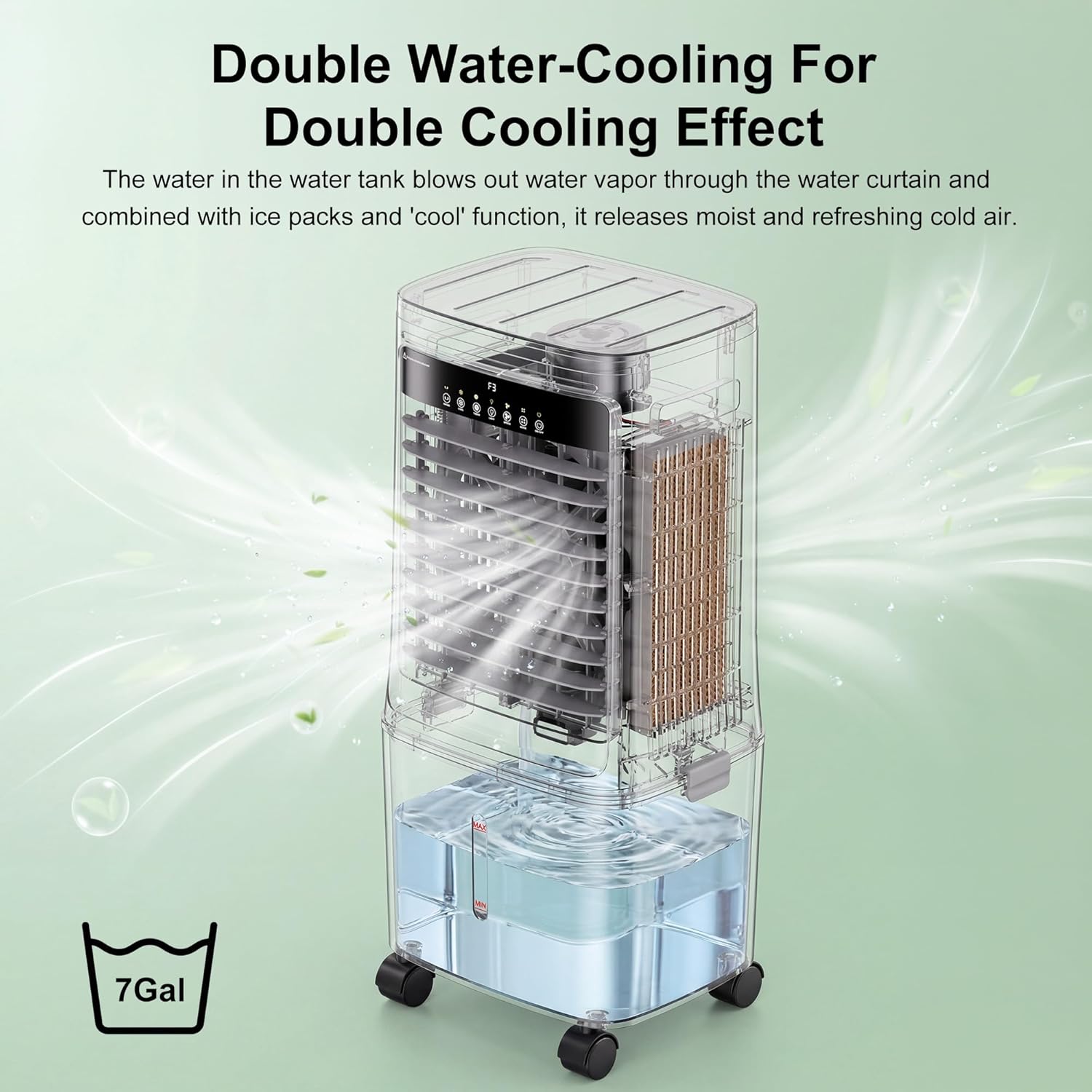
Image Description: An image showing the evaporative air cooler with its removable water tank detached, highlighting the ease of cleaning and maintenance.
6.2 Cleaning the Evaporative Cooling Pad
- Unplug the unit.
- Remove the back panel to access the cooling pad.
- Gently remove the cooling pad.
- Rinse the cooling pad under running water to remove dust and mineral deposits. Do not use harsh chemicals.
- Allow the pad to dry completely before reinstalling.

Image Description: An image depicting the evaporative cooler's water tank and cooling pad being cleaned under running water, emphasizing the ease of maintenance.
6.3 Exterior Cleaning
- Wipe the exterior surfaces with a soft, damp cloth.
- Do not use abrasive cleaners or solvents.
7. Troubleshooting
| Problem | Possible Cause | Solution |
|---|---|---|
| Unit does not turn on. | No power supply. | Check if the power cord is securely plugged into a working outlet. |
| No cooling effect. | Water tank is empty or cooling function is not activated. | Fill the water tank and ensure the "Cool" function is turned on. Add ice packs for better performance. |
| Weak airflow. | Air inlets/outlets are blocked or fan speed is too low. | Clear any obstructions. Increase the fan speed. |
| Unpleasant odor. | Stagnant water or dirty cooling pad. | Drain and clean the water tank. Clean or replace the cooling pad. Use fresh water. |
| Remote control not working. | Batteries are dead or incorrectly installed. | Replace batteries, ensuring correct polarity. Ensure no obstructions between remote and unit. |
8. Specifications
- Model Name: JH-309Y
- Brand: AKIRES
- Airflow: 3000 CFM
- Water Tank Capacity: 7 gallons
- Power Consumption: 80 watts
- Voltage: 120 volts
- Noise Level: 40 dB
- Product Dimensions (D x W x H): 15.59" x 12.2" x 32.64"
- Item Weight: 14.3 pounds
- Control Method: Remote, Touch
- Operating Modes: Cooling, Fan, Humidifier (3-in-1)
- Timer: 1-12 hours
- Oscillation: 120° Horizontal, 120° Vertical
9. Warranty and Support
This AKIRES product is covered by a 1-Year Manufacturer's Warranty from the date of purchase.
The warranty covers defects in materials and workmanship under normal use. It does not cover damage resulting from misuse, accident, modification, or unauthorized repair.
For warranty claims or technical support, please contact AKIRES customer service through the retailer where the product was purchased or visit the official AKIRES website for contact information.
Please retain your proof of purchase for warranty validation.
Ask a question about this manual
Ask about setup, troubleshooting, compatibility, parts, safety, or missing instructions. Manuals+ will review the question and use this page’s manual context to help answer it.