
1. Introduction
Thank you for choosing the Thomson 24HQG3S15C Smart TV. This manual provides essential information for the safe and efficient operation of your new television. Please read these instructions thoroughly before using the product and retain them for future reference.
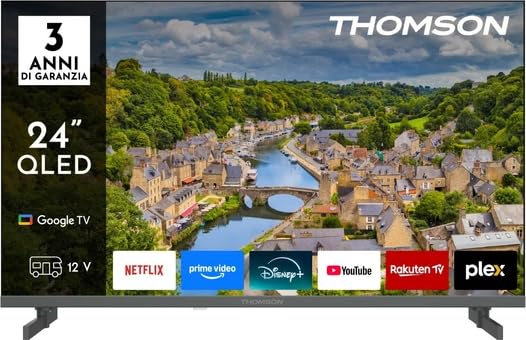
Figure 1: Front view of the Thomson 24HQG3S15C Smart TV.
2. Safety Information
Always observe the following safety precautions to avoid electric shock, fire, or damage to the TV.
- Power Source: Ensure the power supply voltage matches the rating label on the TV.
- Ventilation: Do not block ventilation openings. Allow adequate space around the TV for proper airflow.
- Water and Moisture: Do not expose the TV to rain or moisture. Do not place objects filled with liquids, such as vases, on the TV.
- Cleaning: Unplug the TV before cleaning. Use a soft, dry cloth. Do not use liquid cleaners or aerosol cleaners.
- Placement: Place the TV on a stable, level surface. Avoid placing it in direct sunlight or near heat sources.
- Children: Supervise children to ensure they do not climb on or play with the TV.
- Servicing: Do not attempt to service the TV yourself. Refer all servicing to qualified service personnel.
3. Package Contents
Carefully unpack your Thomson 24HQG3S15C Smart TV and check that all the following items are included:
- Thomson 24HQG3S15C Smart TV
- Remote Control
- Power Cable
- User Manual (this document)
- TV Stand (if applicable, check packaging)
- Screws for TV Stand (if applicable)
If any items are missing or damaged, please contact your retailer immediately.
4. Setup
4.1 Attaching the Stand (Optional)
If you are not wall-mounting the TV, you will need to attach the included stand. Follow these steps:
- Place the TV face down on a soft, clean surface to prevent screen damage.
- Align the stand with the mounting holes on the bottom of the TV.
- Secure the stand using the provided screws. Ensure they are tightened firmly.
4.2 Wall Mounting (Optional)
The TV supports VESA standard mounting (100 x 100 mm). Use a compatible wall-mount bracket (not included) and follow the instructions provided with the bracket. Ensure the wall can support the weight of the TV.
Note: Remove the stand before wall mounting.
4.3 Connecting External Devices
Refer to the following connection options:
- HDMI (x3): Connect Blu-ray players, game consoles, or set-top boxes. The TV supports HDMI 1.4 and Audio Return Channel (ARC) on one port.
- USB 2.0 (x2): Connect USB storage devices for media playback.
- Antenna/Cable Input: Connect an antenna for DVB-T/T2 or a cable for DVB-C.
- Satellite Input: Connect a satellite dish for DVB-S/S2.
- Ethernet (LAN): Connect an Ethernet cable for a wired internet connection.
- CI+ Slot: Insert a Common Interface Plus module for encrypted channels.
4.4 Initial Power On and First-Time Setup
- Connect the power cable to the TV and then to a power outlet.
- Press the power button on the remote control or on the TV.
- The TV will guide you through the initial setup process, including language selection, network connection (Wi-Fi or Ethernet), channel scanning, and Google TV account setup.
5. Operating Your Smart TV
5.1 Remote Control Overview
The included remote control allows you to access all functions of your TV. Familiarize yourself with the buttons for power, volume, channel, input selection, and Smart TV navigation.
Note: Insert two AAA batteries (not included) into the remote control, observing polarity.
5.2 Basic TV Functions
- Power On/Off: Press the Power button.
- Volume Control: Use the VOL +/- buttons.
- Channel Selection: Use the CH +/- buttons or number pad.
- Input Source: Press the Source button to switch between HDMI, TV, USB, etc.
- Menu: Access the TV settings menu.
5.3 Smart TV Features (Google TV)
Your Thomson 24HQG3S15C runs on Google TV, offering a personalized entertainment experience.
- Home Screen: Access recommended content, installed apps (e.g., Disney+), and settings.
- Voice Control: Use the Google Assistant feature (if available on your remote) to search for content, control smart home devices, and more.
- App Store: Download additional apps from the Google Play Store.
- HbbTV: Access interactive services from broadcasters (if supported in your region).
- Smart Modes: Select from various picture and sound modes like Energy Saving, Game, Movie, Sport, Standard, and Vivid.
6. Connectivity
The TV offers various connectivity options for seamless integration with your home network and devices.
- Wi-Fi: Built-in Wi-Fi allows wireless connection to your home network for internet access and streaming.
- Bluetooth 5.1: Connect wireless headphones, soundbars, or other Bluetooth-enabled devices.
- Ethernet LAN: Provides a stable wired internet connection.
- HDMI (x3): High-Definition Multimedia Interface for digital audio and video. One port supports ARC (Audio Return Channel) for simplified audio connections to compatible sound systems.
- USB 2.0 (x2): Universal Serial Bus ports for connecting external storage devices to play media files (3GP, AVI, FLV, MKV, MOV, MP4, MPG, WEBM for video; AAC, FLAC, MP3, WAV for audio; BMP, GIF, JPG, PNG for images).
- Digital Tuners: Supports DVB-C, DVB-S, DVB-S2, DVB-T, DVB-T2 for various digital broadcast standards.
7. Maintenance
7.1 Cleaning the TV
- Screen: Gently wipe the screen with a soft, lint-free cloth. For stubborn marks, slightly dampen the cloth with water or a specialized screen cleaner (never spray directly onto the screen).
- Cabinet: Use a soft, dry cloth to wipe the TV cabinet.
- Do NOT use: Abrasive cleaners, waxes, or solvents like alcohol, benzene, or thinners, as these can damage the TV's finish or screen.
- Always unplug the TV before cleaning.
7.2 Software Updates
Your Smart TV may receive software updates to improve performance and add new features. Ensure your TV is connected to the internet. Updates can usually be checked and installed via the TV's settings menu (System > About > System update).
8. Troubleshooting
If you encounter problems with your TV, refer to the following common issues and solutions:
| Problem | Possible Cause / Solution |
|---|---|
| No power |
|
| No picture, but sound is present |
|
| No sound, but picture is present |
|
| Remote control not working |
|
| Cannot connect to Wi-Fi |
|
If the problem persists, please contact customer support.
9. Specifications
| Feature | Detail |
|---|---|
| Model | Thomson 24HQG3S15C |
| Display Size | 24 inches (61 cm diagonal) |
| Resolution | 1366 x 768 pixels (HD) |
| Display Technology | QLED |
| Refresh Rate | 60 Hz |
| Smart TV Platform | Google TV |
| Digital Tuner | DVB-C, DVB-S, DVB-S2, DVB-T, DVB-T2 |
| Wi-Fi | Yes |
| Bluetooth | Version 5.1 |
| Ethernet LAN | Yes |
| HDMI Ports | 3 (HDMI 1.4, one with ARC) |
| USB 2.0 Ports | 2 |
| Audio Output (RMS) | 6 W (2 speakers) |
| HDR Support | HDR10 |
| VESA Mounting | 100 x 100 mm |
| Dimensions (with stand) | 53.5 cm (W) x 15.1 cm (D) x 35.3 cm (H) |
| Weight (with stand) | 2.4 kg |
| Energy Efficiency Class (SDR) | E |
| Energy Consumption (SDR) | 17 kWh/1000h |
10. Warranty and Support
For warranty information, please refer to the warranty card included in your product packaging or contact your retailer. Thomson provides customer support for technical assistance and service inquiries.
Please visit the official Thomson website or refer to your purchase documentation for contact details and further support resources.


