
1. Introduction
The GOYOJO GRS225 Thermal Riflescope is designed for reliable thermal performance in various outdoor conditions. This manual provides essential information for the proper setup, operation, and maintenance of your device. Please read these instructions carefully before use.
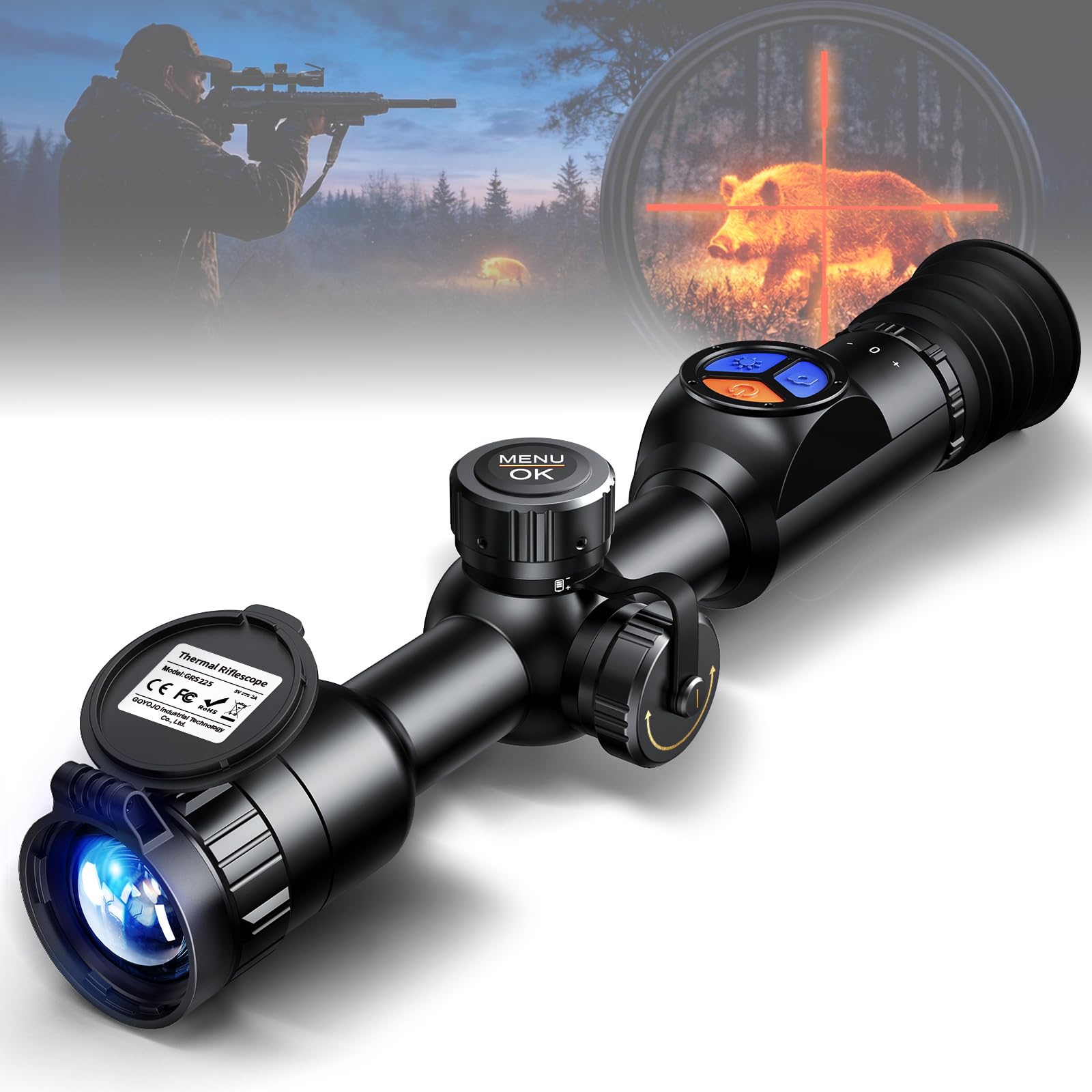
Figure 1: GOYOJO GRS225 Thermal Riflescope
2. Package Contents
Verify that all items are present in the package:
- GOYOJO GRS225 Thermal Riflescope
- 32GB SD Card
- Battery Charger
- Canvas Bag
- Mounting Screws
- Eyepiece Cover
- USB Type-C Cable
- Mounting Rings (if included with specific model variant)
3. Product Overview
Familiarize yourself with the components and controls of your GRS225 Thermal Riflescope.

Figure 2: GRS225 Component Diagram
- Power Button: Controls power ON/OFF, Picture-in-Picture (PIP), and Sleep Mode.
- Photo Button: Captures photos and initiates video recording.
- Pseudo Color Button: Switches between thermal color palettes.
- Knob: Used for menu navigation and selection.
- Objective Focusing Wheel: Adjusts the focus of the objective lens.
- Diopter Adjustment: Adjusts the eyepiece focus for individual vision.
- External Battery Compartment: Houses the CR123 battery.
- Charging Port: USB Type-C port for charging.
- Lens Cap: Protects the objective lens.
- Eyepiece Cover: Protects the eyepiece.
- Charging Cable: USB Type-C cable for charging.
- CR123 Battery: Power source for the device.
- Rings: Mounting rings for attachment to a rifle.
4. Setup
4.1 Battery Installation
Insert the CR123 battery into the external battery compartment, ensuring correct polarity. Use the provided battery charger to fully charge the battery before first use.
4.2 Mounting the Riflescope
Attach the riflescope to your rifle using the provided mounting rings. Ensure the scope is securely fastened and properly aligned for optimal viewing and zeroing.
4.3 Lens Cap Operation
The lens cap is designed for a tight fit to prevent accidental opening. To open, press firmly on the cap and then push it open as shown in the diagram.

Figure 3: Lens Cap Opening Instructions
4.4 Diopter Adjustment
Adjust the diopter ring (6) until the display image appears sharp and clear to your eye. This compensates for individual vision differences.
5. Operating Instructions
5.1 Power On/Off and Sleep Mode
- Power On: Press and hold the Power Button (1) until the display illuminates.
- Power Off: Press and hold the Power Button (1) until the device shuts down.
- Sleep Mode: Briefly press the Power Button (1) to enter or exit sleep mode, conserving battery life.
5.2 Menu Navigation
The GRS225 features an intuitive button layout and menu system. Use the Knob (4) to navigate through menu options and confirm selections.

Figure 4: Easy Operation Controls
5.3 Zoom Function
The device offers 1X-8X adjustable optical magnification. The reticle automatically adjusts to the center of the display when zooming.

Figure 5: Zoom and Picture-in-Picture Functionality
5.4 Zeroing (One-Shot Zero)
The GRS225 supports a one-shot zeroing method. After a single shot confirms the point of impact, move the on-screen reticle to the impact point, and the system automatically completes the zeroing process. No repeated adjustments are required.

Figure 6: One-Shot Zero Process
Video 1: GOYOJO GRS225RF One Shot Zero demonstration. This video illustrates the process of performing a one-shot zero, showing how to adjust the reticle to the point of impact.
5.5 Recoil Activated Video (RAV) & Live Sharing
The GRS225 features Recoil Activated Video (RAV), which automatically records when a shot is fired. The built-in 32GB internal storage provides ample space for footage. Connect to the mobile app via Wi-Fi to stream your view in real-time and share recorded moments.

Figure 7: RAV Recording and Live Sharing
Video 2: GOYOJO GRS225RF Thermal Scope WiFi Connection. This video demonstrates how to connect the thermal scope to a mobile device via Wi-Fi for live streaming and sharing.
5.6 Reticle Options and Color Palettes
The GRS225 offers 10 reticle patterns and 7 pseudo color modes to adapt to different environments and user preferences. Select the appropriate reticle and color palette for optimal target identification.

Figure 8: Reticle Patterns and Color Palettes
Video 3: GOYOJO GRS225 Thermal Riflescope Operation. This video provides a general overview of the riflescope's operational features, including menu navigation and mode selection.
6. Key Features
- High Resolution Thermal Imaging: Equipped with a 25mm objective lens and a 256×192 thermal sensor with <35mK sensitivity and a 1440×1080 OLED display. Detects heat signatures up to 1,224 yards.
- 8X Zoom & 50Hz Refresh Rate: Adjustable 1X–8X optical magnification and a 50Hz frame rate for smooth, natural motion and improved situational awareness.
- Auto AI Image Enhancement: 7 selectable imaging modes and 10 reticle options. AI technology refines edge detail and thermal contrast for clearer viewing.
- RAV Smart Recording & Real-Time Sharing: Recoil Activated Video (RAV) automatically records shots. Built-in 32GB storage. Mobile app connectivity for real-time streaming and sharing.
- Built for Extreme Environments: Withstands recoil up to 800g/0.4 ms. IP67 waterproof and dustproof rating. Operates 7–9 hours in temperatures from −22°F to 122°F (−30°C to 50°C).
7. Specifications
| Feature | Specification |
|---|---|
| Model Name | GRS225 |
| Sensor Resolution | 256 × 192 |
| Objective Lens Diameter | 25 mm |
| Refresh Rate | 50 Hz |
| Magnification | 1–8× |
| Battery Life | 7–9 hours |
| Maximum Detection Range | 1,224 yards |
| Maximum Recognition Range | 306 yards |
| Color Palettes | 7 |
| Reticle Types | 10 |
| Recoil Activated Video (RAV) | Yes |
| Built-in Memory | 32 GB |
| Waterproof Rating | IP67 |
| Recoil Resistance | Up to 800 g/0.4 ms |
| Operating Temperature | −22°F to 122°F (−30°C to 50°C) |
| Material | Aluminum |
| Item Weight | 1.61 Pounds |
| Product Dimensions | 15.3"L x 7.48"W x 4.92"H |
For a comparison of GRS series models, refer to the table below:
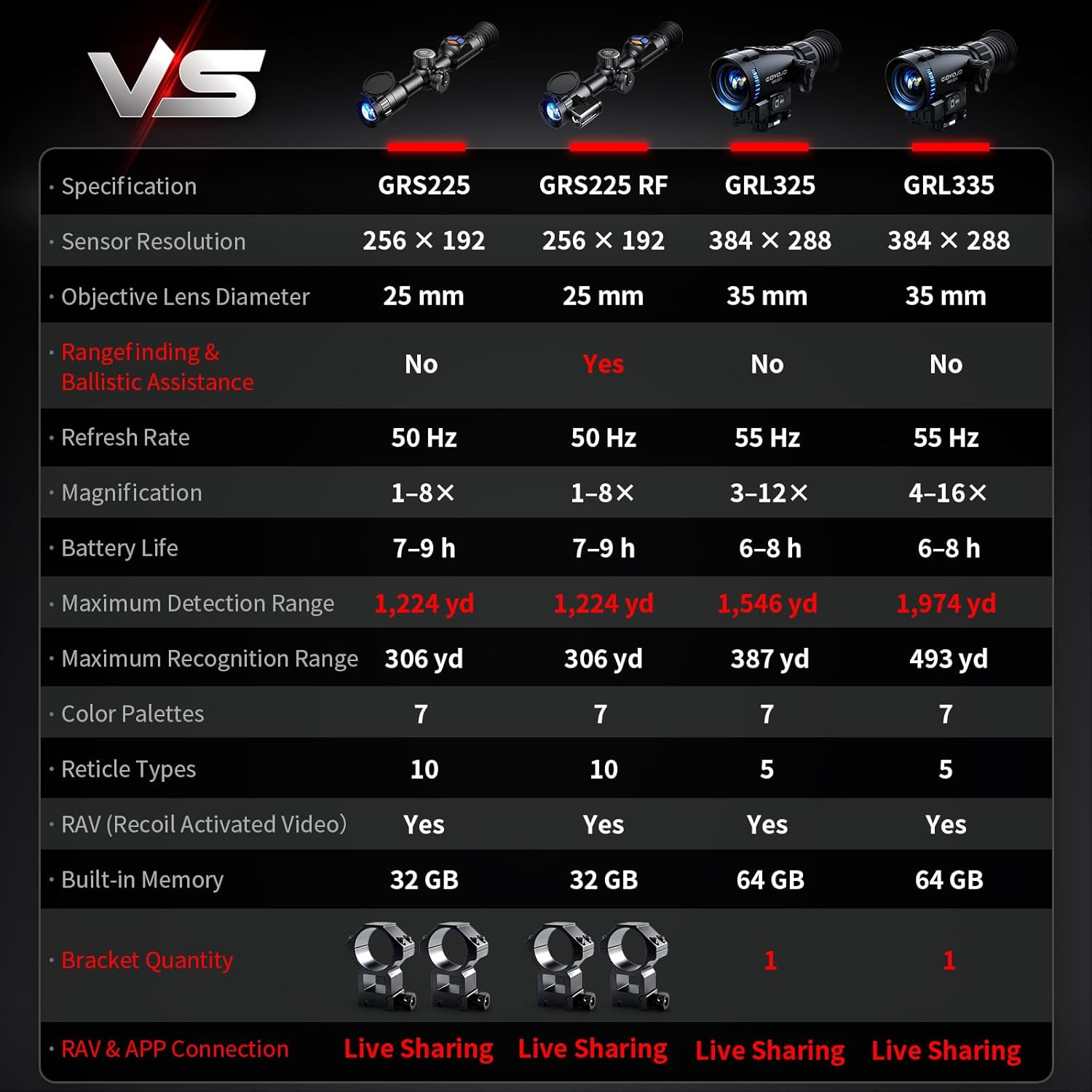
Figure 9: GRS Series Model Comparison
8. Maintenance
- Cleaning: Use a soft, lint-free cloth to clean the lenses. For stubborn dirt, use a lens cleaning solution specifically designed for optics. Do not use abrasive materials.
- Storage: Store the riflescope in a dry, cool place away from direct sunlight and extreme temperatures. Ensure the lens caps are in place to protect the optics.
- Battery Care: Remove the battery if the device will not be used for an extended period. Recharge batteries regularly to maintain their lifespan.
- Water Exposure: While IP67 rated, avoid prolonged submersion. If exposed to water, wipe dry immediately.
9. Troubleshooting
| Problem | Possible Cause | Solution |
|---|---|---|
| Device does not power on | Low or depleted battery; Incorrect battery installation | Charge the battery; Ensure battery is inserted with correct polarity |
| Image is blurry | Diopter not adjusted; Objective lens out of focus | Adjust the diopter (6); Adjust the objective focusing wheel (5) |
| No thermal image | Lens cap is on; Device malfunction | Remove lens cap; Contact customer support if issue persists |
| Wi-Fi connection issues | Incorrect password; Device too far from phone; App not updated | Verify Wi-Fi password; Move closer to device; Update mobile app |
| RAV not recording | SD card full; RAV feature disabled | Check SD card storage; Enable RAV in settings |
10. Warranty and Support
The GOYOJO GRS225 Thermal Riflescope comes with a 1-year warranty from the date of purchase. This warranty covers manufacturing defects and malfunctions under normal use. It does not cover damage caused by misuse, unauthorized modifications, or improper maintenance.
For technical support, warranty claims, or service inquiries, please contact GOYOJO customer service through the retailer where the product was purchased or visit the official GOYOJO website for contact information.


