
1. Introduction
Thank you for choosing the ALIENTEK C2 Lite USB Tester. This device is a precise digital voltmeter and charging power detector designed for monitoring USB chargers, power banks, and cables. It features a 16-bit ADC chip for accurate measurements and supports various fast charging protocols. This manual provides essential information for the safe and effective use of your device.

Image 1.1: The ALIENTEK C2 Lite USB Tester displaying real-time measurement data.
2. What's in the Box
Upon unpacking your ALIENTEK C2 Lite USB Tester, please ensure all the following components are present:
- ALIENTEK C2 Lite USB Tester
- Tempered Glass Screen Protector
- Instruction Manual Card
- Tinplate Packaging Box
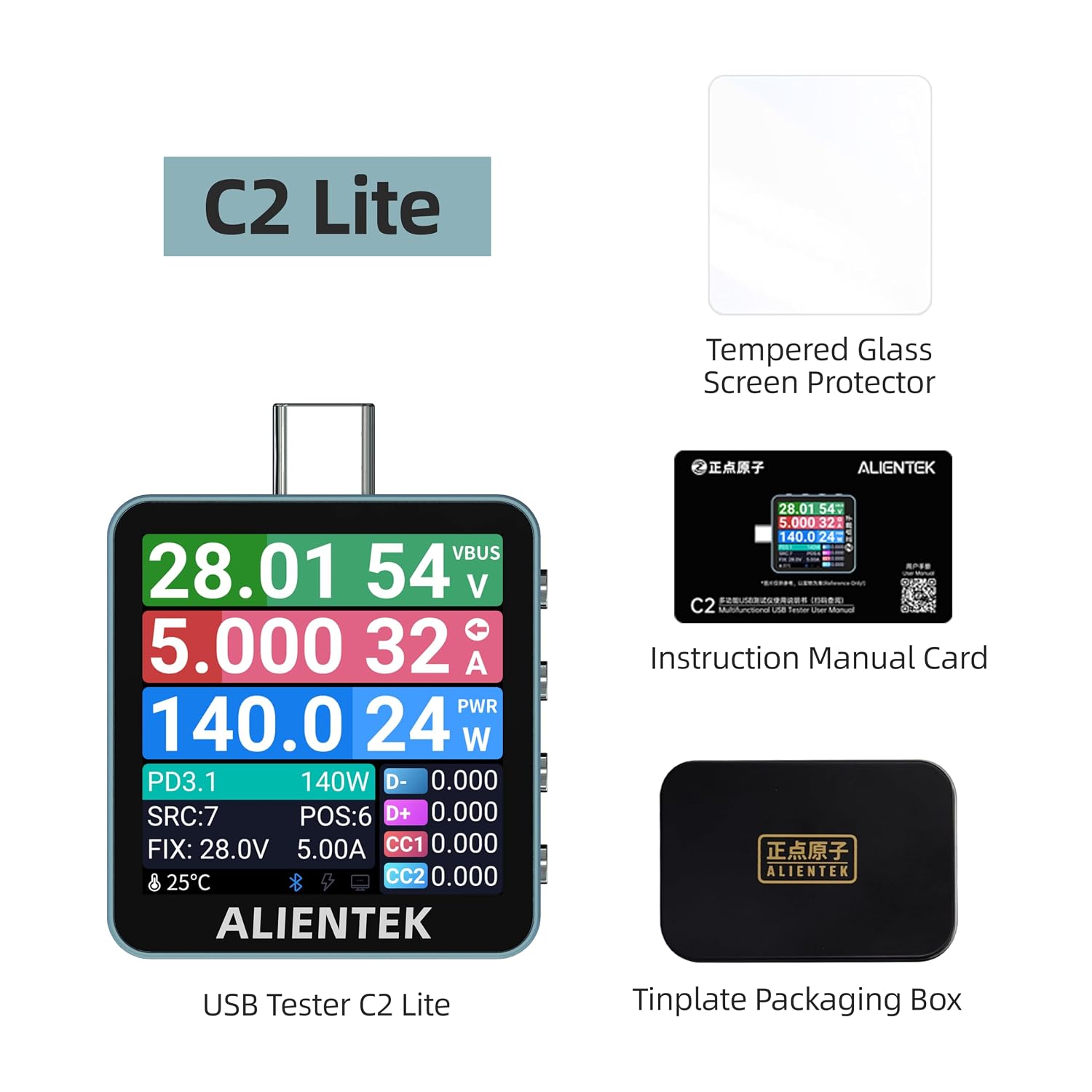
Image 2.1: All items included in the ALIENTEK C2 Lite product package.
3. Setup and Basic Operation
3.1 Device Overview

Image 3.1: Overview of the ALIENTEK C2 Lite interfaces and control buttons.
The C2 Lite features two Type-C interfaces for connection and four buttons for navigation and control:
- Type-C IN: Connect to the power source (charger, power bank).
- Type-C OUT: Connect to the device being charged/tested.
- Type C PC-USB in: For connecting to a computer (C2 Lite does not support PC software features).
- Buttons: Back, Left/Up Key, Confirm, Right/Down Key for menu navigation and function selection.
3.2 Initial Power-On
To power on the C2 Lite, connect the Type-C IN port to a USB power source (e.g., a charger or power bank). The device will automatically power on and display the main measurement interface. If the monitored voltage is below 3.6V, connect the device to a PC USB port for power supply.
4. Operating Instructions
4.1 Basic Measurement
The main screen displays real-time basic measurement parameters including voltage (V), current (A), power (W), D+ and D- voltages, C1 and C2 voltages, and temperature. It also monitors the current fast charging protocol type. Data obtained is for reference only, and monitor mode requires the powered device to request protocols.

Image 4.1: Basic measurement interface of the C2 Lite USB Tester.
4.2 Multi-Protocol Fast Charging Detection & Triggering
The C2 Lite supports automatic detection and manual triggering for various fast charging protocols. This allows you to verify charger capabilities and test device performance.
- Supported Protocols: QC2.0/3.0/4+/5.0, PD2.0/3.0/3.1/3.2, Huawei FCP/SCP, Samsung AFC, UFCS, MTK-PE, VIVO VFCP, OPPO-VOOC/SVOOC.
- Automatic Detection: Automatically identifies the fast charging protocols supported by the power supply device.
- Manual Triggering: Manually select a fast charging protocol and its corresponding trigger voltage to test the power supply device's performance.
Warning: Automatic detection and manual triggering modes may involve high voltage. Do not connect any electrical equipment that is not rated for these voltages; otherwise, damage may occur.

Image 4.2: Multi-protocol detection and triggering capabilities.

Image 4.3: Diversified functions for automatic detection and manual triggering.
4.3 Ripple Measurement
The C2 Lite can measure ripple up to a 2M sampling rate, displaying the peak-to-peak value (Vp-p). This function assists in evaluating the ripple quality of the power supply voltage, which is crucial for stable power delivery.

Image 4.4: Ripple measurement interface showing voltage waveform.
4.4 Cable Detection and Wire Resistance Measurement
The device supports reading E-Marker chip information from cables, including Thunderbolt 5, to understand the cable's capabilities (e.g., data transfer rate, power delivery). It also measures wire resistance using the voltage drop method, allowing for easy detection of a cable's internal resistance.

Image 4.5: Cable detection displaying E-Marker information.

Image 4.6: Wire resistance measurement interface.
4.5 Apple Charger SN Reading
The C2 Lite supports reading the Serial Number (SN) code of Apple chargers. This feature allows users to verify the authenticity of their Apple charging devices.

Image 4.7: Apple Charger SN code reading function.
4.6 Offline Data Logging
The device supports two groups of offline data logging, each capable of storing up to 10,000 data points. This feature can be used to estimate the battery capacity of mobile phones, tablets, and power banks. The calculation method for capacity estimation is provided on the device interface.

Image 4.8: Offline data logging interface for battery capacity estimation.
4.7 Power Bank Mode
The Power Bank Mode provides an intermittent dummy load to keep fast-charging devices active even under low load conditions, preventing them from dropping out of fast charge mode.
4.8 PC Software (C2 Lite Limitation)
While the C2 Pro model supports connection to PC software for advanced features like 1kHz data acquisition, waveform viewing, protocol triggering, and firmware updates, the C2 Lite model does not support these PC software functions.

Image 4.9: Illustration of PC software capabilities (not supported by C2 Lite).
4.9 Product Demonstration Video
Video 4.1: An official ALIENTEK video demonstrating the C2 USB Tester's functions, including real-time voltage, current, and power monitoring during device charging.
5. Maintenance
To ensure the longevity and optimal performance of your ALIENTEK C2 Lite USB Tester, follow these maintenance guidelines:
- Cleaning: Use a soft, dry cloth to clean the device. Avoid using abrasive cleaners or solvents that could damage the screen or casing.
- Storage: Store the tester in a cool, dry place away from direct sunlight and extreme temperatures.
- Handling: Handle the device with care to prevent physical damage. Avoid dropping or subjecting it to strong impacts.
- Screen Protection: Utilize the provided tempered glass screen protector to prevent scratches and damage to the display.
6. Troubleshooting
If you encounter issues with your ALIENTEK C2 Lite USB Tester, refer to the following common troubleshooting steps:
- Device Not Powering On: Ensure the Type-C IN port is securely connected to a functional USB power source. If the voltage is very low, try connecting it to a PC USB port for power.
- Inaccurate Readings: Verify that all connections are secure. Ensure the cables used are in good condition. High resistance cables can affect readings.
- Fast Charging Not Detected: Confirm that both the charger and the device being charged support the fast charging protocol. Some protocols require specific cables.
- Screen Issues: If the screen is unresponsive or displays incorrectly, try disconnecting and reconnecting the power source.
For further assistance, please contact ALIENTEK customer support.
7. Specifications
The following table outlines the key specifications for the ALIENTEK C2 Lite USB Tester:

Image 7.1: Detailed specifications for the C2 Lite and C2 Pro models.
| Feature | Specification |
|---|---|
| Model | C2 Lite |
| ADC | 16-bit |
| Monitored Voltage | 0-36V |
| Monitored Current | 0-7A |
| Monitored Power | 0-240W |
| D+/D- Voltage | 0-3.3V |
| C1/C2 Voltage | 0-2.8V |
| Capacity Measurement | 0-9999.9Ah |
| Energy Measurement | 0-9999.9Wh |
| Statistical Time | 99h 59m 59s |
| Wire Resistance | 0-999.9Ω |
| Gravity Sensing | Supported |
| Apple Charger SN Reading | Supported |
| Screen Size | 1.54-inch IPS |
| Screen LCD Resolution | 240x240 |
| Product Dimensions | 1.476 in × 1.378 in × 0.362 in |
| Net Weight | 0.0386 lb (approx. 17.5g) |
| Power Source | Battery Powered (via USB connection) |
| Minimum Operating Voltage | 5 volts |
| Maximum Operating Voltage | 750 volts (for multimeter function, not direct USB input) |
| Upper Temperature Rating | 40 °C |
| Measurement Type | Multimeter |
| Compatible Devices | USB C devices |
| Certification | CE |
8. Warranty and Support
For information regarding product warranty, technical support, or service, please refer to the official ALIENTEK store or contact their customer service directly.
Visit the ALIENTEK Store for more products and support resources.


