
1. Introduction
This manual provides instructions for the assembly, operation, and maintenance of your HOOBRO Industrial Printer Stand (Model BF22UPS01) and Computer Desk (Model BC40UDN01) bundle. Please read these instructions carefully before assembly and use to ensure safe and correct operation.
2. Safety Instructions
- Keep all packaging materials away from children.
- Ensure all parts are present and undamaged before beginning assembly. Do not proceed with assembly if any parts are missing or damaged.
- Assemble the product on a soft, clean surface to prevent scratches.
- Tighten all screws firmly, but do not overtighten to avoid stripping threads or damaging components.
- Do not exceed the maximum weight capacities specified for each component.
- For the printer stand's power strip, ensure the power cord is fully inserted into a grounded outlet. Do not overload the outlets.
- Keep liquids away from electrical components.
- Regularly check all connections and fasteners to ensure they remain secure.
3. Package Contents
Verify that all components listed in your product's specific parts list (included in the packaging) are present. Typical components include:
- Metal frame components
- Wooden top panels
- Mesh shelves (for printer stand)
- Power strip with USB ports and AC outlet (for printer stand)
- Casters (2 with brakes, 2 without)
- Adjustable feet
- Hooks
- Assembly hardware (screws, Allen wrench)
4. Setup and Assembly
Assembly is designed to be straightforward. Follow the detailed step-by-step instructions provided in your product's assembly guide. Each part is typically labeled for easy identification.
4.1. HOOBRO Industrial Printer Stand (Model BF22UPS01)
This 3-tier mobile printer stand features a rustic brown top, two mesh shelves, a built-in power outlet, and three side hooks. It can be assembled with either casters for mobility or adjustable feet for stationary use.

Figure 1: Assembled HOOBRO 3-Tier Mobile Printer Stand.
General Assembly Steps:
- Unpack all components and verify against the parts list.
- Attach the side frames to the top wooden panel using the provided screws.
- Slide and secure the mesh shelves into the designated slots on the frame.
- Install either the casters (two with brakes on the front, two without on the back) or the adjustable feet into the bottom of the frame.
- Mount the power strip unit onto the side of the frame.
- Attach the three hooks to the side of the top panel.
4.2. HOOBRO Computer Desk (Model BC40UDN01)
This home office desk features a charcoal gray and black tabletop with a sturdy metal frame and three side hooks.

Figure 2: Assembled HOOBRO Computer Desk.
General Assembly Steps:
- Unpack all components and verify against the parts list.
- Assemble the metal frame structure according to the diagrams.
- Attach the tabletop to the assembled frame.
- Install the adjustable feet at the bottom of the desk legs.
- Attach the three hooks to the side of the desk frame.
5. Operating Instructions
5.1. HOOBRO Industrial Printer Stand (Model BF22UPS01)
- Mobility: If casters are installed, unlock the two braking casters to move the stand. Lock them when the stand is in the desired position to prevent accidental movement.
- Adjustable Feet: If adjustable feet are installed, rotate them to level the stand on uneven surfaces.
- Power Outlets: Plug the stand's power cord into a standard 120V AC wall outlet. Use the 1 AC outlet, 1 Type-C USB port, and 1 standard USB port to power or charge your devices.
- Storage: Utilize the three tiers for printers, paper, office supplies, or other items. The side hooks can hold headphones, cables, or small bags.
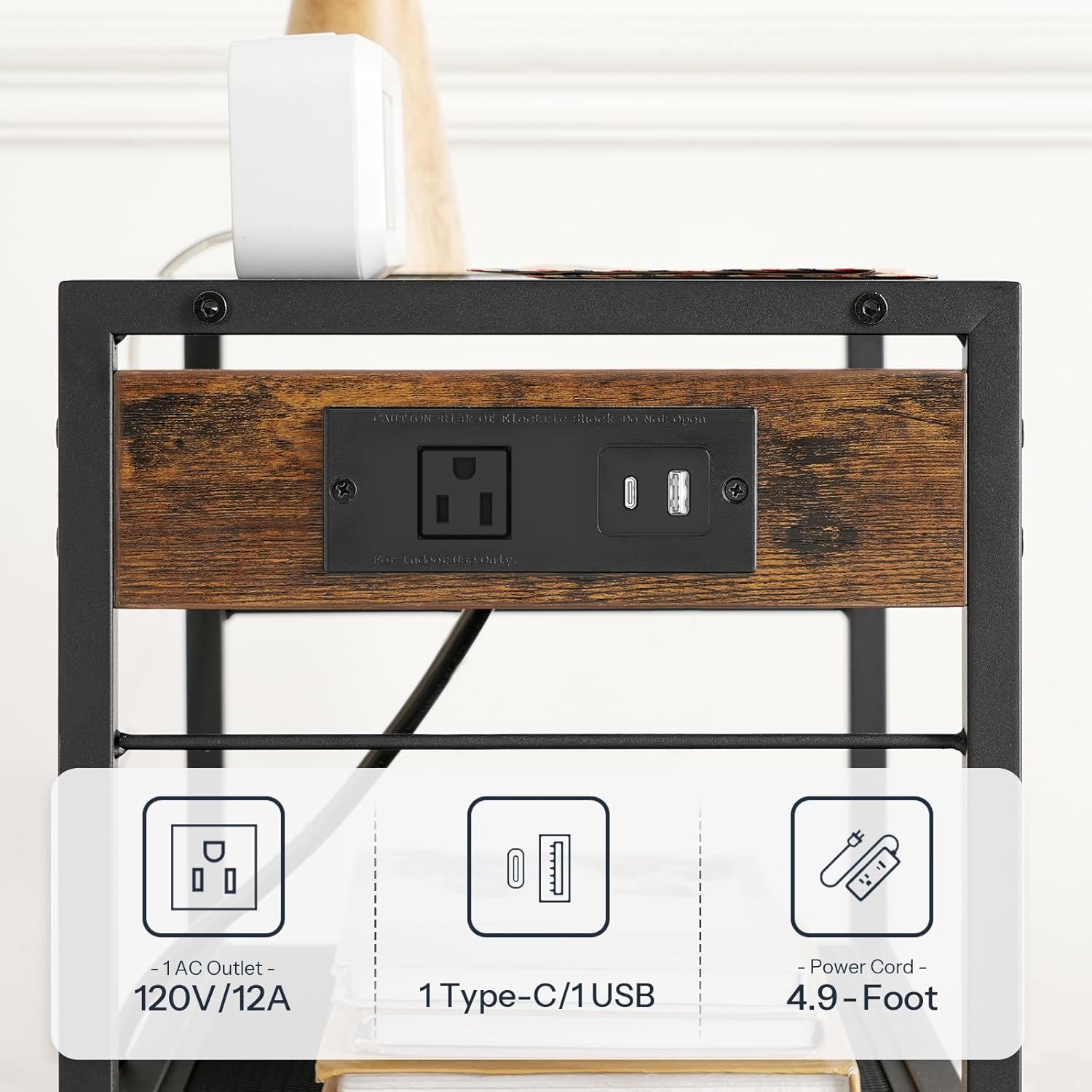
Figure 3: Detail of the printer stand's power outlet with 1 AC, 1 Type-C, and 1 USB port.

Figure 4: Printer stand in use, demonstrating its storage and utility next to a desk.
5.2. HOOBRO Computer Desk (Model BC40UDN01)
- Workspace: Use the spacious tabletop for your computer, monitor, and other work essentials.
- Hooks: The three side hooks provide convenient storage for headphones, backpacks, or other personal items.

Figure 5: Computer desk in use, highlighting the side hooks for accessories.
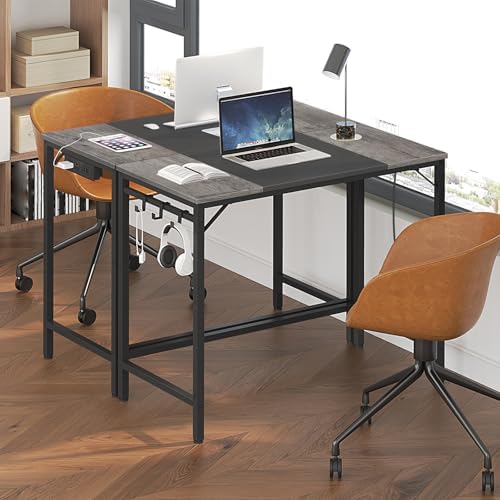
Figure 6: Computer desk providing a functional workspace.
6. Maintenance
- Cleaning: Wipe surfaces with a soft, damp cloth. Avoid harsh chemicals or abrasive cleaners that may damage the finish.
- Fasteners: Periodically check all screws and bolts to ensure they are tight. Retighten if necessary.
- Electrical Components: Ensure the power cord is not pinched or damaged. Do not attempt to repair the power strip yourself; contact qualified personnel if issues arise.
7. Troubleshooting
- Instability/Wobbling: Check that all screws are securely tightened. If using adjustable feet, ensure they are properly adjusted to level the unit on uneven floors. If using casters, ensure they are fully inserted.
- Power Outlets Not Working: Ensure the power cord is fully plugged into a functional wall outlet. Check if the wall outlet itself is working by plugging in another device. Avoid overloading the power strip.
- Missing Parts: If any parts are missing upon unboxing, refer to the contact information in the Warranty and Support section.
8. Specifications
8.1. HOOBRO Industrial Printer Stand (Model BF22UPS01)
| Feature | Specification |
|---|---|
| Overall Dimensions (L x W x H) | 42 cm x 28 cm x 64 cm (16.5" x 11" x 25.2") |
| Height with Casters | Approx. 73.5 cm (28.9") |
| Top Shelf Weight Capacity | 20 kg (44 lbs) |
| Middle/Bottom Shelf Weight Capacity (each) | 7.7 kg (17 lbs) |
| Power Outlet | 1 x AC Outlet (120V/12A), 1 x Type-C USB, 1 x Standard USB |
| Power Cord Length | 1.5 m (4.9 feet) |

Figure 7: Detailed dimensions and weight capacities for the printer stand.
8.2. HOOBRO Computer Desk (Model BC40UDN01)
| Feature | Specification |
|---|---|
| Overall Dimensions (L x W x H) | 80 cm x 40 cm x 77 cm (31.5" x 15.7" x 30.3") |
| Weight Capacity | 15 kg (33 lbs) |

Figure 8: Detailed dimensions and weight capacity for the computer desk.
9. Warranty and Support
For warranty information, missing parts, or technical support, please refer to the contact details provided in your product packaging or visit the official HOOBRO website. Please have your model number (BF22UPS01-BC40UDN01) and purchase information ready when contacting support.