
Introduction
The ULANZI MT44M is a versatile 2-in-1 magnetic phone and camera tripod designed for content creators. It features a MagSafe-compatible magnetic mount, a 1/4" screw thread for cameras, a cold shoe port, a one-touch auto-deploy tripod mechanism, a 7-section telescopic pole, and a detachable Bluetooth remote. This manual provides instructions for setup, operation, maintenance, and troubleshooting to ensure optimal use of your device.
Setup
1. Auto-Deploying the Tripod
To deploy the tripod legs, simply tap the base of the unit on a flat surface. The four legs will automatically extend and lock into a stable quadpod configuration. This allows for quick setup in under 3 seconds.

Image: The ULANZI MT44M tripod in its auto-deploying state, showing the four legs extending from the base with a red 'PUSH' button. This illustrates the quick setup feature.
2. Attaching Your Device
The MT44M offers multiple attachment options:
- Magnetic Mount: For MagSafe-compatible iPhones, simply snap your phone directly onto the magnetic head.
- 1/4" Screw Thread: For mirrorless cameras, action cameras, or other devices, use the universal 1/4" screw thread.
- Cold Shoe Port: A built-in cold shoe port allows for quick attachment of accessories like fill lights or microphones.

Image: A diagram illustrating the magnetic phone mount, the 1/4" screw mount for cameras, and the cold shoe mount for additional accessories on the ULANZI MT44M.
3. Using the Magnetic Adapter Ring (for non-MagSafe devices)
If your phone is not MagSafe-compatible, you can use the included magnetic adapter ring:
- Ensure the back of your phone or phone case is clean, smooth, and dry.
- Carefully align the magnetic adapter ring to the center of your device.
- Firmly press the magnetic adapter ring for 20-30 seconds to ensure a secure bond. Allow 24 hours for the adhesive to fully cure before use.

Image: A visual guide demonstrating how to apply the magnetic adapter ring to a smartphone for MagSafe compatibility.
4. Pairing the Detachable Bluetooth Remote
The MT44M includes a detachable Bluetooth remote for hands-free operation:
- Remove the remote from its storage slot in the handle.
- Turn on the remote to enter pairing mode.
- On your smartphone, go to Bluetooth settings and connect to "Ulanzi MT-44 M".

Image: The ULANZI MT44M tripod with its detachable wireless remote, illustrating its use for remote control of a mounted phone.
Operating Instructions
1. Extending the Telescopic Pole
The 7-section telescopic pole can be extended to various heights, from a compact desktop stand to a full-height tripod of 59 inches (1.49 meters). Simply pull the pole upwards to extend and push downwards to retract. Ensure all sections are securely locked at your desired height.

Image: A person using the ULANZI MT44M tripod fully extended to 58.66 inches (1.49 meters) for photography.
2. Adjusting the Ball Head
The smooth ball head allows for flexible positioning of your device:
- 360° Rotation: Loosen the ball head adjustment knob to rotate your device horizontally for panoramic shots or to change viewing angles.
- 90° Vertical Tilt: The ball head also supports a 90° vertical tilt, enabling you to shoot in portrait mode, capture overhead shots, or achieve low-angle perspectives.

Image: A detailed view of the ULANZI MT44M's ball head, highlighting its 360° rotation and 90° vertical tilt functionality with directional arrows.
3. Using the Wireless Remote
Once paired, the detachable Bluetooth remote can be used to:
- Capture photos.
- Start and stop video recording.
- Take group shots from up to 33 feet (10 meters) away.
4. Multi-Scenario Use
The MT44M is suitable for various content creation scenarios:
- Group Shots: Extend the pole and use the remote for wide-angle group photos.
- Selfie Vlogging: Mount your phone and an action camera simultaneously for dynamic vlogging.
- Live Streaming/Monitoring: Use the tripod as a stable stand for live broadcasts or for monitoring your shots.
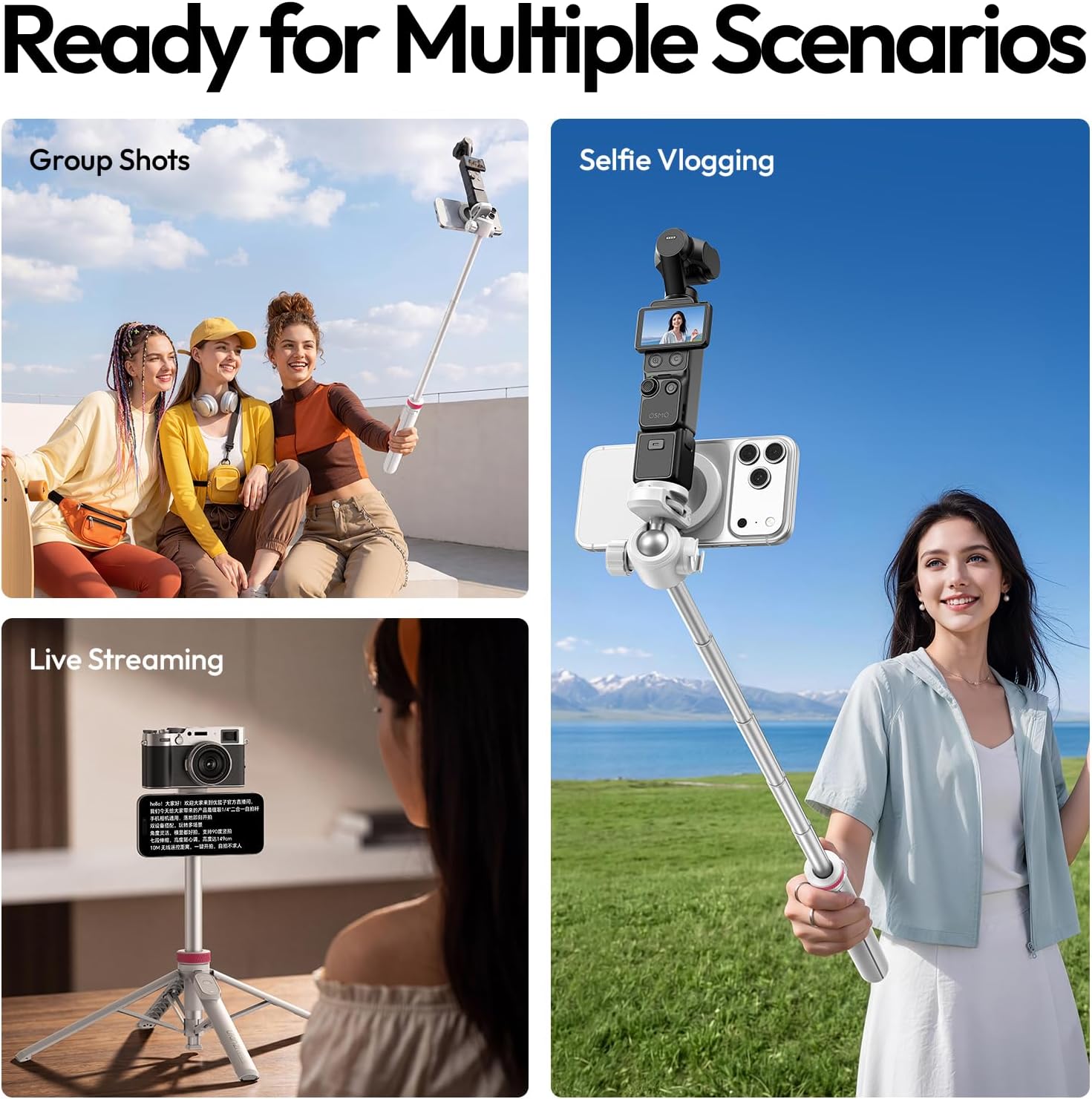
Image: A collage showing the ULANZI MT44M being used for group shots, selfie vlogging with a phone and action camera, and live streaming with a camera.
Maintenance
To ensure the longevity and optimal performance of your ULANZI MT44M tripod, follow these maintenance guidelines:
- Cleaning: Wipe the tripod with a soft, dry cloth after each use to remove dust and debris. For stubborn dirt, use a slightly damp cloth and then dry thoroughly. Avoid harsh chemicals or abrasive cleaners.
- Storage: Store the tripod in a cool, dry place away from direct sunlight and extreme temperatures. Ensure it is fully retracted and the legs are folded for compact storage.
- Magnetic Mount: Keep the magnetic surface clean and free of metallic particles that could interfere with its hold.
- Remote Battery: If the remote control's response becomes sluggish, replace the CR1632 coin cell battery.
Troubleshooting
- Tripod legs do not auto-deploy: Ensure the base is tapped firmly on a flat surface. Check for any obstructions in the leg mechanism.
- Magnetic mount not holding securely: Ensure your phone or case is MagSafe-compatible. If using the adapter ring, verify it is properly adhered and cured for 24 hours. Clean both the magnetic surface of the tripod and your device.
- Bluetooth remote not connecting: Ensure the remote is turned on and in pairing mode. Check your phone's Bluetooth settings to ensure it's searching for devices and that "Ulanzi MT-44 M" is selected. If issues persist, replace the remote's CR1632 battery.
- Telescopic pole is stiff or stuck: Gently twist and pull the sections. Avoid forcing the pole. Ensure no dirt or debris is lodged between sections.
- Device stability issues: Ensure the tripod legs are fully deployed and locked. Verify that the ball head adjustment knob is tightened after positioning your device. Do not exceed the maximum load capacity of 2.64 lbs (1.2 kg).
Specifications
| Feature | Detail |
|---|---|
| Brand | ULANZI |
| Model | MT44M |
| Materials | Plastic, Aluminum Alloy, Magnets |
| Folded Size | 2.36 × 2.36 × 13.19 inches (6 × 6 × 33.5 cm) |
| Extended Height | 59 inches (149 cm) |
| Net Weight | Approx. 14.82 oz (420 g) |
| Load Capacity | Max. 2.65 lbs (1.2 kg) |
| Compatible Systems (Remote) | iOS, Android, HarmonyOS |
| Wireless Control Range | 33 ft (10 m) |
| Remote Battery Type | CR1632 Coin Cell Battery |
| Included Components | Magnetic Selfie Stick ×1, Magnetic Adapter Ring ×1, User Manual ×1 |

Image: A graphic displaying the detailed specifications of the ULANZI MT44M tripod, including physical dimensions and remote control features.
Warranty
The ULANZI MT44M tripod comes with a 1-year warranty from the date of purchase. Please retain your proof of purchase for any warranty claims. This warranty covers manufacturing defects and does not cover damage caused by misuse, accidents, or unauthorized modifications.
Support
For further assistance, technical support, or warranty inquiries, please contact ULANZI customer service through their official website or the retailer where the product was purchased. Refer to the packaging or ULANZI's official channels for the most up-to-date contact information.


