
1. Introduction
Thank you for choosing the Innoliving Bimar INB-CP528 Portable Air Conditioner. This appliance is designed to provide practical comfort throughout the year with its 5-in-1 functions: cooling, heating, ventilation, dehumidification, and sleep mode. This manual provides essential information for the safe and efficient use, installation, and maintenance of your new air conditioner. Please read it thoroughly before operation and retain it for future reference.
2. Safety Information
Before operating the appliance, please read and follow all safety instructions to prevent injury or damage.
- Ensure the power supply matches the specifications indicated on the rating label.
- Do not operate the unit with a damaged cord or plug. If the supply cord is damaged, it must be replaced by the manufacturer, its service agent, or similarly qualified persons to avoid a hazard.
- Do not block air inlets or outlets. Maintain a minimum distance of 20 cm from walls or other objects.
- Do not insert fingers or objects into the air inlet/outlet.
- This appliance is not intended for use by persons (including children) with reduced physical, sensory, or mental capabilities, or lack of experience and knowledge, unless they have been given supervision or instruction concerning use of the appliance by a person responsible for their safety.
- Children should be supervised to ensure that they do not play with the appliance.
- Always unplug the unit before cleaning, maintenance, or moving.
- Do not use the appliance in wet rooms such as bathrooms or laundries.
- The appliance contains R290 refrigerant. R290 is a flammable gas. Do not puncture or burn. Be aware that R290 is odorless.
- Store the appliance in a well-ventilated area where the room size corresponds to the room area as specified for operation.
3. Product Overview
Key Features
- 12000 BTU Cooling & 8000 BTU Heating: Provides year-round comfort.
- 5-in-1 Functionality: Cooling, Heating, Ventilation, Dehumidification, and Sleep mode.
- Smart Control: Integrated WiFi for app control, remote control, and LED display panel.
- Adjustable Airflow: 2 fan speeds and directional louvers with auto-swing.
- High Dehumidification Capacity: Up to 50 liters per day.
- User-Friendly: 24-hour timer, adjustable temperature (16°C - 31°C), washable filter, and 360° wheels for easy mobility.
- Energy Efficient: Class A energy rating for both cooling and heating.
Components
The package includes the following items:
- Portable Air Conditioner Unit
- Extendable Exhaust Hose with Connectors
- Window Kit (Window Slider/Bracket)
- Drainage Hose
- Remote Control
- User Manual

Figure 1: Bimar INB-CP528 Portable Air Conditioner with highlighted features.
4. Setup
4.1 Unpacking
Carefully remove the air conditioner and all accessories from the packaging. Inspect the unit for any damage. Keep the packaging for future storage or transportation.
4.2 Placement
Place the unit on a flat, stable surface. Ensure there is at least 20 cm of clear space around the unit for proper airflow. Do not place the unit near heat sources or in direct sunlight.
4.3 Window Kit Installation
The window kit is designed to exhaust hot air outside. Follow these steps:
- Attach the exhaust hose connectors to both ends of the extendable exhaust hose.
- Insert one end of the hose into the exhaust outlet on the back of the air conditioner.
- Adjust the window slider/bracket to fit your window opening. Secure it in place.
- Insert the other end of the exhaust hose into the opening of the window slider/bracket.
- Ensure the window is closed as much as possible around the kit to prevent outside air from entering.
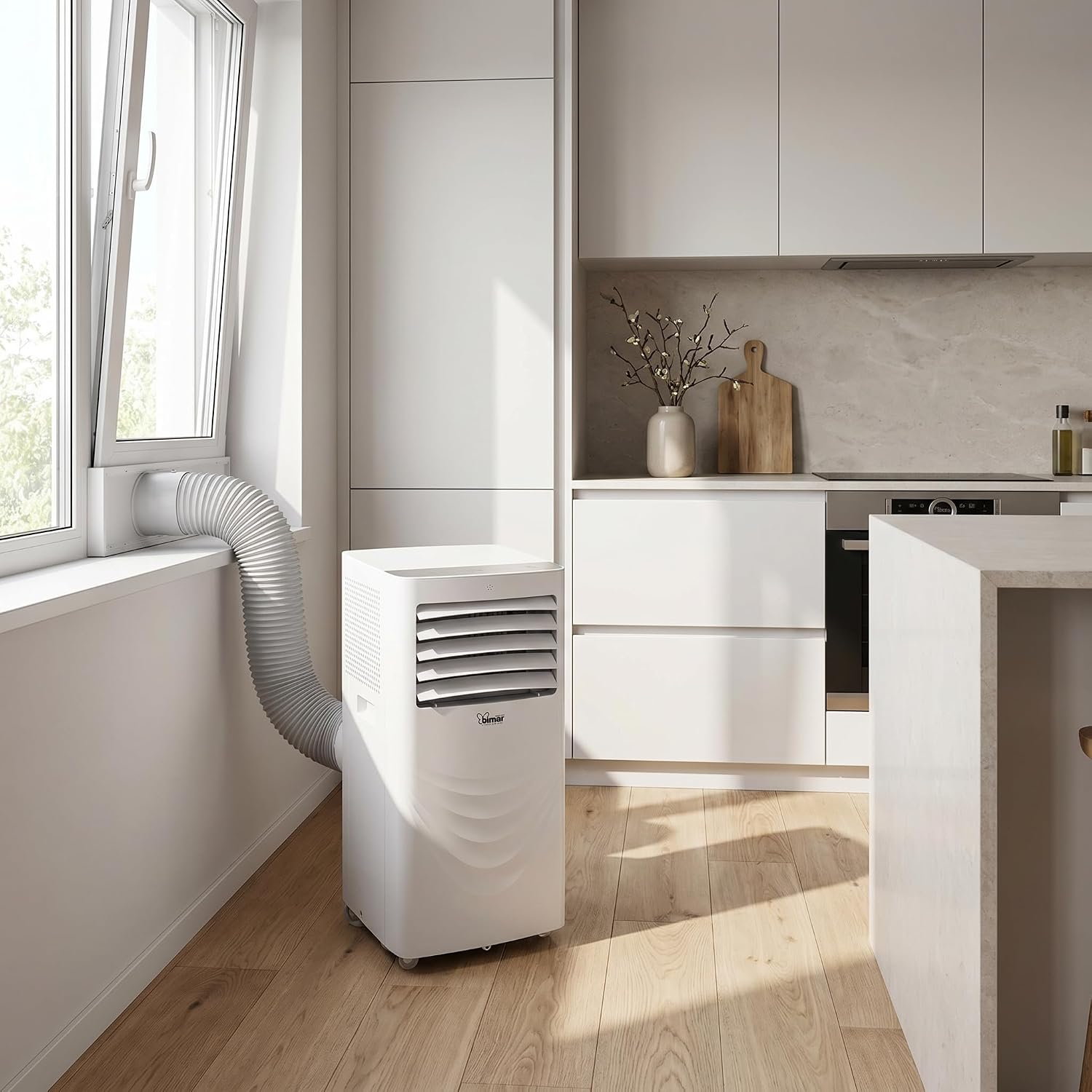
Figure 2: Portable air conditioner with exhaust hose installed in a window.
4.4 Drainage Setup
The unit offers manual or continuous drainage options:
- Manual Drainage: In dehumidification mode or when the internal water tank is full, the unit will stop operating and indicate that it needs to be drained. Place a tray or container under the drainage port and remove the drain plug to empty the water.
- Continuous Drainage: For continuous operation, especially in high humidity, attach the provided drainage hose to the continuous drainage port and direct it to a floor drain or a larger container.
5. Operating Instructions
The unit can be controlled via the control panel on the unit, the remote control, or a WiFi-enabled app.
5.1 Power On/Off
Press the Power button on the control panel or remote control to turn the unit on or off.
5.2 Mode Selection
Press the Mode button to cycle through the available functions:
- Cooling Mode: For cooling the room.
- Heating Mode: For heating the room.
- Dehumidification Mode: For reducing humidity.
- Fan Mode: For air circulation without cooling or heating.
- Sleep Mode: Adjusts temperature and fan speed for quiet, energy-efficient operation during sleep.
5.3 Temperature Adjustment
In Cooling or Heating mode, use the Up and Down arrow buttons to set the desired temperature between 16°C and 31°C.
5.4 Fan Speed
Press the Fan Speed button to select between 2 available fan speeds (Low, High).
5.5 Timer Function
Press the Timer button to set the unit to turn on or off automatically after a set period (up to 24 hours).
5.6 WiFi Control
Download the compatible app on your smartphone. Follow the in-app instructions to connect your air conditioner to your home WiFi network for remote control and smart features.
5.7 Auto-Swing
Press the Swing button to activate or deactivate the automatic oscillation of the air louvers, distributing air more evenly.
6. Maintenance
Regular maintenance ensures optimal performance and extends the lifespan of your air conditioner.
6.1 Filter Cleaning
The unit is equipped with a washable filter. It is recommended to clean the filter every two weeks or more frequently depending on usage.
- Turn off and unplug the unit.
- Locate and remove the air filter from the back or side of the unit.
- Wash the filter with lukewarm water and a mild detergent. Rinse thoroughly.
- Allow the filter to air dry completely before reinserting it into the unit. Do not expose to direct sunlight.
6.2 Drainage
Regularly check and drain any accumulated water, especially if not using continuous drainage. Refer to Section 4.4 for drainage instructions.
6.3 Storage
If storing the unit for an extended period:
- Drain all water from the unit.
- Clean the air filter.
- Run the unit in fan-only mode for a few hours to dry the internal components.
- Unplug the power cord and coil it neatly.
- Store the unit in a dry, cool place, preferably in its original packaging.
7. Troubleshooting
If you encounter issues, refer to the following table for common problems and solutions.
| Problem | Possible Cause | Solution |
|---|---|---|
| Unit does not turn on | No power supply Power cord not plugged in Water tank full | Check power outlet Ensure cord is securely plugged in Drain the water tank |
| Insufficient cooling/heating | Air filter dirty Windows/doors open Room size too large Exhaust hose not properly installed | Clean the air filter Close all windows and doors Ensure unit is suitable for room area (18-26 m²) Check exhaust hose connection and window kit seal |
| Unit is noisy | Unit not on a flat surface Obstruction in fan | Place unit on a flat, stable surface Check for and remove any obstructions |
| Water leakage | Drain plug loose Continuous drainage hose blocked | Ensure drain plug is secure Check and clear any blockages in the drainage hose |
| WiFi connection issues | Incorrect network password Unit too far from router App not updated | Verify WiFi password Move unit closer to router or use a WiFi extender Update the control app to the latest version |
If the problem persists after trying these solutions, please contact customer support.
8. Specifications
| Feature | Specification |
|---|---|
| Model Number | INB-CP528 |
| Brand | Innoliving |
| Cooling Capacity | 12000 BTU/h (3.5 kW) |
| Heating Capacity | 8000 BTU/h (2.3 kW) |
| Energy Class (Cooling) | A |
| Energy Class (Heating) | A |
| Functions | Cooling, Ventilation, Dehumidification, Heating, Sleep |
| Fan Speeds | 2 |
| WiFi Enabled | Yes |
| Air Flow | 380 m³/h |
| Dehumidification Capacity | 50 L/day |
| Ideal Area | 18-26 m² |
| Timer | 24 hours |
| Display | LED |
| Adjustable Temperature | 16°C - 31°C |
| Automatic Defrost | Yes |
| Drainage | Manual or Continuous |
| Mobility | 360° wheels |
| Filter | Washable |
| Noise Level | 65 dB(A) |
| Refrigerant | R290 |
| Refrigerant Charge | 0.21 kg |
| Power Supply | 220-240V ~ 50Hz |
| Cooling Power Consumption | 1.4 kWh/60 min |
| Heating Power Consumption | 1.0 kWh/60 min |
| EER | 2.6 |
| COP | 2.3 |
| Product Dimensions (DxWxH) | 35.6 x 70.6 x 34.5 cm |
| Item Weight | 29 kg |
9. Warranty and Support
9.1 Product Warranty
This Innoliving Bimar INB-CP528 Portable Air Conditioner comes with a 2-year manufacturer's limited warranty. Please retain your proof of purchase for warranty claims. The warranty covers defects in materials and workmanship under normal use. It does not cover damage resulting from misuse, accident, unauthorized modifications, or failure to follow the instructions in this manual.
9.2 Manufacturer Information
Manufacturer: Innoliving S.p.A.
9.3 Customer Support
For technical assistance, warranty service, or general inquiries, please contact your retailer or the manufacturer's customer support channels. Refer to the Innoliving website or your purchase documentation for contact details.