
1. Product Overview
The Aroeally T70 5-in-1 Wall Scanner is a professional-grade detection tool designed to accurately locate wood studs, metal pipes, and live AC electrical wires hidden behind walls, ceilings, and floors. Its advanced sensor technology and updated microprocessor ensure reliable results for both professionals and home users. This device is essential for safe and precise execution of renovation, installation, and DIY projects.

Figure 1: Aroeally T70 5-in-1 Wall Scanner. This image shows the overall design of the device, highlighting its compact and ergonomic form factor.

Figure 2: Versatile Applications. This image demonstrates various uses for the Aroeally T70, including home renovation, construction, plumbing and electrical repairs, and artisanal carpentry, showcasing its utility in diverse projects.
2. Key Features
- 5-in-1 Multi-Surface Detection: Equipped with high-sensitivity sensors, this detector precisely locates wood studs, metal pipes, live AC electrical wires, and hidden fasteners behind drywall and other wall materials.
- Intelligent Modes for Various Materials: Includes 5 scanning modes (Deep Scan, Metal, AC Wire, Professional, and Drywall) to adapt to different wall types.
- Clear LCD Display and Audible Alerts: The backlit LCD clearly shows the location, center, and signal strength of detected objects. Real-time acoustic alerts facilitate quick and reliable detection.
- Automatic Calibration: Simply turn on the device and place it against the wall. Automatic calibration provides accurate results without complex configurations.
- Compact and Ergonomic Design: Lightweight and portable design that fits easily into any toolbox. Ideal for renovations, installations, and DIY projects.
- Integrated Bubble Level and Ruler: Enhances precision for marking and positioning.

Figure 3: Advanced Sensor Chip and Ergonomic Design. This image highlights the internal advanced sensor chip for rapid positioning and precise measurement, along with the anti-slip silicone grip for comfortable and stable use.
3. Setup
3.1. Battery Installation
- Locate the battery compartment cover on the back of the device.
- Slide or unclip the cover to open the compartment.
- Insert one 9V battery, ensuring correct polarity (+/-).
- Close the battery compartment cover securely.
3.2. Initial Calibration
The Aroeally T70 features automatic calibration for ease of use and accurate results. Follow these steps before each scan:
- Press the ON/OFF button to power on the device.
- Place the device flat against the wall surface where you intend to scan. Ensure there are no objects or hands under the scanning area.
- The device will automatically calibrate. Wait for the calibration process to complete, indicated by a stable display and/or an audible signal.
- Once calibrated, you can begin scanning.

Figure 4: One-Button Calibration. This image illustrates the simple three-step calibration process: calibrate after selecting a scan mode, move the device according to navigation arrows, and finally, the device reaches the stud center.
4. Operating Instructions
4.1. Device Layout and Display

Figure 5: Device Layout and LCD Display. This diagram labels the key components including the ON/OFF button, MODE button, Scan button, LED Status Light, Signal Bar, AC Warning, AC Mode, Low Battery Indicator, Metal Mode, Stud Edge Icon, Center Icon, and Moving Direction indicator.
- ON/OFF Button: Powers the device on or off.
- MODE Button: Cycles through the different scanning modes (Stud Scan, Deep Scan, Metal Scan, AC Wire Scan).
- Scan Button: Press and hold to initiate scanning. Release to stop.
- LCD Display: Shows current mode, signal strength, detected object type, center indication, and battery level.
- LED Status Light: Provides visual feedback during detection.
- Audible Alerts: Sounds when an object is detected, indicating its presence and proximity.
4.2. General Scanning Procedure
- Power On: Press the ON/OFF button.
- Select Mode: Press the MODE button to choose the appropriate scanning mode for your task (e.g., Stud Scan for wood, Metal for pipes, AC Scan for electrical wires).
- Calibrate: Place the device flat against the wall in an area where you are certain there are no objects. Press and hold the SCAN button. The device will calibrate automatically. Keep holding the SCAN button throughout the scanning process.
- Scan: Slowly slide the device horizontally across the wall surface. Maintain constant contact with the wall.
- Interpret Display:
- The signal bar on the LCD will increase as you approach an object.
- An audible alert will sound when an object is detected.
- The "Center" icon will appear when the device is directly over the center of the detected object.
- The "Edge" icon will appear when the device is over the edge of a stud.
- An "AC Warning" icon will flash if live AC wires are detected in any mode.
- Mark Object: Once the center of an object is indicated, use the integrated marking hole or a pencil to mark its location on the wall.
- Verify: For best results, scan the area from multiple directions to confirm the object's location.
5. Scanning Modes
The Aroeally T70 offers multiple scanning modes to accurately detect different materials at varying depths. Use the MODE button to cycle through these options.

Figure 6: Multifunctional Wall Detector. This image illustrates the detection capabilities for Stud Scan (0.5 inch/12mm, 1 inch/25mm, 1.5 inch/38mm), Magnetic Mode (Metal detection up to 38mm), and AC Scan (up to 2.3 inches/60mm deep).
5.1. Stud Scan Modes
These modes are designed to locate the center and edges of wood and metal studs behind drywall and other common wall materials.
- 1/2" Stud Scan: Detects studs up to 12 mm (0.5 inches) deep.
- 1" Stud Scan: Detects studs up to 25 mm (1 inch) deep.
- 1.5" Stud Scan: Detects studs up to 38 mm (1.5 inches) deep.
5.2. Deep Scan Mode
This mode provides extended detection depth for studs, allowing the device to locate objects up to 76 mm (3 inches) deep. Use this mode for thicker walls or when standard stud modes do not yield results.
5.3. Metal Scan Mode
This mode is used to detect ferrous and non-ferrous metals, such as rebar, copper pipes, and aluminum studs, up to a depth of 100 mm (4 inches).

Figure 7: Precise and Fast Metal Locator. This image shows the device detecting a metal pipe behind a wall, indicating its precise location with visual and audible cues.
5.4. AC Wire Scan Mode
This mode detects live unshielded AC electrical wires up to a depth of 50 mm (2 inches). For safety, the device will provide an AC warning in all modes if live wires are detected, regardless of the selected mode.
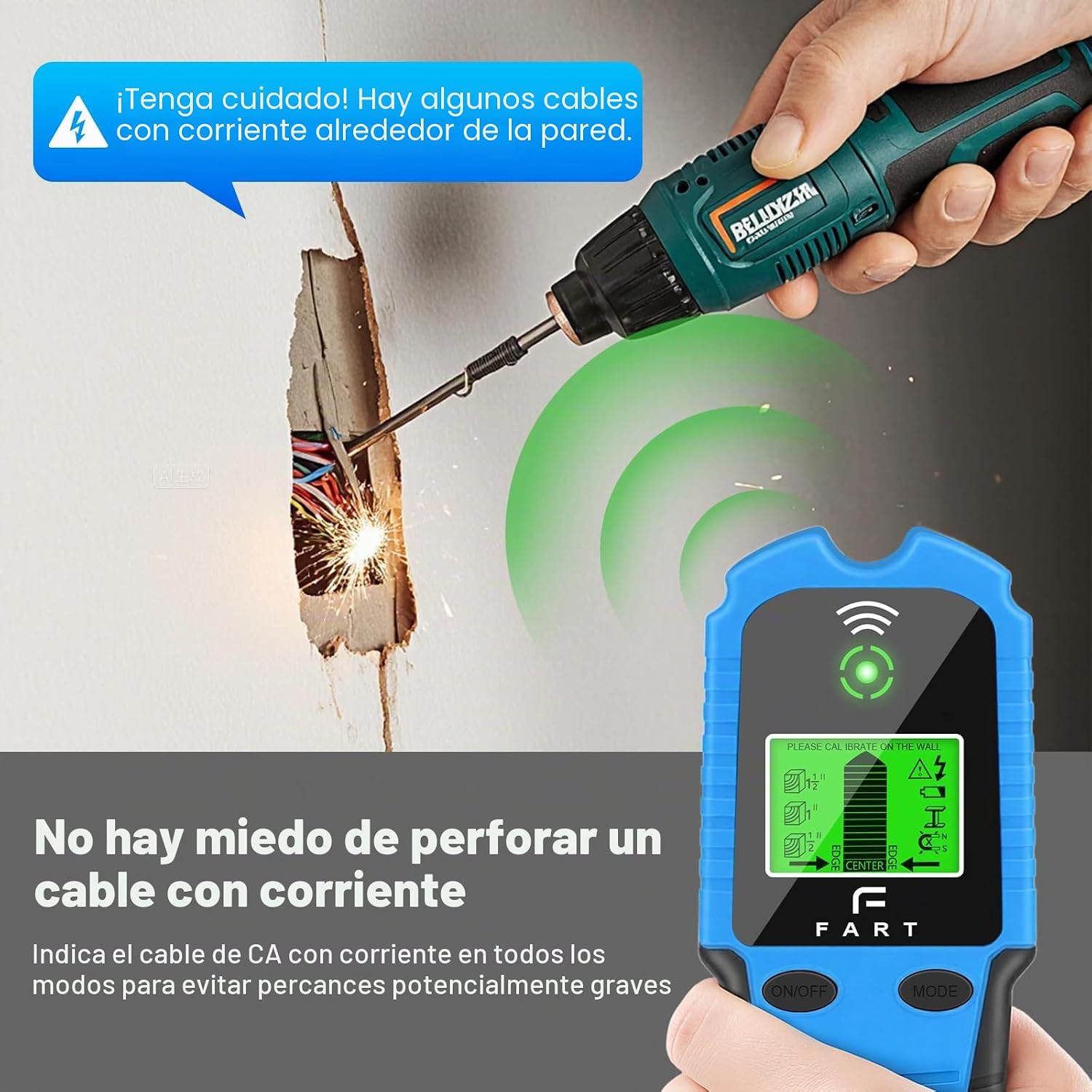
Figure 8: Live Wire Detection. This image demonstrates the device detecting a live AC wire behind a wall, displaying a warning to prevent accidental drilling or cutting into electrical lines.
6. Maintenance
- Cleaning: Wipe the device with a soft, damp cloth. Do not use abrasive cleaners or solvents.
- Storage: Store the device in a dry, dust-free environment when not in use. Remove the battery if storing for extended periods to prevent leakage.
- Battery Replacement: Replace the 9V battery when the low battery indicator appears on the LCD display.
- Avoid Extreme Conditions: Do not expose the device to extreme temperatures, humidity, or direct sunlight.
7. Troubleshooting
| Problem | Possible Cause | Solution |
|---|---|---|
| Device does not turn on. | Low or dead battery; incorrect battery installation. | Replace the 9V battery; ensure correct polarity. |
| Inaccurate or inconsistent readings. | Improper calibration; scanning too fast; presence of moisture in wall; thick or irregular wall material. | Recalibrate the device on a clear section of the wall; scan slowly and steadily; ensure wall is dry; try Deep Scan mode if applicable. |
| Device constantly detects objects or gives false positives. | Improper calibration; high humidity; presence of large metal objects nearby. | Recalibrate in a different, clear spot; ensure environment is not excessively humid; move away from large metal structures. |
| AC warning flashes frequently. | Live AC wires are present in the wall; device is too close to an electrical outlet or appliance. | Proceed with caution; verify the presence of live wires; move the device slightly away from known electrical sources. |
8. Specifications
- Model: T70
- Power Source: 1 x 9V Battery (included)
- Product Dimensions: Approximately 9 cm (L) x 3 cm (W) x 17 cm (H)
- Weight: Approximately 250 g
- Stud Detection Depth:
- 1/2 inch (12 mm)
- 1 inch (25 mm)
- 1.5 inches (38 mm)
- Deep Scan: up to 3 inches (76 mm)
- Metal Detection Depth: Up to 4 inches (100 mm)
- AC Wire Detection Depth: Up to 2 inches (50 mm)
- Display: Backlit LCD
- Operating Temperature: 0°C to 40°C (32°F to 104°F)
- Storage Temperature: -10°C to 50°C (14°F to 122°F)
- Origin: China
9. Warranty and Support
Aroeally products are manufactured to high-quality standards. For warranty information, technical support, or customer service inquiries, please refer to the contact information provided with your purchase or visit the official Aroeally website. Please retain your proof of purchase for warranty claims.