
Introduction
The FOSSIBOT F106 Plus is a rugged smartphone designed for durability and performance in challenging environments. It features a large 12000mAh battery, a 50MP AI main camera, a 20MP infrared night vision camera, and dual 128dB speakers. This manual provides essential information for operating and maintaining your device.

Image: Overview of the FOSSIBOT F106 Plus, showcasing its robust design and primary features.
Safety Information
Please read this section carefully before using your device to ensure safe and proper operation.
- Battery Safety: Do not attempt to replace the battery yourself. Use only FOSSIBOT-approved chargers and cables. Avoid exposing the device to extreme temperatures or direct sunlight for prolonged periods.
- Water and Dust Resistance: The FOSSIBOT F106 Plus is IP68/IP69K rated for water and dust resistance. Ensure all ports are securely closed before exposure to water or dust. Avoid intentional submersion in corrosive liquids or high-pressure water jets.
- Impact Resistance: The device is MIL-STD-810H certified for drop resistance. While designed to withstand drops, extreme impacts can still cause damage.
- Hearing Protection: The device features loud speakers. Avoid prolonged listening at high volumes to prevent hearing damage.
Package Contents
Verify that all items are present in your product package:
- FOSSIBOT F106 Plus Smartphone
- Power Charger
- Type-C Cable
- Pre-applied Screen Protector Film
- SIM Eject Pin
- User Manual & Service Card

Image: Contents included in the FOSSIBOT F106 Plus retail package.
Setup
1. SIM Card Installation
The FOSSIBOT F106 Plus supports dual SIM cards (2 x Nano SIM) or one Nano SIM and one microSD card for storage expansion up to 2TB. This device is compatible with T-Mobile network.
- Locate the SIM card tray on the side of the device.
- Insert the SIM eject pin into the small hole next to the tray to open it.
- Place your Nano SIM card(s) and/or microSD card into the tray with the gold contacts facing down.
- Carefully reinsert the tray into the phone until it clicks into place.

Image: Illustration of SIM card installation and network compatibility.
2. Initial Charging
Before first use, fully charge your FOSSIBOT F106 Plus. The device is equipped with a 12000mAh battery and supports 30W fast charging.
- Connect the Type-C cable to the charging port at the bottom of the phone.
- Connect the other end of the cable to the provided power charger.
- Plug the charger into a power outlet.
- The charging indicator will appear on the screen. A full charge may take several hours.

Image: The FOSSIBOT F106 Plus connected to a charger, illustrating its large battery capacity and charging speed.
3. Power On/Off
- To Power On: Press and hold the Power button (located on the right side) until the FOSSIBOT logo appears.
- To Power Off: Press and hold the Power button, then select 'Power off' from the options on the screen.
- To Restart: Press and hold the Power button, then select 'Restart' from the options.
Operating Instructions
Display
The FOSSIBOT F106 Plus features a 6.745-inch FHD+ display with a 120Hz refresh rate for smooth visuals and responsive touch.
- Screen Size: 6.745 inches
- Resolution: 720*1600
- Refresh Rate: 120Hz
- Peak Brightness: 450cd/m²

Image: The FOSSIBOT F106 Plus display, highlighting its size, resolution, and refresh rate.
Operating System
The device runs on Android 16 OS, offering enhanced privacy controls, system optimization, and a smooth user experience.

Image: The FOSSIBOT F106 Plus interface, demonstrating the Android 16 operating system.
Performance and Storage
The F106 Plus is powered by a high-performance 8-core processor, ensuring smooth operation and efficient multitasking. It comes with 18GB RAM (6GB base + 12GB virtual) and 128GB internal storage, expandable up to 2TB via a TF card.

Image: Internal components of the FOSSIBOT F106 Plus, detailing RAM, ROM, and processor specifications.
Camera System
Capture your adventures with the versatile camera system:
- 50MP AI Main Camera: For vibrant, high-resolution photos.
- 20MP Infrared Night Vision Camera: Enables clear photography and video recording in complete darkness.
- 8MP Front Camera: For sharp selfies and video calls.
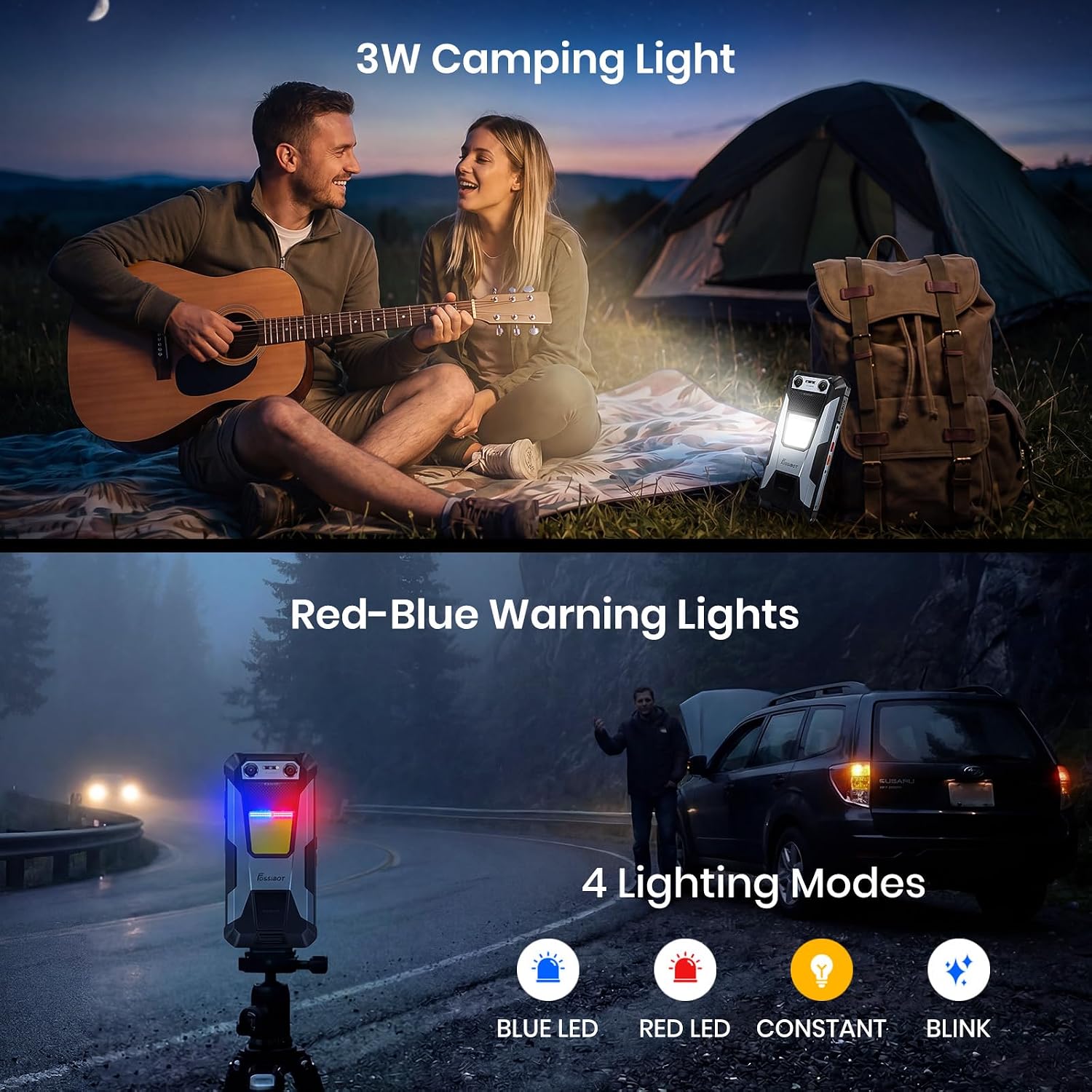
Image: The FOSSIBOT F106 Plus camera array and example photos taken with its various lenses.

Image: Demonstrates the clarity of the 20MP Infrared Night Vision Camera in low-light conditions.
Special Features
Camping Light & Warning Lights
The F106 Plus integrates a powerful 512LM camping light with multiple modes:
- Lighting: Standard bright illumination.
- SOS: For emergency signaling.
- Flash: Strobe effect.
- Red & Blue Warning Light: Designed for roadside emergencies or signaling.

Image: The FOSSIBOT F106 Plus demonstrating its camping light and red/blue warning light functions.
Dual 128dB Speakers
Experience clear audio with the dual 128dB speakers, providing rich sound even in noisy environments.

Image: Close-up of the FOSSIBOT F106 Plus speakers, illustrating their design and loud output.
OTG Reverse Charging
Utilize the OTG (On-The-Go) function to reverse-charge other devices, turning your phone into a power bank for emergencies.

Image: The FOSSIBOT F106 Plus demonstrating its OTG reverse charging capability.
Connectivity and Security
- NFC: For contactless payments and data transfer.
- GPS: Supports GPS/Glonass/Galileo/Beidou for precise navigation.
- Bluetooth 5.2: For wireless accessory connection.
- Wi-Fi: Dual-band Wi-Fi (2.4GHz + 5GHz).
- Face Unlock: Secure facial recognition for unlocking.
- Side Fingerprint Unlock: Convenient fingerprint sensor for quick access.

Image: Visual representation of the FOSSIBOT F106 Plus's connectivity and security options.
Intelligent Built-in System Functions
The F106 Plus includes several smart features to enhance usability:
- Glove Mode: Allows touch screen operation while wearing gloves.
- Pocket Mode: Prevents accidental touches when the phone is in a pocket.
- Kids Space: A dedicated mode with app and screen time limits.
- Intruder Selfie: Automatically captures a photo of anyone attempting to unlock your phone unsuccessfully.
- App Freeze: Hibernates unused apps to save battery.
- Floating Window: Enables multi-tasking with apps in floating windows.
- Double Tap Wake-up: Tap the screen twice to wake the device.

Image: Demonstrates the FOSSIBOT F106 Plus's intelligent software features.
Offline Talk
The F106 Plus supports offline communication, allowing real-time calls and voice messages within a 20-meter range without cellular data or Wi-Fi.

Image: Illustrates the offline talk feature of the FOSSIBOT F106 Plus.
Maintenance
Durability and Protection
The FOSSIBOT F106 Plus is built to withstand harsh conditions, certified with:
- IP68: Water resistant up to 1.5 meters for 30 minutes.
- IP69K: Dustproof and resistant to high-pressure, high-temperature water jets.
- MIL-STD-810H: Military-grade drop protection up to 1.5 meters onto concrete.
To maintain its protective features, ensure all port covers are securely closed when not in use, especially before exposure to water or dust.

Image: The FOSSIBOT F106 Plus undergoing drop, dust, and water resistance tests.
Cleaning
To clean your device, use a soft, damp cloth. Avoid using harsh chemicals or abrasive materials, which can damage the phone's protective coatings.
Troubleshooting
If you encounter issues with your FOSSIBOT F106 Plus, try the following steps:
- Device Unresponsive: Press and hold the Power button for about 10-15 seconds to force a restart.
- Battery Draining Quickly: Check for background apps consuming power. Adjust screen brightness. Ensure location services are off when not needed.
- Network Issues: Verify SIM card installation. Check network settings. Restart the device. Confirm compatibility with your carrier (T-Mobile recommended).
- App Malfunctions: Clear the app's cache and data in settings, or uninstall and reinstall the app.
- Software Glitches: Ensure your device's software is up to date. A factory reset can resolve persistent software issues (Note: This will erase all data on your phone. Back up important information first.).
Specifications
| Feature | Specification |
|---|---|
| Brand | FOSSIBOT |
| Model Name | F106Plus |
| Operating System | Android 16 OS |
| RAM Memory Installed Size | 18 GB (6GB Base + 12GB Virtual) |
| Memory Storage Capacity | 128 GB |
| Flash Memory Supported Size Maximum | 2 TB (via TF card) |
| CPU Speed | 2.2 GHz |
| Screen Size | 6.75 inches |
| Refresh Rate | 120 Hz |
| Display Type | LCD |
| Rear Facing Camera Photo Sensor Resolution | 50 MP |
| Front Photo Sensor Resolution | 8 MP |
| Night Vision Camera | 20 MP Infrared |
| Battery Capacity | 12000 mAh |
| Charging Power | 30W Fast Charging |
| Battery Average Life (Standby) | 1200 hours |
| Phone Talk Time | 89 hours |
| Water Resistance Level | IP68, IP69K |
| Drop Resistance | MIL-STD-810H (1.5m) |
| Wireless Carrier Compatibility | T-Mobile |
| Cellular Technology | 4G |
| SIM Card Slot Count | Dual SIM |
| Connectivity Technology | Bluetooth 5.2, Wi-Fi, NFC, GPS |
| Connector Type | USB Type C |
| Special Features | 512LM Camping Light, 128dB Dual Speakers, OTG Reverse Charging |
Warranty and Support
FOSSIBOT provides comprehensive support for your F106 Plus device:
- Warranty: Official 2-Year Professional Warranty.
- Return Policy: 30-Day Risk-Free Return Policy.
- Customer Care: 24/7 dedicated customer support.
- Contact: For support inquiries, please email fossibotphone@163.

