
Introduction
This instruction manual provides detailed guidance for installing and operating your BrickSoul Light Kit, designed specifically for the Lego 11506 Rocking Plants Botanical Building Set. This kit enhances your Lego model with integrated lighting, featuring touch control and dimming capabilities. Please note that the Lego 11506 building set is not included with this light kit.
What's Included
Your BrickSoul Light Kit package contains the following components:
- LED Light Kit components (various light strings and boards)
- Light Control Button (USB wired control)
- Battery Box (requires 3 AAA batteries, not included)
- USB Power Cable (adapter not included)
- Installation Guide (digital access via QR code/online resources)
- Tweezers (for precise placement)
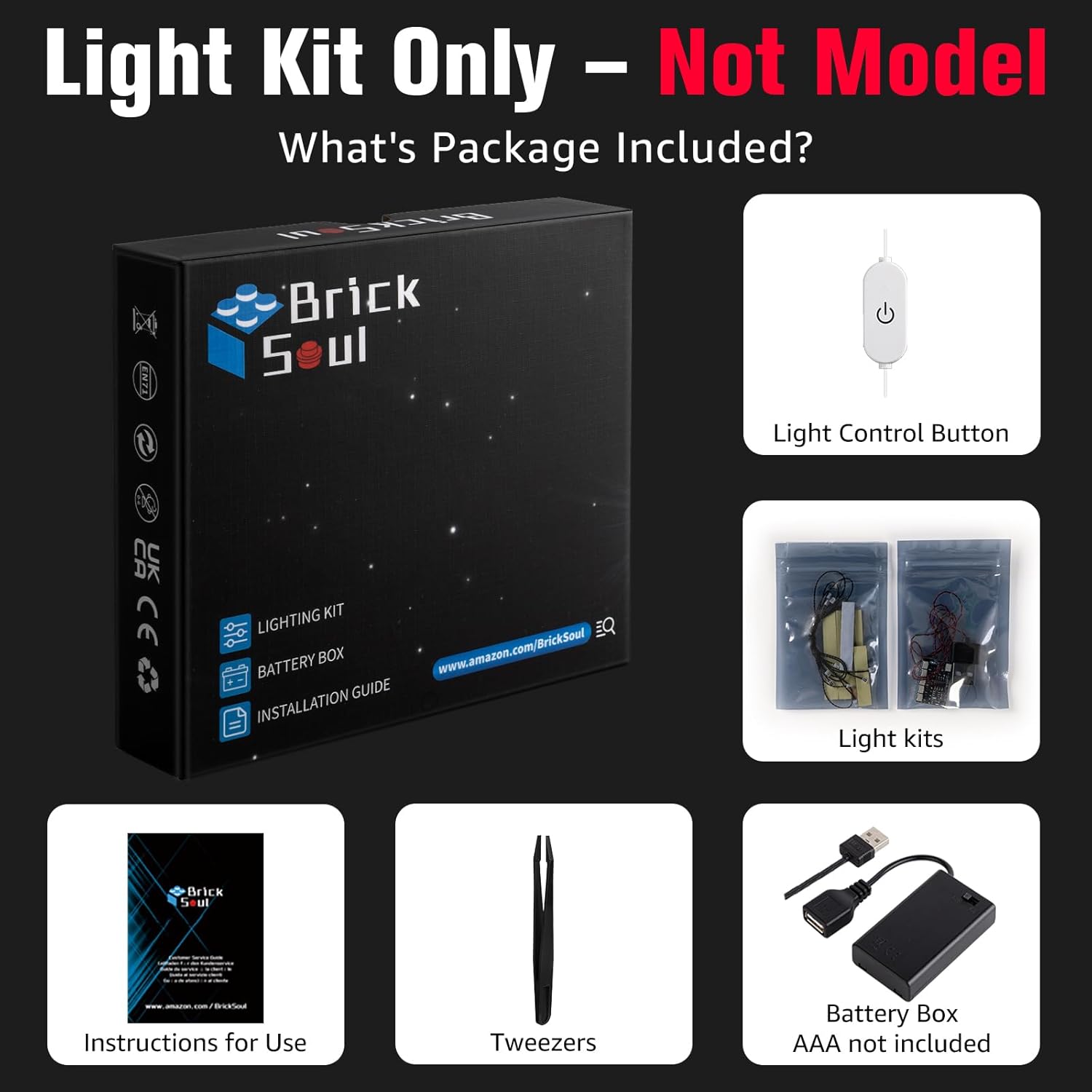
Figure 1: Package Contents.
Safety Information
Please read and understand all safety instructions before installation and use. Failure to follow these instructions may result in electric shock, fire, or other hazards.
- Age Recommendation: This product is recommended for individuals aged 14 years and older.
- Power Source: Use only the provided USB cable with a compatible 5V USB power adapter (not included) or the battery box with 3 AAA batteries (not included). Do not use power sources exceeding 5V.
- Wiring: Ensure all wires are properly connected and not pinched or damaged during installation. Avoid excessive force when connecting components.
- Water Exposure: This product is not waterproof. Avoid exposure to water or high humidity.
- Disassembly: Do not attempt to disassemble or modify the light kit components. This may void the warranty and create safety hazards.
- Small Parts: The kit contains small parts that may pose a choking hazard to young children. Keep out of reach of children under 3 years old.
Setup and Installation
The BrickSoul Light Kit is designed for easy and enjoyable assembly. Follow these general steps for installation. For detailed, step-by-step instructions, refer to the online video and PDF guides accessible via the QR code on your physical instruction sheet or by visiting the BrickSoul website.
- Prepare Your Lego Model: Ensure your Lego 11506 Rocking Plants Botanical Building Set is fully assembled and ready for lighting integration.
- Identify Components: Unpack the light kit components. The light bags are numbered to correspond with installation steps in the digital guides.
- Follow Digital Guide: Access the online video or PDF guide. These resources provide precise instructions for integrating each light component into your Lego model, utilizing the hidden wiring technology for a clean finish.
- Connect Lights: Carefully connect the light components using the snap-on connectors. Use the included tweezers for precise placement of small wires and LEDs.
- Power Connection:
- USB Power: Connect the USB power cable from the light control button to a 5V USB power adapter (not included) or a USB power bank.
- Battery Box Power: Insert 3 AAA batteries (not included) into the battery box. Connect the battery box to the light control button.
- Test Functionality: Before finalizing all connections and placements, briefly connect power and test the lights to ensure all components are working correctly.

Figure 2: Illuminated Lego 11506 Set after installation.

Figure 3: Close-up of illuminated details.
Operating Instructions
The BrickSoul Light Kit features an upgraded touch control USB button for easy operation.
- Power On/Off: Tap the light control button once to turn the lights on or off.
- Adjust Brightness: Hold the light control button to adjust the brightness level. The lights will cycle through various dimming levels (0% to 100%). Release the button when the desired brightness is reached.

Figure 4: Touch Control Operation.
Video 1: Demonstration of the touch control and dimming features of the BrickSoul Light Kit for Lego 11506.
Maintenance
To ensure the longevity and optimal performance of your BrickSoul Light Kit, follow these simple maintenance guidelines:
- Cleaning: Gently wipe the illuminated Lego model with a soft, dry cloth to remove dust. Avoid using liquid cleaners or abrasive materials.
- Battery Replacement: If using the battery box, replace all 3 AAA batteries when the lights become dim or stop working. Ensure correct polarity when inserting new batteries.
- Storage: If storing the model for an extended period, disconnect the power source (unplug USB or remove batteries) to prevent battery leakage or unnecessary power drain.
- Handle with Care: Avoid pulling on wires or applying excessive pressure to the light components to prevent damage.
Troubleshooting
If you encounter any issues with your BrickSoul Light Kit, please refer to the following common troubleshooting steps:
| Problem | Possible Cause | Solution |
|---|---|---|
| Lights do not turn on. | No power, loose connection, faulty component. |
|
| Lights are dim or flickering. | Low power, dimming setting, loose connection. |
|
| Some lights are not working. | Damaged wire/LED, loose connection. |
|
Specifications
| Brand | BrickSoul |
| Model Number | BS-11506-tvw |
| Compatible Set | Lego 11506 Rocking Plants Botanical Building Set |
| Material | Plastic |
| Power Input | 5V USB (adapter not included) or 3x AAA Batteries (not included) |
| Control Method | Touch Control USB Button (On/Off, Dimming) |
| Recommended Age | 14+ years |
Warranty and Support
BrickSoul is committed to providing high-quality products and excellent customer service.
- 1-Year Hassle-Free Support: Your BrickSoul Light Kit comes with 1 year of dedicated support.
- Customer Support: If you have any questions, encounter issues not covered in this manual, or require assistance, please contact BrickSoul customer support. Our team is ready to resolve any questions you may have.
- Online Resources: For additional installation guides, FAQs, and support, please visit the official BrickSoul website or refer to the digital instructions provided with your kit.
