
Introduction
This manual provides detailed instructions for the use and maintenance of your OPPO Enco Air5 Pro True Wireless Earbuds. Please read this manual thoroughly before using the product to ensure proper operation and to maximize its performance and lifespan.
Package Contents
Your OPPO Enco Air5 Pro Earbuds package includes the following:
- OPPO Enco Air5 Pro Earbuds (Left and Right)
- Charging Case
- Eartips (various sizes for optimal fit)
- User Manual

Image: Contents of the OPPO Enco Air5 Pro Earbuds retail package.
Product Overview
Familiarize yourself with the components of your OPPO Enco Air5 Pro Earbuds.
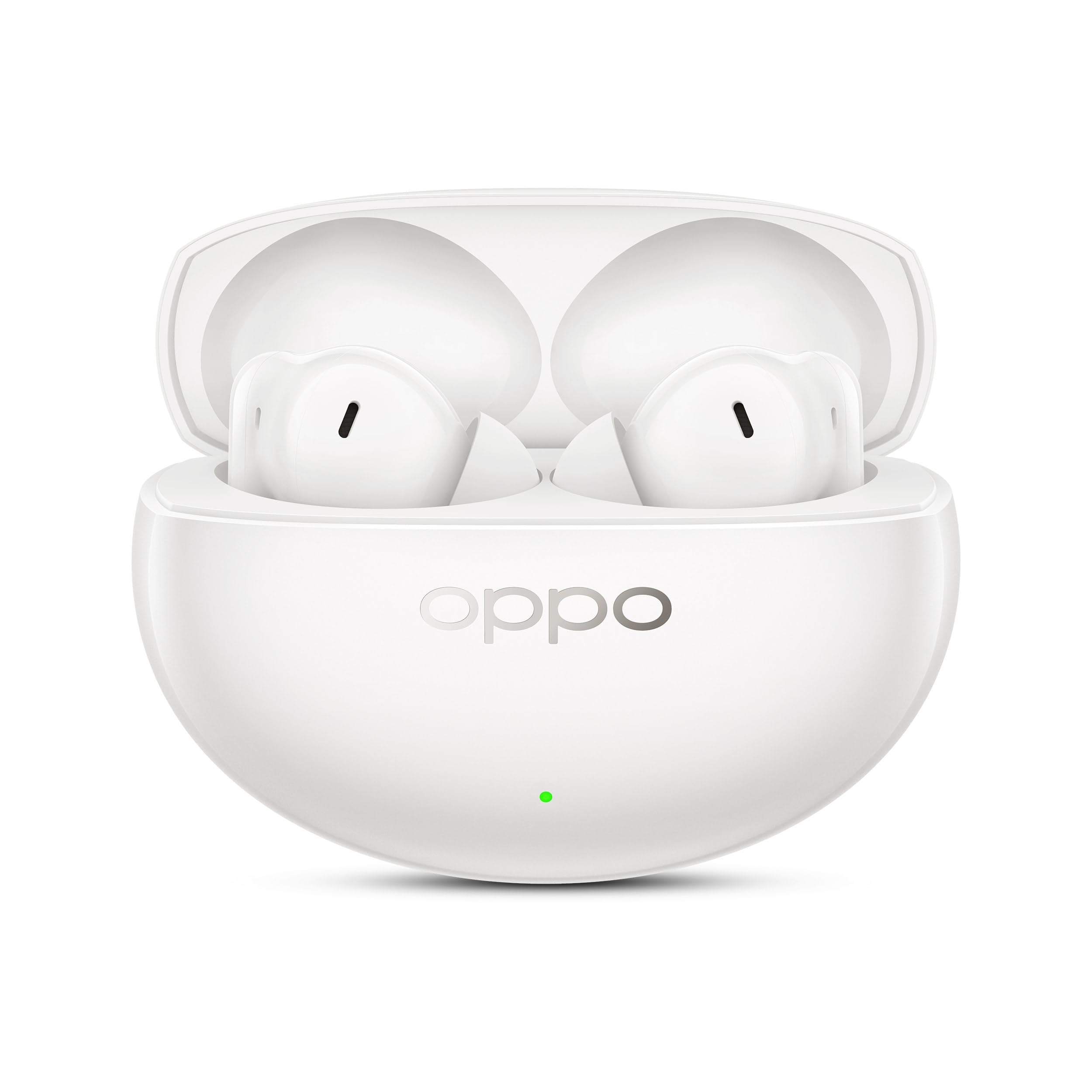
Image: OPPO Enco Air5 Pro Earbuds and charging case.
Earbud Components
- Eartips: Silicone tips for comfortable fit and sound isolation.
- Microphones: Multiple microphones for Active Noise Cancellation and clear call quality.
- Touch Control Area: For managing playback, calls, and modes.
- Charging Contacts: Located at the bottom of the earbud stems.

Image: Triple-Mic AI Clear Call technology diagram.

Image: 12mm Titanium-Coated Diaphragm driver detail.
Setup
1. Initial Charging
Before first use, place the earbuds into the charging case and connect the case to a power source using a USB-C cable. Ensure the earbuds and case are fully charged.
2. Pairing with a Device
- Open the charging case with the earbuds inside.
- Press and hold the function button on the charging case until the indicator light flashes white, indicating pairing mode.
- On your device (smartphone, tablet, laptop), enable Bluetooth and search for "OPPO Enco Air5 Pro" in the list of available devices.
- Select the earbuds to complete the pairing process.

Image: Bluetooth 6.0 connectivity for OPPO Enco Air5 Pro.
3. Installing the Hey Melody App
For advanced features and customization, download the "Hey Melody" app from your device's app store. The app allows for:
- Customizing touch controls.
- Adjusting ANC modes and intensity.
- Performing ear fit tests for optimal sound.
- Updating firmware.
- Accessing Sound Master EQ settings.

Image: Sound Master EQ customization via the Hey Melody app.
Operating the Earbuds
Touch Controls
The earbuds feature intuitive touch controls. Default functions typically include:
- Double Tap: Play/Pause, Answer/End Call.
- Triple Tap: Next Track.
- Long Press (Left Earbud): Switch between Noise Cancellation modes (ANC On/Transparency/ANC Off).
- Long Press (Right Earbud): Voice Assistant.
- Slide Up/Down: Volume Control.
Note: Specific touch controls can be customized via the Hey Melody app.

Image: Slide Volume Control on the earbud stem.
Active Noise Cancellation (ANC) and Transparency Mode
The OPPO Enco Air5 Pro features 55dB Active Noise Cancellation with wide frequency coverage, certified by TÜV Rheinland. It also includes Smart Adaptive Noise Cancellation that adjusts based on your environment and ear fit.
- ANC On: Reduces ambient noise for an immersive listening experience.
- Transparency Mode: Allows you to hear your surroundings without removing the earbuds.
- ANC Off: Standard audio playback without noise cancellation.
Switch between modes by long-pressing the touch control area on the left earbud or through the Hey Melody app.

Image: 55dB Active Noise Cancellation in action.

Image: Smart Scene Noise Cancellation for various environments.
Audio Features
- Hi-Res Audio with LHDC 5.0: Supports high-resolution audio playback for detailed sound.
- 12mm Titanium-Coated Dynamic Drivers: Delivers deep bass and clear audio.
- OPPO Alive Audio: Provides a 360° immersive audio experience.

Image: Hi-Res Audio with LHDC 5.0 support.
Battery and Charging
The earbuds and charging case offer up to 54 hours of total playback time. The earbuds support fast charging.
- Place earbuds in the case to charge them.
- Connect the case to a USB-C power adapter for charging the case and earbuds simultaneously.
- The indicator light on the case shows charging status.

Image: Up to 54 hours of total playback with charging case.
Additional Features
- Dual Connection: Seamlessly switch between two paired devices.
- Spotify Tap: Quick access to Spotify playback with a tap (requires app configuration).
- AI Translate: Supports real-time translation features (requires compatible app).
- Gaming Mode: Reduces audio latency for an improved gaming experience.

Image: Dual Connection across multiple devices.

Image: Immersive Gaming Scene with low latency.
Maintenance
Cleaning
- Regularly clean the earbuds, especially the eartips and charging contacts, with a soft, dry, lint-free cloth.
- Remove eartips and clean any earwax or debris from the speaker mesh using a small, soft brush.
- Clean the charging case interior and exterior with a soft, dry cloth.
- Do not use abrasive materials, alcohol, or chemical cleaners.
Storage
- Always store the earbuds in their charging case when not in use to protect them and keep them charged.
- Store in a cool, dry place away from extreme temperatures and direct sunlight.
Water and Dust Resistance
The earbuds are IP55 dust and water resistant. This means they are protected against limited dust ingress and low-pressure water jets from any direction. They are not waterproof and should not be submerged in water.

Image: IP55 Dust and Water Resistance for active use.
Troubleshooting
If you encounter issues with your earbuds, refer to the following common solutions:
| Problem | Solution |
|---|---|
| Earbuds not pairing |
|
| No sound or low volume |
|
| ANC not working effectively |
|
| Earbuds not charging |
|
If the issue persists, please contact customer support.
Specifications
| Feature | Detail |
|---|---|
| Brand | OPPO |
| Model Number | ETEL1 |
| Model Name | Air 5PRO |
| Colour | Pearl white |
| Ear Placement | In Ear |
| Form Factor | In Ear |
| Noise Control | Environmental Noise Cancellation (55dB Active Noise Cancellation) |
| Audio Driver Type | Dynamic Driver |
| Audio Driver Size | 12mm (Titanium-Coated Diaphragm) |
| Battery Average Life | Up to 54 Hours (with charging case) |
| Wireless Technology | Bluetooth |
| Control Type | Touch, In-line Remote (via app) |
| Water Resistance Level | IP55 (Dust and Water Resistant) |
| Item Weight | 44 Grams (total, likely case + earbuds) |
| Compatible Devices | Cellphones, Laptops, Tablets |
| Special Features | Fast Charging, Integrated Equalizer, Microphone Included, Noise Cancellation, Hi-Res Audio with LHDC 5.0, Dual Connection, Smart Adaptive Noise Cancellation, OPPO Alive Audio |
Safety Information
- Do not expose earbuds or charging case to extreme temperatures, direct sunlight, or fire.
- Avoid using earbuds at high volume for extended periods to prevent hearing damage.
- Keep out of reach of children and pets.
- Do not attempt to disassemble or modify the product.
- Dispose of the product responsibly according to local regulations.
Warranty and Support
Warranty
Your OPPO Enco Air5 Pro Earbuds come with a 1 Year Manufacturer Warranty from the date of purchase. Please retain your proof of purchase for warranty claims.
Customer Support
For any queries, technical assistance, or service requests, please contact OPPO customer support:
- Hotline: 18001032777 (9:00 - 22:00 Mon-Sun, including holidays)
- WhatsApp: +91-9871502777
- Service Centers: Over 580 authorized service centers available.

Image: OPPO Customer Service and Support Information.


