
1. Introduction
This manual provides detailed instructions for the installation, operation, maintenance, and troubleshooting of your Mygate Smart Door Lock Plus (2026 Model). Please read this manual thoroughly before installation and use to ensure proper functionality and safety. Keep this manual for future reference.
2. Product Overview
2.1 Key Features
- 6-Way Unlocking: Fingerprint, PIN, Mobile App, RFID Card, Manual Keys, and Remote OTP.
- Integrated Wi-Fi: For real-time alerts and remote management.
- Advanced Security: Anti-tamper technology, decoy PIN feature, and automatic freeze on multiple failed attempts.
- Child Lock: Prevents accidental opening from the inside.
- Durable Construction: High-grade stainless steel and aluminum alloy.
- Emergency Power: Low battery alerts and USB Type-C jump-start port.
2.2 What's in the Box
- 1 Mortise
- 2 Mechanical Keys
- 2 RFID Cards
- 4 AA Batteries
- User Manual

Image: Overview of Mygate Smart Door Lock Plus components, highlighting child lock, auto-engaging deadbolts, aluminum alloy body, stainless steel bolt, and anti-tamper features.
3. Setup
3.1 Installation Requirements
- Suitable for wooden doors only.
- Door thickness: 35mm to 65mm.
- Minimum gap between main door and safety door: 85mm.
- Not compatible with double doors, metal/glass doors, or sliding doors.

Image: Illustrates door compatibility, showing the lock is suitable for wooden doors with specific thickness and gap requirements, and incompatible with other door types.
3.2 App Setup and Wi-Fi Pairing
To utilize all smart features, download the Mygate app and pair your lock with a Wi-Fi Gateway (sold separately). This enables remote unlocking and real-time notifications.
- Download the Mygate app from your device's app store.
- Create an account or log in.
- Follow the in-app instructions to add your Smart Door Lock Plus.
- Pair the lock with your Wi-Fi Gateway for internet connectivity.

Image: Shows the Mygate Smart Door Lock Plus and a Wi-Fi Gateway, indicating how pairing enables remote unlock and notifications via the phone app.
4. Operating Instructions
4.1 Unlocking Methods
The Mygate Smart Door Lock Plus offers six ways to unlock your door:
- Fingerprint: Register up to 100 unique fingerprints. Place your registered finger on the sensor.
- PIN Code: Enter your personalized PIN on the keypad. The decoy PIN feature allows you to enter random digits before or after your actual PIN to prevent shoulder surfing.
- Mobile App: Use the Mygate app to unlock the door remotely (requires Wi-Fi Gateway).
- RFID Card: Tap a registered RFID card on the designated area of the lock.
- Manual Key: Use the provided mechanical keys for traditional unlocking in emergencies or power outages.
- Remote OTP: Generate one-time passwords (OTPs) via the app and share them for temporary access.

Image: Visual representation of the six unlocking methods available for the Mygate Smart Door Lock Plus.
4.2 User Management and Access Sharing
Manage access for family, friends, and visitors through the Mygate app:
- Fingerprint Registration: Easily register up to 100 fingerprints for various users.
- App Access: Grant or revoke app access to other users.
- OTP Sharing: Share access via OTP through WhatsApp, SMS, or email. Set access types as timed, recurring, one-time, or permanent.
- Passage Mode: Configure Passage Mode for easy access for multiple guests during specific periods. Note: Passage Mode requires manual activation via a registered credential after the scheduled start time.
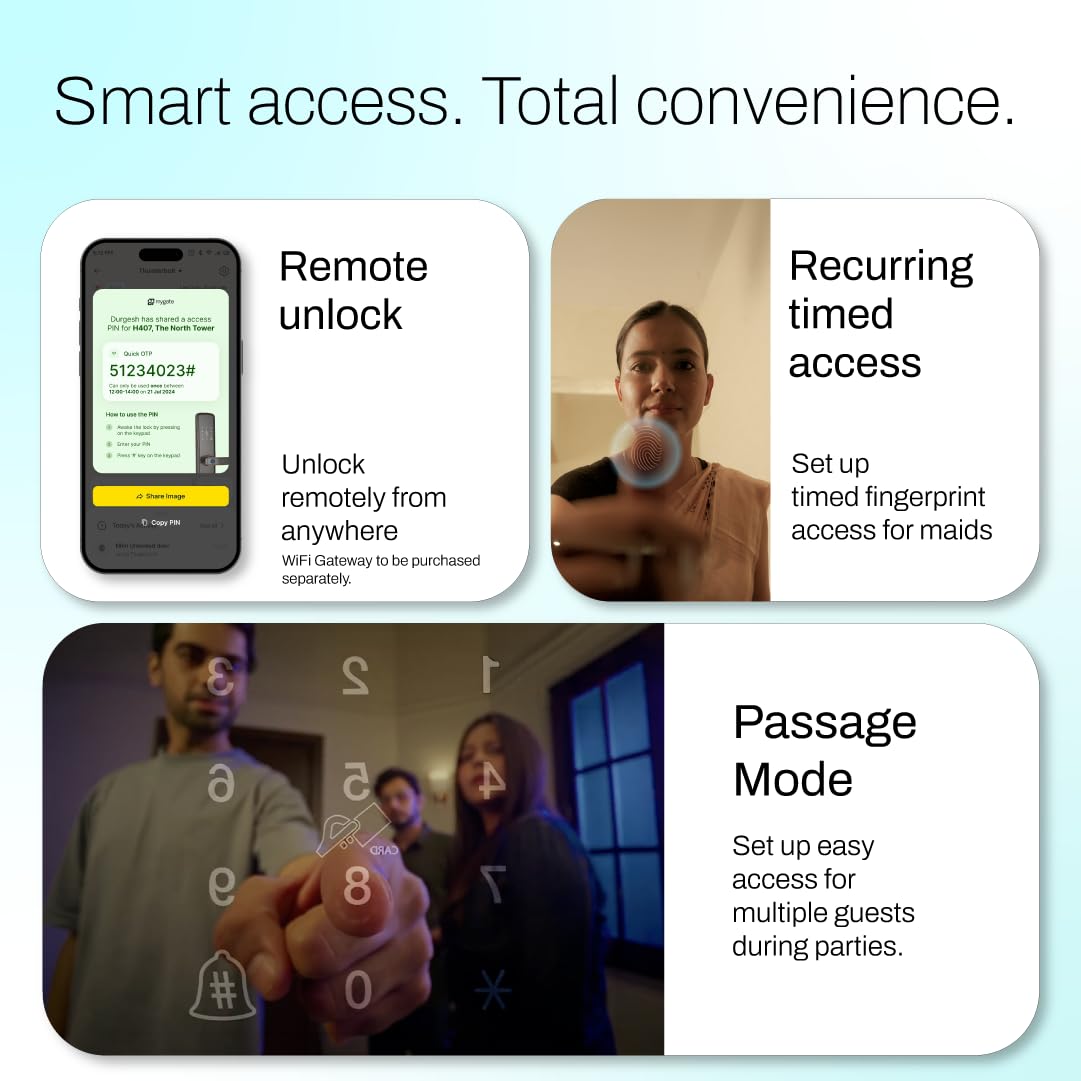
Image: Demonstrates smart access features including remote unlock via OTP, recurring timed access for household staff, and Passage Mode for guests.
5. Maintenance
5.1 Battery Management
The lock operates on 4 AA batteries, providing approximately 6-8 months of battery life.
- Low Battery Alerts: The lock will provide audible warnings and send notifications to the Mygate app when battery levels are low.
- Battery Replacement: Replace all four AA batteries promptly when low battery alerts are received.
- Emergency Jump-Start: In case of complete battery depletion, use a USB Type-C power bank to temporarily power the lock via the emergency port for access.

Image: Details the battery features of the Mygate Smart Door Lock Plus, including battery life, low battery warnings, and the USB Type-C port for emergency power.
5.2 Cleaning
Wipe the lock's surface with a soft, dry cloth. Avoid using abrasive cleaners or solvents that may damage the finish or electronic components.
6. Troubleshooting
| Problem | Possible Cause | Solution |
|---|---|---|
| Lock not responding to fingerprint/PIN. | Low battery, incorrect fingerprint/PIN, sensor obstruction. | Check battery level, re-enter PIN carefully, clean fingerprint sensor, re-register fingerprint if needed. |
| Cannot unlock via mobile app. | No Wi-Fi connection, Wi-Fi Gateway offline, app issue. | Ensure Wi-Fi Gateway is connected and online, check phone's internet connection, restart app, try manual key. |
| Lock makes unusual sounds. | Mechanical obstruction, internal issue. | Check for any physical obstructions around the latch/bolt. If sounds persist, contact customer support. |
| Low battery alert persists after changing batteries. | Faulty batteries, incorrect battery insertion. | Ensure batteries are new and inserted correctly according to polarity. Try a different set of new batteries. |
7. Specifications
- Brand: Mygate
- Model Name: Mygate Locks Plus
- Model Number: 8908023617026
- Lock Type: Biometric
- Material: Aluminium, Stainless Steel
- Item Dimensions (L x W x H): 36.1 x 7.5 x 2.4 Centimeters
- Item Weight: 3.8 Kilograms
- Connectivity Protocol: Wi-Fi
- Controller Type: Finger Print Control, Mechanical Keys, Mobile App Access, PIN/OTP Unlocking Access, RFID Access Card
- Power Source: 4 AA Batteries
- Recommended Uses: Home - Main Wooden Door
8. Warranty and Support
8.1 Warranty Information
The Mygate Smart Door Lock Plus comes with a 3-year warranty from the date of purchase. Please retain your purchase receipt as proof of warranty.
8.2 Customer Support
For technical assistance, installation queries, or warranty claims, please contact Mygate customer support. Refer to the contact information provided in your product packaging or visit the official Mygate website.