
1. Introduction
The BSIDE S600A PV Multimeter is a high-precision digital multimeter designed for comprehensive electrical measurements, particularly in photovoltaic (PV) systems. It features a 60000-count display, power measurement capabilities, a 10000A flexible AC clamp, and a 3.98-inch touch LCD with data recording functionality. This manual provides essential information for the safe and effective operation, maintenance, and troubleshooting of your device.

Image 1.1: BSIDE S600A PV Multimeter showcasing its main features.
2. What's in the Box
Carefully unpack your BSIDE S600A PV Multimeter and verify that all items listed below are present and in good condition. If any item is missing or damaged, please contact customer support.
- 1 x BSIDE S600A Digital Multimeter
- 1 x Flexible Clamp Wire (for 10000A AC current measurement)
- 1 x Pair of Test Leads (red and black)
- 1 x Charging Cable
- 1 x Carrying Case
- 1 x Thermocouple (for temperature measurement)
- 1 x User Manual (this document)

Image 2.1: All components included with the BSIDE S600A PV Multimeter.
3. Product Features
The BSIDE S600A PV Multimeter offers a range of advanced features for precise and versatile measurements:
- 60000 Counts Display: Provides high resolution for accurate measurements, suitable for precision industries and solar panel validation.
- Power Measurement: Accurately measures output power up to 1500VDC/1000VAC/10000AAC, ideal for various solar applications.
- 10000A AC Current Flexible Clamp: Includes a flexible clamp wire for measuring AC currents up to 10000A.
- Data Recording Mode: Tracks and records tested data over time, including voltage, resistance, current, capacitance, and temperature.
- 3.98-inch Touch LCD: A large touch screen display for an enhanced reading experience in diverse working environments.
- Portable and Powerful: Measures DC voltage up to 1500V, AC voltage up to 1000V, power, capacitance, diode, temperature, current, PEAK, resistance, continuity, and more.
- Rechargeable Battery: Equipped with a 3000mAh rechargeable battery for extended use without power concerns.
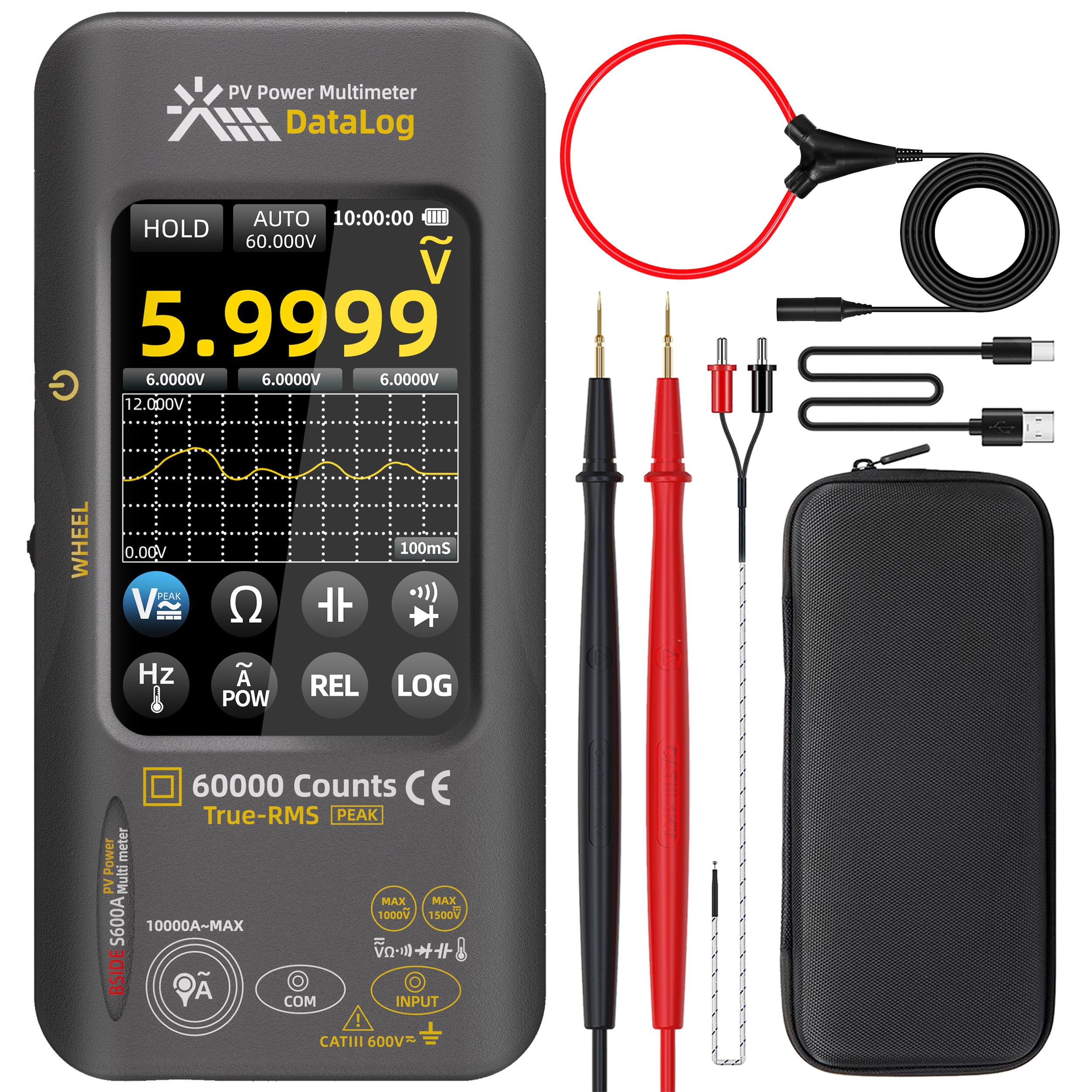
Image 3.1: Multimeter displaying a 60000 counts measurement.
4. Setup
Before using the multimeter, ensure it is fully charged and properly set up.
- Charging the Battery: Connect the provided charging cable to the multimeter's charging port and a suitable USB power source. The battery indicator on the display will show charging status.
- Connecting Test Leads:
- Insert the red test lead into the INPUT terminal.
- Insert the black test lead into the COM terminal.
- For current measurements up to 10A, insert the red lead into the 10A terminal.
- For flexible clamp measurements, connect the flexible clamp wire to the designated port.
- Power On/Off: Press and hold the power button (usually marked with ⏻) to turn the multimeter on or off.

Image 4.1: Multimeter with test leads connected for a voltage measurement.
5. Operating Instructions
The BSIDE S600A features a touch screen interface and a rotary wheel for mode selection. Always ensure the correct measurement mode is selected and test leads are connected appropriately for the measurement type.
5.1. General Operation and Touch Screen
The 3.98-inch touch LCD allows for intuitive navigation and setting adjustments. Tap icons to select functions, and swipe or tap to navigate menus. The rotary wheel on the side can also be used to cycle through primary measurement modes.

Image 5.1: Close-up of the multimeter's touch screen display.
5.2. Measurement Modes
- Voltage Measurement (DC/AC): Select the voltage mode (V≈ for DC, V∿ for AC). Connect test leads in parallel to the circuit or component. The multimeter supports up to 1500VDC and 1000VAC.
- AC Current Measurement (Flexible Clamp): Connect the flexible clamp wire to the multimeter. Wrap the flexible clamp around the conductor carrying the AC current. Select the AC current mode (A∿). The device can measure up to 10000A AC.
- Power Measurement: Select the power mode (POW). Connect the test leads to measure voltage and current simultaneously to calculate power. This is crucial for PV system analysis.
- Resistance, Continuity, Diode, Capacitance, Frequency, Temperature: Select the corresponding mode using the rotary wheel or touch screen. Connect test leads to the component under test as per standard multimeter practices. Use the provided thermocouple for temperature measurements.

Image 5.2: Multimeter using the flexible AC clamp for high current measurement.

Image 5.3: Multimeter screen showing a power measurement in Watts.
5.3. Data Recording Mode
The data recording feature allows you to log measurements over time, which is useful for monitoring system performance or troubleshooting intermittent issues.
- Activate Recording: From the main screen, tap the 'LOG' icon.
- Configure Settings: Adjust parameters such as logging interval, log type, and duration using the touch screen.
- Start/Stop Recording: Tap 'START' to begin data logging and 'STOP' to end it.
- Review Data: Access recorded data and graphs through the 'LOG' menu.

Image 5.4: Multimeter screen showing the data recording interface with a graph.
5.4. Video Demonstration
Watch this video for a practical demonstration of the BSIDE S600A PV Multimeter's measurement capabilities.
Video 5.1: Demonstration of the BSIDE S600A PV Multimeter performing various measurements, including voltage and continuity tests.
6. Maintenance
Proper maintenance ensures the longevity and accuracy of your multimeter.
- Battery Charging: The multimeter is equipped with a 3000mAh rechargeable battery. Charge the device when the low battery indicator appears on the display. Use the provided charging cable and a standard USB power adapter.
- Cleaning: Wipe the device with a soft, damp cloth. Do not use abrasive cleaners or solvents. Ensure the device is powered off and disconnected from any power source before cleaning.
- Storage: Store the multimeter in its carrying case in a cool, dry place away from direct sunlight and extreme temperatures. Remove test leads and flexible clamp before storage.

Image 6.1: Multimeter being charged via a USB connection.
7. Troubleshooting
If you encounter issues with your BSIDE S600A Multimeter, refer to the following common problems and solutions:
| Problem | Possible Cause | Solution |
|---|---|---|
| No display/Device won't turn on | Low battery; Device not powered on | Charge the battery; Press and hold the power button. |
| Incorrect readings | Wrong measurement mode; Poor test lead connection; Damaged test leads | Select correct mode; Ensure secure connections; Replace damaged leads. |
| Data recording not working | Recording not initiated; Insufficient memory | Ensure 'START' is tapped; Check available memory. |
| Touch screen unresponsive | Software glitch; Screen dirty | Restart the device; Clean the screen gently. |
If the problem persists after attempting these solutions, please contact BSIDE customer support.
8. Specifications
Detailed technical specifications for the BSIDE S600A PV Multimeter:
| Parameter | Specification |
|---|---|
| MAX Display | 60000 counts |
| DC Voltage Range | 600mV/6V/60V/600V/1500V |
| AC Voltage Range (40Hz-1000Hz) | 600mV/6V/60V/600V/1000V |
| AC Current Range (40Hz-1000Hz) | 10A/100A (via leads), 1000A/10000A (via flexible clamp) |
| Resistance Range | 600Ω/6KΩ/60KΩ/600KΩ/6MΩ/60MΩ |
| Capacitance Range | 999.99nF/9.999μF/999.99μF/59.999mF |
| Temperature Range | -200℃~1300℃ (-328℉~2372℉) |
| Frequency Range | 99.999Hz/999.99Hz/99.999KHz/999.99KHz/99.999MHz |
| Continuity | 0Ω~200Ω |
| Diode | 0V~3V |
| Battery | 3000mAh (built-in, rechargeable) |
| Dimensions | 169 x 81 x 26.8 mm (6.65 x 3.19 x 1.02 inches) |
| Weight | 259g |
9. Warranty and Support
BSIDE products are manufactured to high-quality standards. For warranty information, please refer to the warranty card included with your product or visit the official BSIDE website. For technical support, troubleshooting assistance, or to inquire about replacement parts, please contact BSIDE customer service through their official channels.
Please retain your purchase receipt as proof of purchase for warranty claims.

