
1. Introduction
This manual provides instructions for the proper use and maintenance of your Lamshaw Magnetic Replacement Charger, designed for the KIPTUMTEK T7 Smart Watch (1.83 Inches). Please read this manual thoroughly before using the product to ensure safe and efficient operation.
2. Product Overview
The Lamshaw Magnetic Replacement Charger is a dedicated charging cable for the KIPTUMTEK T7 Smart Watch. It features a magnetic charging interface for easy connection and a USB Type C connector for power input. The cable is designed for durability and includes safety features to protect your device during charging.
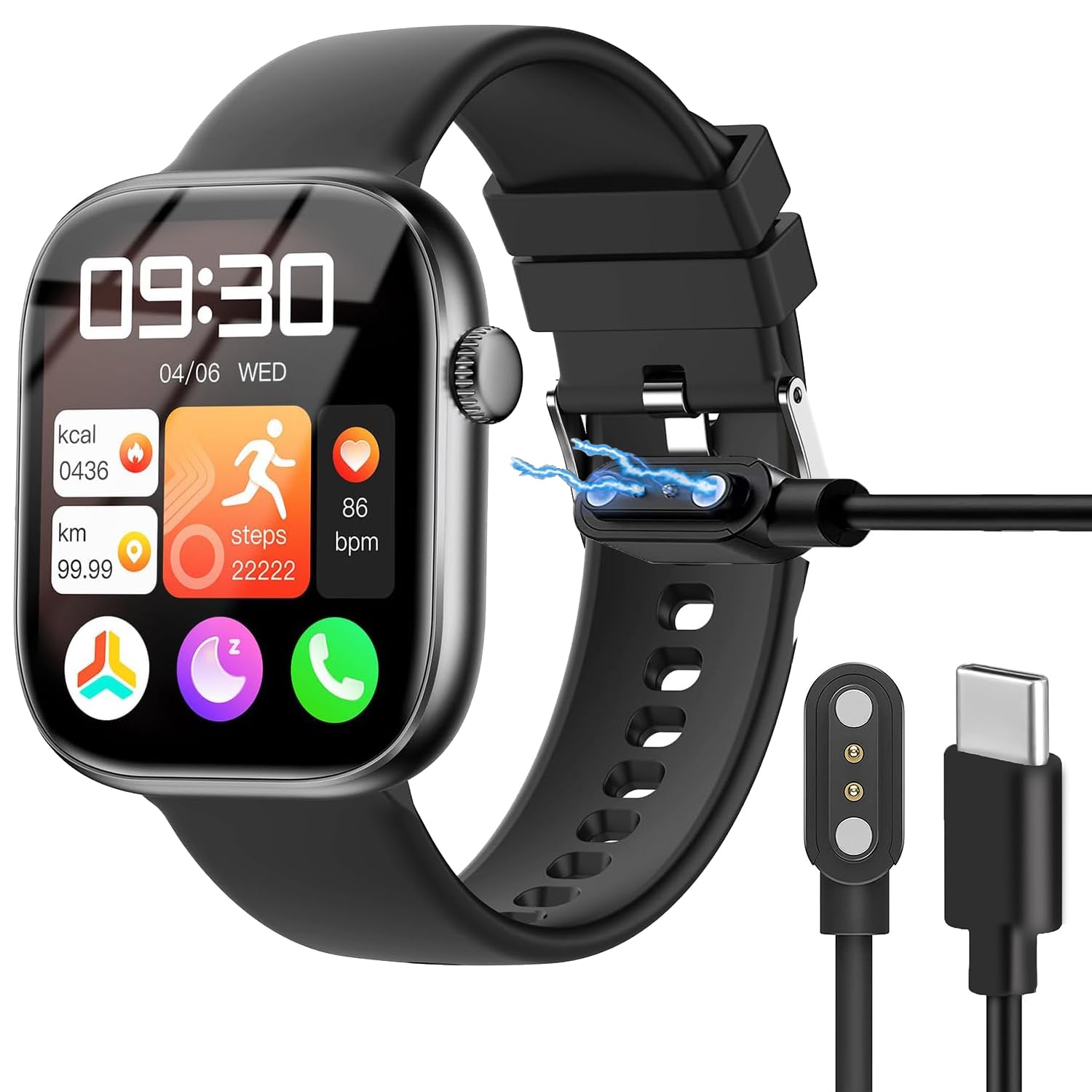
Figure 2.1: Lamshaw Magnetic Replacement Charger. This image displays the complete charging cable, showing both the magnetic charging puck and the USB Type C connector.
Key Features:
- Magnetic Charging: Ensures a secure and convenient connection to your smartwatch.
- USB Type C Connector: Compatible with standard USB Type C power adapters and ports.
- Durable Construction: Features a flexible PVC cable, multi-layer shielding, and pure copper probes for stable power delivery.
- Integrated Safety: Built-in protection against overvoltage and overcurrent.

Figure 2.2: Reinforced Cable Design. This image illustrates the internal structure of the cable, highlighting its multi-layer shielding, flexible PVC outer layer, and pure copper probes for enhanced durability and stable conduction.

Figure 2.3: Advanced Chip Design. This image shows a transparent view of the USB Type C connector, revealing the integrated advanced chip designed for faster, stronger, and safer charging performance.
3. Safety Information
The charger incorporates a built-in Short-circuit protection IC to prevent damage from overvoltage and overcurrent conditions. In the event of a short-circuit, the protection IC will automatically cut off the circuit. This safety feature also functions if the charger remains plugged in after your device is fully charged.
- Do not expose the charger to water or extreme temperatures.
- Avoid using damaged cables or adapters.
- Keep out of reach of children.
- Use only with compatible devices as specified.
4. Setup
To set up your Lamshaw Magnetic Replacement Charger:
- Connect the USB Type C end of the charging cable to a compatible power source, such as a USB wall adapter, power bank, or computer USB port. Ensure the power source provides 5 volts output.
- Place your KIPTUMTEK T7 Smart Watch onto the magnetic charging puck. The magnets will align the watch correctly, and charging will begin automatically.

Figure 4.1: Charger Connectors. This image provides a close-up view of both the magnetic charging puck, which connects to the smartwatch, and the USB Type C connector, which plugs into a power source.

Figure 4.2: Magnetic Charging Mechanism. This diagram illustrates how the magnetic charging puck securely attaches to the smartwatch, ensuring immediate and stable power transfer upon contact.
5. Operating Instructions
Once the charger is connected to a power source and your KIPTUMTEK T7 Smart Watch is placed on the magnetic puck, the watch should indicate that it is charging. The charging process is fully automatic.
- Ensure the magnetic connection is firm. If charging does not begin, adjust the watch's position on the puck.
- Monitor your smartwatch screen for charging status.
- Disconnect the watch once it is fully charged, or leave it connected; the built-in protection will manage overcharging.
6. Maintenance
Proper maintenance ensures the longevity and performance of your charger:
- Cleaning: Gently wipe the charging puck and cable with a dry, soft cloth to remove dust or debris. Do not use liquid cleaners.
- Storage: When not in use, store the cable in a cool, dry place. Avoid tightly coiling the cable to prevent damage. The flexible PVC cable is designed for easy storage.
- Inspection: Periodically check the cable and connectors for any signs of wear or damage. Discontinue use if damage is observed.

Figure 6.1: Compact Cable Storage. This image shows the charger cable neatly coiled, demonstrating its flexible design which allows for easy storage and portability.
7. Troubleshooting
If you encounter issues with your charger, refer to the following:
- Watch not charging:
- Ensure the USB Type C connector is fully inserted into the power source.
- Verify the power source is active and providing power (e.g., try a different USB port or wall adapter).
- Check that the smartwatch is correctly aligned and securely seated on the magnetic charging puck.
- Inspect the charging contacts on both the watch and the puck for any debris or damage.
- Slow charging:
- Ensure your power adapter provides sufficient output (e.g., 5V/1A).
- Avoid charging in extremely hot environments, which can slow down the charging process.
- Charger feels warm:
- It is normal for the charger to feel slightly warm during operation. If it becomes excessively hot, disconnect it immediately and contact support.
8. Specifications
| Feature | Detail |
|---|---|
| Brand | Lamshaw |
| Model Number | KIPTUMTEK T7 -CABLE |
| Connector Type | USB Type C |
| Compatible Device | KIPTUMTEK T7 Smart Watch-1.83 Inches |
| Input Voltage | 5 Volts |
| Output Current | 1 A |
| Output Voltage | 5 Volts |
| Color | Black |
| Cable Length | Approximately 2 feet (0.6 meters) |
| Included Components | Charger Cable |

Figure 8.1: Cable Length and Features. This image highlights the approximate 2-foot length of the Type-C cable and reiterates its key attributes: Type-C connectivity, magnetic charging, durability, and safe charging capabilities.
9. Warranty and Support
For warranty information or technical support, please contact Lamshaw customer service. Refer to the manufacturer's contact information provided with your purchase or visit the official Lamshaw website.
Manufacturer Contact Information: Lamshaw