
1. Introduction
This manual provides essential information for setting up, operating, maintaining, and troubleshooting your Glorlin Mini PC GT105. Please read this manual thoroughly before using the device to ensure optimal performance and longevity.
The Glorlin Mini PC GT105 is a compact desktop computer designed for a wide range of applications, from office productivity and content creation to light gaming and home entertainment. It features an AMD Ryzen 7 8745HS processor, 16GB DDR5 RAM, and a 1TB NVMe SSD, running on Windows 11 Pro.
2. Package Contents
Carefully unpack your Glorlin Mini PC GT105 and ensure all items listed below are present and in good condition. If any items are missing or damaged, please contact customer support.
- Glorlin Mini PC GT105
- Power Adapter
- HDMI Cable
- VESA Mounting Bracket with Screws
- User Manual

Image: Contents of the Glorlin Mini PC GT105 package. This includes the mini PC unit, a power adapter, an HDMI cable for display connection, a VESA mounting bracket with screws for monitor attachment, and the user manual.
3. Setup Instructions
3.1 Connecting Peripherals
- Power Connection: Connect the power adapter to the DC IN port on the Mini PC and then plug it into a power outlet.
- Display Connection: Connect your monitor(s) to the Mini PC using the HDMI, DisplayPort, or USB4 ports. The device supports up to three monitors simultaneously for enhanced productivity.
- Keyboard and Mouse: Connect your USB keyboard and mouse to the available USB ports. If using Bluetooth peripherals, ensure they are charged and ready for pairing during the initial Windows setup.
- Network Connection: For a stable internet connection, connect an Ethernet cable to one of the 2.5G LAN ports. Alternatively, the Mini PC supports Wi-Fi 6 for wireless connectivity.
3.2 Initial Power On and Windows Setup
- Press the power button located on the front of the Mini PC.
- The system will boot into Windows 11 Pro. During the first boot, you may encounter a "System Preparation Tool" window. Click "OK" to restart the system and proceed with the standard Windows setup.
- Follow the on-screen prompts to configure your Windows operating system, including language, region, user account, and network settings.
- Ensure all necessary drivers are installed. The system typically comes with pre-installed drivers, but you may need to update specific drivers (e.g., Bluetooth, graphics) after initial setup.

Image: Front and rear views of the Glorlin Mini PC GT105, highlighting its versatile ports including USB Type-A, USB Type-C (with DisplayPort and full features), audio jack, RJ45 LAN, HDMI, DisplayPort, and DC power input.
4. Operating Instructions
4.1 Basic Operation
- Power On/Off: Press the power button to turn the PC on. To turn off, use the Windows Shut Down option or press and hold the power button for a few seconds.
- Restart: Use the Windows Restart option for system reboots.
- Sleep Mode: The PC can enter sleep mode to save power. Wake it up by moving the mouse or pressing a key on the keyboard.
4.2 Multi-Monitor Setup
The Glorlin Mini PC GT105 supports connecting up to three monitors simultaneously, allowing for extended desktop space and increased productivity. Use a combination of the HDMI 2.1, DisplayPort 1.4, and USB4 ports for display output.
- Connect your monitors to the available video output ports on the Mini PC.
- Once connected, Windows should automatically detect the additional displays.
- To configure display settings (e.g., resolution, orientation, primary display), right-click on the desktop and select "Display settings."
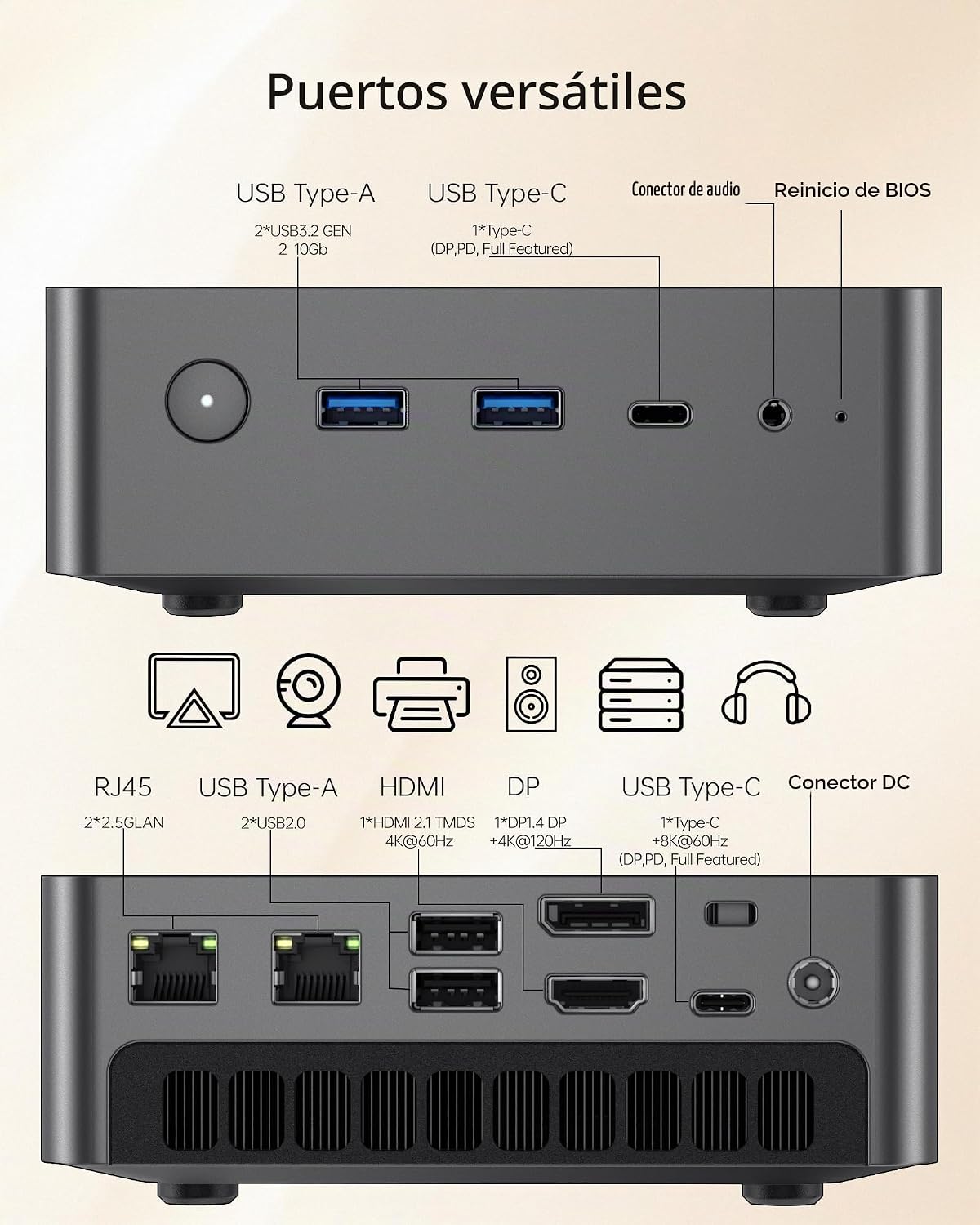
Image: A Glorlin Mini PC GT105 connected to a multi-monitor setup, demonstrating its capability to support multiple displays for enhanced workspace or entertainment.
5. Performance and Expansion
5.1 Processor and Graphics
The Mini PC is equipped with an AMD Ryzen 7 8745HS processor, offering high performance for demanding tasks. The integrated AMD Radeon 780M graphics handle 4K video editing, casual gaming, and content creation efficiently.

Image: A detailed diagram illustrating the powerful AMD Ryzen 7 8745HS CPU and the integrated AMD Radeon 780M GPU, highlighting their architecture and performance capabilities.
5.2 Memory (RAM) and Storage (SSD)
The system comes with 16GB of DDR5 RAM and a 1TB NVMe SSD, providing fast data access and ample storage. The RAM is installed in a single channel configuration. For optimal graphics performance, especially in gaming, upgrading to a dual-channel RAM configuration is recommended. The system supports up to 32GB of DDR5 RAM and up to 8TB of NVMe SSD storage.

Image: An internal view of the Glorlin Mini PC GT105 motherboard, showcasing the DDR5 RAM slots and the NVMe PCIe 4.0 SSD slot, indicating expandability options.
6. Cooling and Noise Management
The Glorlin Mini PC GT105 features an efficient dual-fan cooling system designed to maintain optimal operating temperatures even under prolonged workloads. This system helps keep the CPU and other components cool, ensuring stable performance and a quiet user experience.

Image: An exploded diagram illustrating the internal cooling system of the Glorlin Mini PC GT105, showing the dual fans and heat dissipation components.
Under normal operating conditions, the Mini PC operates quietly. During intensive tasks, such as gaming or heavy processing, the fans may increase speed, resulting in a noticeable but generally non-disruptive sound level.

Image: A user working in a quiet environment with the Glorlin Mini PC GT105, emphasizing its low noise operation, with a cat sleeping peacefully next to the device.
7. Maintenance
- Keep Clean: Regularly clean the exterior of the Mini PC with a soft, dry cloth. Ensure ventilation openings are free from dust and obstructions to maintain efficient cooling.
- Software Updates: Keep your Windows operating system and drivers updated to ensure security, stability, and optimal performance.
- Environmental Conditions: Operate the Mini PC in a well-ventilated area, away from direct sunlight, heat sources, and excessive moisture.
- Power Management: Use the provided power adapter. Avoid frequent power cycles or sudden disconnections.
8. Troubleshooting
8.1 Common Issues and Solutions
- No Power:
- Ensure the power adapter is securely connected to both the Mini PC and a working power outlet.
- Verify the power outlet is functional.
- No Display:
- Check that the HDMI, DisplayPort, or USB4 cable is securely connected to both the Mini PC and the monitor.
- Ensure the monitor is powered on and set to the correct input source.
- If experiencing resolution issues (e.g., stuck at 640x480), try restarting the PC and reconfiguring display settings in Windows.
- Wi-Fi Connectivity Issues:
- Ensure Wi-Fi is enabled in Windows settings.
- Restart the Mini PC and your Wi-Fi router.
- If wireless connection remains unstable, consider using a wired Ethernet connection for better reliability.
- Update Wi-Fi drivers if available.
- Excessive Fan Noise:
- Fan noise may increase during heavy workloads. This is normal.
- Ensure the Mini PC is placed in a well-ventilated area and that its vents are not obstructed.
- Clean any dust accumulation from the vents.
- System Slowdown:
- Check for background applications consuming high CPU or RAM resources.
- Ensure Windows and drivers are up to date.
- Consider upgrading RAM to a dual-channel configuration for improved performance, especially for integrated graphics.
9. Specifications
| Feature | Specification |
|---|---|
| Model Number | GT105 |
| Processor | AMD Ryzen 7 8745HS (up to 4.9 GHz) |
| Graphics | Integrated AMD Radeon 780M |
| RAM | 16GB DDR5 (4800 MHz), expandable up to 32GB |
| Storage | 1TB NVMe SSD (PCIe 4.0), expandable up to 8TB |
| Operating System | Windows 11 Pro |
| Connectivity | Wi-Fi 6, Bluetooth 5.2, 2x 2.5G LAN |
| Ports | 2x USB4 (40Gbps, 8K output), 2x USB 3.2 Gen 2, 2x USB 2.0, 1x HDMI 2.1, 1x DisplayPort 1.4, 1x 3.5mm Audio Jack, 2x RJ45 2.5G LAN, DC IN |
| Video Output | HDMI, DisplayPort, USB4 (supports up to 3 displays, 4K resolution) |
| Dimensions | 138.5 x 131.3 x 52.1 mm (approx. 10 x 10 x 5 cm) |
| Weight | 1.1 kg |
| Cooling Method | Air Cooling (Dual Fan System) |
10. Warranty and Support
The Glorlin Mini PC GT105 comes with a 1-year product warranty from the date of purchase. This warranty covers manufacturing defects and malfunctions under normal use. Please retain your proof of purchase for warranty claims.
For technical support, troubleshooting assistance, or warranty inquiries, please contact Glorlin customer service through your retailer or the official Glorlin support channels.


