
1. Introduction
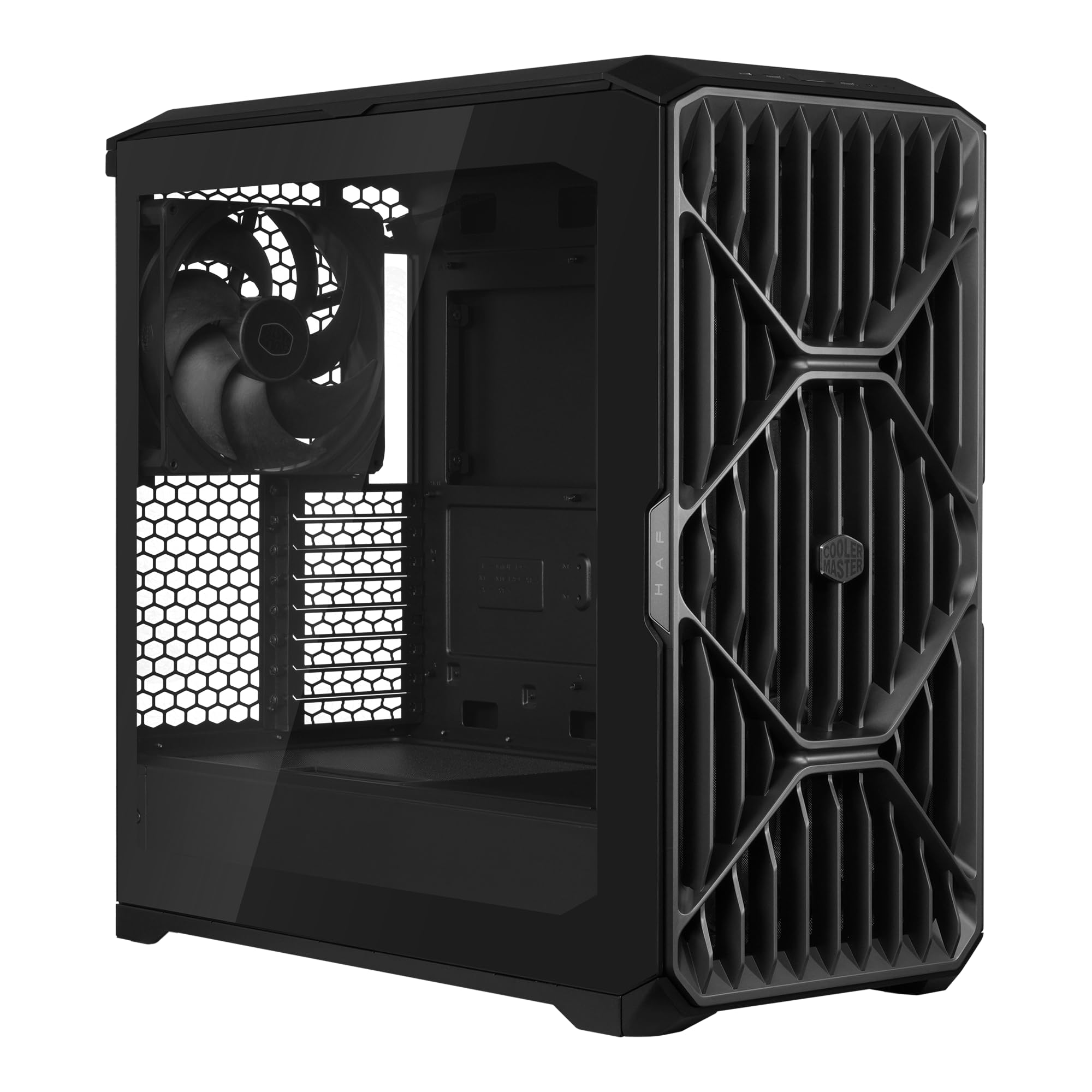
The Cooler Master HAF II 500 is an ATX PC case engineered for high airflow and efficient cooling. It features an oversized fan system designed to maintain optimal temperatures for your components. This manual provides essential information for setting up, operating, maintaining, and troubleshooting your HAF II 500 PC case.
Key features include:
- Oversized Mighty40 cooling system with two 220 x 40 mm front intake fans and one 180 x 40 mm rear exhaust fan.
- Low airflow resistance design with large front and rear ventilation openings.
- Split-level cable management for optimized routing space.
- MasterRail mounting system supporting multiple fan and radiator sizes.
- Dual-Mode GPU Holder for enhanced stability of graphics cards.
- Flexible storage cage for 3.5-inch and 2.5-inch drives.

2. Setup and Installation
This section guides you through the process of installing components into your HAF II 500 PC case.
2.1 Preparing the Case
Before installation, ensure all side panels are removed. The HAF II 500 supports ATX and E-ATX motherboards.

2.2 Motherboard Installation
- Install the necessary standoffs for your motherboard form factor (ATX, E-ATX).
- Carefully place the motherboard into the case, aligning it with the standoffs and I/O shield opening.
- Secure the motherboard with screws.
2.3 GPU Installation with Dual-Mode GPU Holder
The Dual-Mode GPU Holder provides adjustable support for graphics cards, preventing sag and ensuring stability.
- Install your graphics card(s) into the PCIe slots on your motherboard. The case supports up to two GPUs up to 3.6 slots (72 mm) thick each, or a single clamped GPU.
- Adjust the Dual-Mode GPU Holder to align with the bottom edge of your graphics card(s).
- Secure the holder in place to provide support.

2.4 Fan and Radiator Installation with MasterRail System
The MasterRail mounting system allows flexible placement of fans and radiators.
- Identify your desired mounting location (front or top) for additional fans or radiators.
- Slide the MasterRail mounts to accommodate your fan or radiator size (e.g., 120mm, 140mm, 180mm fans, or up to 360mm radiators).
- Secure the fans or radiators to the MasterRail system.

2.5 Storage Drive Installation
The flexible storage cage supports both 3.5-inch and 2.5-inch drives. The orientation can be adjusted based on PSU length.
- Locate the storage cage.
- Install your 3.5-inch HDDs or 2.5-inch SSDs into the designated bays.
- Secure the drives with screws or tool-less mechanisms if available.
2.6 Cable Management
Utilize the split-level layout and routing channels behind the motherboard tray to manage cables effectively. This improves airflow and maintains a clean interior.
3. Operating the Cooling System
The HAF II 500 is designed for optimal airflow to keep your components cool.
3.1 Airflow Design
The case features two 220mm front intake fans and one 180mm rear exhaust fan, creating a balanced and efficient airflow path. The large fans move a significant volume of air at lower RPMs, contributing to quieter operation.


3.2 GPU Air Guide
An integrated airflow divider directs cool intake air directly towards the graphics card, ensuring efficient cooling for this critical component.

3.3 Fan Control
The case includes a fan hub for managing the pre-installed fans. Connect the fan hub to your motherboard's fan headers for control via BIOS or fan control software. If you experience issues with fan detection or control through the included hub, consider connecting the fan connectors directly to your motherboard's system fan headers.
4. Maintenance
Regular maintenance ensures optimal performance and longevity of your PC case.
4.1 Dust Filter Cleaning
The HAF II 500 features easily removable dust filters. Periodically remove and clean these filters to prevent dust buildup, which can restrict airflow and reduce cooling efficiency.
- Power off your PC and disconnect it from the power source.
- Locate the dust filters (e.g., front panel, bottom).
- Gently remove the filters.
- Clean the filters using compressed air or by rinsing them with water. Ensure they are completely dry before reinstallation.
- Reinstall the dust filters.
4.2 General Cleaning
Use a soft, damp cloth to wipe down the exterior of the case. Avoid using harsh chemicals or abrasive materials that could damage the finish.
5. Troubleshooting
This section addresses common issues you might encounter with your HAF II 500 PC case.
5.1 Fans Not Spinning or Detected
- Check Connections: Ensure all fan cables are securely connected to the fan hub and the fan hub is connected to a motherboard fan header.
- Bypass Fan Hub: If issues persist, try connecting the fans directly to available system fan headers on your motherboard, bypassing the included fan controller.
- BIOS Settings: Verify that fan control settings in your motherboard's BIOS are correctly configured and not set to 'off' or a very low RPM.
5.2 Overheating Components
- Dust Buildup: Clean all dust filters and internal components as described in the Maintenance section.
- Fan Orientation: Ensure fans are oriented correctly for optimal airflow (front fans as intake, rear fan as exhaust).
- Cable Management: Poor cable management can obstruct airflow. Reroute cables to minimize interference.
- Component Clearance: Verify that large components (e.g., CPU cooler, GPU) are not directly blocking critical airflow paths.
5.3 Component Fit Issues
- GPU Length: The case supports graphics cards up to 430mm. Ensure your GPU does not exceed this length.
- CPU Cooler Height: The case supports CPU coolers up to 221mm (Intel) / 220mm (AMD). Verify your cooler fits within this specification.
- PSU Length: Power supply length compatibility varies based on drive orientation (150mm for North-South, 210mm for East-West). Adjust drive cage configuration if needed.
6. Specifications
Detailed technical specifications for the Cooler Master HAF II 500 ATX PC Case.
| Feature | Specification |
|---|---|
| Brand | Cooler Master |
| Model Name | HAF II 500 |
| Model Number | H500G2-KGNN-S00 |
| Case Type | Mid Tower |
| Motherboard Compatibility | ATX, E-ATX |
| Material | Metal, Plastic |
| Color | Black |
| Item Weight | 21.3 pounds |
| Product Dimensions (D x W x H) | 21.93"D x 21.57"W x 10.32"H |
| Cooling Method | Air |
| Number of Fans | 3 (2 x 220mm front, 1 x 180mm rear) |
| Total Expansion Slots | 8 |
| Total USB Ports | 3 (USB 3.0) |
| Hard Disk Form Factor Support | 2.5 inches (and 3.5 inches via flexible cage) |
| Max GPU Length Support | 430mm |
| Max CPU Cooler Height Support | 221mm (Intel); 220mm (AMD) |
| Radiator Support (MasterRails) | Up to 360mm per rail |
7. Warranty Information
The Cooler Master HAF II 500 ATX PC Case comes with a 2 Year Manufacturer Warranty. Please retain your proof of purchase for warranty claims. For specific terms and conditions, refer to the official Cooler Master website or contact their customer support.
8. Support
For further assistance, technical support, or to view additional product resources, please visit the official Cooler Master website or their Amazon store page:
- Cooler Master Official Website: www.coolermaster.com
- Cooler Master Amazon Store: Visit Cooler Master Store on Amazon


