
Introduction
This manual provides detailed instructions for the installation, operation, and maintenance of your MOES Water Flow Meter. This device is designed to accurately measure water consumption in gallons or liters, featuring durable brass inlet and outlet metal threads for reliable connection. Please read this manual thoroughly before using the product to ensure correct operation and to prevent damage.
Product Features
- Accurate measurement of water flow in gallons or liters.
- Durable brass inlet and outlet metal threads for secure connections.
- Clear digital display for easy reading of consumption data.
- Suitable for various watering applications, including garden hoses and irrigation systems.
Package Contents
Upon unpacking, please verify that all items are present and undamaged. The package should contain:
- 1 x MOES Water Flow Meter (Model: T-TWM-SGS05-US-CU-MS)
- 1 x Instruction Manual (this document)
- (Note: Batteries are typically not included and must be purchased separately.)
Safety Information
Observe the following safety precautions to prevent injury or damage to the device:
- Do not expose the device to extreme temperatures or direct sunlight for prolonged periods.
- Ensure all connections are tight to prevent leaks.
- Do not immerse the device in water. It is water-resistant, not waterproof.
- Keep out of reach of children.
- Use only the specified battery type (if applicable) and dispose of batteries properly.
- Do not attempt to disassemble or modify the device.
Product Overview
Familiarize yourself with the components of your water flow meter:
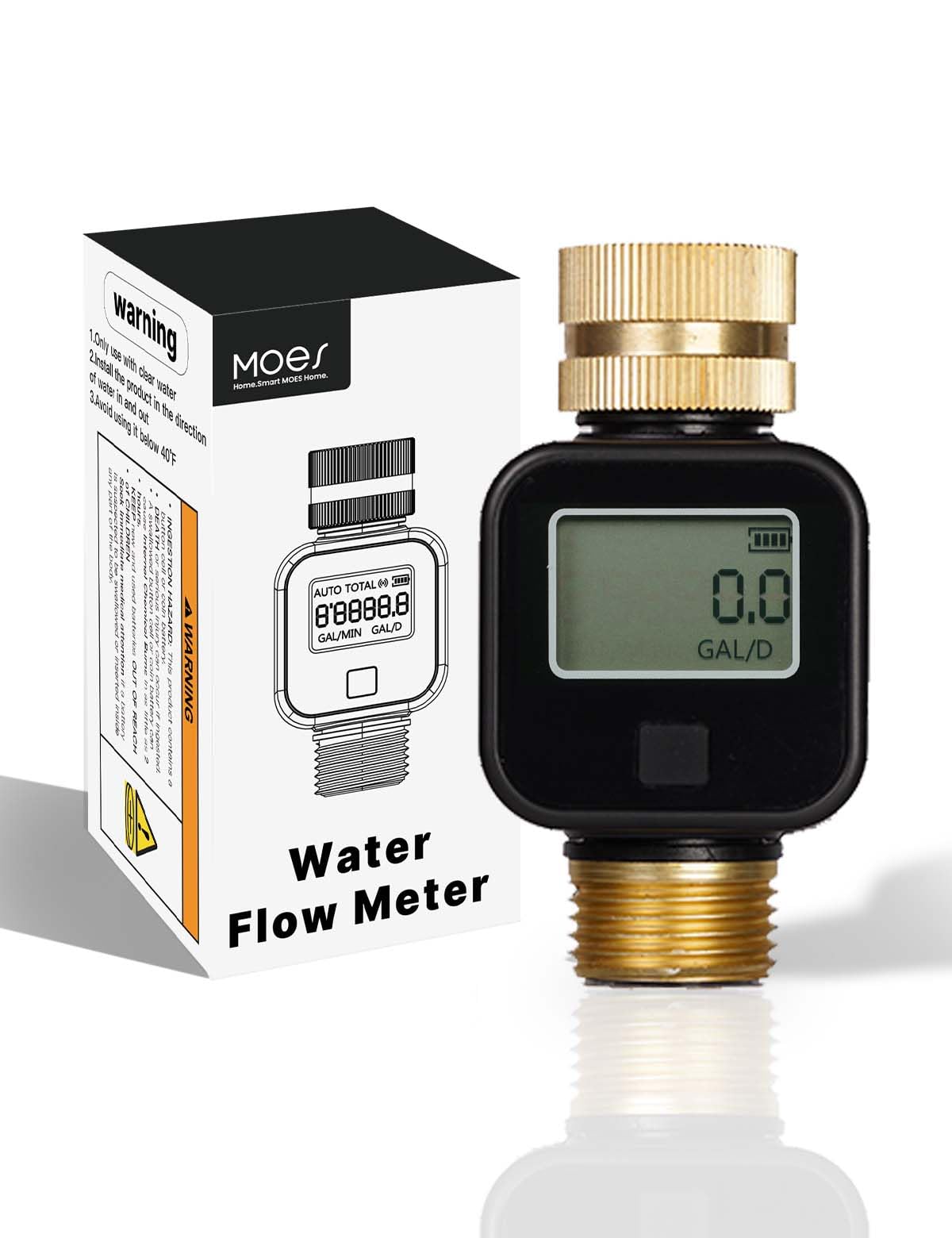
Figure 1: Front view of the MOES Water Flow Meter, showing the digital display and control buttons. This image illustrates the overall design and key user interface elements.
- Digital Display: Shows current flow rate, total consumption, and unit of measurement.
- Control Buttons: Typically include a "MODE" button to switch display modes and a "RESET" button to clear measurements.
- Brass Inlet: Connects to the water source (e.g., garden faucet).
- Brass Outlet: Connects to the watering device (e.g., hose, sprinkler).
- Battery Compartment: Located on the back or side, for power supply.
Setup and Installation
Follow these steps to set up your water flow meter:
- Install Batteries: Open the battery compartment (usually secured with a small screw or clip). Insert the required batteries (e.g., 2 x AAA, not included) according to the polarity markings. Close the compartment securely.
- Connect to Water Source:
- Identify the Inlet side of the flow meter (often marked with an arrow indicating flow direction or labeled "IN").
- Screw the inlet thread onto your water source (e.g., outdoor faucet, garden hose). Hand-tighten first, then use a wrench if necessary, but do not overtighten.
- Connect Watering Device:
- Identify the Outlet side of the flow meter (often marked with an arrow indicating flow direction or labeled "OUT").
- Screw your garden hose or other watering device onto the outlet thread. Ensure a snug, leak-free connection.
- Check for Leaks: Slowly turn on the water supply and check all connections for leaks. Tighten any leaking connections.
Figure 2: Illustrative image of the MOES Water Flow Meter connected in-line with a garden hose. This demonstrates the typical installation configuration between a water source and a watering tool.
Operating Instructions
The MOES Water Flow Meter is designed for straightforward operation:
- Power On: The device typically powers on automatically when water flow is detected or when a button is pressed.
- Select Measurement Unit: Press the "MODE" button (or similar) to cycle through available display modes, which may include:
- Current Flow Rate: Displays the instantaneous water flow (e.g., Gallons/Minute or Liters/Minute).
- Single Use Consumption: Shows the total water used for the current watering session.
- Total Consumption: Accumulates all water used since the last manual reset of the total counter.
To switch between Gallons and Liters, usually press and hold the "MODE" button for a few seconds until the unit changes.
- Resetting Measurements:
- To reset the Single Use Consumption, navigate to this display mode and press the "RESET" button (or similar).
- The Total Consumption counter is typically designed to accumulate over a long period and may require a prolonged press of the "RESET" button or a specific sequence to clear, or it might not be resettable by the user to track lifetime usage. Refer to the on-screen prompts or specific button labels.
- Watering: Once the desired unit and display mode are set, turn on your water supply. The meter will begin to measure and display consumption.
Maintenance
Regular maintenance ensures the longevity and accuracy of your water flow meter:
- Cleaning: Wipe the exterior of the device with a soft, damp cloth. Do not use abrasive cleaners or solvents.
- Battery Replacement: When the display becomes dim or the device stops responding, replace the batteries. Ensure correct polarity.
- Storage: During winter months or periods of non-use, disconnect the meter, drain any remaining water, and store it in a dry, frost-free location.
- Inspect Connections: Periodically check the brass threads for wear or damage. Replace washers if necessary to prevent leaks.
Troubleshooting
If you encounter issues with your MOES Water Flow Meter, refer to the following common problems and solutions:
| Problem | Possible Cause | Solution |
|---|---|---|
| No display or dim display | Dead or low batteries; incorrect battery installation. | Replace batteries with new ones, ensuring correct polarity. |
| Inaccurate readings | Air in the line; very low flow rate; debris in the meter. | Ensure water flows steadily before measuring. Check for blockages. Ensure the meter is installed correctly (flow direction). |
| Water leaks from connections | Loose connections; worn washers; damaged threads. | Tighten connections. Replace rubber washers if they are old or damaged. Inspect threads for damage. |
| Meter not measuring flow | No water flow; meter installed backward; internal blockage. | Verify water supply. Check installation direction (inlet/outlet). Disconnect and check for debris. |
If the problem persists after attempting these solutions, please contact customer support.
Specifications
| Feature | Detail |
|---|---|
| Model Number | T-TWM-SGS05-US-CU-MS |
| Brand | MOES |
| Product Dimensions (D x W x H) | 1.9"D x 3.6"W x 1.7"H |
| Inlet/Outlet Material | Brass Metal Thread |
| Measurement Units | Gallons, Liters |
| Color | Black |
| Manufacturer | WENZHOU NOVA NEW ENERGY CO., LTD |
Warranty and Support
MOES products are manufactured to high-quality standards. This product comes with a standard manufacturer's warranty against defects in materials and workmanship. Please refer to the warranty card included with your purchase or visit the official MOES website for detailed warranty terms and conditions.
For technical support, troubleshooting assistance, or warranty claims, please contact MOES customer service through their official website or the contact information provided with your purchase. When contacting support, please have your model number (T-TWM-SGS05-US-CU-MS) and purchase date available.
MOES Official Website: Visit the MOES Store on Amazon