
Introduction
Thank you for choosing the WLIVE Double Tilt-Out Trash Can Cabinet. This manual provides essential information for the safe assembly, operation, and maintenance of your new cabinet. Please read these instructions carefully before use and retain them for future reference.
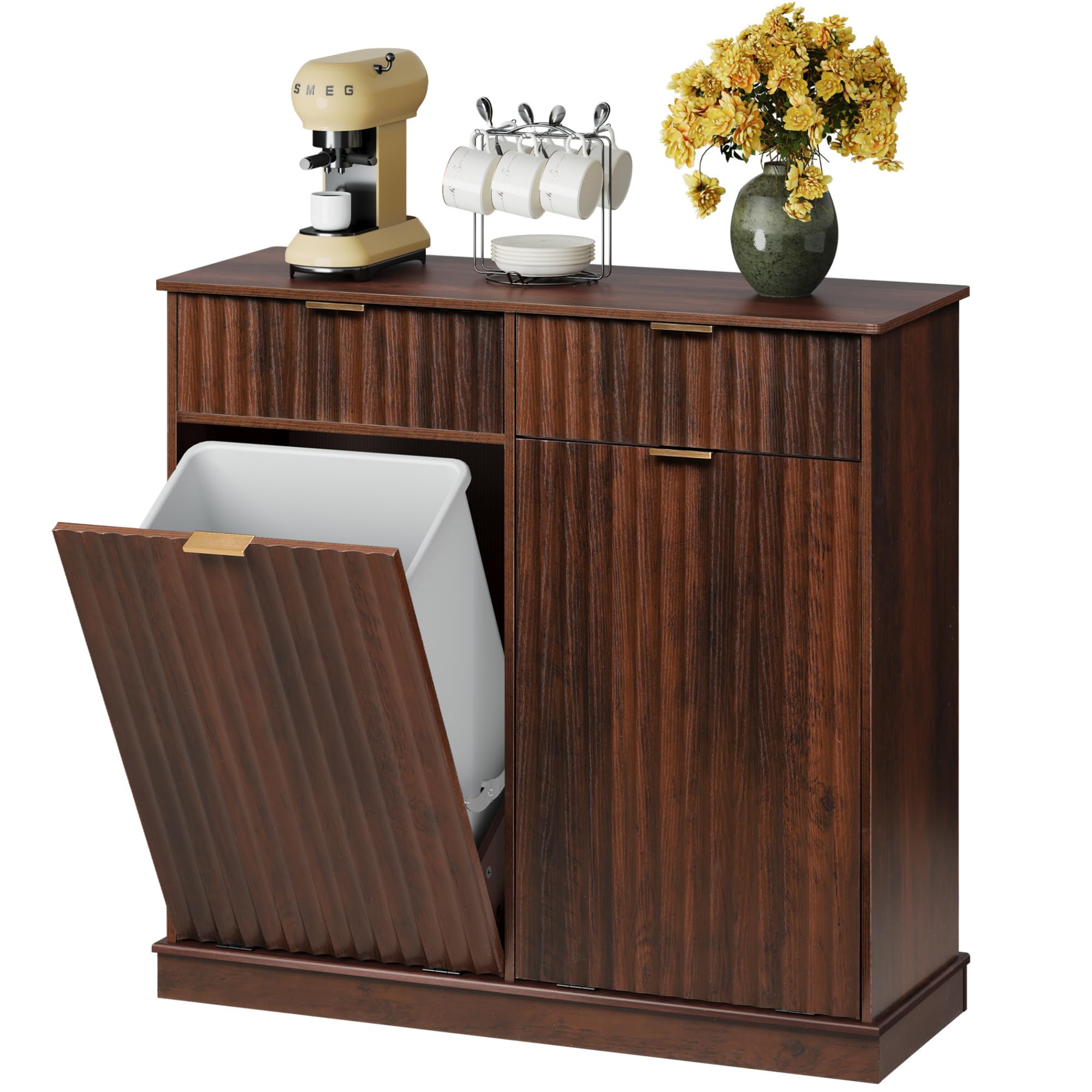
Image: The WLIVE Double Tilt-Out Trash Can Cabinet, brown finish, integrated into a modern kitchen environment, showcasing its aesthetic appeal and functionality.
Safety Information
To ensure safe use and prevent damage, please observe the following safety guidelines:
- Always assemble the cabinet on a soft, clean surface to prevent scratches.
- Ensure all screws and fasteners are securely tightened before use. Periodically check and re-tighten as necessary.
- Do not overload the drawers or tilt-out compartments. The cabinet supports up to 88 lbs on the top surface.
- Keep small parts and packaging materials away from children and pets to avoid choking hazards.
- Do not stand or climb on the cabinet.
- Place the cabinet on a level surface to prevent tipping.
Package Contents
Before assembly, verify that all components are present and undamaged. If any parts are missing or damaged, please contact customer support.
While a detailed list is not provided, the package typically includes:
- Cabinet panels (top, bottom, sides, back, drawer fronts, tilt-out fronts)
- Hardware kit (screws, cam locks, dowels, handles, drawer slides, tilt-out hinges)
- Instruction manual

Image: An illustrative diagram showing the various wooden panels and hardware components required for assembling the tilt-out trash can cabinet.
Setup and Assembly
Assembly is required for this product. Follow the detailed instructions provided in the included guide. It is recommended to have two people for assembly.
Tools Required:
- Phillips head screwdriver
- Hammer (optional, for dowels)
Assembly Steps Overview:
- Unpack all components and verify against the parts list.
- Attach cam locks and dowels to the designated panels.
- Assemble the main frame of the cabinet.
- Install drawer slides and assemble the storage drawers.
- Attach the tilt-out mechanisms and front panels.
- Secure the back panel.
- Install handles on drawers and tilt-out fronts.
For a visual guide, please refer to the official installation video:
Video: Official WLIVE Tilt-out Trash Cabinet Clear Installation Guide. This video provides step-by-step visual instructions for assembling the cabinet.

Image: Diagram illustrating the overall dimensions of the cabinet (38.66"L x 13.98"W x 36.22"H), drawer dimensions (16.1"x9.4"x5"), and tilt-out compartment dimensions (16.1"x11.7"x20.4"), along with the 88 lbs weight capacity for the top surface.
Operating Instructions
Using the Tilt-Out Compartments:
- Gently pull the handle on the front panel of the compartment you wish to open. The panel will tilt forward at a 30° angle, revealing the interior space for your trash bin.
- Insert a 10-gallon trash bin into the compartment. Ensure the bin fits securely.
- To close, push the panel back into the cabinet until it is flush.
Using the Storage Drawers:
- Pull the handle on the drawer front to open. The full-extension metal runners ensure smooth access.
- Store items such as kitchen utensils, pet food, or laundry supplies.
- Push the drawer back until it is fully closed.

Image: The WLIVE cabinet with its top drawers open, displaying organized coffee beans and tableware, and the tilt-out compartments open, showing a trash bin and laundry. This illustrates the ample storage capacity and versatile uses.
Video: WLIVE Tilt-out Trash Can Cabinet with Storage Drawers. This video demonstrates the smooth operation of the drawers and the tilt-out mechanism, highlighting the cabinet's functionality.
Maintenance
- Cleaning: Wipe the cabinet surfaces with a soft, damp cloth. Avoid harsh chemicals or abrasive cleaners that may damage the finish.
- Hardware: Periodically check all screws and connections to ensure they remain tight. Re-tighten as needed to maintain stability.
- Spills: Clean up spills immediately to prevent staining or damage to the engineered wood.
Troubleshooting
| Problem | Possible Cause | Solution |
|---|---|---|
| Cabinet feels wobbly or unstable. | Loose fasteners; uneven floor. | Ensure all screws and cam locks are fully tightened. Place the cabinet on a level surface or use shims if necessary. |
| Drawers do not slide smoothly. | Drawer slides are misaligned or dirty; overloaded drawer. | Check that drawer slides are correctly installed and free of debris. Do not exceed the weight capacity of the drawers. |
| Tilt-out door does not close properly or feels loose. | Hinges are loose or damaged; obstruction. | Inspect hinges for damage and tighten any loose screws. Ensure no items are obstructing the door's path. |
| 10-gallon trash can does not fit. | Trash can dimensions vary. | Verify the internal dimensions of the tilt-out compartment (16.1"W x 11.7"D x 20.4"H) and compare with your trash can. Some 10-gallon bins may be too wide or tall. |
Specifications
- Brand: WLIVE
- Model: Double Cabinets without Outlets (B0F66ZFCJ3)
- Material: Engineered Wood
- Color: Brown
- Overall Dimensions (L x W x H): 38.66" x 13.98" x 36.22"
- Tilt-Out Compartment Capacity: Designed for two 10-gallon trash bins (total 20 gallons)
- Tilt-Out Compartment Internal Dimensions: 16.1"W x 11.7"D x 20.4"H (each)
- Drawer Internal Dimensions: 16.1"W x 9.4"D x 5"H (each)
- Top Surface Weight Capacity: 88 lbs
- Opening Mechanism: Tilt-Out (30° angle)
- Special Features: Dual Compartment, Hidden Trash Can Cabinet, Odor Seal, Rustproof, Sturdy construction with thickened MDF panels and reinforced metal hinges.
Warranty and Support
WLIVE products are designed for quality and durability. This product comes with a standard warranty against manufacturing defects. For specific warranty details, please refer to the documentation included with your purchase or contact WLIVE customer support.
If you encounter any issues during assembly or use, or if you have questions about your product, please contact our U.S.-based customer support team for assistance. Our team is ready to help.
Contact Information: Please refer to your purchase receipt or the WLIVE official website for the most current customer support contact details.