
Introduction
Thank you for choosing the Ltinist BX29 Bluetooth 5.4 Sport Earbuds. These earbuds are designed to provide a superior audio experience with advanced features tailored for active lifestyles. This manual will guide you through the setup, operation, and maintenance of your new earbuds to ensure optimal performance and longevity.
Package Contents
Please check the package for the following items:
- Ltinist BX29 Bluetooth Earbuds (Left and Right)
- Charging Case with LED Display
- USB-C Charging Cable
- User Manual
- Silicone Ear Tips (Sizes S, M, L)

Image: All items included in the Ltinist BX29 Earbuds package.
Product Overview
Key Features
- Bluetooth 5.4 Technology: Ensures stable, fast, and low-latency connections up to 50 feet.
- Hi-Fi Stereo Sound: Equipped with 14.2mm drivers for powerful bass and clear audio.
- ENC Noise Cancellation: Four integrated microphones filter out 75% of environmental noise for clear calls.
- IPX8 Waterproof: Resistant to intense sweat, heavy rain, and accidental splashes, ideal for sports.
- Ergonomic Design: Secure and comfortable fit with flexible ear hooks, suitable for intense activities.
- Long Battery Life: Up to 15 hours on a single charge, extended to 75 hours with the charging case.
- LED Power Display: Digital display on the charging case shows remaining battery for both earbuds and case.
- Touch Controls: Intuitive controls for music, calls, and voice assistant.
Setup
1. Charging the Earbuds and Case
Before first use, fully charge the earbuds and the charging case. Use the provided USB-C cable to connect the charging case to a power source.
- Place the earbuds into the charging case. Ensure they are correctly seated; the LED indicators on the earbuds will light up to confirm charging.
- Connect the USB-C cable to the charging port on the case and to a USB power adapter (not included).
- The LED display on the charging case will show the battery percentage of the case and individual earbuds during charging.
- A full charge for the case typically takes approximately 1.5 hours. The earbuds charge within the case.

Image: Charging case with LED display showing battery levels and USB-C port.

Image: Battery life overview, showing 15 hours per charge and 75 hours total with the charging case.
2. Bluetooth Pairing
The earbuds feature one-step auto-pairing for convenience.
- Power On: Open the charging case. The earbuds will automatically power on and enter pairing mode.
- Activate Bluetooth: On your device (smartphone, tablet, etc.), enable Bluetooth.
- Select Device: Search for "BX29" in the list of available Bluetooth devices and select it to connect.
- Confirmation: Once connected, you will hear an audio prompt, and the earbud indicator lights will turn off.
Note: After the initial pairing, the earbuds will automatically connect to the last paired device when removed from the charging case.

Image: One-step auto-pairing process with a smartphone.

Image: Bluetooth 5.4 technology for enhanced connectivity.
Operating Instructions
1. Wearing the Earbuds
The Ltinist BX29 earbuds are designed with flexible ear hooks for a secure and comfortable fit, especially during sports and intense activities.
- Choose the correct size of ear tips for your ears to ensure a snug fit and optimal sound quality.
- Place the earbud into your ear canal.
- Adjust the flexible ear hook over your ear until it feels secure and comfortable.
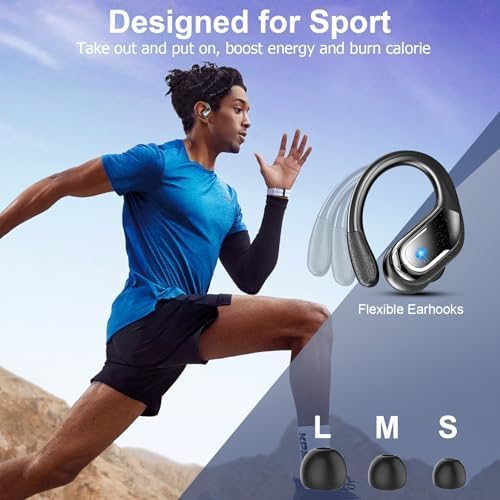
Image: Ergonomic design with flexible ear hooks for sport.

Image: Step-by-step guide on how to wear the earbuds for an ergonomic fit.
2. Touch Controls
The Ltinist BX29 earbuds feature intuitive touch controls on each earbud. The following actions can be performed:
| Action | Left Earbud (L) | Right Earbud (R) |
|---|---|---|
| Volume Up | Single Tap | |
| Volume Down | Single Tap | |
| Next Track | Hold for 2 seconds | |
| Previous Track | Hold for 2 seconds | |
| Play/Pause | Double Tap (L or R) | |
| Answer/End Call | Single Tap (L or R) | |
| Reject Call | Hold for 2 seconds (L or R) | |
| Activate Voice Assistant | Triple Tap (L or R) | |

Image: Detailed overview of touch control gestures.
Maintenance
Proper maintenance ensures the longevity and optimal performance of your earbuds.
- Cleaning: Regularly clean the earbuds and charging case with a soft, dry, lint-free cloth. Do not use abrasive cleaners or solvents.
- Ear Tips: Remove and clean the silicone ear tips with mild soap and water, then dry thoroughly before reattaching.
- Storage: When not in use, store the earbuds in their charging case to protect them from dust and damage.
- Water Resistance: The earbuds are IPX8 waterproof, meaning they can withstand immersion in water up to 1 meter for 30 minutes. However, they are not designed for swimming or prolonged underwater use. Ensure the earbuds are dry before placing them back in the charging case to prevent damage.

Image: IPX8 waterproof and sweatproof features.

Image: IPX8 waterproof rating for various conditions.
Troubleshooting
If you encounter any issues with your Ltinist BX29 earbuds, please refer to the following common solutions:
- Earbuds not pairing: Ensure both earbuds are charged. Place them back in the case, close it, then open it again to re-initiate pairing mode. On your device, forget the "BX29" Bluetooth connection and try pairing again.
- Only one earbud working: Ensure both earbuds are charged. Try placing both earbuds back into the charging case, closing the lid, and then opening it again. This often resets the connection between the two earbuds.
- No sound or low volume: Check the volume level on both your device and the earbuds. Ensure the earbuds are properly seated in your ears and that the ear tips provide a good seal.
- Charging issues: Ensure the USB-C cable is securely connected to both the charging case and the power source. Check if the charging port is clean and free of debris.
- Unstable connection: Ensure your device is within the 50-foot Bluetooth range. Avoid obstacles between your device and the earbuds that might interfere with the signal.
If the issue persists, please contact customer support for further assistance.
Specifications
Here are the technical specifications for the Ltinist BX29 Bluetooth 5.4 Sport Earbuds:
| Feature | Detail |
|---|---|
| Model Name | BX29 |
| Bluetooth Version | 5.4 |
| Wireless Range | Up to 15 meters (50 feet) |
| Driver Size | 14.2 mm Dynamic Driver |
| Noise Control | ENC Environmental Noise Cancellation |
| Water Resistance | IPX8 (Waterproof) |
| Earbud Battery Life | Up to 15 hours (single charge) |
| Total Playtime (with case) | Up to 75 hours |
| Charging Port | USB-C |
| Control Type | Touch Control |
| Material | Plastic |
| Recommended Use | Sports, Calls, Office Meetings, Driving, Gaming, Running, Cycling |

Image: Internal structure of the earbud driver for Hi-Fi stereo sound.

Image: Superior sound quality with 14.2mm drivers and enhanced bass.
Warranty and Support
The Ltinist BX29 Bluetooth 5.4 Sport Earbuds come with a 1-year warranty from the date of purchase, covering manufacturing defects.
For warranty claims, technical support, or any questions regarding your product, please contact Ltinist customer service through the retailer where you purchased the product or visit the official Ltinist website for contact information.
Please retain your proof of purchase for warranty validation.

