
1. Product Overview
The T&G TG227 is a portable Bluetooth speaker designed for versatile audio playback. It features Bluetooth 5.3 connectivity, IPX5 water resistance, dynamic LED lights, and supports True Wireless Stereo (TWS) pairing for an enhanced sound experience. Multiple input options including AUX, USB, and TF card are available.
What's in the Box
- 1x T&G TG227 Bluetooth Speaker
- 1x Type-C Charging Cable
- 1x User Manual (this document)
2. Safety Information
- Do not expose the speaker to extreme temperatures or direct sunlight for prolonged periods.
- The speaker has an IPX5 water resistance rating, meaning it is protected against low-pressure water jets from any direction. It is not designed for submersion in water.
- Keep the speaker away from flammable materials.
- Do not attempt to disassemble or modify the speaker. This may void the warranty and pose a safety risk.
- Use only the provided Type-C charging cable or a certified equivalent.
- Clean the speaker with a soft, dry cloth. Avoid using abrasive cleaners or solvents.
3. Key Features
- Bluetooth 5.3: Provides stable and efficient wireless connection up to 66 feet.
- True Wireless Stereo (TWS): Connect two TG227 speakers for a synchronized stereo sound experience.
- IPX5 Water Resistance: Splash-proof and rain-resistant design suitable for outdoor use.
- Dynamic LED Lights: 7-color LED lights that sync with music rhythm.
- Multiple Playback Modes: Supports Bluetooth, AUX input, USB drive, and TF card playback.
- Built-in Microphone: For hands-free calling with noise reduction.
- Long Battery Life: 1200mAh rechargeable battery offering up to 10 hours of playtime (actual playtime varies with volume and content).
4. Controls and Indicators

This image highlights the speaker's control buttons and indicates its charging status, emphasizing ease of use and battery life.
Button Functions
- Power Button (⏻): Press and hold to power on/off. Short press to play/pause music or answer/end calls.
- Volume Down / Previous Track (-): Short press to decrease volume. Long press to go to the previous track.
- Volume Up / Next Track (+): Short press to increase volume. Long press to go to the next track.
- Light Mode Button (💡): Short press to cycle through LED light modes. Press and hold to turn lights on/off.
LED Indicators
- Blue LED (Bluetooth): Flashes when pairing, solid when connected.
- Red LED (Charging): Solid red when charging, turns off when fully charged.
5. Setup
5.1 Charging the Speaker
- Connect the provided Type-C charging cable to the speaker's charging port.
- Connect the other end of the cable to a USB power adapter (5V) or a computer's USB port.
- The red LED indicator will illuminate during charging. It will turn off once the speaker is fully charged.
- A full charge typically takes approximately 2 hours.
5.2 Power On/Off
- To Power On: Press and hold the Power button (⏻) for 2-3 seconds until you hear an audible prompt and the LED lights activate.
- To Power Off: Press and hold the Power button (⏻) for 2-3 seconds until you hear an audible prompt and the LED lights turn off.
5.3 Bluetooth Pairing

This image demonstrates the speaker's wireless connectivity, showing it paired with a mobile device for easy music streaming.
- Ensure the speaker is powered on. The blue LED indicator will flash, indicating it is in pairing mode.
- On your device (smartphone, tablet, computer), enable Bluetooth.
- Search for available Bluetooth devices and select "TG227" from the list.
- Once connected, the blue LED indicator will become solid, and you will hear a confirmation sound.
- The speaker will automatically attempt to reconnect to the last paired device when powered on.
6. Operation
6.1 Playing Music
- After successful Bluetooth pairing, open your music application on your device and start playback.
- Use the Volume Up (+) and Volume Down (-) buttons on the speaker or your device to adjust the volume.
- Long press Volume Up (+) for the next track, and long press Volume Down (-) for the previous track.
- Short press the Power button (⏻) to play or pause music.
6.2 True Wireless Stereo (TWS) Pairing

This image illustrates the True Wireless Stereo (TWS) function, showing two T&G speakers linked together to provide an immersive stereo sound experience.
- Ensure both TG227 speakers are powered on and not connected to any Bluetooth device.
- On one of the speakers (this will be the primary speaker), double-press the Power button (⏻). You will hear a pairing tone.
- The two speakers will automatically connect to each other. Once connected, you will hear a confirmation tone, and the blue LED on the primary speaker will flash, while the secondary speaker's blue LED will be solid.
- Now, connect your device to the primary speaker via Bluetooth (as described in section 5.3).
- Audio will now play through both speakers in stereo.
- To disconnect TWS, double-press the Power button (⏻) on either speaker.
6.3 Using AUX, USB, and TF Card

This image illustrates the speaker's versatile connectivity options, including TWS, FM Radio, and standard wireless Bluetooth, allowing for various audio sources.
- AUX Input: Insert a 3.5mm audio cable into the AUX port on the speaker and connect the other end to your audio device. The speaker will automatically switch to AUX mode.
- USB Drive: Insert a USB flash drive containing MP3 audio files into the USB port. The speaker will automatically detect and play the music.
- TF Card: Insert a TF (MicroSD) card containing MP3 audio files into the TF card slot. The speaker will automatically detect and play the music.
6.4 LED Light Modes

This image highlights the speaker's capability to deliver high-resolution audio, ensuring a quality music experience, and shows the glowing LED lights.
- Short press the Light Mode button (💡) to cycle through different LED light patterns and colors.
- Press and hold the Light Mode button (💡) to turn the LED lights on or off.
6.5 Hands-Free Calling
- When connected via Bluetooth, incoming calls will be routed through the speaker.
- Short press the Power button (⏻) to answer an incoming call.
- Short press the Power button (⏻) again to end a call.
- Press and hold the Power button (⏻) to reject an incoming call.
7. Maintenance
- Cleaning: Wipe the speaker with a soft, damp cloth. Do not use harsh chemicals or abrasive materials. Ensure all ports are dry before charging or using.
- Storage: Store the speaker in a cool, dry place away from direct sunlight and extreme temperatures.
- Battery Care: To prolong battery life, charge the speaker fully before long periods of inactivity and recharge it at least once every three months.
8. Troubleshooting
| Problem | Possible Solution |
|---|---|
| Speaker does not power on. | Ensure the speaker is charged. Connect it to a power source using the Type-C cable. |
| Cannot pair via Bluetooth. |
|
| No sound or low volume. |
|
| TWS pairing failed. |
|
| LED lights are not working. | Press the Light Mode button (💡) to cycle through modes or press and hold to turn them on. |
9. Technical Specifications

This diagram provides insight into the speaker's internal design, showcasing its dual speakers and double diaphragm technology for rich audio output.
| Feature | Specification |
|---|---|
| Model Number | TG227 |
| Brand | T&G |
| Connectivity Technology | Bluetooth 5.3, USB, AUX, TF Card |
| Speaker Type | Outdoor, Portable |
| Speaker Maximum Output Power | 10 watts |
| Input Voltage | 5 volts |
| Battery Capacity | 1200mAh |
| Playtime | Up to 10 hours (varies by volume and content) |
| Charging Time | Approximately 2 hours |
| Water Resistance Rating | IPX5 |
| Item Dimensions (D x W x H) | 6.36" x 2.69" x 2.69" |
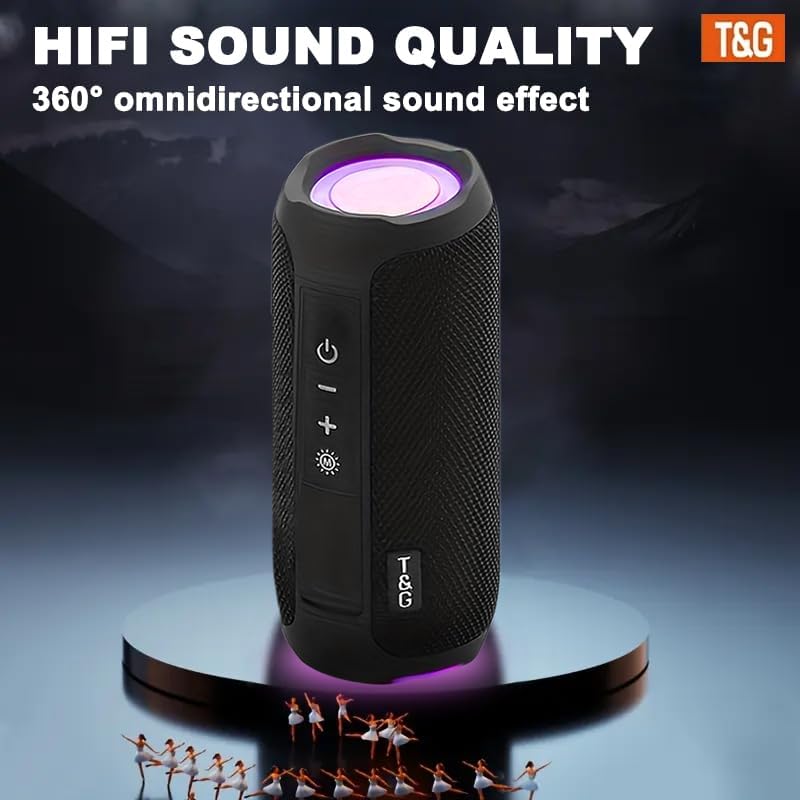
This image represents the speaker's high-fidelity sound quality and 360-degree omnidirectional audio effect, creating an immersive listening experience.
10. Product Video
This video demonstrates the T&G TG227 speaker's waterproof capabilities and its 360-degree sound output, showcasing its suitability for various environments.
11. Warranty and Support
No specific warranty information is provided with this product. For any questions, technical assistance, or support regarding your T&G TG227 Portable Bluetooth Speaker, please refer to the contact information provided by your retailer or the T&G official support channels.
Please retain your purchase receipt for any potential support inquiries.


