
Product Overview
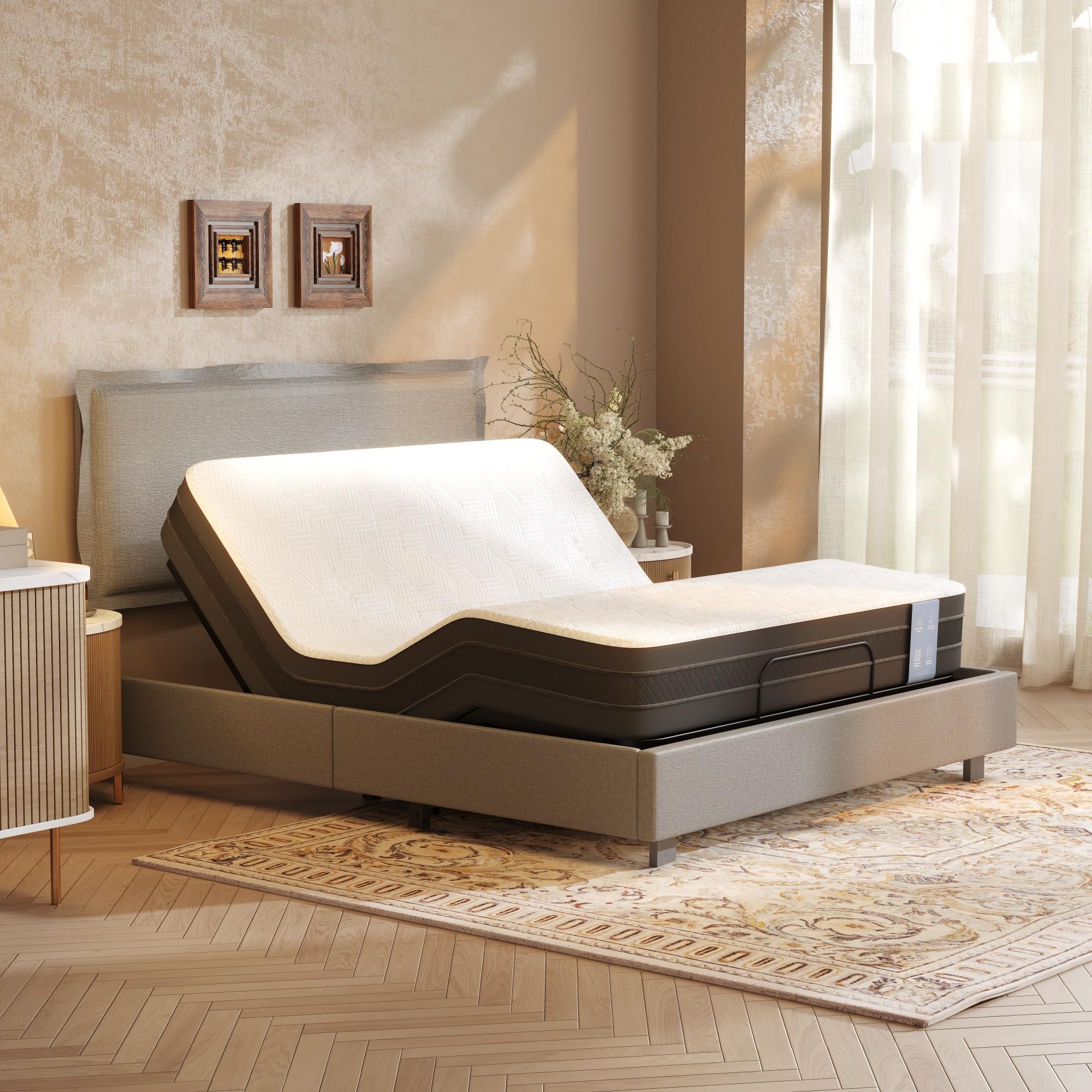
Image: The FLEXISPOT All-In-One Adjustable Bed Base with Upholstered Bed Frame, Queen size in Light Grey, showcasing its integrated design and adjustable features.
The FLEXISPOT All-In-One Adjustable Bed Base combines a sturdy bed frame with an advanced adjustable base, offering both comfort and functionality. Its minimalist design, upholstered headboard, and quiet motor provide a versatile sleeping and lounging experience.
Important Safety Information
WARNING: To prevent injury and ensure proper operation, please read and understand all instructions before assembly and use.
- Do not load more than 600 lbs onto the bed frame. Exceeding this weight limit can cause damage to the product and potential injury.
- Keep all electrical components away from water or excessive moisture.
- Ensure all connections are secure before operating the adjustable features.
- Keep children and pets away from moving parts during operation.
- Unplug the bed from the power outlet before cleaning or performing any maintenance.
Package Contents
The FLEXISPOT All-In-One Adjustable Bed is shipped in two clearly labeled boxes. Please verify all components are present before beginning assembly.

Image: The adjustable bed frame components are packaged in two separate boxes for shipping, labeled for easy identification.
- Bed Frame Components (Headboard, Side Rails, Footboard)
- Adjustable Base Mechanism
- Wired Remote Control
- Power Adapter and Cables
- Assembly Hardware (bolts, washers, nuts)
- Assembly Tools (e.g., Allen wrench)
Setup Instructions
This adjustable bed frame features an all-in-one design for straightforward assembly. It is recommended to have two people for assembly.
- Unpack Components: Carefully remove all parts from the packaging. Lay them out on a clean, soft surface to prevent scratches.
- Assemble Bed Frame: Follow the included diagram to connect the side rails, footboard, and headboard. Ensure all bolts are tightened securely.
- Integrate Adjustable Base: Place the adjustable base mechanism within the assembled bed frame. The all-in-one design means the base fits seamlessly.
- Connect Power: Plug the power adapter into the adjustable base and then into a grounded electrical outlet.
- Attach Headboard: Secure the upholstered headboard to the frame. The headboard height is adjustable (37.8" to 47.6").
- Place Mattress: Position your Queen size mattress (not included) onto the adjustable base. This bed frame is compatible with mattresses between 6 and 14 inches in height, including memory foam, latex, gel, and hybrid types.

Image: The all-in-one design integrates the bed frame and adjustable base, simplifying setup and providing a sturdy foundation.

Image: The headboard offers adjustable height settings to accommodate various mattress thicknesses, and the frame supports different mattress types.
Operating Instructions
The FLEXISPOT Adjustable Bed Base is operated using a simple wired remote control.

Image: The wired remote control provides intuitive buttons for adjusting the head and foot sections of the bed.
- Head Incline: Use the designated button on the wired remote to raise or lower the head section. The head incline can be adjusted from 0 to 60 degrees, ideal for reading or watching TV.
- Foot Incline: Use the designated button on the wired remote to raise or lower the foot section. The foot incline can be adjusted from 0 to 35 degrees, which can help improve circulation.
- Synchronized Movement: The single motor system allows for smooth, synchronized adjustment of both head and foot sections, providing a seamless transition between positions.
- Return to Flat: A dedicated button on the remote will typically return the bed to a flat, neutral sleeping position.
This adjustable bed is designed for various activities such as watching TV, reading, working, or simply relaxing, offering ergonomic comfort and improved circulation.
Video: A brief demonstration of the FlexiSpot All-In-One Adjustable Bed & Upholstered Bed Frame in operation, highlighting its adjustable head and foot positions for enhanced comfort.
Maintenance
Regular maintenance ensures the longevity and optimal performance of your adjustable bed.
- Cleaning the Upholstery: For general cleaning, use a soft brush or vacuum cleaner with an upholstery attachment to remove dust and debris. For spills, blot immediately with a clean, dry cloth. For stubborn stains, use a mild fabric cleaner according to its instructions, testing on an inconspicuous area first.
- Inspecting Moving Parts: Periodically check all bolts and connections to ensure they are tight. Do not over-tighten.
- Motor Care: The motor is designed for durability and quiet operation. Avoid obstructing the motor area. If you notice any unusual noises or performance issues, refer to the troubleshooting section or contact customer support.
- Cable Management: Ensure all power cords and remote control cables are neatly routed and not pinched or tangled to prevent damage.
Troubleshooting
If you encounter any issues with your adjustable bed, please refer to the following common solutions before contacting customer support.
| Problem | Possible Cause | Solution |
|---|---|---|
| Bed does not respond to remote. | No power, loose connection, remote issue. |
|
| Motor makes unusual noise. | Obstruction, loose parts. |
|
| Bed moves slowly or unevenly. | Overload, power issue. |
|
Specifications
Detailed specifications for the FLEXISPOT All-In-One Adjustable Bed Base.
- Model: All-In-One Adjustable Bed
- Size: Queen (Light Grey)
- Product Dimensions (L x W x H): 85.4" x 63" x 47.6"
- Adjustable Headboard Height: 37.8" - 47.6"
- Material: Wood, Steel, Fabric (Upholstered)
- Maximum Weight Recommendation: 600 lbs
- Head Incline: 0-60 degrees
- Foot Incline: 0-35 degrees
- Motor Type: Single, Quiet Motor
- Control: Wired Remote Control
- Compatible Mattress Height: 6-14 inches
- UPC: 840521569712
- ASIN: B0H13QVBD8

Image: Detailed dimensions for the Queen size adjustable bed frame, including length, width, and adjustable headboard height.

Image: The bed frame is certified safe with a maximum weight capacity of 600 lbs, indicated by ISO 9001 SGS certification.
Warranty Information
The FLEXISPOT Adjustable Bed Base is backed by a comprehensive warranty to ensure your peace of mind.
- Motor Warranty: 5 years
- Frame Warranty: 10 years
For detailed terms and conditions, please refer to the warranty card included with your product or visit the official FLEXISPOT website.
Customer Support
If you have any questions, require assistance with assembly, or need to report a problem, please contact FLEXISPOT customer support.
- Website: www.flexispot.com
- Email: support@flexispot.com (example)
- Phone: 1-800-XXX-XXXX (example)
Please have your model number (All-In-One Adjustable Bed) and ASIN (B0H13QVBD8) ready when contacting support.
