
1. Product Overview
The EasyByMall H28 Nuclear Radiation Detector is a compact and portable device designed for accurate detection of beta, gamma, and X-rays. Utilizing an advanced electronic chip module, it provides real-time radiation measurements with high sensitivity, updating data every second. Its pen-style design allows for easy portability and continuous 24/7 monitoring.
This device features an OLED display for clear readings and a built-in rechargeable lithium battery for extended operation. An audible and visual alarm system alerts users when detected radiation levels exceed a preset threshold, ensuring safety in various environments.
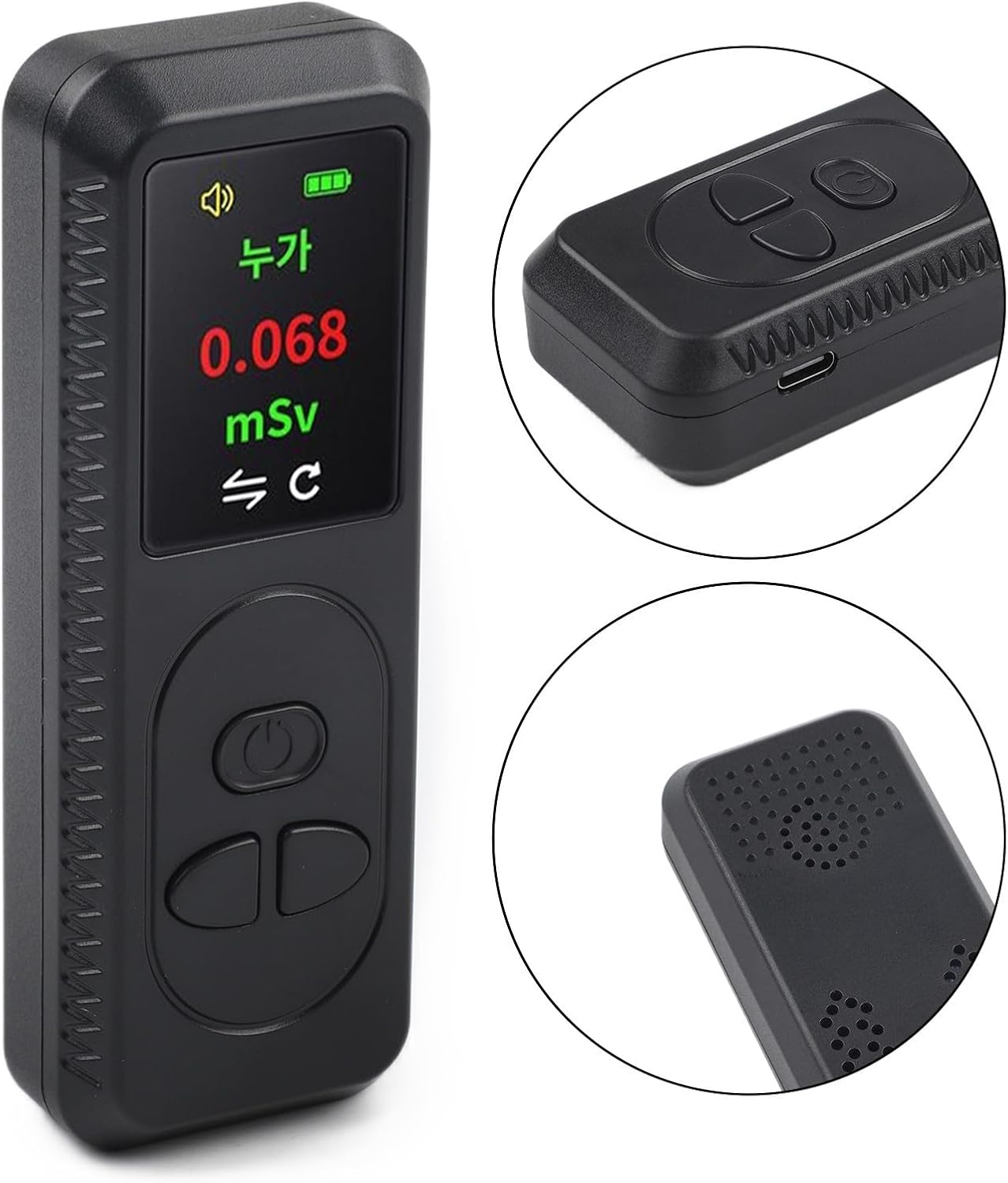
Figure 1.1: Front view of the H28 detector, showing the OLED display and control buttons.
2. Safety Information
- Read this manual thoroughly before operating the device.
- Do not attempt to disassemble or modify the device. This may lead to inaccurate readings, damage, or exposure to internal components.
- Keep the device away from extreme temperatures, humidity, and strong magnetic fields.
- This device is intended for personal monitoring and general environmental screening. It is not a substitute for professional-grade radiation detection equipment or official safety protocols.
- If you suspect high radiation levels, evacuate the area and contact local authorities or radiation safety professionals.
- Dispose of the device and its battery according to local environmental regulations.
3. Package Contents
Please check the package contents upon unboxing:
- 1 x EasyByMall H28 Nuclear Radiation Detector (Black)
- 1 x USB Charging Cable
- 1 x User Manual
4. Setup
4.1 Charging the Device
- Locate the USB charging port on the side of the device.
- Connect the provided USB charging cable to the device and a standard USB power adapter (not included) or a computer USB port.
- The battery indicator on the OLED display will show charging status. A full charge typically takes 2-3 hours.
- Once fully charged, disconnect the charging cable.

Figure 4.1: The H28 detector with its USB charging cable.
4.2 Powering On/Off
- To Power On: Press and hold the power button (usually the central button) for approximately 3 seconds until the display illuminates.
- To Power Off: Press and hold the power button for approximately 3 seconds until the display turns off.
5. Operating Instructions
5.1 Understanding the Display
The OLED display provides critical information:
- Real-time Dose Rate: Displays the current radiation level in mSv/h (millisieverts per hour). This value updates every second.
- Cumulative Dose: Shows the total accumulated radiation dose over time. This value can typically be reset.
- Battery Indicator: Shows the remaining battery life.
- Alarm Status: Indicates if the alarm is active or muted.
5.2 Taking Measurements
- Ensure the device is powered on.
- Hold the detector in the area you wish to measure. For best results, keep it still for a few seconds to allow the sensor to stabilize.
- Observe the real-time dose rate on the display.
- The device continuously monitors and updates the readings.

Figure 5.1: The H28 detector in use, measuring potential radiation from samples.
5.3 Alarm Settings
The device features an adjustable alarm threshold. When the detected radiation dose rate exceeds this threshold, the device will emit a loud audible alarm and the screen will flash.
- Adjusting Threshold: Refer to the specific button functions (usually indicated by 'up' and 'down' arrows or menu options) to navigate to the alarm setting and adjust the desired mSv/h threshold.
- Muting Alarm: A short press of a designated button (often the power button or a specific 'mute' button) can temporarily mute the audible alarm while the visual alert continues.
5.4 Resetting Cumulative Dose
To reset the cumulative dose reading, navigate to the reset option in the device's menu or press and hold a specific button combination as indicated by the on-screen prompts.
6. Maintenance
6.1 Cleaning
- Wipe the device with a soft, dry cloth.
- Do not use abrasive cleaners, solvents, or harsh chemicals, as these can damage the casing or internal components.
- Ensure no liquids enter the device, especially through the sensor area or charging port.
6.2 Battery Care
- Charge the device regularly, even if not in frequent use, to maintain battery health.
- Avoid fully discharging the battery frequently.
- Do not expose the device to extreme heat or cold, as this can degrade battery performance and lifespan.
6.3 Storage
- Store the device in a cool, dry place away from direct sunlight.
- Keep it away from dust and corrosive substances.
7. Troubleshooting
| Problem | Possible Cause | Solution |
|---|---|---|
| Device does not turn on | Low battery; Device malfunction | Charge the device fully. If problem persists, contact support. |
| Inaccurate or fluctuating readings | Interference; Device not stable; Sensor obstruction | Move away from potential sources of interference. Hold the device steady. Ensure sensor area is clear. |
| Alarm not sounding | Alarm muted; Threshold too high; Device malfunction | Check alarm settings and ensure it's not muted. Lower the alarm threshold. If problem persists, contact support. |
| Display not working | Low battery; Device malfunction | Charge the device. If problem persists after charging, contact support. |
8. Specifications
| Feature | Specification |
|---|---|
| Brand | EasyByMall |
| Model Number | X702787IY163ARQ05QI6674 |
| Color | Black |
| Dimensions (L x W x H) | 15 x 10 x 4 cm |
| Weight | 113 g |
| Material | Plastic |
| Detection Range | 0.08 - 50 mSv/h |
| Detected Rays | Beta, Gamma, X-rays |
| Battery Type | Rechargeable Lithium Battery |
| Charging Time | Approx. 2-3 hours |
| Display | OLED |
9. Warranty and Support
For warranty information and customer support, please refer to the product packaging or contact the retailer/manufacturer directly. Keep your purchase receipt as proof of purchase.
For technical assistance or inquiries, please visit the EasyByMall official website or contact their customer service department.