
1. Introduction
This manual provides essential instructions for setting up and operating your CASCHO Smartwatch P125. Please read this guide thoroughly to ensure proper use and to maximize the features of your device. The CASCHO Smartwatch P125 is designed to enhance your daily life with smart notifications, health monitoring, and fitness tracking capabilities.
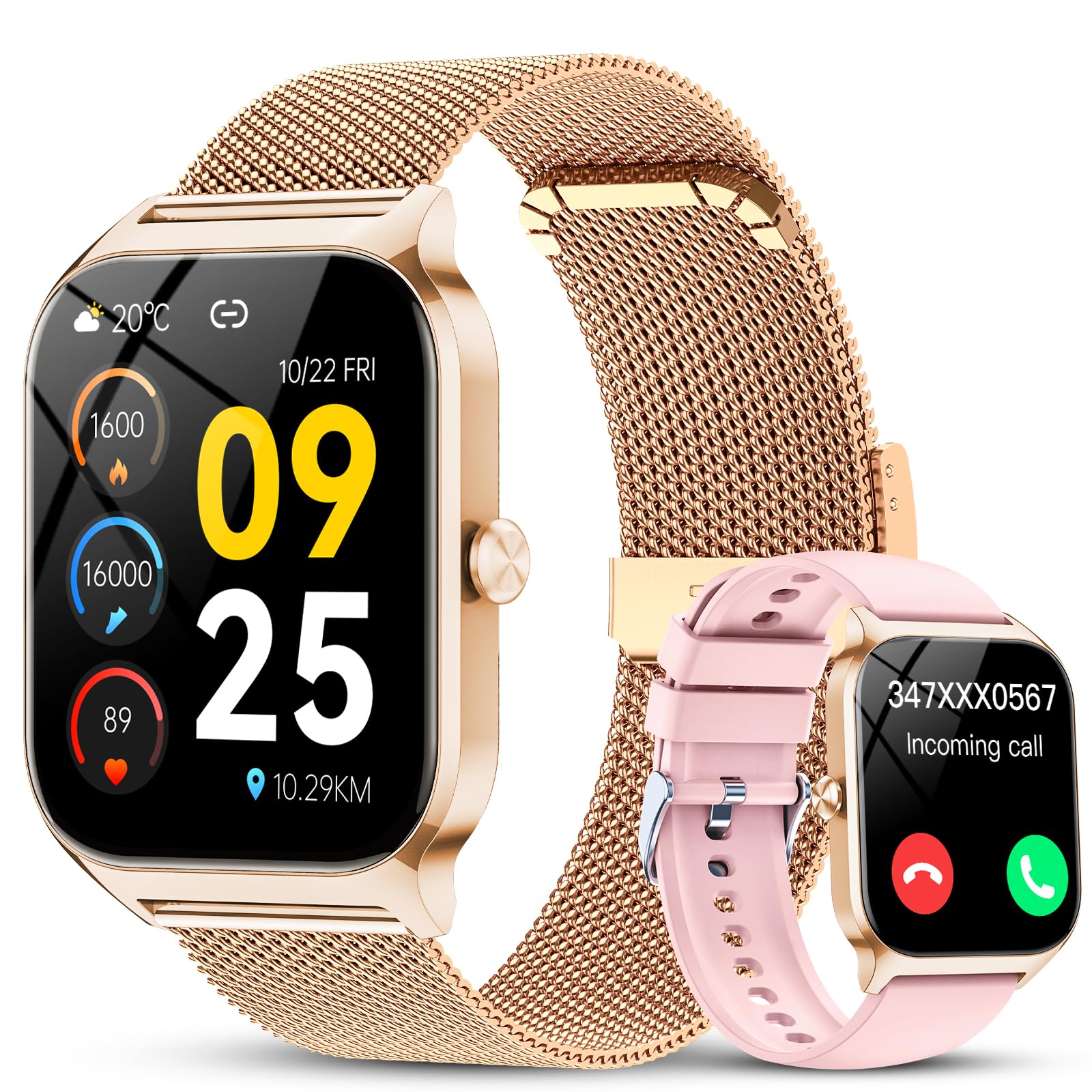
Image: The CASCHO Smartwatch P125, showcasing its elegant rose gold finish and digital display.
2. Package Contents
Verify that all items are present in your package:
- CASCHO Smartwatch (P125) x 1
- Gold Mesh Strap x 1
- Pink Silicone Strap x 1
- Magnetic Charging Cable x 1
- User Manual x 1

Image: A visual representation of the smartwatch, two interchangeable straps, magnetic charging cable, and user manual included in the box.
3. Setup Guide
3.1. Charging the Smartwatch
Before first use, fully charge your smartwatch. Connect the magnetic charging cable to the charging points on the back of the watch and plug the USB end into a power adapter (not included) or a computer USB port.
- Charging Time: Approximately 1.5 hours for a full charge.
- Battery Life: Up to 7 days of typical use.
- Standby Time: Up to 30 days.

Image: The smartwatch being charged via its magnetic charging cable.
3.2. App Installation and Pairing
To unlock all features, connect your smartwatch to your smartphone via the 'Da Fit' application.
- Activate Bluetooth: Ensure Bluetooth is enabled on your smartphone.
- Download App: Search for 'Da Fit' in the Google Play Store (for Android) or Apple App Store (for iOS), or scan the QR code provided in the physical manual.
- Install and Open: Install the 'Da Fit' app and open it.
- Pair Device: In the app, navigate to 'Add Device', select 'P125' from the list, and follow the on-screen prompts to complete the pairing process.

Image: A visual guide demonstrating the steps to connect the smartwatch to your phone via the Da Fit app.
4. Operating the Smartwatch
4.1. Basic Navigation
The smartwatch features a 1.85-inch HD touchscreen for intuitive navigation. Swipe left, right, up, or down to access different functions and menus. Press the side button to return to the main watch face or to power on/off the device.

Image: The smartwatch screen showcasing its high-definition display and vibrant colors.
4.2. Bluetooth Calls and AI Assistant
With the built-in microphone and speaker, you can make and answer calls directly from your wrist when connected to your phone via Bluetooth.
- Making Calls: Access contacts or use the dial pad on the watch.
- Answering Calls: Tap the green icon on the watch screen when a call comes in.
- AI Voice Assistant: Activate the AI assistant to check weather, control music, set alarms, and access other functions using voice commands.

Image: The smartwatch displaying Bluetooth call functions, message notifications, and the voice assistant feature.
4.3. Smart Notifications
Receive real-time notifications from various applications directly on your smartwatch. This includes messages from WhatsApp, Instagram, Facebook, SMS, and other social media apps.
- Note: The smartwatch can receive messages but does not support replying to them.
- Ensure app permissions are granted in the 'Da Fit' app for notifications to function correctly.

Image: The smartwatch screen showing icons for various smart notifications.
4.4. Customizable Watch Faces
Personalize your smartwatch with over 200 available watch faces. You can also upload your own photos through the 'Da Fit' app to create custom watch faces.

Image: A selection of customizable watch faces available for the smartwatch.
4.5. Other Functions
- Music Control: Control music playback on your smartphone (play, pause, skip tracks).
- Camera Control: Use your smartwatch as a remote shutter for your phone's camera.
- Weather Report: View current weather conditions and forecasts.
- Sedentary Reminder: Get alerts to move after periods of inactivity.
- Find Phone: Locate your paired smartphone by making it ring.
- Breathing Exercises: Guided breathing sessions for relaxation.

Image: The smartwatch interface showing icons for various additional functions.
5. Health Monitoring
The CASCHO Smartwatch P125 is equipped with advanced sensors to monitor key health metrics.
- Heart Rate Monitoring: The PPG heart rate sensor provides 24/7 heart rate tracking. View your current heart rate and historical data in the 'Da Fit' app.
- Blood Oxygen (SpO2) Monitoring: Monitor your blood oxygen saturation levels.
- Sleep Tracking: The watch automatically tracks your sleep patterns overnight, providing analysis of deep sleep, light sleep, and wakefulness periods.
- Stress Detection: The smartwatch can detect stress levels.
- Female Menstrual Cycle Tracking: Track and predict menstrual cycles.
Important Note: This device is not a medical device. The health data provided is for reference only and should not be used for medical diagnosis or treatment.

Image: The smartwatch showing real-time data for heart rate, SpO2, and sleep duration.
6. Fitness Tracking
The smartwatch supports over 120 activity modes to help you track your fitness progress.
- Activity Modes: Includes walking, running, cycling, swimming, yoga, basketball, and more.
- Data Tracking: Accurately records steps, calories burned, and distance covered during your workouts.
- App Synchronization: Synchronize your workout data from the watch to the 'Da Fit' app for comprehensive analysis and progress tracking.

Image: A display of various sports mode icons and a smartphone screen showing detailed activity tracking data.
7. Battery Life and Water Resistance
7.1. Battery Life
The 450mAh battery provides extended usage:
- Up to 7 days of daily use.
- Up to 30 days in standby mode.
- Fast magnetic charging, approximately 1.5 hours for a full charge.
7.2. Water Resistance
The smartwatch has an IP68 water resistance rating, meaning it can withstand sweat, rain, and daily splashes. It is suitable for everyday use and light water exposure.
- Note: Do not use the smartwatch while swimming in saltwater or during hot showers/saunas, as steam and high temperatures can affect its water resistance.

Image: The smartwatch on its magnetic charger, highlighting its long battery life and efficient charging.
8. Specifications
| Feature | Detail |
|---|---|
| Model Number | P125 |
| Screen Size | 1.85 Inches |
| Screen Type | AMOLED |
| Resolution | 240 x 284 |
| Battery Capacity | 450 mAh |
| Charging Time | 1.5 Hours |
| Daily Use Battery Life | Up to 7 Days |
| Standby Battery Life | Up to 30 Days |
| Connectivity | Bluetooth 5.3 |
| Water Resistance | IP68 |
| Compatible OS | Android (7.0 and above), iOS (9.0 and above) |
| Sensors | Heart Rate, SpO2, Sleep Sensor, G-sensor |
| Special Functions | Bluetooth Calls, AI Voice Control, Music Player, Camera Remote, Activity Tracker, Calendar |
| Dimensions | 27.6 x 8.7 x 1.9 cm (Package); 38mm (Width), 53mm (Height), 11.2mm (Thickness) |
| Weight | 90 g |
| Strap Material | Gold Silicone (also includes Pink Silicone) |
9. Maintenance
Proper care will extend the life of your smartwatch:
- Cleaning: Wipe the watch and straps regularly with a soft, dry cloth. For silicone straps, a damp cloth with mild soap can be used, then rinse and dry thoroughly.
- Avoid Chemicals: Do not use harsh chemicals, cleaning solvents, or strong detergents, as they can damage the watch's finish and seals.
- Temperature: Avoid exposing the watch to extreme temperatures (very hot or very cold) or sudden temperature changes.
- Impact: Protect the watch from strong impacts or drops.
- Charging: Use only the provided magnetic charging cable. Ensure the charging contacts are clean and dry before charging.
10. Troubleshooting
If you encounter issues with your smartwatch, refer to the following common solutions:
- Watch not turning on:
Ensure the watch is fully charged. Connect it to the charger for at least 10-15 minutes before attempting to power it on again. - Cannot pair with phone:
a. Ensure Bluetooth is enabled on your phone.
b. Make sure the 'Da Fit' app is installed and running.
c. Check that the watch is within Bluetooth range (typically 10 meters/33 feet).
d. Restart both your phone and the smartwatch.
e. Forget the device in your phone's Bluetooth settings and try pairing again through the 'Da Fit' app. - Notifications not received:
a. Verify that the smartwatch is successfully paired with the 'Da Fit' app.
b. Check notification permissions for the 'Da Fit' app in your phone's settings.
c. Ensure that app notifications are enabled within the 'Da Fit' app itself.
d. Make sure your phone's notification bar is receiving messages (if your phone doesn't receive them, the watch won't either). - Inaccurate health data (Heart Rate/SpO2/Sleep):
a. Ensure the watch is worn snugly on your wrist, not too tight or too loose.
b. Keep the sensor area on the back of the watch clean.
c. Avoid excessive movement during measurements.
d. Remember that these are not medical devices; readings are for reference. - Battery drains quickly:
a. Reduce screen brightness.
b. Limit the number of active notifications.
c. Turn off continuous heart rate monitoring if not needed 24/7.
d. Ensure no background apps are excessively consuming power on the watch.
11. Warranty and Support
11.1. Product Warranty
The CASCHO Smartwatch P125 comes with a 1-year warranty from the date of purchase, covering manufacturing defects. This warranty does not cover damage caused by misuse, accidents, unauthorized modifications, or normal wear and tear.
11.2. Customer Support
For any questions, technical assistance, or warranty claims, please contact CASCHO customer support through the platform where you purchased the product or refer to the contact information provided in the original packaging.


