
Introduction
Thank you for choosing the NUTRI FIT Digital Food Scale EK3862. This compact and precise kitchen scale is designed to assist you with various tasks, including cooking, baking, meal preparation, and portion control. It offers multiple units of measurement and a convenient tare function for ease of use. Please read this manual thoroughly before operation to ensure proper use and maintenance.
What's in the Box
- 1 x NUTRI FIT Digital Kitchen Scale (Model EK3862)
- 2 x AAA Batteries
- 1 x User Guide
Product Overview
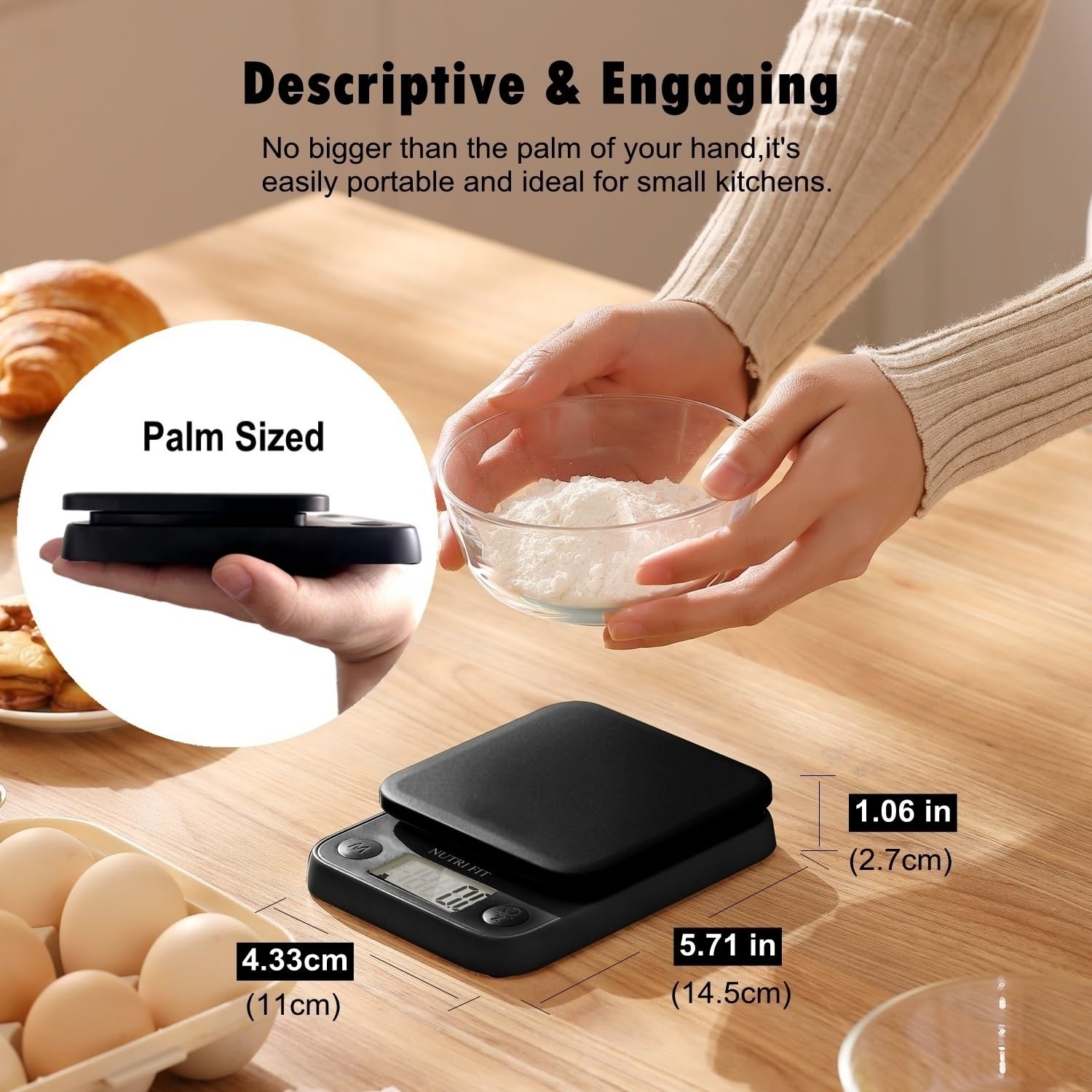
The NUTRI FIT Digital Food Scale EK3862 features a sleek design with an easy-to-read LCD screen and intuitive buttons. Its compact size makes it ideal for any kitchen space and for travel.

LCD Screen: The clear LCD screen provides sharp and visible numbers for easy reading, even in low light conditions.

Compact Design: The scale is designed to be no larger than a smartphone, ensuring portability and minimal counter space usage. Dimensions are approximately 5.71 inches (14.5 cm) long, 4.33 inches (11 cm) wide, and 1.06 inches (2.7 cm) high.
Setup
1. Battery Installation
- Locate the battery compartment on the underside of the scale.
- Open the battery compartment cover.
- Insert the two AAA batteries, ensuring correct polarity (+/-).
- Close the battery compartment cover securely.
Video: This video demonstrates the battery installation process for the NUTRI FIT Digital Food Scale EK3862, showing how to open the compartment and insert the AAA batteries correctly.
2. Initial Placement
Place the scale on a hard, flat, and stable surface. Uneven surfaces can affect accuracy.
Operating Instructions
1. Power On/Off
- To turn on: Press the ON/OFF button. The display will show '0.0' or '0' when ready.
- To turn off: Press and hold the ON/OFF button for a few seconds. The scale also features an automatic turn-off function after 2-3 minutes of inactivity to conserve battery life.
2. Unit Conversion
The scale supports 5 units of measurement: grams (g), pounds:ounces (lb:oz), fluid ounces (fl'oz), and milliliters (mL) for water and milk.
- With the scale on, press the M (Mode) button to cycle through the available units.
- Select your desired unit before weighing.

Unit Conversion: Easily switch between grams, pounds:ounces, fluid ounces, and milliliters by pressing the 'M' button.
3. Tare Function
The Tare function allows you to subtract the weight of a container or previous ingredients, enabling you to measure multiple items in the same bowl.
- Place an empty container on the scale. The display will show its weight.
- Press the Z (Zero/Tare) button. The display will reset to '0.0'.
- Add the item you wish to weigh into the container. The display will show only the weight of the added item.
- Repeat the process for additional ingredients.
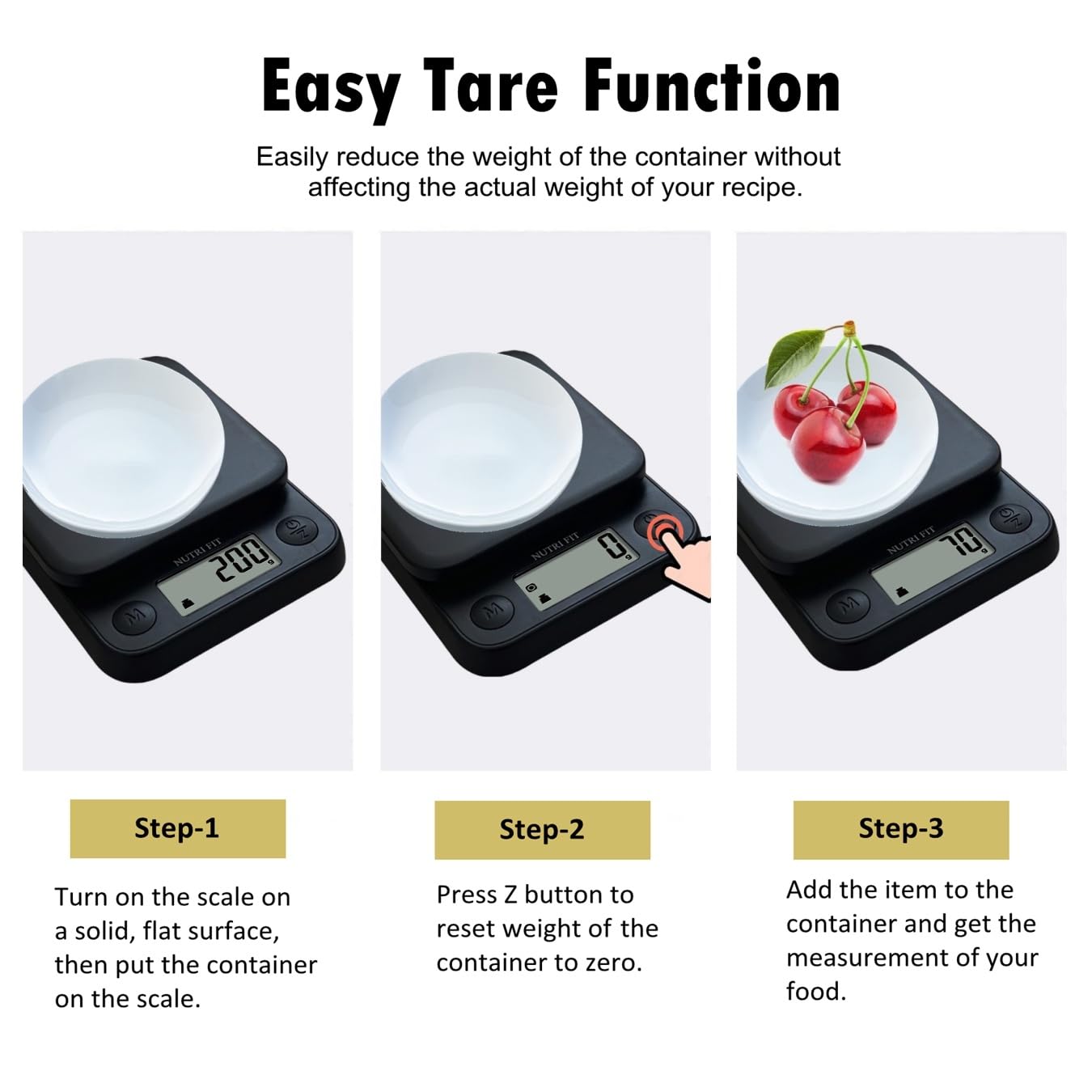
Tare Function Steps: Follow these steps to accurately weigh ingredients in a container by zeroing out the container's weight.
4. Weighing Items
Ensure the scale is on a flat surface and powered on. Place the item directly onto the weighing platform or in a tared container. The weight will be displayed on the LCD screen.
Accurate Weighing: The scale provides precise measurements for various food items, as shown with this bowl of cereal and berries.
Dynamic Precision Modes
The NUTRI FIT Digital Food Scale EK3862 automatically adjusts its precision based on the weight being measured to ensure accuracy across different ranges:
- Light Food (0g to 200g): Division = 0.1g
- Medium-Weight Food (200g to 1kg): Division = 0.5g
- Heavy Food (1kg to 5kg): Division = 1g

Precision Across Ranges: The scale adapts its sensitivity for light, medium, and heavy items, ensuring accurate measurements for everything from spices to large fruits.
Maintenance
1. Cleaning
To clean the scale, wipe it down with a clean, damp cloth. Avoid using abrasive cleaners or submerging the scale in water, as this can damage the electronic components.

Easy Cleaning: The sleek surface of the scale can be easily wiped clean with a damp cloth, maintaining its pristine condition.
2. Battery Replacement
When the 'Lo' indicator appears on the display, it signifies low battery. Replace the AAA batteries as described in the 'Battery Installation' section.
Troubleshooting
| Indicator | Description | Solution |
|---|---|---|
| 'Err' | Overload indication | The weight on the scale exceeds its maximum capacity (11lb/5kg). Remove items immediately to prevent damage. |
| 'Lo' | Low battery indication | Replace the AAA batteries. |
| Inaccurate Readings | Weight displayed is inconsistent or incorrect. | Ensure the scale is on a flat, stable surface. Avoid placing it on soft or uneven surfaces. Recalibrate if necessary (refer to manufacturer support if no specific recalibration steps are provided in this manual). |
| Scale Does Not Turn On | No display when pressing the ON/OFF button. | Check if batteries are installed correctly and are not depleted. Replace batteries if needed. |
Specifications
| Feature | Detail |
|---|---|
| Brand | NUTRI FIT |
| Model Number | EK3862 |
| Color | Classic Black |
| Maximum Weight Capacity | 11 lb / 5 kg |
| Readout Accuracy | 0.1g (<200g), 0.5g (200g-1kg), 1g (>1kg) |
| Measurement Units | oz, lb:oz, fl'oz, g, mL |
| Display Type | LCD |
| Power Source | 2 x AAA Batteries (Included) |
| Special Features | Tare Function, Auto-Off, Overload Indication, Low Battery Indication, Portable |
| Material | ABS Plastic |
| Item Weight | 0.48 Pounds |
Warranty and Support
For warranty information, technical support, or any questions regarding your NUTRI FIT Digital Food Scale EK3862, please contact NUTRI FIT customer service. Refer to the contact information provided on the product packaging or the official NUTRI FIT website.