
1. Introduction
The INGCO HLDD05086 Laser Distance Meter is a precision digital measuring tool designed for fast and accurate distance calculations. This device offers a measuring range of 0.05 to 55 meters with an accuracy of ±2.0mm, making it suitable for various professional and DIY measurement tasks. It features multiple intelligent functions including area, volume, indirect measurement, and Pythagorean calculations. This manual provides essential information for the safe and effective use of your device, covering setup, operation, maintenance, and troubleshooting.
2. Safety Information
WARNING: Read all safety warnings and instructions before using this product. Failure to follow the warnings and instructions may result in serious injury.
- This device uses a Class 2 laser. Do not stare directly into the laser beam or direct it at other people.
- Do not attempt to modify or disassemble the device. Unauthorized modifications can lead to hazardous laser radiation exposure.
- Keep the device out of reach of children.
- Do not use the device in explosive atmospheres or near flammable materials.
- Avoid exposing the device to extreme temperatures, humidity, or direct sunlight for prolonged periods.
- Use only AAA alkaline batteries as specified. Do not mix old and new batteries or different types of batteries.
3. Package Contents
Verify that all items are present in the package:
- INGCO HLDD05086 Laser Distance Meter
- 2 x AAA 1.5V Alkaline Batteries
- User Manual (this document)
4. Device Overview
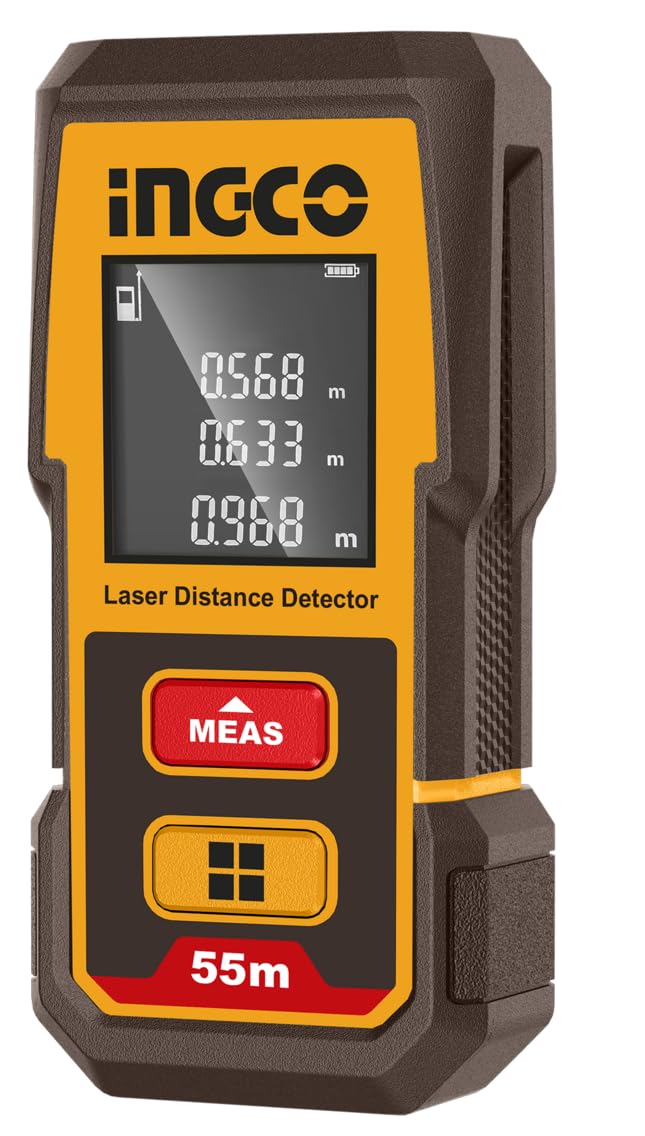
Figure 1: INGCO HLDD05086 Laser Distance Meter, showing the device itself, two AAA batteries, and its retail packaging. The device features a digital display and two main control buttons.
The INGCO HLDD05086 features a compact design with an intuitive interface.
4.1. Buttons and Display
- MEAS Button (Red): Powers on the device, initiates single measurement, continuous measurement, and confirms selections.
- Function Button (Yellow/Orange with house icon): Cycles through measurement modes (Area, Volume, Pythagorean, etc.), changes measurement reference point, and clears previous measurements.
- LCD Display: Shows measurement results, battery status, measurement mode, and reference point.
5. Setup
5.1. Battery Installation
- Locate the battery compartment cover on the rear of the device.
- Slide the cover open.
- Insert two AAA 1.5V alkaline batteries, ensuring correct polarity (+/-) as indicated inside the compartment.
- Close the battery compartment cover securely.
Figure 2: Two AAA alkaline batteries, required for powering the INGCO HLDD05086 Laser Distance Meter. Ensure correct polarity during installation.
5.2. Power On/Off
- To Power On: Press the MEAS button. The laser will activate.
- To Power Off: Press and hold the MEAS button for approximately 3 seconds, or the device will automatically power off after 45 seconds of inactivity to conserve battery.
6. Operating Instructions
6.1. Changing Measurement Reference Point
The device can measure from its front edge or its rear edge. The default is usually the rear edge.
- Press the Function button briefly to toggle between front and rear reference points. An icon on the display will indicate the current reference point.
6.2. Single Distance Measurement
- Power on the device by pressing the MEAS button.
- Aim the laser beam at the target point.
- Press the MEAS button again. The measured distance will be displayed.
6.3. Continuous Measurement (Tracking)
This mode allows you to track distances in real-time as you move the device.
- Power on the device.
- Press and hold the MEAS button for approximately 2 seconds. The device will enter continuous measurement mode, displaying minimum, maximum, and current distances.
- Move the device to track distances.
- Press the MEAS button again to exit continuous measurement.
6.4. Area Measurement
- Power on the device.
- Press the Function button repeatedly until the area measurement icon (a square) appears on the display.
- Press MEAS to measure the first side (e.g., length).
- Press MEAS again to measure the second side (e.g., width).
- The calculated area will be displayed.
6.5. Volume Measurement
- Power on the device.
- Press the Function button repeatedly until the volume measurement icon (a cube) appears on the display.
- Press MEAS to measure the length.
- Press MEAS again to measure the width.
- Press MEAS a third time to measure the height.
- The calculated volume will be displayed.
6.6. Pythagorean Measurement (Indirect Measurement)
This mode allows you to calculate inaccessible heights or distances using the Pythagorean theorem.
- Power on the device.
- Press the Function button repeatedly until the desired Pythagorean icon appears (e.g., for single indirect height or double indirect height).
- Follow the on-screen prompts to measure the required sides (hypotenuse, base). Ensure the device remains stationary and level for accurate base measurements.
- The calculated indirect distance will be displayed.
6.7. Unit Conversion
The device typically supports units like meters (m), feet (ft), and inches (in).
- While the device is on, press and hold the Function button for a few seconds to cycle through available measurement units. Release the button when the desired unit is displayed.
7. Maintenance
7.1. Cleaning
- Wipe the device with a soft, damp cloth. Do not use abrasive cleaners or solvents.
- Clean the laser lens carefully with a soft cloth, similar to cleaning camera lenses.
7.2. Storage
- Store the device in a dry, cool place, away from direct sunlight and extreme temperatures.
- If storing for extended periods, remove the batteries to prevent leakage.
7.3. Battery Replacement
When the battery indicator on the display shows low power, replace both AAA batteries following the instructions in Section 5.1.
8. Troubleshooting
| Problem | Possible Cause | Solution |
|---|---|---|
| Device does not power on. | Batteries are dead or incorrectly installed. | Replace batteries or check polarity. |
| Inaccurate measurements. |
|
|
| Laser beam is not visible. | Strong ambient light. | Measure in lower light conditions or use a target plate. |
9. Specifications
- Model: HLDD05086
- Measuring Range: 0.05 - 55 meters
- Measurement Accuracy: ±2.0mm
- Laser Class: Class 2
- Laser Type: 635nm, <1mW
- Measurement Functions: Single, Continuous, Area, Volume, Indirect (Pythagorean)
- Units: Meters (m), Feet (ft), Inches (in)
- Automatic Laser Shut-off: 45 seconds
- Automatic Power Shut-off: 45 seconds
- Operating Temperature: 0°C to +50°C
- Storage Temperature: -20°C to +60°C
- Batteries: 2 x AAA 1.5V Alkaline
- Dimensions: Approximately 18 x 7.6 x 3.6 cm
- Weight: Approximately 120 g (without batteries)
10. Warranty and Support
For warranty information or technical support, please refer to the warranty card included with your product or contact INGCO customer service through their official website. Keep your purchase receipt as proof of purchase.

