
1. Introduction
Thank you for choosing the Protmex Cordless Impact Wrench Model C06301. This manual provides essential information for the safe and efficient operation, maintenance, and troubleshooting of your new tool. Please read this manual thoroughly before first use and keep it for future reference.
Product Overview
The Protmex C06301 is a powerful 21V cordless impact wrench featuring a brushless motor, designed for high-torque applications such as automotive repair, construction, and DIY projects. It delivers up to 900 Ft-lbs (1200 N.m) of torque, making it suitable for removing stubborn nuts and bolts.
Key Features
- Efficient Brushless Motor: Provides up to 3500 RPM, quieter operation, and spark-free performance, extending tool life.
- High Torque Output: Delivers 900 Ft-lbs (1200 N.m) for demanding tasks.
- Variable Speed Modes: Three forward speed settings (0-2500 RPM, 0-2900 RPM, 0-3500 RPM) and one fixed reverse speed.
- Long-lasting Batteries: Equipped with two 4.0Ah 21V battery packs for extended runtime and a fast charger.
- Built-in LED Light: Illuminates the work area for improved visibility in dark or confined spaces.
- Two-way Brake Stop: In reverse mode, automatically reduces speed and torque once a fastener is loose to prevent it from flying off.
- Complete Kit: Includes the impact wrench, two batteries, a fast charger, four impact sockets (17mm, 19mm, 21mm, 24mm), and an extension rod.
2. Setup Instructions
Package Contents
Before starting, ensure all items are present in the package:
- 1 x Protmex Cordless Impact Wrench
- 2 x 4.0Ah 21V Lithium-ion Battery Packs
- 1 x Fast Charger
- 4 x Impact Sockets (17mm, 19mm, 21mm, 24mm)
- 1 x Extension Rod
- 1 x Carrying Case

Image: The complete Protmex Cordless Impact Wrench kit, including the wrench, batteries, charger, and various accessories, neatly organized in its carrying case.
Battery Charging and Installation
The battery packs are not fully charged upon delivery. Fully charge them before first use.
- Connect the fast charger to a standard power outlet.
- Slide the battery pack onto the charger until it clicks into place. The charger indicator light will show the charging status.
- Once fully charged (typically 1-2 hours), remove the battery from the charger.
- To install the battery onto the impact wrench, align the battery with the base of the tool and slide it in until it locks securely.
- To remove, press the battery pack release button and slide the battery off.
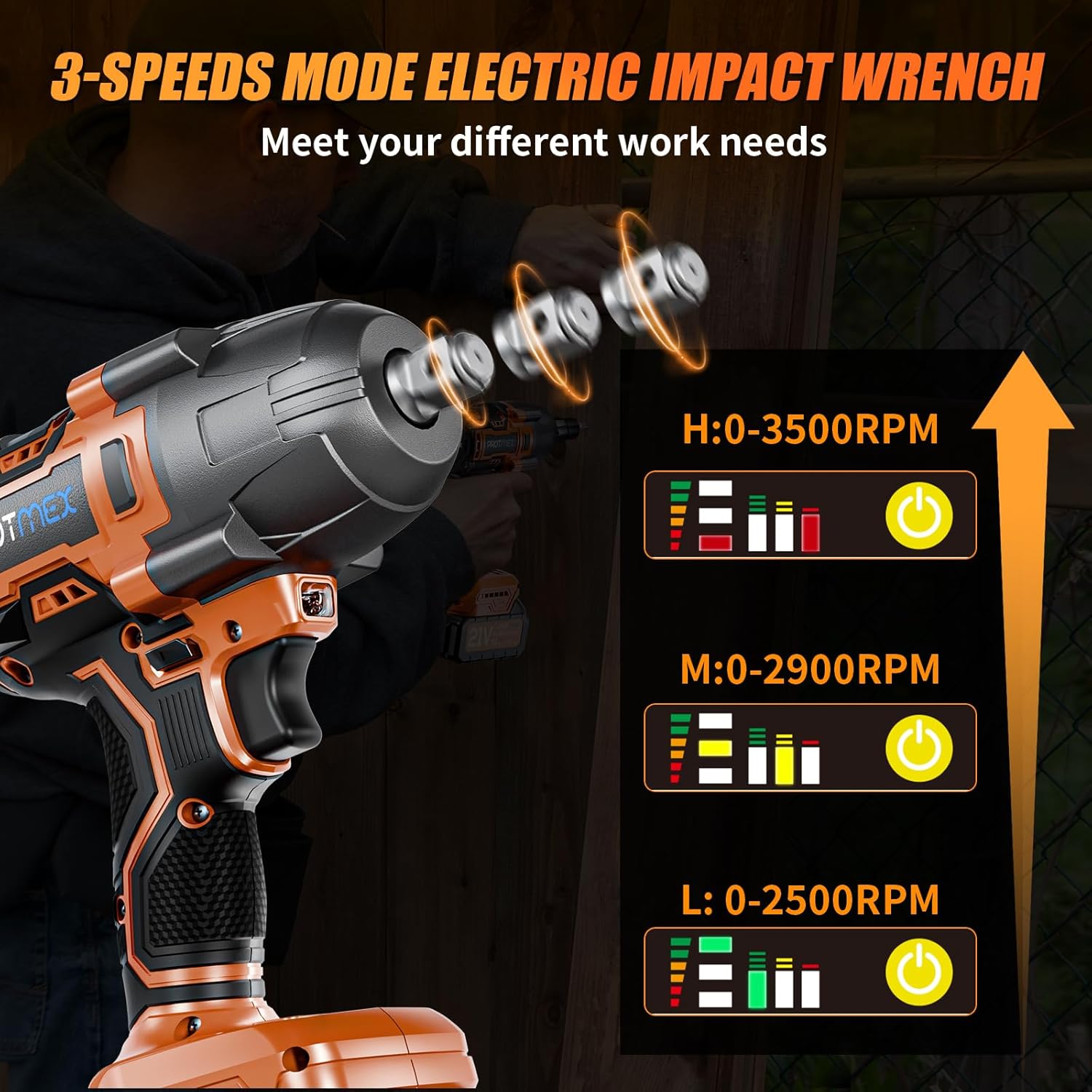
Image: Two 4.0Ah 21V Lithium-ion battery packs shown with the fast charger, illustrating the charging components.
Video: This video demonstrates the features of the 21V High Torque Cordless Impact Driver, including battery installation and chuck operation.
Socket Installation
The impact wrench features a 1/2-inch square drive for attaching sockets.
- Select the appropriate impact socket for your fastener.
- Push the socket firmly onto the 1/2-inch square drive anvil until it clicks into place.
- To remove, pull the socket off the anvil.

Image: A close-up view of the Protmex Cordless Impact Wrench with an impact socket securely attached to its 1/2-inch square drive.
3. Operating Instructions
Power On/Off and Speed Selection
The tool is activated by pressing the trigger switch. The speed is variable based on trigger pressure.
- Power On: Squeeze the trigger switch to start the tool. The speed increases with more pressure.
- Power Off: Release the trigger switch to stop the tool.
- Speed Modes (Forward): Use the speed selector button to cycle through three speed settings: L (0-2500 RPM), M (0-2900 RPM), and H (0-3500 RPM). Select the appropriate speed for your task.

Image: A visual representation of the three-speed modes (Low, Medium, High) available on the Protmex electric impact wrench, indicating their respective RPM ranges.
Forward and Reverse Operation
The direction of rotation is controlled by the forward/reverse switch located above the trigger.
- Forward Rotation: Push the switch to the left for tightening fasteners. In this mode, all three speed settings are available.
- Reverse Rotation: Push the switch to the right for loosening fasteners. In this mode, there is one fixed speed.
- Locking Protection: Position the switch in the center to lock the trigger and prevent accidental operation.
- Two-way Brake Stop (Reverse Mode): When loosening, once the nut or bolt is free, the brake stop device activates, reducing speed and torque to prevent the fastener from falling off.

Image: A detailed view of the forward and reverse switch mechanism on the impact wrench, showing how to select rotation direction for tightening or loosening screws.
Video: This video showcases the 1200N.m Cordless Impact Wrench in action, demonstrating its power and ease of use for various tasks.
Using the LED Work Light
The built-in LED light automatically activates when the trigger is pressed, illuminating your work area.
- The LED light is located at the front of the tool, below the square drive.
- It provides improved visibility in dimly lit environments, making it easier to work in tight or dark spaces.

Image: A user operating the impact wrench on a car wheel, highlighting how the integrated LED light provides illumination for precision in dark conditions.
4. Maintenance
Regular maintenance ensures the longevity and optimal performance of your Protmex impact wrench.
General Cleaning
- Always disconnect the battery pack before cleaning.
- Use a soft, damp cloth to wipe down the tool's exterior. Do not use harsh chemicals or abrasive cleaners.
- Keep ventilation openings clear of dust and debris to prevent overheating. Use compressed air if necessary.
Battery Care
- Store batteries in a cool, dry place away from direct sunlight and extreme temperatures.
- Do not store fully discharged batteries for extended periods. Charge them periodically if not in use.
- Avoid dropping or physically damaging the battery packs.
Brushless Motor Advantages
Your Protmex impact wrench features a brushless motor, which offers several maintenance benefits:
- No Carbon Brushes: Eliminates the need for brush replacement, a common maintenance task for brushed motors.
- Reduced Heat: Operates cooler, leading to less wear and tear on internal components.
- Longer Lifespan: Generally more durable and requires less frequent servicing compared to brushed motors.

Image: An exploded view diagram of the brushless motor, highlighting its efficient design and internal workings.
5. Troubleshooting
If you encounter issues with your impact wrench, refer to the following common problems and solutions:
| Problem | Possible Cause | Solution |
|---|---|---|
| Tool does not start | Battery not charged or improperly installed. Forward/reverse switch in center (locked) position. | Ensure battery is fully charged and correctly installed. Move forward/reverse switch to forward or reverse position. |
| Low power or reduced torque | Battery charge is low. Incorrect speed mode selected. | Recharge the battery. Select a higher speed mode (H) for maximum torque. |
| Tool overheats | Continuous heavy use. Ventilation ports blocked. | Allow the tool to cool down. Clear any debris from ventilation openings. |
| Socket does not attach securely | Incorrect socket size or type. Debris on anvil. | Ensure you are using a 1/2-inch impact-rated socket. Clean the anvil and socket. |
If the problem persists after trying these solutions, please contact Protmex customer support.
6. Specifications
Detailed technical specifications for the Protmex Cordless Impact Wrench Model C06301:
| Feature | Detail |
|---|---|
| Model Number | C06301 |
| Brand | Protmex |
| Voltage | 21V |
| Max Torque | 900 Ft-lbs (1200 N.m) |
| No-Load Speed (Forward) | L: 0-2500 RPM, M: 0-2900 RPM, H: 0-3500 RPM |
| Drive Size | 1/2 inch Square Drive |
| Motor Type | Brushless |
| Battery Capacity | 4.0Ah Lithium-ion |
| Item Weight | 4.63 Pounds |
| Material | Acrylonitrile Butadiene Styrene, Alloy Steel, Carbon Steel, Metal |
7. Warranty and Support
Warranty Information
Protmex products are manufactured to high-quality standards. For specific warranty details regarding your Model C06301 impact wrench, please refer to the warranty card included in your product packaging or visit the official Protmex website. Keep your purchase receipt as proof of purchase for any warranty claims.
Customer Support
If you have any questions, require technical assistance, or need to report a problem with your Protmex Cordless Impact Wrench, please contact our customer support team. Contact information can typically be found on the product packaging, the official Protmex website, or through your retailer.