
Introduction
The Infinix Note 60 Pro is a 5G smartphone designed for powerful performance, extended battery life, and a premium visual experience. It features a Snapdragon 7s Gen 4 processor, a 6.78-inch Full HD+ AMOLED display, and a 50MP camera system. This manual provides instructions for setting up, operating, and maintaining your device.

Image: The Infinix Note 60 Pro smartphone in Deep Ocean Blue, showcasing its sleek design.
What's in the Box
- Infinix Note 60 Pro Smartphone
- Charging Adapter
- USB Type-C Cable
- SIM Ejector Tool
- Protective Case
- Quick Start Guide
- Warranty Card
Note: Specific accessories may vary by region. Please check your packaging contents.
Setup
SIM Card Installation
- Locate the SIM card tray on the side of your device.
- Insert the provided SIM ejector tool into the small hole on the tray to open it.
- Carefully place your Nano-SIM cards into the designated slots on the tray. Ensure the gold contacts face downwards. The device supports Dual SIM functionality.
- Gently push the tray back into the phone until it clicks into place.

Image: Side view of the Infinix Note 60 Pro, highlighting the location of the SIM card tray and volume/power buttons.
Powering On and Initial Configuration
Press and hold the power button located on the side of the device until the Infinix logo appears on the screen. Follow the on-screen prompts to select your language, connect to a Wi-Fi network, and set up your Google account. This process will guide you through essential settings to personalize your device.
Charging the Device
Connect the USB Type-C cable to the charging port at the bottom of the phone and plug the other end into the charging adapter. Plug the adapter into a power outlet. The device supports 90W wired fast charging and 30W wireless charging for quick power replenishment. A full charge of the 6500mAh battery provides extended usage time.
Operating
Display Features
The Infinix Note 60 Pro features a 6.78-inch Full HD+ AMOLED display with a 144Hz refresh rate, offering smooth scrolling and vibrant visuals. It boasts up to 4500 Nits Peak Brightness for clear visibility even in bright conditions. The device also incorporates an Active Matrix Display on the rear for interactive notifications and information at a glance.
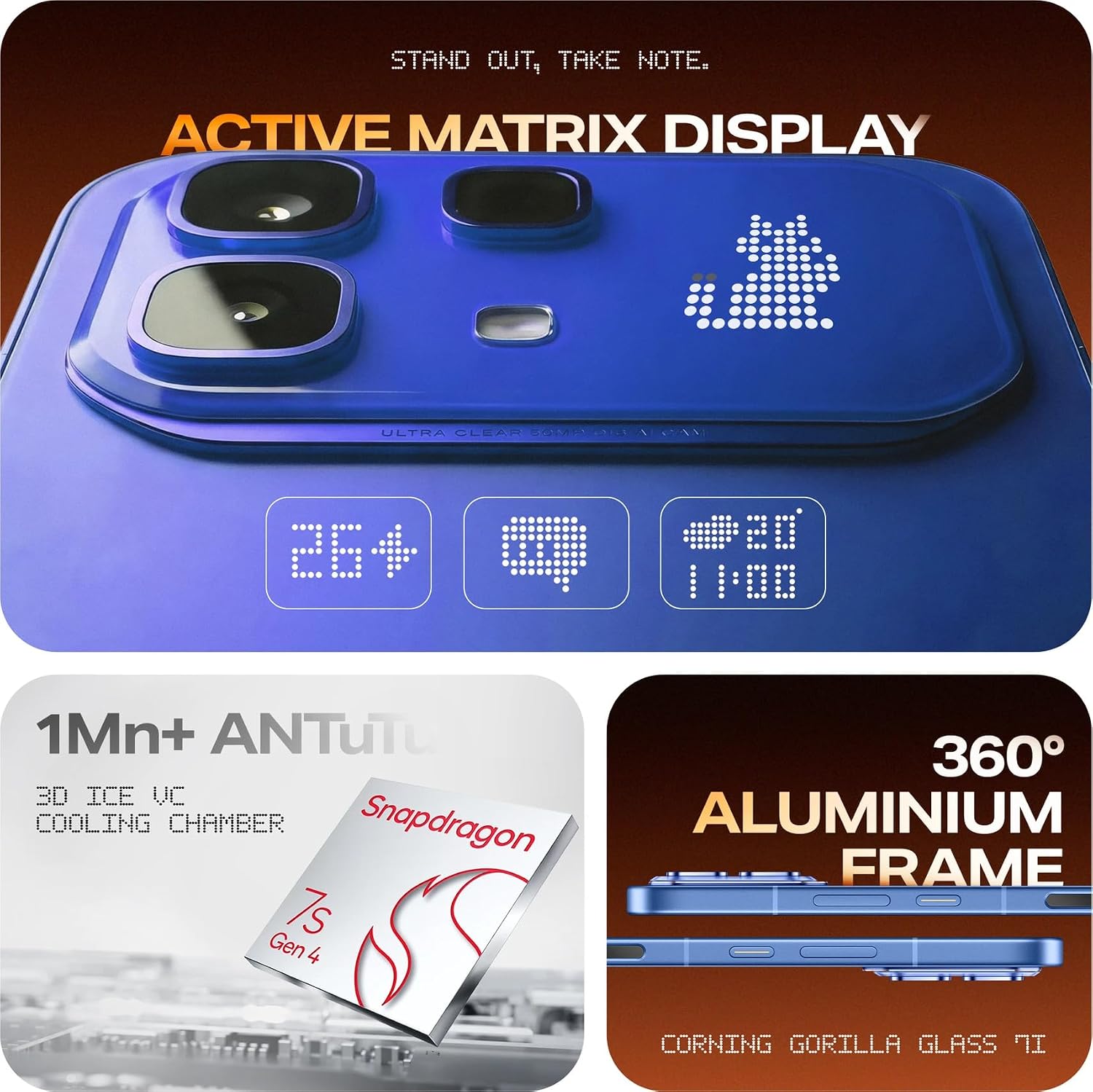
Image: Close-up of the Infinix Note 60 Pro's rear panel, showcasing the Active Matrix Display with dynamic light patterns for notifications and information.
Camera Usage
The device is equipped with a 50MP rear camera and a 13MP front camera, allowing for high-quality photography and video recording. To open the camera application, tap the camera icon on your home screen or lock screen.
- Shooting Modes: Available modes include High Dynamic Range (HDR) for improved detail in varied lighting conditions.
- AI Studio Features: Enhance your photos with advanced AI capabilities:
- AI HD Enhancement: Improves overall image clarity and detail.
- AI Flare Remover: Reduces unwanted lens flare in your shots.
- AI Shadow Remover: Brightens dark areas to reveal hidden details.
- AI Reflection Remover: Minimizes reflections from surfaces like glass.
- AI Eraser: Intelligently removes unwanted objects from your images.
- AI Extender: Expands the content of your image beyond its original borders.

Image: Detailed view of the Infinix Note 60 Pro's dual camera module on the rear, showing the 50MP lens and LED flash.

Image: Screenshot illustrating the XOS 16 AI Studio features, including AI HD Enhancement, AI Flare Remover, AI Shadow Remover, AI Reflection Remover, AI Eraser, and AI Extender.
Performance and Gaming
The Infinix Note 60 Pro is powered by the Snapdragon 7s Gen 4 processor and features 8GB of RAM, ensuring smooth performance for multitasking, demanding applications, and gaming. For an optimized gaming experience, activate the XBOOST Esports Mode through the device settings to prioritize system resources for games.
Battery Management
The device is equipped with a large 6500mAh battery, providing extended usage throughout the day. Utilize the 90W wired fast charging for rapid power-ups or the convenient 30W wireless charging. To optimize battery life, manage background app usage and adjust screen brightness.

Image: Visual representation of the Infinix Note 60 Pro's key features, including the 6500mAh battery, 90W charging, 1.5K 144Hz AMOLED display, 30W wireless charging, 50MP OIS camera, and health monitoring sensor.
Operating System and AI Features
The Infinix Note 60 Pro runs on the Android operating system, customized with the XOS 16 interface. XOS 16 includes an integrated AI Assistant to help with various tasks, manage settings, and provide smart suggestions for a more intuitive user experience.
Audio Experience
The device features audio enhancements by JBL, providing a rich and immersive sound experience for media consumption and calls.
Maintenance
Software Updates
Regularly check for and install software updates to ensure your device has the latest features, security patches, and performance improvements. You can typically find update options in Settings > System > Software Update.
Cleaning Your Device
To clean your Infinix Note 60 Pro, use a soft, lint-free cloth. Gently wipe the screen and the back panel. Avoid using abrasive materials, harsh chemicals, or aerosol sprays, as these can damage the device's finish or internal components.
Water Resistance
The device is designed with a water-resistant rating. While it can withstand splashes and light rain, it is not fully waterproof. Avoid intentional submersion in water, exposure to high-pressure water jets, or use in humid environments like saunas or steam rooms. Damage caused by liquid exposure is typically not covered under warranty.
Troubleshooting
Device Not Powering On
- Ensure the battery is sufficiently charged. Connect the device to the charger for at least 15 minutes before attempting to power it on.
- Perform a force restart by pressing and holding the power button for 10-15 seconds.
Poor Network Connectivity
- Check if your SIM card(s) are properly inserted into the tray.
- Restart the device to refresh network connections.
- Verify your mobile data or Wi-Fi settings are correctly configured and enabled.
- If using mobile data, ensure you are in an area with network coverage.
Apps Crashing or Freezing
- Close the problematic app and reopen it.
- Clear the app's cache: Go to Settings > Apps > [App Name] > Storage > Clear Cache.
- Ensure the app is updated to its latest version from the Google Play Store.
- If the issue persists, try uninstalling and reinstalling the app.
Technical Specifications
| Feature | Specification |
|---|---|
| Brand | Infinix |
| Model Series | Infinix Note 60 Pro |
| Operating System | Android |
| CPU Model | Snapdragon 7s Gen 4 |
| CPU Speed | 2.4 GHz |
| RAM | 8 GB |
| Internal Storage | 128 GB |
| Display Size | 6.78 Inches |
| Display Type | FHD+ AMOLED |
| Max Display Resolution | 2392 × 1080 Pixels |
| Peak Brightness | 4500 Nits |
| Rear Camera Resolution | 50 MP |
| Front Camera Resolution | 13 MP |
| Battery Capacity | 6500 Milliamp Hours |
| Wired Charging | 90W |
| Wireless Charging | 30W |
| Cellular Technology | 5G |
| SIM Card Slot Count | Dual SIM |
| Connector Type | USB Type C |
| Water Resistance Level | Water Resistant |
| Item Dimensions | 16.4 x 7.5 x 0.9 Centimeters |
| Item Weight | 190 Grams |
| Model Year | 2024 |
| Country of Origin | India |
Warranty and Customer Support
Warranty Information
The Infinix Note 60 Pro comes with a 1 Year Warranty from the date of purchase. Please retain your proof of purchase (invoice or receipt) as it is required for any warranty claims. The warranty covers manufacturing defects but typically excludes damage caused by misuse, accidents, unauthorized repairs, or liquid exposure.
Customer Support
For technical assistance, service inquiries, or any questions regarding your Infinix Note 60 Pro, please contact Infinix customer care:
- Customer Care Helpline: 1800-419-0525
- Manufacturer: Infinix India Pvt. Ltd.
- Address: Building No. 9, Tower B, DLF Cyber City, Gurugram, Haryana – 122002, India
For additional information and support resources, you can visit the official Infinix Store on Amazon.


