
1. Important Safety Instructions
Please read all instructions carefully before using this appliance and retain for future reference. Always follow basic safety precautions to reduce the risk of fire, electric shock, or injury.
Electrical Safety
- Ensure the power supply matches the voltage specified on the rating label.
- Do not operate the unit with a damaged cord or plug. If the supply cord is damaged, it must be replaced by the manufacturer or a qualified service agent.
- Do not share the electrical outlet with other appliances.
- Always plug the unit into a grounded three-prong outlet.
- Do not use extension cords or adapter plugs.
General Safety
- This appliance is for indoor use only.
- Keep the unit away from heat sources, direct sunlight, and flammable materials.
- Do not insert fingers or objects into the air inlet or outlet.
- Always turn off and unplug the unit before cleaning or servicing.
- Do not attempt to repair or modify the unit yourself. Contact qualified service personnel.
- Ensure the unit is placed on a flat, stable surface to prevent tipping.
2. Product Overview
The Feelfunn 10,000 BTU Portable Air Conditioner is a versatile 3-in-1 unit designed to provide cooling, fan, and dehumidification functions for rooms up to 450 sq. ft. It features an intuitive LED display, remote control, and a quiet operation suitable for various living spaces.
Included Components
- Portable AC Unit
- Window Installation Kit (adjustable for 20"-49" wide windows)
- Exhaust Hose
- Hose Connectors
- Remote Control
- Instruction Manual

Image: Feelfunn Portable AC unit with all included accessories: exhaust hose, window kit, and remote control.
Key Features
- Powerful Cooling: 10,000 BTU ASHRAE (6,000 BTU SACC) capacity, adjustable 60-86°F.
- 3-in-1 Functionality: Cool, Fan, and Dehumidifier modes (52 pints/day).
- User-Friendly Controls: LED display and remote control for easy operation.
- Quiet Operation: Operates at less than 50dB, ideal for bedrooms and offices.
- Energy Efficient: High CEER 6.6 and Sleep mode to reduce energy consumption.
- Portable Design: Equipped with 360° casters and hidden handles for easy movement.
- Washable Filter: Reusable filter for improved air quality and easy maintenance.
3. Setup and Installation
Proper installation is crucial for the efficient operation of your portable air conditioner. Follow these steps carefully.
Window Kit Installation
The adjustable window kit is designed to fit both horizontal and vertical sliding windows between 20 and 49 inches wide.
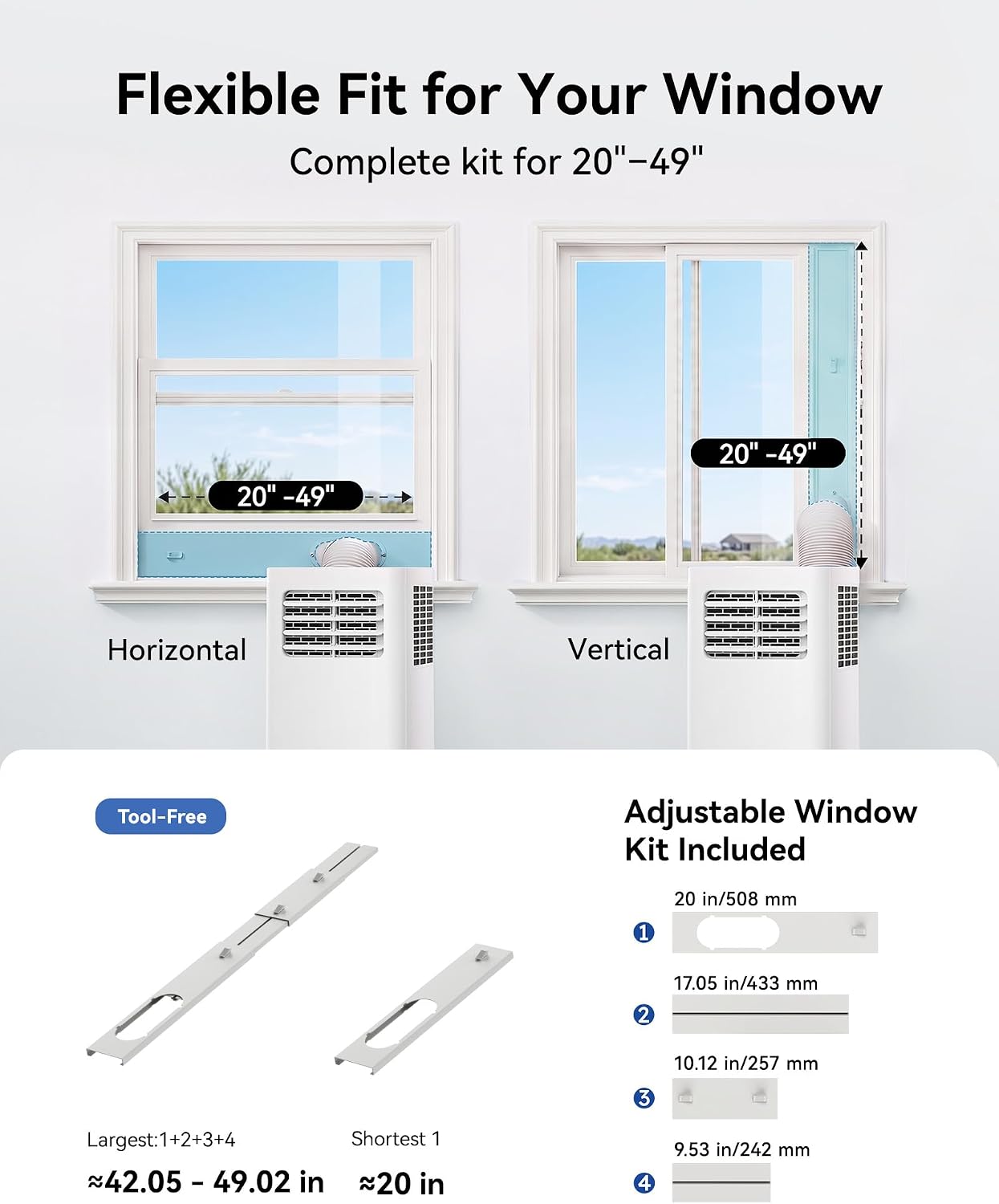
Image: Diagram illustrating the flexible window kit installation for both horizontal and vertical sliding windows, accommodating widths from 20 to 49 inches.
- Assemble Window Panel: Connect the window panel pieces to match your window's width. The kit includes multiple panels for flexible adjustment.
- Install Window Panel: Open your window and place the assembled window panel into the window opening. Extend the panel to fit snugly and secure it. Close the window against the panel to hold it in place.
- Attach Hose Connector to Unit: Twist one end of the exhaust hose connector onto the exhaust outlet of the portable AC unit.
- Attach Hose to Window Kit: Twist the other end of the exhaust hose connector onto the opening in the window panel. Ensure both connections are secure to prevent air leakage.
- Position Unit: Place the portable AC unit on a flat surface near the window, ensuring the exhaust hose is not kinked or bent sharply. Maintain adequate clearance around the unit for proper airflow.

Image: A visual guide demonstrating the six-step installation process, from connecting the hose to the unit and window kit, to plugging in and operating the AC.
4. Operating Instructions
Your Feelfunn portable AC unit can be controlled via the intuitive LED display on the unit or the included remote control.
Control Panel and Remote Control

Image: The portable AC unit's touch panel with LED display and the remote control, illustrating the dual control options for convenience.
- Power Button: Turns the unit on or off.
- Mode Button: Cycles through Cool, Fan, and Dehumidifier modes.
- Temperature Adjustment: Use the Up/Down arrows to set the desired temperature (60-86°F).
- Fan Speed: Adjusts fan speed (Low/High) in Fan mode.
- Timer: Sets a 24-hour on/off timer.
- Sleep Mode: Activates quiet, energy-saving operation, often dimming the display.
Operating Modes

Image: A visual representation of the unit's 3-in-1 functionality, detailing Cool, Dry (Dehumidifier), Fan, Sleep, and 24-hour Timer modes.
- Cool Mode: Provides powerful cooling. Set your desired temperature. The unit will cycle on and off to maintain the set temperature.
- Fan Mode: Circulates air without cooling. Choose between low and high fan speeds.
- Dehumidifier Mode: Removes excess moisture from the air (up to 52 pints/day). In this mode, the unit will primarily dehumidify, and cooling may be secondary.
- Sleep Mode: Designed for quiet operation during sleep. The fan speed is typically set to low, and the display may dim. The temperature may automatically adjust slightly to save energy.

Image: A bedroom scene depicting the portable AC unit in operation, highlighting its quiet 50dB noise level for undisturbed sleep, along with a 24H Auto-Off Timer feature.
Product Features and Usage Scenarios
Video: This video provides an overview of the Feelfunn Portable Air Conditioner's features and demonstrates various usage scenarios, showcasing its versatility in different room settings.
5. Maintenance
Regular maintenance ensures optimal performance and extends the lifespan of your air conditioner.
Cleaning the Air Filter
The unit is equipped with a washable filter. Clean the filter every two weeks or more frequently if the unit is used in a dusty environment.

Image: Details on maintenance, including how to remove and wash the air filter, and an illustration of the dual drainage options for the unit.
- Turn off and unplug the air conditioner.
- Locate the air filter cover (usually on the back or side of the unit).
- Remove the filter.
- Wash the filter under running water (warm, soapy water if heavily soiled).
- Allow the filter to air dry completely before reinserting it.
- Reinstall the filter and close the cover.
Drainage
The unit features a self-evaporating system, meaning drainage is often not required in Cool mode under normal humidity conditions. However, in Dehumidifier mode or high humidity environments, manual drainage may be necessary.
- Continuous Drainage: For continuous drainage, connect a drain hose (not always included, check accessories) to the continuous drain port and direct it to a floor drain or bucket.
- Manual Drainage: When the internal water tank is full, the unit will typically display a 'Full Water' indicator (e.g., 'FL' or 'E5' error). Turn off the unit, place a shallow pan under the drain port, remove the drain plug, and allow the water to drain completely. Replace the drain plug securely.
6. Troubleshooting
Before contacting customer support, please refer to the following troubleshooting guide for common issues.
| Problem | Possible Cause | Solution |
|---|---|---|
| Unit does not turn on | No power; Power cord unplugged; Circuit breaker tripped. | Check power outlet; Ensure plug is fully inserted; Reset circuit breaker. |
| Insufficient cooling | Air filter dirty; Room too large; Doors/windows open; Exhaust hose blocked/leaking; Temperature setting too high. | Clean air filter; Ensure room size is within specifications (450 sq. ft.); Close all doors and windows; Check exhaust hose for kinks or leaks; Lower temperature setting. |
| Unit is noisy | Unit not on a flat surface; Air filter dirty; Normal operating sounds. | Place unit on a flat, stable surface; Clean air filter; Some operational noise (e.g., refrigerant flow, fan) is normal. |
| Water leakage | Drain plug loose; Unit tilted; Continuous drain hose not properly connected. | Ensure drain plug is secure; Place unit on a level surface; Check continuous drain hose connection. |
| "E5" Error Code | Water tank full. | Drain the internal water tank as described in the Maintenance section. |
7. Specifications
| Feature | Specification |
|---|---|
| Model Name | PAC003-10KWH-USZX |
| Cooling Capacity (ASHRAE) | 10,000 BTU |
| Cooling Capacity (SACC) | 6,000 BTU |
| Coverage Area | Up to 450 sq. ft. |
| Dehumidification Capacity | 52 Pints/Day |
| Temperature Range | 60°F - 86°F |
| Noise Level | Less than 50 dB |
| Seasonal Energy Efficiency Ratio (CEER) | 6.6 |
| Refrigerant | R-32 |
| Voltage | 115 Volts |
| Product Dimensions (D x W x H) | 11.4" x 12" x 26.7" |
| Item Weight | 43.7 lbs |
| Window Kit Compatibility | 20" - 49" wide windows |
| Control Method | Remote, Touch Panel |
8. Warranty and Customer Support
This Feelfunn Portable Air Conditioner comes with a 1-year manufacturer's limited warranty from the date of purchase.
The warranty covers defects in materials and workmanship under normal use. It does not cover damage resulting from misuse, accident, modification, unauthorized repair, or failure to follow instructions.
For warranty claims, technical assistance, or any questions regarding your product, please contact Feelfunn customer support. Please have your model number (PAC003-10KWH-USZX) and proof of purchase ready.
Customer Support Contact: Refer to the contact information provided in your product packaging or visit the official Feelfunn website for the most up-to-date support details.
