
1. Introduction
This manual provides essential information for the safe operation, assembly, maintenance, and troubleshooting of your Arshin R100 4-wheel mobility scooter. Please read this manual thoroughly before using the scooter to ensure proper function and safety.
2. Safety Information
Your safety is paramount. Adhere to all warnings and instructions to prevent injury or damage.
- Maximum Weight Capacity: Do not exceed the maximum load of 300 pounds (136 kg). Exceeding this limit can compromise stability and performance.
- Incline Limits: The scooter is designed to climb inclines up to 12 degrees. Do not attempt to operate on steeper slopes.
- Visibility: Utilize the bright LED headlights for enhanced visibility, especially during nighttime or low-light conditions.
- Stability: The scooter is equipped with anti-rollover rear wheels for improved stability. Always operate on stable surfaces and avoid sudden turns at high speeds.
- Tires: The puncture-resistant tires are designed for durability. Regularly inspect tires for wear and damage.
- Environmental Conditions: Avoid operating the scooter in extreme weather conditions, such as heavy rain or snow, to prevent damage to electrical components.
- Children and Pets: Keep children and pets away from the scooter during operation and charging.
3. Setup and Assembly
The Arshin R100 mobility scooter features a detachable and foldable design for easy transport and storage. Assembly is tool-free and straightforward.
3.1 Unpacking and Initial Inspection
- Carefully remove all components from the packaging.
- Inspect all parts for any signs of damage that may have occurred during shipping. Contact your retailer immediately if any damage is found.
- Ensure all listed components are present.
3.2 Assembly Steps
- Attach the Seat: Align the seat post with the receiver on the scooter base and insert it. Secure the seat in place.
- Install the Tiller: Raise the tiller (handlebar column) and secure it in the upright position using the locking mechanism.
- Connect the Battery: The scooter uses a 24V 12AH lead-acid battery. Ensure the battery is properly seated and connected. The battery is removable for convenient charging.
- Attach the Basket: Secure the front basket to the designated mounting points on the tiller.

Image: The Arshin R100 mobility scooter showing its main components disassembled for tool-free setup and highlighting the removable battery.
3.3 Adjustments
- Seat Height: Adjust the seat to a comfortable height for proper posture and control.
- Seat Rotation: The seat can rotate 360 degrees for easier access.
- Armrests: Adjust the width and angle of the armrests for comfort. Armrests are liftable for easier transfers.

Image: Visual guide demonstrating the customizable adjustments for the seat height, rotation, and armrests on the Arshin R100 scooter.
3.4 Folding for Transport
The scooter can be easily folded for transport in most vehicle trunks (sedan, SUV, MPV two-seater).

Image: The Arshin R100 scooter folded compactly in a car trunk, illustrating its portability.
4. Operating Instructions
Familiarize yourself with the control panel before operating the scooter.
4.1 Dashboard Control System
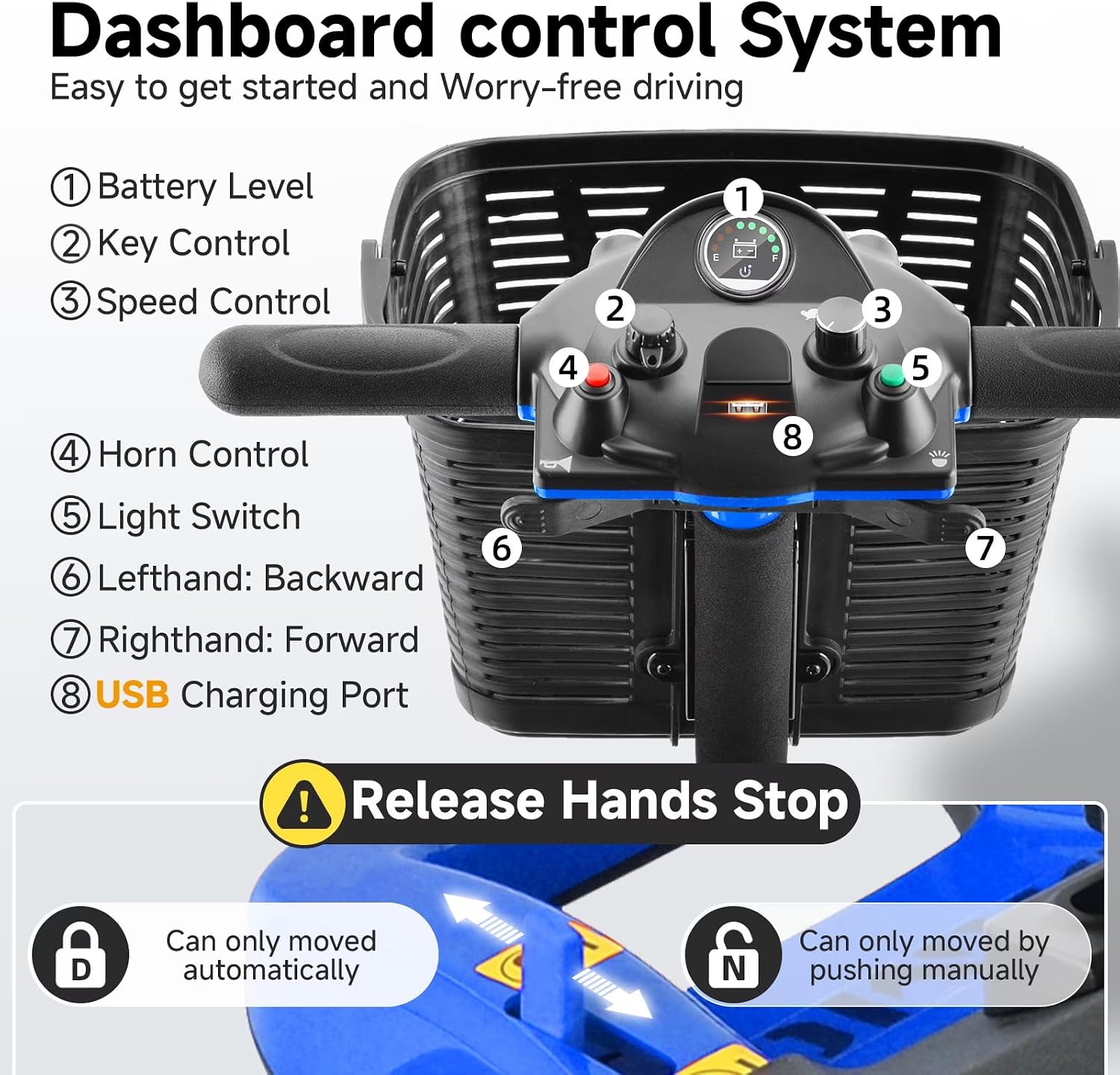
Image: Detailed view of the scooter's dashboard, highlighting each control function.
- Battery Level Indicator: Displays the current charge level of the battery.
- Key Control: Insert the key and turn to power on/off the scooter.
- Speed Control: Adjust the maximum speed using this dial. The scooter has a maximum speed of 4.5 MPH.
- Horn Control: Press to activate the horn.
- Light Switch: Toggles the LED headlights on/off.
- Left-hand Lever: Pull to move the scooter backward.
- Right-hand Lever: Pull to move the scooter forward.
- USB Charging Port: For charging personal electronic devices.
4.2 Driving the Scooter
- Ensure the key is in the 'ON' position.
- Adjust the speed control to a comfortable setting, especially when starting.
- Gently pull the right-hand lever to move forward or the left-hand lever to move backward. Release the lever to stop. The scooter will automatically brake when levers are released.
- Steer by turning the tiller.
- The scooter is suitable for various terrains including lawn, cobbled roads, muddy ground, and asphalt roads.

Image: The Arshin R100 scooter demonstrating its suitability for various outdoor terrains.

Image: The scooter demonstrating its ability to climb inclines up to 12 degrees.

Image: Illustrating the scooter's safe and manageable top speed of 4.5 MPH.

Image: The scooter's visibility lights, suitable for day and night use.
5. Maintenance
Regular maintenance ensures the longevity and safe operation of your scooter.
- Battery Care: Charge the 24V 12AH lead-acid battery regularly, especially after each use, to maintain optimal performance and extend battery life. Avoid fully discharging the battery. Use only the charger provided by the manufacturer.
- Tire Inspection: Periodically check the puncture-resistant tires for signs of wear, cuts, or punctures. While resistant, severe damage can still occur.
- Cleaning: Clean the scooter with a damp cloth. Avoid using harsh chemicals or direct water spray, which can damage electrical components.
- Fasteners: Periodically check all nuts, bolts, and fasteners to ensure they are tight.
- Storage: When storing the scooter for extended periods, ensure the battery is fully charged and stored in a cool, dry place.
6. Troubleshooting
This section addresses common issues you might encounter with your scooter.
| Problem | Possible Cause | Solution |
|---|---|---|
| Scooter does not power on | Key not inserted/turned; Battery discharged; Battery connection loose. | Ensure key is fully inserted and turned to 'ON'; Charge battery; Check battery connections. |
| Reduced range or power | Battery not fully charged; Battery aging; Overload. | Fully charge battery; Consider battery replacement if old; Ensure weight is within limits. |
| Scooter moves slowly or erratically | Speed control set too low; Low battery; Motor issue. | Adjust speed control; Charge battery; Contact customer support if issue persists. |
| Brakes not engaging properly | Lever not fully released; Brake mechanism issue. | Ensure levers are fully released; Contact customer support for inspection. |
If you encounter issues not listed here or if the suggested solutions do not resolve the problem, please contact Arshin customer support.
7. Specifications
Key technical specifications for the Arshin R100 Mobility Scooter.
- Model Number: R100
- Brand Name: Arshin
- Maximum Weight Recommendation: 300 pounds (136 kg)
- Motor: 180W Pure Copper Motor
- Battery: 24V 12AH Lead-Acid Battery (Detachable)
- Range Per Charge: Approximately 15 miles (24 km)
- Maximum Speed: 4.5 miles per hour (7.2 km/h)
- Incline Capability: Up to 12 degrees
- Seat Depth: 13.4 inches (34 cm)
- Wheel Type: Solid, Puncture-Resistant
- Additional Features: Foldable design, LED Headlights, USB Charging Port, Anti-Tip Rear Wheels
- Color: Blue (as per current product variant)
8. Warranty and Support
For warranty information, please refer to the documentation provided with your purchase or contact your retailer directly. Specific warranty terms and conditions may vary.
For technical support or inquiries, please contact Arshin customer service through the contact information provided by your retailer or on the official Arshin website.