
Introduction
Thank you for purchasing the DCG 3-in-1 Fan. This versatile fan is designed to provide efficient air circulation in various settings, functioning as a pedestal, wall-mounted, or table fan. Please read this manual carefully before assembly, operation, and maintenance to ensure safe and optimal performance of your appliance. Keep this manual for future reference.
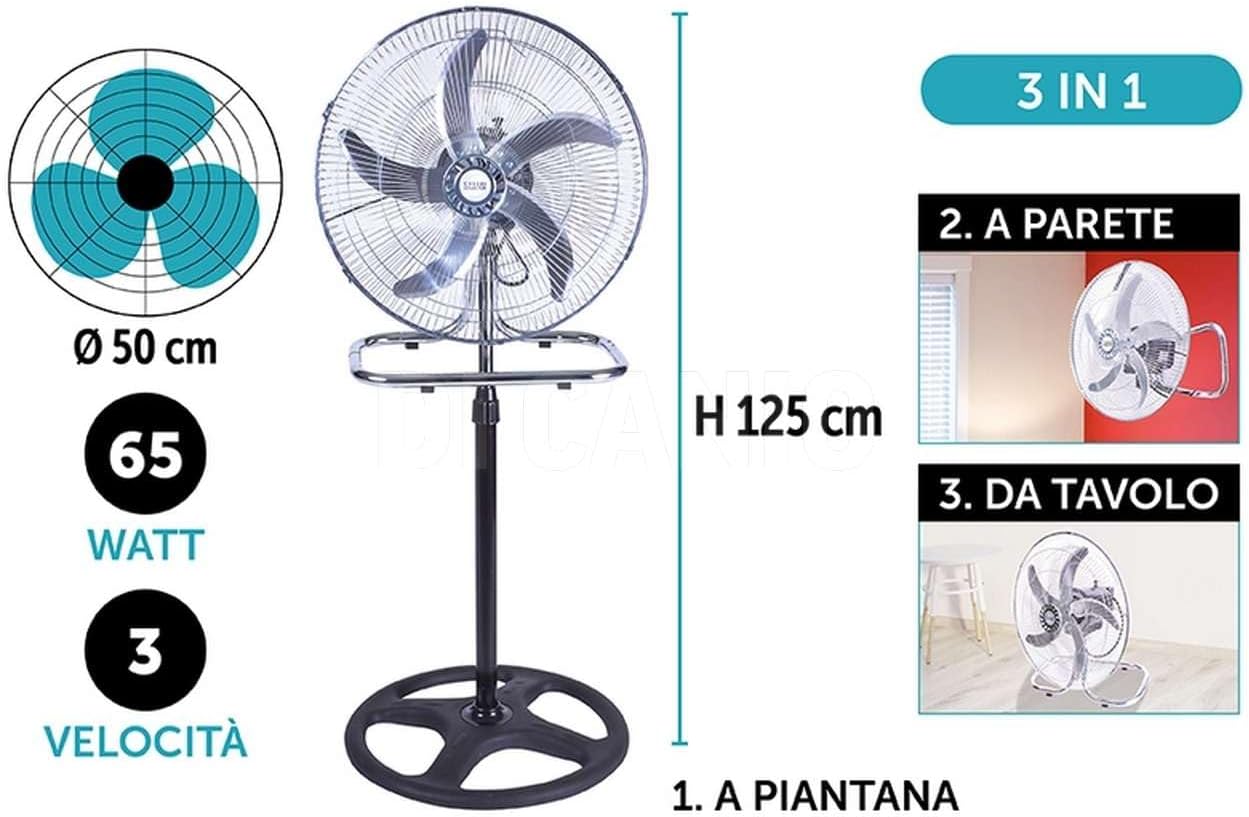
Image: The DCG 3-in-1 fan illustrating its three versatile configurations: pedestal, wall-mounted, and table-top, along with key dimensions and features.
Safety Information
WARNING: To reduce the risk of fire, electric shock, or injury, always follow basic safety precautions when using electrical appliances.
- Read all instructions before using this fan.
- Ensure the power supply voltage matches the rating label on the fan.
- Do not operate any fan with a damaged cord or plug. Discard the fan or return to an authorized service facility for examination and/or repair.
- Do not run cord under carpeting. Do not cover cord with throw rugs, runners, or similar coverings. Arrange cord away from traffic area and where it will not be tripped over.
- To disconnect the fan, turn controls to OFF, then remove plug from outlet.
- Do not insert fingers or any other objects through the grille when the fan is operating.
- Do not use this fan near windows, in a bathroom, or in any wet location.
- This appliance is intended for indoor use only.
- Supervise children when the fan is in use.
- For detailed safety information, please refer to the official safety document: Safety Information (PDF).
Product Components
Before assembly, ensure all components are present and undamaged:
- Fan Head (with blades and motor)
- Pedestal Base
- Table Base
- Telescopic Pole (for pedestal configuration)
- Wall Mount Bracket
- Fasteners and Screws (various sizes for different configurations)
- Instruction Manual (this document)
Setup and Assembly
1. Pedestal Fan Configuration
- Attach the telescopic pole to the pedestal base using the provided screws. Ensure it is stable and secure.
- Extend the telescopic pole to the desired height and secure it with the locking mechanism.
- Mount the fan head onto the top of the telescopic pole. Tighten all fasteners to prevent wobbling.
- Ensure the fan head is securely attached and the base is stable on a flat surface.

Image: The DCG fan assembled in its pedestal configuration, positioned in a living space.
2. Wall-Mounted Fan Configuration
- Select a suitable wall location, ensuring it is sturdy enough to support the fan's weight and near a power outlet.
- Using the wall mount bracket as a template, mark the drilling points on the wall.
- Drill holes and insert appropriate wall anchors (not always included, depending on wall type).
- Securely attach the wall mount bracket to the wall using screws.
- Mount the fan head onto the wall mount bracket. Ensure it clicks into place or is securely fastened with screws.

Image: The DCG fan installed in its wall-mounted configuration, providing airflow in a room.
3. Table Fan Configuration
- Attach the fan head directly to the table base using the designated screws.
- Ensure all connections are tight and the fan head is stable on the table base.
- Place the assembled table fan on a flat, stable surface, away from edges.

Image: The DCG fan configured as a table fan, resting on a wooden surface.
Operating Instructions
- Power Connection: Plug the fan into a standard electrical outlet (European Type F Schuko plug).
- Power On/Off and Speed Selection: Locate the mechanical rotary switch on the fan. Turn the switch to select one of the three available speeds:
- 0: Off
- 1: Low Speed
- 2: Medium Speed
- 3: High Speed
- Adjusting Tilt: The fan head's inclination can be manually adjusted to direct the airflow. Loosen the adjustment knob on the side of the fan head, tilt the fan to the desired angle, and then tighten the knob to secure its position.
Maintenance and Cleaning
Regular cleaning and maintenance will help prolong the life of your fan and ensure optimal performance.
- Before Cleaning: Always unplug the fan from the power outlet before cleaning or performing any maintenance.
- Exterior Cleaning: Use a soft, damp cloth to wipe the exterior surfaces of the fan. Do not use abrasive cleaners or solvents, as these may damage the finish.
- Grille and Blades: Periodically remove the front grille (if detachable) to clean dust from the fan blades. Use a soft brush or vacuum cleaner to remove accumulated dust. Ensure the grille is securely reattached before operating the fan.
- Do Not Immerse: Never immerse the fan, motor, or power cord in water or any other liquid.
- Storage: When not in use for extended periods, store the fan in a cool, dry place, preferably in its original packaging, to protect it from dust and damage.
Troubleshooting
If you encounter issues with your fan, please refer to the following common problems and solutions:
| Problem | Possible Cause | Solution |
|---|---|---|
| Fan does not turn on. | No power supply. Fan switch is off. |
Check if the fan is properly plugged into a working outlet. Turn the rotary switch to a speed setting (1, 2, or 3). |
| Weak or no airflow. | Fan speed is too low. Obstruction in front or behind the fan. Dust accumulation on blades. |
Increase the fan speed. Ensure there are no objects blocking the airflow. Clean the fan blades and grilles as described in the Maintenance section. |
| Excessive noise during operation. | Loose components. Fan not on a stable surface. Normal operational noise. |
Check all assembly points (base, pole, fan head) and tighten any loose screws. Ensure the fan is placed on a flat, stable surface. Some level of operational noise is normal for powerful fans. |
If the problem persists after trying these solutions, please contact customer support.
Specifications
| Brand | DCG GIUSEPPE DI CANIO COLLECTION |
| Model Name | Ventilatore 3 In 1 Dictaris |
| Model Number | Ventilatore 3in1 50x130 |
| Type | 3-in-1 (Pedestal, Wall, Table) |
| Color | Black and Chromed |
| Material | Chromed Steel, Metal, Plastic |
| Dimensions (D x W x H) | 50P x 50l x 125H cm (Max Height 130cm, Diameter 50cm) |
| Wattage | 65 Watts |
| Number of Speeds | 3 |
| Airflow Capacity | 3500 Cubic meters per hour |
| Noise Level | 45 Decibels |
| Number of Blades | 5 |
| Power Source | AC (Alternating Current) |
| Switch Type | Mechanical Rotary Switch with 3 Speeds |
| Plug Type | European Type F (Schuko) |
| Certifications | CE, RoHS |
| Intended Use | Indoor |
Warranty and Support
Warranty: This product comes with a 2-year availability for spare parts within the EU, which typically implies a corresponding warranty period for manufacturing defects. Please retain your proof of purchase for warranty claims.
Customer Support: For technical assistance, troubleshooting beyond this manual, or warranty inquiries, please contact your retailer or the manufacturer directly. Refer to your purchase documentation for specific contact details.


