
Introduction
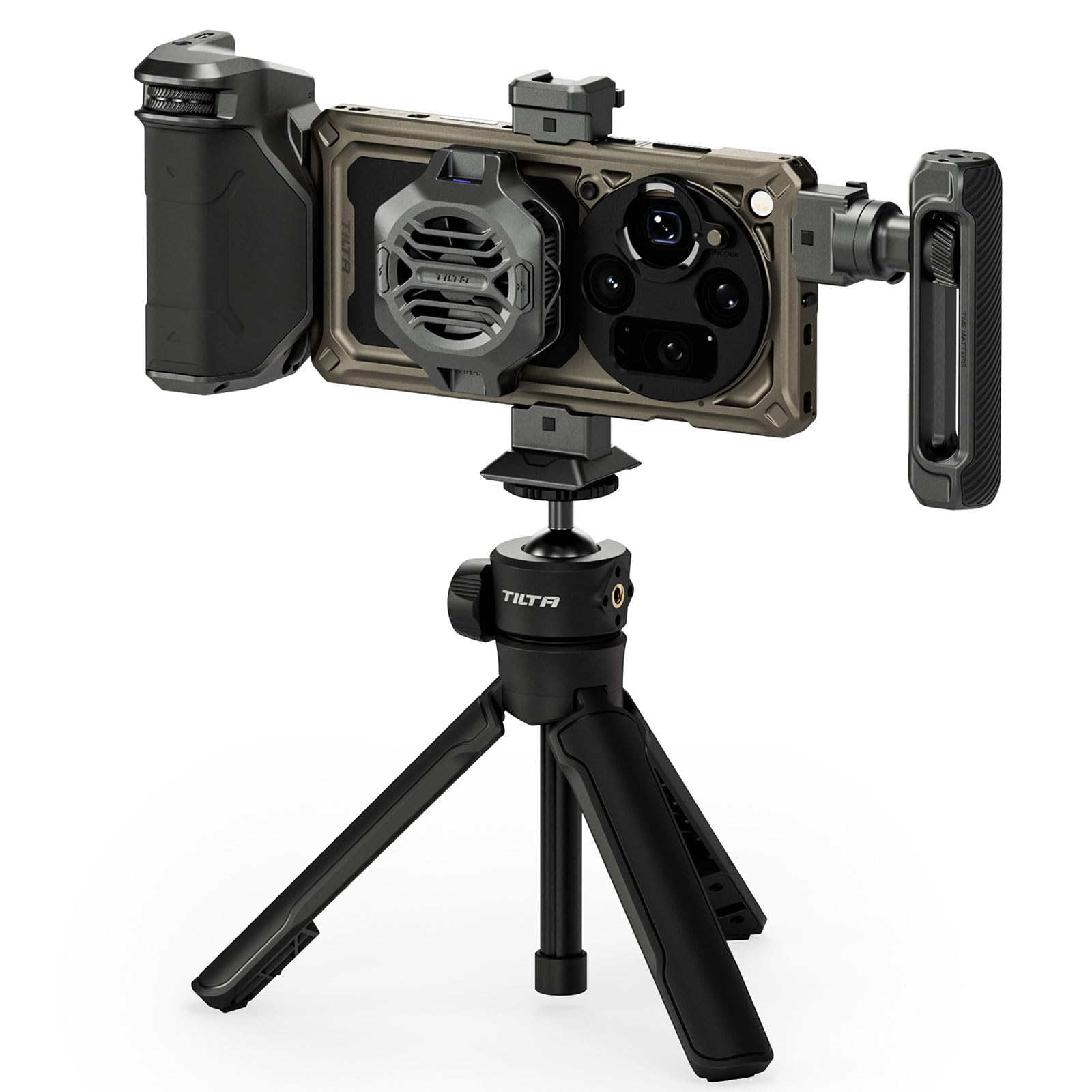
The TILTA Khronos Ultra Creation Kit transforms your OPPO Find X9 Ultra into a professional mobile filmmaking rig. This comprehensive system includes a precision-engineered phone cage, a Focus PD Handle with an integrated battery, an active cooling module, a versatile selfie tripod, a 67mm filter holder, and various mounting options. Designed for ease of use and enhanced functionality, this kit provides all the necessary tools for capturing high-quality photos and videos.
Key features include:
- All-in-one Professional Creator Kit: A complete mobile cinema system with a precision cage, Focus PD Handle, 22W active cooling, selfie tripod, 67mm filter holder, Cold Shoe, and adjustable side/top handle.
- Focus PD Handle with Integrated 5,000 mAh Battery: Provides supplementary power to the entire system via electronic contact points on the case. Features a precision wheel for smooth focus and zoom control via Bluetooth, plus a dedicated record button for convenient start/stop recording.
- 22W Variable Frequency Active Cooling: A magnetic cooling module designed to prevent overheating during extended 4K/8K recording sessions. It can be powered directly by the Focus PD Handle or an external USB-C source, ensuring your OPPO Find X9 Ultra remains cool for longer recording times without thermal throttling.
- Electronic Contact Power System: The case features integrated electronic contact points that power accessories instantly upon attachment. When paired with the Focus PD Handle, the entire rig stays powered for extended shooting sessions, eliminating the need for separate batteries or cumbersome cables.
- Versatile Selfie Tripod + Complete Accessory Kit: Includes a quick-deploy tripod with a one-touch mechanism that converts into a selfie stick with a multi-angle ball head. Also features a 67mm filter holder, a Cold Shoe receiver for lights/microphones, and an adjustable side/top handle to suit various shooting situations.
Setup Instructions
Follow these steps to assemble your TILTA Khronos Ultra Creation Kit:
- Install the Phone Case: Gently insert your OPPO Find X9 Ultra smartphone into the dedicated Khronos phone case. Ensure it is seated correctly and all cutouts align with the phone's buttons and ports.
- Attach the Focus PD Handle: Align the electronic contact points on the Focus PD Handle with those on the side of the phone case. Slide the handle into place until it clicks securely. This connection provides both mechanical stability and power.
- Attach the Active Cooling Module: The cooling module attaches magnetically to the designated area on the back of the phone case. Ensure it is firmly in place for optimal heat dissipation.
- Assemble the Tripod/Selfie Stick: Screw the tripod base onto the 1/4"-20 thread located at the bottom of the phone case. The tripod can be used as a stable base or extended as a selfie stick.
- Install the 67mm Filter Holder: Clip the 67mm filter holder onto the lens area of the phone case. Once attached, you can screw in any standard 67mm photographic filters (ND, CPL, GND).
- Attach Cold Shoe Accessories: If using external accessories like microphones or LED lights, slide them into the cold shoe receiver on the top of the phone case.


Operating Instructions
Using the Focus PD Handle
- Bluetooth Connection: Ensure your OPPO Find X9 Ultra's Bluetooth is enabled. The Focus PD Handle should automatically connect to your phone's camera app, allowing for remote control.
- Focus and Zoom Control: Use the precision wheel on the Focus PD Handle to smoothly adjust focus or zoom within your camera application. The function can typically be toggled within the app or by a dedicated button on the handle.
- Record Button: Press the dedicated record button on the handle to start or stop video recording without touching your phone screen, minimizing camera shake.

Managing Power
- The Focus PD Handle contains a 5000mAh battery that powers itself and other connected accessories via the electronic contact system on the case.
- To charge the Focus PD Handle, connect a USB-C cable to its charging port.

Active Cooling Module
- The 22W active cooling module automatically activates when the phone's temperature rises during intensive tasks like 4K/8K video recording.
- It draws power from the Focus PD Handle or can be powered independently via its USB-C port.
Tripod/Selfie Stick Functionality
- Tripod Mode: Extend the legs of the tripod for stable tabletop or ground-level shooting.
- Selfie Stick Mode: Collapse the legs and extend the central column to use it as a handheld selfie stick. The multi-angle ball head allows for flexible positioning.

Maintenance
- Cleaning: Use a soft, dry cloth to clean the surfaces of the kit components. For stubborn dirt, a slightly damp cloth can be used, followed by immediate drying. Avoid harsh chemicals or abrasive materials.
- Storage: Store the kit in a cool, dry place away from direct sunlight and extreme temperatures. Use the original packaging or a protective case to prevent dust and damage.
- Battery Care: For optimal battery life, avoid fully discharging the Focus PD Handle's battery frequently. Charge it regularly, even if not in use for extended periods (e.g., every 3-6 months).
- Electronic Contacts: Keep the electronic contact points on the case and handle clean and free of debris to ensure reliable power transmission.
Troubleshooting
Focus PD Handle Not Responding
- Ensure the handle is securely attached to the phone case and the electronic contacts are clean.
- Check the battery level of the Focus PD Handle. Charge if necessary.
- Verify Bluetooth connection in your phone's settings and camera app. Try re-pairing if needed.
- Restart your phone and the Focus PD Handle.
Active Cooling Module Not Working
- Ensure the module is magnetically attached correctly to the case.
- Check if the Focus PD Handle has sufficient power, or try powering the cooling module directly via a USB-C cable.
- Confirm that the phone is performing a task that generates enough heat to trigger the cooling.
Accessories Not Receiving Power
- Ensure the Focus PD Handle is fully charged and correctly attached to the case.
- Check the electronic contact points for any obstructions or dirt.
- Verify that the accessory itself is functioning correctly when powered independently.
Specifications
| Brand | Tilta |
| Compatible Devices | OPPO Find X9 Ultra (Mobile Phone) |
| Color | Brown |
| Battery | 1 Non-standard Battery (included) - 5000mAh in Focus PD Handle |
| Package Dimensions | 28.9 x 22.1 x 9.7 cm |
| Item Weight | 1.72 Kilograms |
| Manufacturer | Shenzhen Tilta Technology Co., Ltd |
| Number of Items | 1 Total |
| Special Feature | Case, 67mm filter, Tripod, Filters, Cold Shoe, Side Handle, Focus PD Handle with 5,000mAh Battery, Bluetooth |
Warranty Information
This TILTA Khronos Ultra Creation Kit comes with a 1-Year Limited Warranty from the date of purchase. This warranty covers manufacturing defects and workmanship under normal use. Please retain your proof of purchase for warranty claims. For specific terms and conditions, refer to the official Tilta website or contact customer support.
Support
For further assistance, technical support, or inquiries regarding your TILTA Khronos Ultra Creation Kit, please visit the official Tilta website. You can typically find FAQs, troubleshooting guides, and contact information for customer service there.
Official Website: www.tilta.com (Please check for the most current URL)
When contacting support, please have your product model (Khronos Ultra Creation Kit for OPPO Find X9 Ultra) and purchase details readily available.