
Introduction
Welcome to your DoCred G3TUB-JX Heater Pump. This manual provides essential information for the safe and efficient operation, installation, and maintenance of your multifunctional spa heating, filtration, and bubble unit. This unit is designed exclusively for use with DoCred inflatable hot tubs.
Safety Precautions
To ensure safe operation and prevent injury or damage, please observe the following safety guidelines:
- Always connect the unit to a grounded electrical outlet.
- Ensure the standard GFCI plug is used for outdoor applications to prevent electrical hazards.
- Do not operate the pump if it is damaged or malfunctioning.
- Keep children away from the unit during operation.
- The unit features overheating protection, leakage prevention, and dry burn resistance. However, regular inspection is recommended.
- This heater pump is only suitable for DoCred inflatable hot tubs.

Image: Safety features of the DoCred heater pump, including overheat protection, overload protection, and GFCI plug compatibility.
Product Overview and Features
The DoCred G3TUB-JX Heater Pump is an all-in-one unit designed to enhance your inflatable hot tub experience. It integrates heating, water filtration, and bubble massage functions into a single compact device.
- All-in-one Design: Combines heating, bubble massage, and water filtration.
- High-Power Heating: A 1350W heating core provides stable and fast water heating.
- Digital Control Panel: Easy-to-use LED touch panel for temperature and function adjustments.
- Efficient Filtration: Circulating filtration system keeps spa water clean.
- Soothing Bubble Function: Provides a relaxing bubble massage.

Image: Overview of the DoCred heater pump, illustrating its integrated filtration, heating, and bubble functions with numbered connection points.

Image: Detailed view of the multifunctional heater pump, highlighting the control panel buttons for bubble, lock, temperature adjustment, heater, and filter functions.
Setup and Installation
The DoCred G3TUB-JX Heater Pump features a plug-and-play design for straightforward installation. It is intended as a replacement or primary unit for DoCred inflatable hot tubs.
- Placement: Position the heater pump on a stable, level surface near your DoCred inflatable hot tub. Ensure adequate space for ventilation and access.
- Connection: Connect the pump's inlet and outlet ports to the corresponding connections on your inflatable hot tub. Refer to your hot tub's instruction manual for specific connection details. The connections are typically color-coded (e.g., red for outlet, blue for inlet).
- Power Connection: Plug the GFCI power cord into a suitable, grounded electrical outlet. Ensure the outlet meets the power requirements specified in the Technical Specifications section.
- Initial Check: Before filling the hot tub, ensure all connections are secure to prevent leaks.
No additional tools are typically required for installation.
Operating Instructions
The digital LED touch control panel allows for easy management of the heater pump's functions.
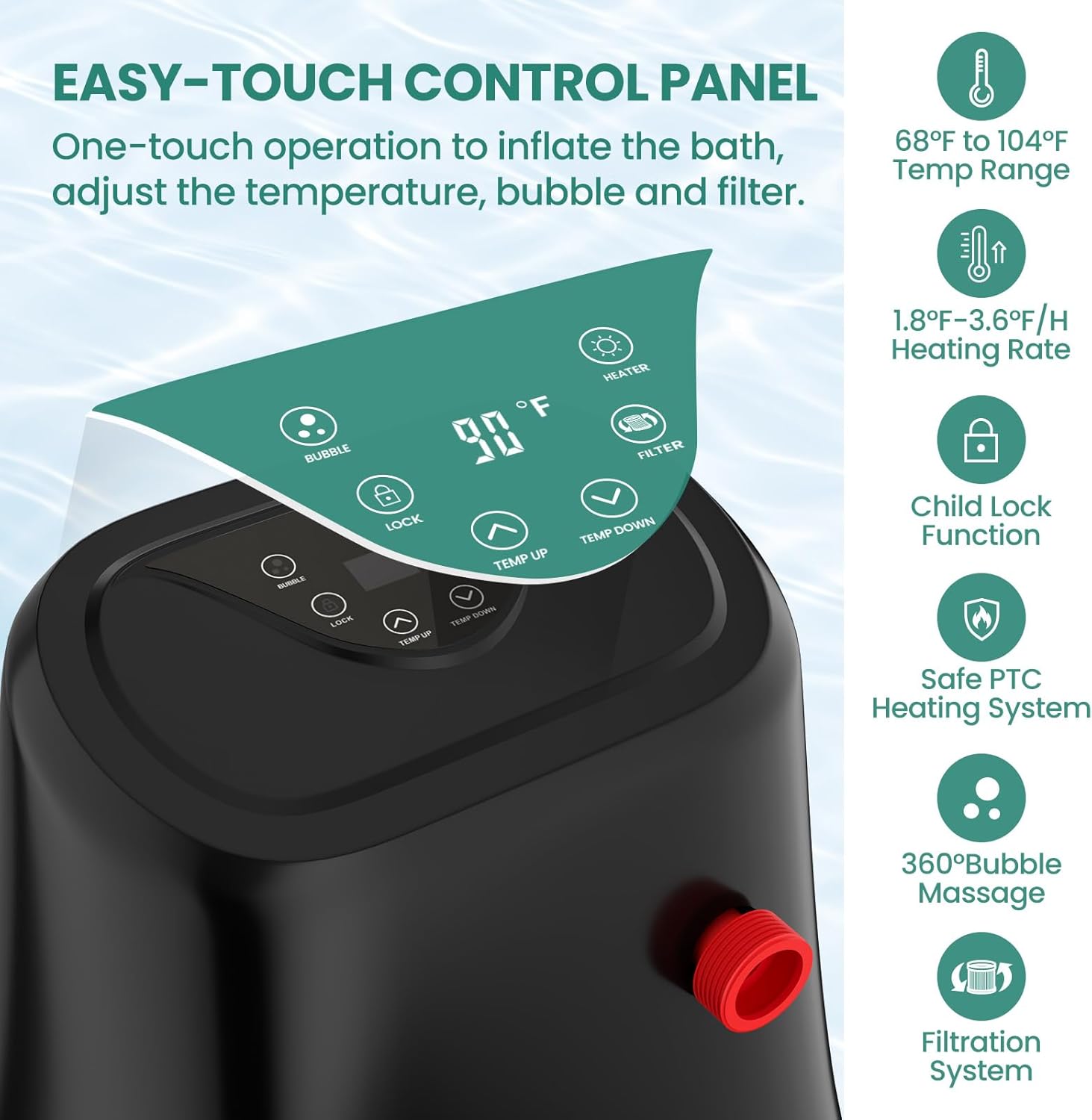
Image: The easy-touch control panel of the DoCred heater pump, displaying temperature settings and function buttons.
- Power On/Off: Press the power button (if available, or plug in) to activate the unit.
- Temperature Adjustment: Use the TEMP UP and TEMP DOWN buttons to set your desired water temperature. The adjustable range is 68°F to 104°F (20°C to 40°C). The digital display will show the current temperature.
- Heating Function: Press the HEATER button to activate the heating element. The unit will work to reach and maintain the set temperature.
- Bubble Massage: Press the BUBBLE button to activate the bubble massage function. Press again to turn off.
- Filtration System: The FILTER button controls the circulating filtration system. It is recommended to run the filter regularly to maintain water quality.
- Child Lock: Press the LOCK button to engage the child lock, preventing accidental changes to settings. Press again to unlock.
- Timing Heating: The unit may include a timing heating function to preset heating schedules. Refer to the specific hot tub manual for detailed instructions on setting timers.
Maintenance and Care
Regular maintenance ensures the longevity and optimal performance of your heater pump.
- Filter Cartridge Cleaning/Replacement: The unit features a detachable filter cartridge. Regularly remove and clean the filter cartridge to remove debris. Replace the cartridge every few weeks, or as needed, depending on usage and water quality.
- Water Quality: Maintain proper water chemistry in your hot tub as per your hot tub's guidelines. This will reduce strain on the filtration system and prolong the life of the pump.
- Exterior Cleaning: Wipe the exterior of the pump with a damp cloth. Do not use abrasive cleaners or solvents.
- Storage: If storing the unit for an extended period, ensure it is clean, dry, and stored in a protected environment away from extreme temperatures.

Image: Example of spa filter cartridges, which require regular cleaning and replacement.
Troubleshooting Guide
If you encounter issues with your DoCred G3TUB-JX Heater Pump, refer to the following common solutions:
- Unit Not Powering On: Check the power connection and ensure the GFCI plug is reset. Verify the electrical outlet is functional.
- No Heating: Ensure the heater function is activated on the control panel and the desired temperature is set above the current water temperature. Check for sufficient water flow.
- Weak Bubbles: Ensure the bubble function is active. Check for any obstructions in the air jets or pump.
- Poor Filtration: Clean or replace the filter cartridge. Ensure the filter function is active.
- Error Codes: If the control panel displays an error code, consult your hot tub's specific manual or contact customer support for interpretation and resolution.
For persistent issues not resolved by these steps, please contact DoCred customer support.
Technical Specifications
Below are the technical specifications for the DoCred G3TUB-JX Heater Pump:

Image: Technical specifications and dimensions of the DoCred heater pump.
| Specification | Value |
|---|---|
| Brand | DoCred |
| Model Name | G3TUB-JX |
| Product Dimensions (L x W x H) | 16"L x 10.5"W x 17"H |
| Rated Power | 1350W |
| Voltage/Frequency | AC110-120V/60Hz |
| Temperature Control Range | 68°F - 104°F (20°C - 40°C) |
| Power Cord Length | 11.48 ft |
| Assembly Required | Yes (for connection to hot tub) |
| Power Source | AC |
Warranty Information
For detailed warranty information regarding your DoCred G3TUB-JX Heater Pump, please refer to the warranty card included with your purchase or visit the official DoCred website. Keep your proof of purchase for warranty claims.
Customer Support
If you have any questions, require technical assistance, or need to report an issue, please contact DoCred customer support. You can find contact information on the official DoCred website or through the retailer where you purchased the product.
For more information, visit the DoCred Store.