
1. Important Safety Information
Please read all instructions carefully before assembly and use. Keep this manual for future reference.
- Ensure all parts are present and undamaged before beginning assembly.
- Assemble the vanity desk on a soft, clean surface to prevent scratches.
- Do not overtighten screws during assembly to avoid damaging the material.
- Keep children and pets away from the assembly area.
- For electrical components (LED mirror, charging station), ensure proper power connection and avoid contact with water. Unplug when not in use or during cleaning.
- Do not exceed the maximum load capacity of drawers and shelves.
- Always use the vanity desk on a level surface to prevent tipping.
2. Package Contents
Verify that all components listed below are included in your package. Refer to the assembly diagram for visual identification of parts and hardware.

Image: Product Dimensions and Components Overview. This image illustrates the overall dimensions of the vanity desk and detailed measurements for various drawers and compartments, providing a visual guide to the components.
- Vanity Desk Frame (Engineered Wood Panels)
- Tri-Folding Mirror with Integrated LED Lighting
- 7 Drawers with Gold-Tone Handles
- 2 Side Cabinets with Mirrored Doors and Shelves
- Built-in Charging Station (2 AC Outlets, 1 USB Port, 1 Type-C Port)
- Hairdryer Holder
- Assembly Hardware (screws, dowels, cam locks, etc.)
- Instruction Manual
3. Setup and Assembly Instructions
Assembly of the COMHOMA Vanity Desk requires careful attention to detail. All parts and accessories are labeled to facilitate the process. It is recommended to have two people for assembly.
Assembly Video Guide:
Video: Assembly Instructions for COMHOMA Vanity B2002. This video provides a step-by-step visual guide for assembling the vanity desk, demonstrating how to connect various components and install hardware.
General Assembly Steps:
- Unpack and Identify: Carefully unpack all components and hardware. Match each part to the corresponding label in the instruction manual.
- Assemble Base Structure: Begin by assembling the main base panels of the vanity desk, ensuring all connections are secure.
- Install Drawers and Cabinets: Follow the instructions to install the drawer slides, assemble the drawers, and attach the cabinet doors.
- Attach Mirror Unit: Securely attach the tri-folding mirror unit to the main desk structure. Ensure all electrical connections for the LED lights are properly routed and connected.
- Connect Charging Station: Install the built-in charging station and hairdryer holder as indicated in the manual.
- Final Checks: Once assembled, ensure all screws are tightened, the desk is stable, and all electrical components are functioning correctly.
If you encounter any difficulties during assembly, please refer to the detailed instruction manual included in the package or contact customer support.
4. Operating Instructions
4.1. Tri-Folding Mirror and LED Lighting

Image: 360° View Tri-Folding Mirror. This image demonstrates the functionality of the tri-folding mirror, allowing users to view themselves from multiple angles for comprehensive makeup application and hairstyling.
- 360° View Mirror: The central mirror is flanked by two adjustable side mirrors. These side panels can be angled to provide a comprehensive view, including the back of your head, for detailed grooming.
- LED Lighting Modes: The integrated LED lights offer three distinct lighting modes: Natural Light, Warm Light, and Cool Light.
- Adjusting Lighting:
- Mode Selection: Short press the touch sensor on the mirror to cycle through the three lighting modes.
- Brightness Adjustment: Long press the touch sensor to dim or brighten the lights to your preferred intensity.

Image: Professional Lighting Mirror Controls. This image highlights the three lighting modes (Warm, Natural, Cool) and the touch controls for adjusting both the lighting mode and brightness.
4.2. Built-in Charging Station

Image: Charging Station and Hairdryer Holder. This image displays the integrated power strip with two AC outlets, one USB port, and one Type-C port, along with the dedicated hairdryer holder for convenient access and organization.
The vanity desk includes a built-in power strip for convenient charging and powering of your electronic devices and styling tools.
- 2 AC Outlets (125V/12A): Use these outlets to plug in hair straighteners, curling irons, or other small appliances.
- 1 USB Port (5V/2A): Ideal for charging smartphones, tablets, or other USB-powered devices.
- 1 Type-C Port (2.5V/2.1A): Provides fast charging for compatible Type-C devices.
- Hairdryer Holder: A dedicated holder keeps your hairdryer easily accessible and prevents cord tangles on the countertop.
4.3. Storage Features

Image: Massive Storage Organization. This image provides an aerial view of the vanity desk with all drawers and cabinets open, showcasing the extensive storage capacity and organizational features, including divided compartments.
The vanity desk is designed with ample storage to keep your beauty essentials organized and easily accessible.
- 7 Easy-Access Drawers: These drawers provide varied storage for makeup, accessories, and personal items. Some drawers may include dividers for better organization.
- 2 Spacious Side Cabinets: Located behind the mirrored doors, these cabinets offer hidden storage for larger items or frequently used products, keeping your desktop clutter-free.
- Hidden 3-Tier Shelves: Within the side cabinets, multi-tier shelves provide additional space for organizing bottles and other items.
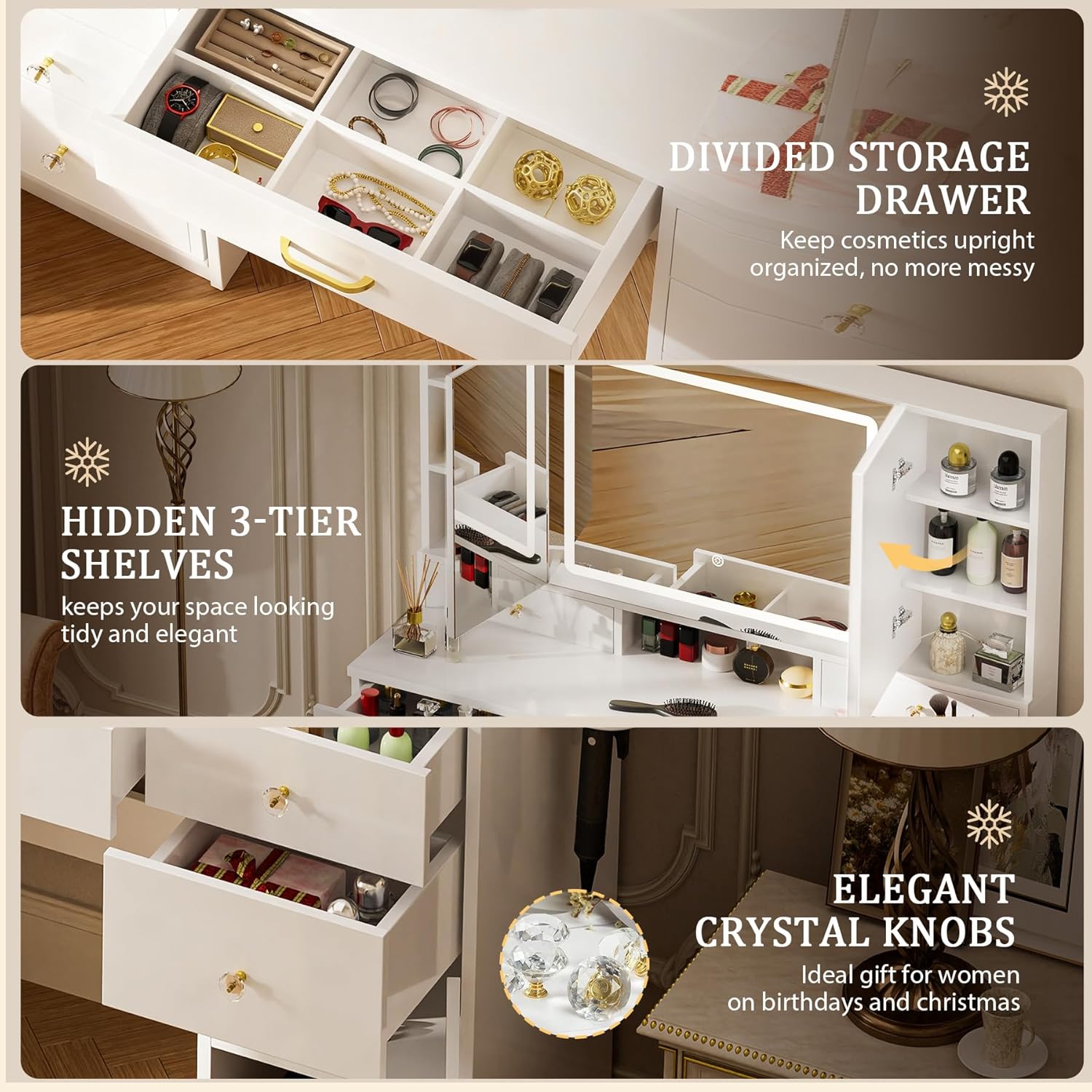
Image: Detailed Storage and Design Features. This composite image highlights specific features such as a divided storage drawer for small items, hidden shelves behind the mirror for discreet storage, and the decorative crystal knobs on the drawers.
5. Maintenance
Proper care and maintenance will ensure the longevity and appearance of your COMHOMA Vanity Desk.
- Cleaning: Wipe the surface of the vanity desk with a dry, soft cloth. For stubborn marks, a slightly damp cloth can be used, followed immediately by a dry cloth. Avoid abrasive cleaners or harsh chemicals, as these can damage the engineered wood finish.
- Mirror Care: Clean the mirror surfaces with a glass cleaner and a soft, lint-free cloth. Do not spray cleaner directly onto the mirror; instead, apply it to the cloth first.
- Electrical Components: Ensure the charging station is unplugged before cleaning. Wipe with a dry cloth only.
- Avoid Moisture: Protect the desk from excessive moisture and direct sunlight to prevent warping or discoloration.
- Regular Checks: Periodically check all screws and connections to ensure they remain tight. Retighten if necessary.
6. Troubleshooting
If you encounter any issues with your vanity desk, refer to the following common troubleshooting tips:
- LED Lights Not Working:
- Ensure the power cord is securely plugged into a functional wall outlet.
- Check if the power switch for the lights is turned on.
- Verify that the touch sensor on the mirror is clean and unobstructed.
- Charging Station Not Functioning:
- Confirm the vanity desk's main power cord is plugged in.
- Test the outlets/ports with a different device to rule out device-specific issues.
- Ensure the charging station unit is properly connected internally (refer to assembly steps if unsure).
- Drawers Sticking or Not Closing Smoothly:
- Check for any obstructions in the drawer slides.
- Ensure the drawer slides are correctly aligned and installed.
- Verify that the drawer is not overloaded.
- Desk Instability:
- Ensure the desk is placed on a flat, level surface.
- Check all assembly screws and tighten any that are loose.
If these steps do not resolve the issue, please contact COMHOMA customer support for further assistance.
7. Specifications
| Feature | Detail |
|---|---|
| Brand | COMHOMA |
| Model Number | B2002-1005 |
| Color | White |
| Material | Engineered Wood |
| Product Dimensions (D x W x H) | 15.7" x 43.3" x 55.1" |
| Item Weight | 24 Pounds |
| Number of Drawers | 7 |
| Mirror Type | Tri-Folding Mirror with LED Lights |
| Lighting Modes | 3 (Natural, Warm, Cool) |
| Charging Station | 2 AC Outlets (125V/12A), 1 USB Port (5V/2A), 1 Type-C Port (2.5V/2.1A) |
| Included Components | Hairdryer rack, Large LED Mirror, Outlet |
| Required Assembly | Yes |
| Product Care Instructions | Wipe with Dry Cloth |
8. Warranty and Support
COMHOMA is committed to providing high-quality products and customer satisfaction. If you experience any issues with your vanity desk, including packaging damage during transportation, missing components, or require installation guidance, please do not hesitate to contact our dedicated seller support team.
For assistance, please refer to the contact information provided with your purchase or visit the official COMHOMA website. Please have your model number (B2002-1005) and purchase details ready when contacting support.
